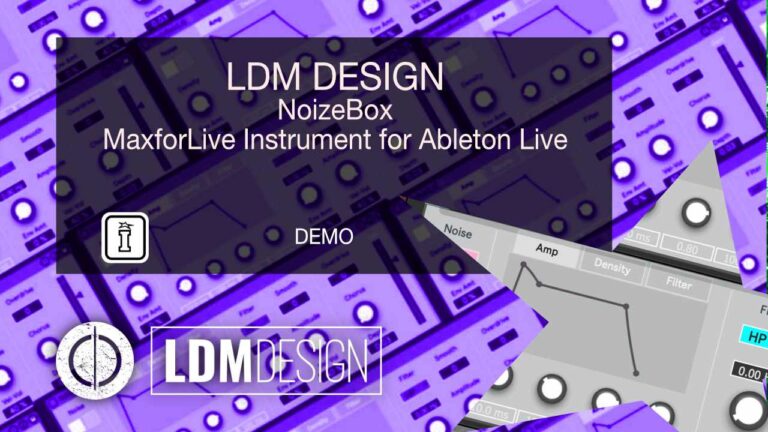
Noizebox by LDM Design
VINYL CRACKLE TO FULL RIPPING NOISE GENERATOR
BUILD YOUR BUNDLE: Select three or more LDM Design products and unlock an instant 20% discount – applied automatically when you check out.
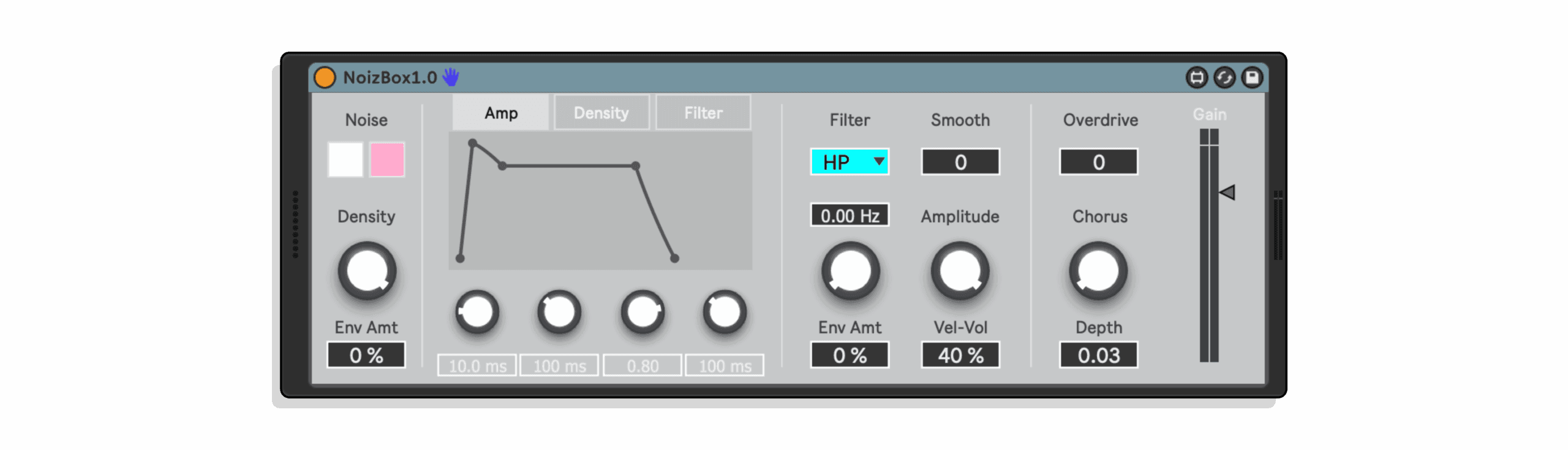
Noizebox transforms noise into complex, evolving textures through unique density control where a second noise oscillator gates the main source. Low density creates sparse vinyl crackle. Medium density produces ripping, tearing textures. Maximum density outputs full white or pink noise. Three independent envelopes (Amp, Density, Filter) with visual curve editing enable complex modulation where particle density, amplitude, and tone all evolve independently over time.
Inside you’ll find:
- White or pink noise source selection
- Unique density control – second noise oscillator gates main source via threshold
- Three independent ADSR envelopes: Amp, Density, Filter
- Visual envelope curve editing – click and drag to shape transitions
- Four filter modes: Lowpass, Highpass, Bandpass, Bandreject
- Filter envelope modulation with positive or negative amounts
- Smooth control attenuates rapid amplitude changes
- Velocity to Volume – adjustable dynamic response
- Overdrive – subtle warmth to aggressive saturation
- Chorus effect with depth control for stereo width and movement
- Amplitude control sets maximum Amp envelope level
- Gain control for final output volume
- Simple, focused interface encouraging exploration
- Perfect for percussion synthesis, atmospheric textures, sound effects
Synthesize hi-hats, snares, cymbals with fast envelopes and filter sweeps. Create evolving ambient pads with slow envelope attacks and chorus. Generate industrial ripping sounds with medium density and overdrive. Design environmental effects – wind, rain, vinyl crackle, radio static. Layer with drums for textural grit and attack transients. From subtle analog imperfection to aggressive noise walls.
Requires: Ableton Live 10/11/12 Standard (with MaxforLive installed) or Suite | Mac or Windows
USER GUIDE: Noizbox
Noizebox by LDM Design
VINYL CRACKLE TO FULL RIPPING NOISE GENERATOR
BUILD YOUR BUNDLE: Select three or more LDM Design products and unlock an instant 20% discount – applied automatically when you check out.
Noizebox transforms noise into complex, evolving textures through unique density control where a second noise oscillator gates the main source. Low density creates sparse vinyl crackle. Medium density produces ripping, tearing textures. Maximum density outputs full white or pink noise. Three independent envelopes (Amp, Density, Filter) with visual curve editing enable complex modulation where particle density, amplitude, and tone all evolve independently over time.
Inside you’ll find:
- White or pink noise source selection
- Unique density control – second noise oscillator gates main source via threshold
- Three independent ADSR envelopes: Amp, Density, Filter
- Visual envelope curve editing – click and drag to shape transitions
- Four filter modes: Lowpass, Highpass, Bandpass, Bandreject
- Filter envelope modulation with positive or negative amounts
- Smooth control attenuates rapid amplitude changes
- Velocity to Volume – adjustable dynamic response
- Overdrive – subtle warmth to aggressive saturation
- Chorus effect with depth control for stereo width and movement
- Amplitude control sets maximum Amp envelope level
- Gain control for final output volume
- Simple, focused interface encouraging exploration
- Perfect for percussion synthesis, atmospheric textures, sound effects
Synthesize hi-hats, snares, cymbals with fast envelopes and filter sweeps. Create evolving ambient pads with slow envelope attacks and chorus. Generate industrial ripping sounds with medium density and overdrive. Design environmental effects – wind, rain, vinyl crackle, radio static. Layer with drums for textural grit and attack transients. From subtle analog imperfection to aggressive noise walls.
Requires: Ableton Live 10/11/12 Standard (with MaxforLive installed) or Suite | Mac or Windows
USER GUIDE: Noizbox
Additional information
| MaxforLive | Instruments |
|---|---|
| Ableton Live Compatibility | Ableton Live 10 Standard with MaxforLive, Ableton Live 10 Suite, Ableton Live 11 Standard with MaxforLive, Ableton Live 11 Suite, Ableton Live 12 Standard with MaxforLive, Ableton Live 12 Suite |
| Min. Requirements | Ableton Live 10 Standard with MaxforLive Installed or Ableton Live 10 Suite |
| OS | Mac, Windows |
PRICE: £12.00
Product reviews
4.5 out of 5
2 reviews
How item rating is calculated
We show the average based on reviews. Only genuine reviews are displayed.
Sort by
April 19, 2025
This reviewer bought this product from our store.
A simple noise generator for white and pink noise, with an envelope. Good for further processing or combinations with other tools.
Reply from LDM Design
April 23, 2025
September 8, 2024
This reviewer bought this product from our store.
A relatively simple concept, but endlessly useful for synthesizing drum sounds and FX sound. It has enough additional features to make it exceptionally versatile.
Noizebox by LDM Design
Overview & The Density Concept
Noizebox is a MaxforLive instrument that transforms simple noise sources into complex, evolving textures through a unique density control system. Unlike standard noise generators that output continuous full-spectrum noise, Noizebox filters its noise source through a second noise oscillator connected to a threshold control, creating variable density where the noise becomes sparse, granular, or completely dense depending on the density setting. This seemingly simple concept produces a remarkable range of sounds – sparse vinyl crackle at low density, ripping torn-fabric textures at medium density, and full white or pink noise at maximum density.
The device features three independent envelopes controlling amplitude, density, and filter cutoff, each with adjustable attack, decay, sustain, and release parameters plus visual curve editing. This multi-envelope architecture enables complex modulation where the density of noise particles, overall amplitude, and tonal character all evolve independently over time. A lowpass, highpass, bandpass, or bandreject filter shapes the frequency spectrum, with envelope modulation depth control. Additional processing includes smoothing for amplitude changes, overdrive for grit, chorus for width and movement, and comprehensive velocity and gain controls.
Noizebox excels at synthesizing percussive sounds – hi-hats, snares, cymbals, and electronic drums all rely heavily on noise content shaped by envelopes and filters. It generates atmospheric textures for ambient and experimental music where evolving noise elements provide movement and interest. Industrial and aggressive electronic genres benefit from the ripping, tearing quality of medium-density settings with envelope modulation. Sound designers use it for wind, water, vinyl crackle, radio static, and countless other noise-based effects. The interface remains simple and focused, encouraging exploration rather than overwhelming with parameters.
Noise Source and Density Control
The noise source selector chooses between white noise (equal energy across all frequencies) or pink noise (equal energy per octave, emphasizing lower frequencies). White noise provides bright, hissy character suitable for hi-hats, cymbals, and high-frequency textures. Pink noise offers warmer, more balanced frequency distribution appropriate for snare bodies, atmospheric pads, and natural environmental sounds. Both sources route through the density control system before reaching the filter and amplitude stages.
Density is Noizebox’s signature parameter. The main noise source feeds into a gating system controlled by a second white noise oscillator. This control oscillator’s output determines when the main noise passes through – when the control oscillator exceeds the threshold, noise sounds; when below threshold, silence. At low density settings, the control oscillator rarely exceeds threshold, producing sparse, intermittent noise bursts resembling vinyl crackle or sporadic radio static. At medium density, the noise becomes more continuous but retains gaps and variations, creating ripping, tearing, or granular textures. At maximum density, the threshold is always exceeded and full continuous noise passes through.
The Density envelope modulates this threshold over time. Set a fast attack and decay on the Density envelope, and the noise transitions from sparse to dense to sparse across the note duration. Use a slow attack and the density gradually increases from crackle to full noise. Combine negative envelope amounts with high base density settings to reverse the effect – start dense and thin out. This dynamic density modulation is what separates Noizebox from static noise generators, enabling evolving textures that change character throughout each note.
Triple Envelope Architecture
Three independent envelopes control Amplitude, Density, and Filter cutoff, each with standard ADSR parameters (Attack, Decay, Sustain, Release) plus visual curve editing. The Amp envelope controls overall volume, functioning like a traditional amplitude envelope on any synthesizer. Short attack and decay with zero sustain creates percussive hits. Long attack with high sustain produces sustained pads. The Amplitude knob sets the maximum level the Amp envelope can reach, providing a master volume control that scales the envelope’s output.
The Density envelope modulates the density control’s threshold, as described above. This envelope adds time-based variation to the noise particle density independent of amplitude. For example, set the Amp envelope for a short percussive hit while the Density envelope has a slow attack – the sound fades out quickly (amplitude) while simultaneously becoming denser (more continuous noise before the volume drops). This creates complex timbral evolution within a single note. The Env Amt parameter sets how much the envelope affects density – positive values increase density over time, negative values decrease it.
The Filter envelope modulates filter cutoff frequency. Set a fast attack and decay to create filter sweeps characteristic of analog percussion. Use slow attack for gradually brightening textures. Combine with lowpass filter for classic subtractive synthesis where the brightness increases then settles. The Env Amt knob controls modulation depth – at 0%, the filter cutoff remains static; at 100%, the envelope creates maximum filter movement. Each envelope includes visual curve editing where clicking and dragging on the envelope display adjusts the transition curves between stages, adding another layer of shaping control.
Filter and Tone Shaping
The filter section provides four modes – Lowpass, Highpass, Bandpass, and Bandreject – for spectral shaping of the noise signal. Lowpass mode is the most common for synthesis, removing high frequencies to create darker, warmer noise suitable for snare bodies, kick sub-textures, and ambient pads. Set moderate cutoff with envelope modulation for classic sweeping hi-hat sounds. Highpass mode removes low frequencies, emphasizing the bright, airy quality of noise useful for bright cymbals, atmospheric shimmer, and thin textural layers.
Bandpass mode allows only frequencies within a specific range to pass, creating focused, resonant noise bands. This produces metallic, ringing character when the cutoff is set to specific frequencies, useful for tuned noise percussion or sci-fi effects. Bandreject (notch) mode removes a specific frequency band while allowing everything above and below to pass, creating hollow, phased quality. This mode is less common but effective for unusual timbral effects and removing problematic frequency buildups.
The cutoff frequency knob sets the filter’s center point. Low cutoff with lowpass creates dark, rumbling noise. High cutoff produces bright, full-spectrum noise with minimal filtering. The Env Amt parameter determines how much the Filter envelope affects cutoff – at 0% the filter stays static, at high positive values the envelope creates dramatic sweeps. Negative envelope amounts work in reverse, starting bright and darkening. The Smooth control attenuates rapid amplitude changes, preventing clicks and harsh transitions when envelope stages change abruptly or when density shifts create sudden volume jumps.
Effects and Output Processing
Velocity to Volume controls how much MIDI velocity affects the final output level. At 0%, all notes play at the same volume regardless of how hard keys are struck or MIDI velocity values. At 100%, velocity fully controls volume with high velocity notes much louder than low velocity. This parameter enables both velocity-sensitive performance (important for realistic hi-hat rolls and drum patterns) and velocity-independent textures (useful when triggering from sequencers or when consistent volume is desired regardless of input velocity).
Overdrive adds saturation and harmonic distortion to the signal. Low settings introduce subtle warmth and grit, thickening the sound without obvious distortion. Medium settings create noticeable harmonic content and aggressive character appropriate for industrial sounds and aggressive electronic music. High overdrive produces heavily saturated, dense noise useful for noise walls, drone textures, and extreme sound design. The overdrive processes the signal before the final gain stage, allowing the Gain control to compensate for volume increases from saturation.
Chorus provides stereo width and movement through pitch modulation. The Depth parameter controls how much pitch variation occurs – low depth creates subtle detuning and stereo spread, high depth produces more obvious pitch wobble and vibrato character. Chorus is particularly effective on sustained noise pads where it adds organic movement and prevents the static, lifeless quality of unprocessed continuous noise. The effect works on both white and pink noise sources, and its interaction with different filter modes creates varied stereo imaging and timbral results.
The Gain control sets final output volume before the signal leaves the device. This master level control compensates for the cumulative gain changes from density settings, envelope levels, overdrive saturation, and filter resonance. Set appropriately to match Noizebox’s output level with other instruments in your project, preventing it from being too quiet or overloading downstream processing. The combination of Amplitude knob (scales Amp envelope), Velocity to Volume (scales velocity response), and Gain (final output) provides comprehensive level control at multiple stages in the signal path.
Synthesis Applications and Techniques
Percussive synthesis is Noizebox’s most straightforward application. Hi-hats require fast Amp envelope attack and decay, lowpass or highpass filter with envelope modulation, and medium-to-high density. Adjust filter cutoff and envelope amount to taste – brighter for open hi-hats, darker for closed. Snares combine Noizebox (for the noise body) with a tonal oscillator or sample (for the fundamental pitch). Set fast attack, medium decay, no sustain, short release on both Amp and Density envelopes. Use lowpass filter with moderate envelope modulation. Overdrive adds punch and aggression.
Cymbals and crash sounds benefit from longer Amp envelopes with extended release, creating the sustained shimmer characteristic of metal percussion. Set high density for continuous noise, use highpass or bandpass filter to remove muddy low frequencies, add chorus for width and movement. Experiment with Density envelope creating slight variations in particle density during the sustain phase for organic, non-static shimmer. Velocity to Volume at high settings enables expressive dynamics where soft strikes produce gentle rides while hard strikes create explosive crashes.
Atmospheric and ambient textures emerge from long, slow envelope settings across all three envelopes. Set Amp envelope with slow attack (1-2 seconds or more), high sustain, long release. Configure Density envelope to gradually increase density over time, starting sparse and building to full noise. Filter envelope can sweep slowly upward (lowpass mode, brightening over time) or downward (starting bright, darkening). Add chorus for movement, keep overdrive low for clean character. These evolving noise pads work under melodic content, adding textural interest without competing for attention.
Industrial and aggressive sounds exploit medium density settings where the noise has ripping, tearing quality. Fast envelope attacks with moderate decay create percussive attack followed by gritty sustain. Highpass or bandpass filters emphasize harsh upper frequencies. Overdrive at medium-to-high settings adds distortion and intensity. These sounds work for industrial percussion, aggressive transitions, noise hits in electronic music, and sound design elements requiring visceral, non-musical character. Density envelope modulation creates evolving aggression where the sound becomes more or less intense over its duration.
Sound Design and Creative Uses
Environmental sound effects are surprisingly accessible through Noizebox. Wind sounds use low density with slow, subtle Density envelope modulation creating gusts and variations. Lowpass filter with moderate cutoff removes excessive high frequency content. Long Amp envelope with high sustain maintains the wind throughout the note. Rain and water textures combine low-to-medium density with highpass or bandpass filtering. Short notes with random velocity create individual rain drops, while sustained notes with chorus produce flowing water ambience.
Vinyl crackle and analog imperfection effects set very low density for sparse, intermittent pops and crackles. No envelope modulation (or very subtle changes) maintains consistent crackle character. Highpass filter removes low frequency rumble, focusing on the characteristic high-frequency pops. Layer this under music tracks to add warmth and analog character. Radio static and interference sounds use medium density with bandpass filter, optionally modulated by envelopes for tuning effects. These textures work in experimental music, sound design, and as transitional elements.
Layering Noizebox with other instruments expands its utility beyond pure noise sounds. Layer it with kick drums to add high-frequency click and attack transient. Use short Amp envelope with highpass filter, triggering simultaneously with the kick. Layer with snares (as mentioned) to provide the noise body while a sample or oscillator supplies the fundamental tone. Layer with bass synths to add subtle grit and texture – very low density, lowpass filter, matching the Amp envelope to the bass’s amplitude envelope. These layers add dimension and character that pure tonal sounds lack.
MIDI sequencing and performance techniques vary depending on the application. Percussive sounds respond well to velocity variations – program velocity changes in MIDI clips to create realistic hi-hat patterns with accents and ghost notes. Sustained pads can be triggered and held, with the envelopes controlling evolution. Short notes with fast envelope times create rhythmic noise hits usable as percussion or textural accents. Experiment with note lengths – longer notes allow envelopes to complete their full cycle, shorter notes cut off mid-envelope for different timbral results.
Features & Highlights
Unique Density Control: Second noise oscillator gates main noise source for variable density from vinyl crackle to full noise.
Triple Envelope Architecture: Independent Amp, Density, and Filter envelopes with ADSR controls and visual curve editing.
White and Pink Noise Sources: Choose bright, full-spectrum white noise or warmer, frequency-balanced pink noise.
Four Filter Modes: Lowpass, Highpass, Bandpass, and Bandreject for comprehensive tonal shaping.
Envelope Modulation: Density and Filter envelopes enable time-based modulation with positive or negative amounts.
Smooth Control: Attenuates rapid amplitude changes to prevent clicks and harsh transitions.
Velocity Response: Adjustable velocity-to-volume control from completely dynamic to completely static.
Overdrive: Saturation and harmonic distortion from subtle warmth to aggressive grit.
Chorus Effect: Stereo width and movement with depth control for animated textures.
Comprehensive Level Control: Amplitude, Velocity, and Gain controls at multiple signal stages.
Visual Envelope Editing: Click-and-drag curve editing for precise envelope shaping.
Simple, Focused Interface: Essential parameters only, encouraging exploration without overwhelming options.
Ideal For
- Electronic music producers synthesizing percussion from scratch
- Sound designers creating environmental effects and noise textures
- Experimental and ambient musicians seeking evolving atmospheric elements
- Industrial and aggressive electronic genre producers requiring harsh, visceral sounds
- Anyone needing noise-based layers for drums, bass, or melodic content
- Musicians wanting analog imperfection effects like vinyl crackle and tape hiss
- Producers seeking unique textures beyond standard synthesizer oscillators
What’s Included
- Noizebox MaxforLive Instrument (.amxd)
- White and pink noise sources with density control
- Three independent ADSR envelopes (Amp, Density, Filter)
- Visual envelope curve editing interface
- Four-mode filter (Lowpass, Highpass, Bandpass, Bandreject)
- Overdrive saturation effect
- Chorus effect with depth control
- Velocity-to-volume scaling control
- Smooth control for amplitude attenuation
- Comprehensive PDF user manual
- Compatible with Mac and Windows
- Requires Ableton Live 10/11/12 Standard (with MaxforLive) or Suite
Technical Notes
Noizebox is a MaxforLive instrument (.amxd file) that generates audio from internal noise oscillators rather than processing external audio input. Place it in a MIDI track in Ableton Live, trigger with MIDI notes, and it outputs audio signal based on the density control, envelope settings, and filter configuration. The density mechanism uses a white noise oscillator as a control signal connected to a threshold gate – when the control oscillator’s amplitude exceeds the threshold, the main noise source passes through; when below threshold, output is silent. This creates variable density where the proportion of time the noise sounds versus silence varies based on the density setting and Density envelope modulation.
The three envelopes operate independently – Amp envelope controls volume, Density envelope modulates the threshold for particle density, Filter envelope modulates cutoff frequency. Each envelope has standard ADSR stages plus visual curve editing where clicking and dragging on the envelope display changes the transition curves between stages. Envelope amounts can be positive (increasing the parameter) or negative (decreasing the parameter), enabling reverse envelope effects. The Smooth control uses an attack/release envelope follower to attenuate sudden amplitude changes, preventing clicks when envelopes change stages or when density shifts create abrupt volume jumps. CPU usage is minimal as the device uses simple noise oscillators and standard filter algorithms.
Explore More from LDM Design
Chance Pack FOUR | LP Pack | FRAKTOR | ADD | View All LDM Design Products
Frequently Asked Questions
A: Noizebox is a MaxforLive instrument that generates noise-based sounds with unique density control. Unlike standard noise generators, Noizebox filters its main noise source (white or pink) through a second white noise oscillator connected to a threshold control, creating variable density where the noise can be sparse and intermittent (vinyl crackle), medium density with ripping/tearing character, or full continuous noise. The device features three independent ADSR envelopes controlling Amplitude, Density, and Filter cutoff (each with visual curve editing), a four-mode filter (Lowpass, Highpass, Bandpass, Bandreject), overdrive, chorus, velocity response control, and comprehensive level controls. It’s designed for synthesizing percussion, creating atmospheric textures, sound effects, and noise-based layers.
A: Yes, Noizebox is a MaxforLive instrument (.amxd file) that requires either Ableton Live Standard with MaxforLive installed separately or Ableton Live Suite (which includes MaxforLive).
A: MaxforLive is a platform that integrates the visual programming environment Max with Ableton Live, allowing users to create and use custom audio, MIDI, and control devices. It’s included with Ableton Live Suite or can be purchased separately for use with Ableton Live Standard.
A: The density control uses a second white noise oscillator as a gate for the main noise source. This control oscillator connects to a threshold – when the control oscillator’s amplitude exceeds the threshold, the main noise passes through; when below threshold, output is silent. At low density settings, the control oscillator rarely exceeds threshold, creating sparse, intermittent noise bursts like vinyl crackle. At medium density, the noise is more continuous but retains gaps, creating ripping or tearing textures. At maximum density, the threshold is always exceeded and full continuous noise plays. The Density envelope modulates this threshold over time, enabling evolving textures that change from sparse to dense (or vice versa) during each note.
A: Noizebox excels at multiple applications: (1) Percussive synthesis – hi-hats, snares, cymbals, and electronic drums using fast envelopes with filter modulation; (2) Atmospheric and ambient textures – evolving noise pads with slow envelopes and chorus; (3) Industrial and aggressive sounds – ripping, tearing character with medium density and overdrive; (4) Environmental sound effects – wind, rain, vinyl crackle, radio static; (5) Noise layers – add high-frequency click to kicks, noise body to snares, subtle grit to bass; (6) Analog imperfection – sparse vinyl crackle or tape hiss under music tracks. The three independent envelopes enable complex modulation where density, amplitude, and tone evolve independently, creating sounds that change character throughout their duration.
A: The Amp envelope controls overall volume, functioning like a traditional amplitude envelope. The Density envelope modulates the density control’s threshold, changing how sparse or dense the noise particles are over time – independent of volume. For example, you can have a short percussive Amp envelope while the Density envelope slowly increases density, creating a sound that fades out quickly while simultaneously becoming denser before it disappears. The Filter envelope modulates filter cutoff frequency for timbral changes – creating filter sweeps, gradually brightening or darkening sounds. Each envelope operates independently with standard ADSR controls plus visual curve editing, enabling complex evolving textures where particle density, amplitude, and tone all change at different rates.
A: You can explore more of LDM Design’s tools and devices here: LDM Design
Important Information
V1.0.0 – Initial Release – June 2022
Our Products are generally provided as Zip file downloads which in all cases will need to be extracted and saved to your hard drive prior to installation. Details on the different file type provided and what to do with them are below.
.alp Files – These are Ableton Live Packs and will either install directly into the Packs Section of the browser of Ableton Live or ask you to save them to your hard drive. For packs that install to the library, when you double click on them you will see a pop up window asking you to confirm that installation is ok as the files are described as “Legacy”. This is fine and you are ok to proceed, the packs are created using the format for an earlier version of Live and so remain compatible with the current version.
.amxd files – These are individual MaxforLive Devices and can be stored anywhere on your hard drive. We’d advise creating a folder for them and then adding that folder as a location within the Places section of Lives Browser.
END-USER LICENSE AGREEMENT FOR ISOTONIK STUDIOS SOFTWARE PRODUCTS.
PLEASE READ THE TERMS AND CONDITIONS OF THIS LICENSE AGREEMENT CAREFULLY BEFORE CONTINUING WITH THIS PROGRAM INSTALL.
This End-User License Agreement (referred to as “EULA”) is a legal agreement between an individual or a single entity (referred to as “LICENSEE”) and Isotonik Studios for the Isotonik Studios software product(s) which may include associated software components, media, printed materials, and “online” or electronic documentation (referred to as “SOFTWARE PRODUCT”). By installing, copying, or otherwise using the SOFTWARE PRODUCT, the LICENSEE agrees to be bound by the terms of this EULA.
This EULA represents the entire agreement concerning the program between the LICENSEE and Isotonik Studios and it supersedes any prior proposal, representation, or understanding between the parties. If the LICENSEE does not agree to the terms of this EULA, the LICENSEE should not install or use the SOFTWARE PRODUCT.
The SOFTWARE PRODUCT is protected by copyright laws and international copyright treaties, as well as other intellectual property laws and treaties. The SOFTWARE PRODUCT is licensed, not sold.
- GRANT OF LICENSE.
The SOFTWARE PRODUCT is licensed as follows:
(a) Installation and Use. Providing that the LICENSEE has paid any applicable license fees, Isotonik Studios grants the LICENSEE the right to install and use copies of the SOFTWARE PRODUCT on up to two computers in the LICENSEE’s possession that are running a validly licensed copy of the operating system for which the SOFTWARE PRODUCT was designed [e.g., Windows 10, macOS]. The computer(s) must be owned by the LICENSEE.
(b) Backup Copies. The LICENSEE may also make copies of the SOFTWARE PRODUCT as may be necessary for backup and archival purposes.
- DESCRIPTION OF OTHER RIGHTS AND LIMITATIONS.
(a) Maintenance of Copyright Notices. The LICENSEE must not remove or alter any copyright notices on any and all copies of the SOFTWARE PRODUCT.
(b) Distribution. The LICENSEE may not distribute registered copies of the SOFTWARE PRODUCT to third parties.
(c) Prohibition on Reverse Engineering, Decompilation, and Disassembly. The LICENSEE may not reverse engineer, decompile, or disassemble the SOFTWARE PRODUCT, except and only to the extent that such activity is expressly permitted by applicable law notwithstanding this limitation.
(d) Rental. The LICENSEE may not rent, lease, or lend the SOFTWARE PRODUCT.
(e) License transfer The LICENSEE may not transfer their license to the SOFTWARE PRODUCT to any third party. Any attempt to do so will be considered a violation of this EULA.
(f) Support Services. Isotonik Studios may provide the LICENSEE with support services related to the SOFTWARE PRODUCT for a period of 12 months following the date of purchase. Any supplemental software code provided to the LICENSEE as part of the Support Services shall be considered part of the SOFTWARE PRODUCT and subject to the terms and conditions of this EULA.
(g) Compliance with Applicable Laws. The LICENSEE must comply with all applicable laws regarding use of the SOFTWARE PRODUCT.
- TERMINATION Without prejudice to any other rights, Isotonik Studios may terminate this EULA if the LICENSEE fails to comply with the terms and conditions of this EULA. In such event, the LICENSEE must destroy all copies of the SOFTWARE PRODUCT in the LICENSEE’s possession.
- COPYRIGHT All title, including but not limited to copyrights, in and to the SOFTWARE PRODUCT and any copies thereof are owned by Isotonik Studios or its suppliers. All title and intellectual property rights in and to the content which may be accessed through use of the SOFTWARE PRODUCT is the property of the respective content owner and may be protected by applicable copyright or other intellectual property laws and treaties. This EULA grants the LICENSEE no rights to use such content. All rights not expressly granted are reserved by Isotonik Studios.
- NO WARRANTIES Isotonik Studios expressly disclaims any warranty for the SOFTWARE PRODUCT. The SOFTWARE PRODUCT is provided ‘As Is’ without any express or implied warranty of any kind, including but not limited to any warranties of merchantability, noninfringement, or fitness of a particular purpose. Isotonik Studios does not warrant or assume responsibility for the accuracy or completeness of any information, text, graphics, links or other items contained within the SOFTWARE PRODUCT. Isotonik Studios makes no warranties respecting any harm that may be caused by the transmission of a computer virus, worm, time bomb, logic bomb, or other such computer program. Isotonik Studios further expressly disclaims any warranty or representation to the LICENSEE or to any third party.
- LIMITATION OF LIABILITY In no event shall Isotonik Studios be liable for any damages (including, without limitation, lost profits, business interruption, or lost information) arising out of the LICENSEE’s use of or inability to use the SOFTWARE PRODUCT, even if Isotonik Studios has been advised of the possibility of such damages. In no event will Isotonik Studios be liable for loss of data or for indirect, special, incidental, consequential (including lost profit), or other damages based in contract, tort or otherwise. Isotonik Studios shall have no liability with respect to the content of the SOFTWARE PRODUCT or any part thereof, including but not limited to errors or omissions contained therein, libel, infringements of rights of publicity, privacy, trademark rights, business interruption, personal injury, loss of privacy, moral rights or the disclosure of confidential information.
MORE FROM LDM Design...
£18.00