Honeycomb by LDM Design
INHARMONIC RESONANCE, METALLIC PRECISION
BUILD YOUR BUNDLE: Select three or more LDM Design products and unlock an instant 20% discount—applied automatically when you check out.
Creating convincing metallic percussion requires inharmonic resonances that standard harmonic filters can’t produce. Honeycomb solves this with nested comb filter architecture—16 parallel inharmonic filters arranged in 4 groups, based on research by Jae Hyun Ahn and Richard Dudas. One comb filter nests within another’s feedback loop, allowing independent frequency tuning with coefficient interpolation between harmonic, odd-harmonic, and inharmonic spectra.
Inside you’ll find:
- 16 Nested Comb Filters — unique architecture where inner comb sits within outer comb’s feedback loop
- Dual Frequency Control — independent tuning of outer and inner comb frequencies per filter
- Two-Coefficient System — interpolate between harmonic, odd-harmonic, and inharmonic spectra
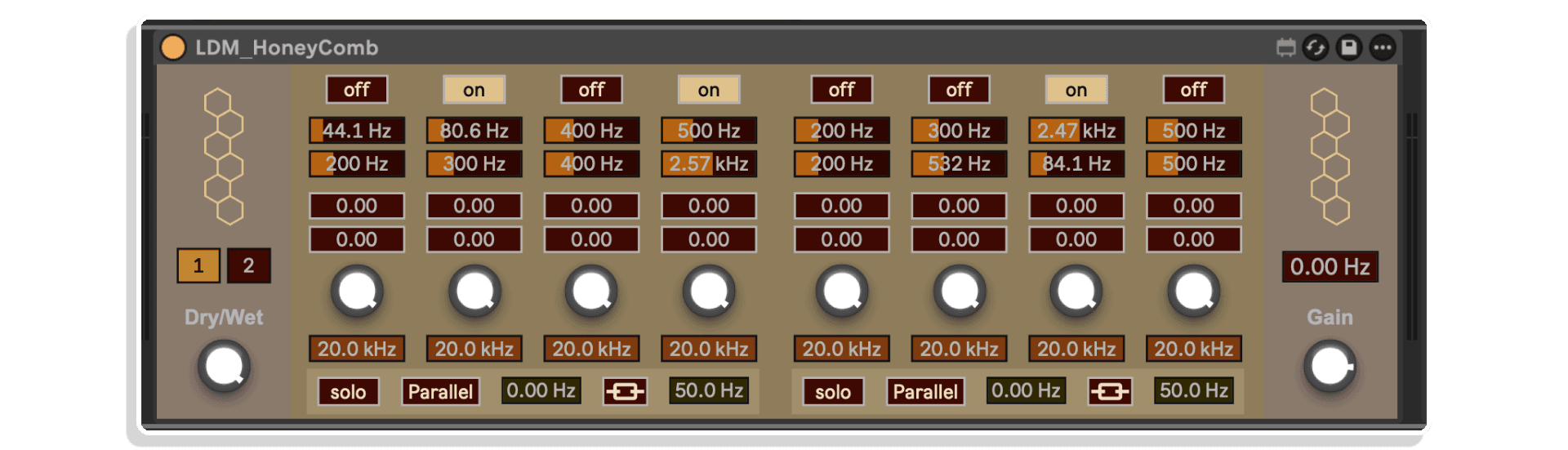
- 4 Groups of 4 Filters — organized structure with solo, routing, and linking controls per group
- Parallel or Serial Routing — cascade filters for complex resonance interactions
- Frequency Linking — lock group frequencies together with adjustable Hz offset
- Group Frequency Shifting — shift entire groups for inharmonic shimmer
- Per-Filter Processing — gain control and 2-pole lowpass filter on each of 16 filters
- Global Controls — frequency shift, dry/wet mix, output gain, built-in limiter
Perfect for metallic hi-hats and cymbals, bell and gong synthesis, riser effects, or adding metallic character to any sound. The coefficient controls create inharmonic relationships impossible with traditional filters—essential for physical modeling of metallic objects and experimental sound design. Manual recommends following with EQ to boost highs and attenuate specific resonant spikes.
Requires Ableton Live 11/12 Standard with MaxforLive or Suite | Mac/Windows
USER GUIDE: Honeycomb
Honeycomb by LDM Design
INHARMONIC RESONANCE, METALLIC PRECISION
BUILD YOUR BUNDLE: Select three or more LDM Design products and unlock an instant 20% discount—applied automatically when you check out.
Creating convincing metallic percussion requires inharmonic resonances that standard harmonic filters can’t produce. Honeycomb solves this with nested comb filter architecture—16 parallel inharmonic filters arranged in 4 groups, based on research by Jae Hyun Ahn and Richard Dudas. One comb filter nests within another’s feedback loop, allowing independent frequency tuning with coefficient interpolation between harmonic, odd-harmonic, and inharmonic spectra.
Inside you’ll find:
- 16 Nested Comb Filters — unique architecture where inner comb sits within outer comb’s feedback loop
- Dual Frequency Control — independent tuning of outer and inner comb frequencies per filter
- Two-Coefficient System — interpolate between harmonic, odd-harmonic, and inharmonic spectra
- 4 Groups of 4 Filters — organized structure with solo, routing, and linking controls per group
- Parallel or Serial Routing — cascade filters for complex resonance interactions
- Frequency Linking — lock group frequencies together with adjustable Hz offset
- Group Frequency Shifting — shift entire groups for inharmonic shimmer
- Per-Filter Processing — gain control and 2-pole lowpass filter on each of 16 filters
- Global Controls — frequency shift, dry/wet mix, output gain, built-in limiter
Perfect for metallic hi-hats and cymbals, bell and gong synthesis, riser effects, or adding metallic character to any sound. The coefficient controls create inharmonic relationships impossible with traditional filters—essential for physical modeling of metallic objects and experimental sound design. Manual recommends following with EQ to boost highs and attenuate specific resonant spikes.
Requires Ableton Live 11/12 Standard with MaxforLive or Suite | Mac/Windows
USER GUIDE: Honeycomb
Product reviews
5 out of 5
1 review
How item rating is calculated
We show the average based on reviews. Only genuine reviews are displayed.
Sort by
April 6, 2026
This reviewer bought this product from our store.
A sound designer's dream
Great idea and implementation! I wasn't able to create as many useful percussion sounds in the first few sessions, as I was hoping. Probably because I didn't spend enough time with the device to really understand and master it. But whenever I put it on some sterile synth sounds or melodic samples that lack character, it instantly gives them a certain edge and rawness that I wasn't able to create with any other plugin so far. This makes it a very valuable tool.
I recommend this product
Honeycomb by LDM Design
Creating convincing metallic percussion—realistic hi-hats, cymbals, bells, or experimental metallic textures—requires inharmonic resonances that standard harmonic filters can’t produce. Traditional comb filters create evenly spaced harmonic peaks, but real metal doesn’t ring in perfect harmonics. Honeycomb solves this with a unique nested comb filter architecture featuring 16 parallel inharmonic filters arranged in 4 groups, each capable of producing harmonic, odd-harmonic, and inharmonic spectra through coefficient interpolation.
This MaxforLive audio effect is built on research by Jae Hyun Ahn and Richard Dudas, implementing nested comb filters where one comb is placed within the feedback loop of another. This architecture allows independent tuning of outer and inner comb frequencies, with two interpolating coefficients that control harmonic relationships. The result is precise control over inharmonic resonances—essential for metallic sound design, cymbal synthesis, hi-hat creation, riser effects, and experimental timbres impossible to achieve with conventional filters.
Overview & Nested Comb Filter Architecture
Standard comb filters create evenly spaced resonant peaks in the frequency spectrum by delaying the signal and feeding it back into itself. These peaks are harmonically related—perfect for pitched resonances like strings or flutes, but unsuitable for metallic sounds which ring with complex, inharmonic overtones. Honeycomb’s nested comb architecture breaks this harmonic limitation by placing one comb filter inside the feedback loop of another.
Each of Honeycomb’s 16 filters features two independently tunable frequencies: Freq 1 (outer comb) and Freq 2 (inner comb). By nesting the inner comb within the outer comb’s feedback path, the two delay times interact to create complex resonance patterns. Add two interpolating coefficients (C and K), and you gain control over whether those resonances are harmonic, odd-harmonic, or inharmonic—and everything in between.
This implementation is based on the paper by Jae Hyun Ahn and Richard Dudas, “Nested Allpass Filters for Inharmonic Audio Effects.” The mathematical relationships between the coefficients and frequencies create spectral characteristics impossible with traditional filter designs, making Honeycomb uniquely suited for physical modeling of metallic objects.
Sixteen Filters, Four Groups
Honeycomb provides 16 individual nested comb filters arranged into 4 groups of 4 filters each. This architecture allows you to build complex, layered metallic timbres by stacking multiple inharmonic resonances. A single comb filter might create a simple metallic ring, but 16 filters with carefully tuned frequencies and coefficients produce the rich, complex overtones of real cymbals, bells, or gongs.
Each filter can be switched on or off independently to preserve CPU resources—only active filters are processed. This matters when working with 16 computationally intensive nested comb filters. Enable just a few filters for simple metallic accents, or activate all 16 for dense, complex timbres.
The four-group structure provides organizational clarity and additional processing options. Each group offers solo mode (for focused editing), routing control (parallel or serial), group frequency shifting, and frequency linking—features that make managing 16 filters practical rather than overwhelming.
Coefficient Control – Harmonic to Inharmonic
The real power of Honeycomb lies in its two-coefficient system that controls harmonic relationships:
Coefficient 1 (C) determines the basic spectral character. Positive values produce harmonic spectra (evenly spaced peaks). Negative values produce odd-harmonic spectra (every other harmonic) at half the frequency. This coefficient establishes the fundamental resonance structure.
Coefficient 2 (K) acts as an interpolator between different harmonic spacings. When K is zero, peaks are spaced at a frequency corresponding to the sum of the two delay times. When K approaches 1 (assuming positive C), peaks align in a harmonic spectrum at the outer comb frequency. When K approaches -1, peaks form an odd-harmonic spectrum at half that frequency. At values between these extremes (like 0.75), the resonances interpolate between spectra, creating inharmonic relationships.
This coefficient interpolation is what makes Honeycomb special. Real metallic objects don’t ring in perfect harmonics—their overtones are slightly (or dramatically) inharmonic. By adjusting K values, you create these natural inharmonic relationships, producing metallic timbres that sound organic rather than synthetic.
Dual Frequency Control
Each filter features two independently tunable frequencies: Freq 1 (outer comb) and Freq 2 (inner comb). These frequencies determine the delay times of the nested combs, which in turn establish the fundamental pitch regions where resonances occur. The interaction between these two frequencies, mediated by the coefficients, creates the final spectral character.
Tuning is critical for metallic sound design. Small frequency changes produce dramatically different timbres. Frequencies that create simple harmonic relationships (like octaves or perfect fifths) produce more tonal results. Frequencies with complex mathematical relationships create more chaotic, bell-like timbres. Experimentation is essential—the manual explicitly recommends using your ears and experimenting with different frequency combinations to discover useful timbres.
Group Features – Routing, Linking, and Processing
Parallel and Serial Routing: By default, the four filters within each group run in parallel, their outputs summed together. Switch to Serial mode, and the filters cascade—filter 1 feeds filter 2, which feeds filter 3, which feeds filter 4. Serial routing creates more complex resonance interactions as each filter colors the output of the previous one, producing denser, more chaotic timbres.
Frequency Linking: Enable Link mode within a group, and the four filters’ frequencies lock together. Adjust the first filter’s frequency, and the others follow with a fixed Hz offset (set by the Offset parameter). This makes it easy to transpose entire groups or maintain specific frequency relationships while exploring different pitch regions. Instead of adjusting four filters individually, you control all four from a single frequency knob.
Group Frequency Shifting: Each group has its own frequency shifter that shifts the entire group’s output. Unlike pitch shifting (which maintains harmonic relationships), frequency shifting moves all frequencies by a fixed Hz amount, disrupting harmonic relationships and creating inharmonic spectra. This is particularly effective for metallic sounds, adding shimmer, dissonance, or otherworldly character.
Solo Mode: Solo a group to mute all others, making it easy to focus on editing one group’s filters without the complexity of hearing all 16 at once. This is essential for detailed sound design work.
Per-Filter Processing
Each of the 16 filters includes additional processing:
Gain Control attenuates the filter’s output, essential for balancing levels across filters with different resonance characteristics. Some frequency/coefficient combinations produce louder resonances than others, and individual gain controls let you create balanced mixes.
Lowpass Filter (2-pole) cuts high frequencies from each filter’s output. Nested comb filters can produce very bright, harsh high-frequency resonances. The lowpass filter tames these when needed, or leaves them intact when you want aggressive metallic brilliance.
Global Processing
Global Frequency Shift shifts the entire output of all four groups, adding one more layer of inharmonic processing on top of the already complex filter interactions. Use subtle amounts for gentle shimmer, or extreme settings for dramatic pitch-bending effects.
Dry/Wet Mix blends the processed signal with the original input. Pure wet (100%) gives you only the filtered resonances—perfect for using Honeycomb as a metallic resonator or synthesizer. Mix in dry signal to add metallic character to existing sounds without completely replacing them.
Output Gain attenuates the final output. Comb filter resonances can build up significant amplitude, especially when using multiple filters. The built-in limiter prevents speaker damage, but output gain gives you control over overall level. The manual recommends following Honeycomb with EQ to boost high frequencies for effective metallic sounds and attenuate specific resonant spikes that might be too prominent.
Workflow and Sound Design Applications
Metallic Hi-Hats and Cymbals: Feed white noise bursts or short impulses into Honeycomb. Tune the filters to create inharmonic resonances that mimic the spectral characteristics of metal percussion. Adjust coefficients to control harmonic/inharmonic balance, use frequency shifting for shimmer, and layer multiple groups for complex timbres.
Bell and Gong Synthesis: Use Honeycomb as a resonator for synthesis. Feed it impulses or noise with slow attacks, tune filters to create bell-like inharmonic overtones, and use serial routing for complex resonance interactions.
Riser Effects: Send noise with gradual attacks into Honeycomb, automate frequency parameters or global frequency shift to create evolving metallic risers perfect for transitions and builds.
Sound Design and Texture: Process any sound—drums, vocals, synths, field recordings—through Honeycomb to add metallic character. Use subtle settings for gentle shimmer and resonance, or extreme settings for complete transformation into experimental metallic textures.
Physical Modeling: Honeycomb’s nested comb architecture is based on physical modeling research. Use it to model the resonance characteristics of physical objects by carefully tuning frequencies and coefficients to match real-world inharmonic relationships.
Technical Background
Honeycomb implements nested allpass comb filters as described in the paper “Nested Allpass Filters for Inharmonic Audio Effects” by Jae Hyun Ahn and Richard Dudas. This research demonstrates how nesting one comb filter within another’s feedback loop creates control over inharmonic spectra through coefficient interpolation. The device was also inspired by Zion Jaymes’ YouTube videos on cymbal design using physical modeling techniques.
Understanding the underlying theory isn’t required to use Honeycomb effectively, but it helps explain why the coefficient controls behave as they do. The complex mathematical relationships between the two delay times and two coefficients create spectral characteristics that can’t be achieved with simpler filter designs.
How to Use
Insert Honeycomb as an audio effect on any track in Ableton Live. Send audio into it—short impulses with white noise work well for hi-hat sounds, noise with slow attacks creates risers, or process any existing sound for metallic character. Enable one or more filters and set frequencies and coefficient values. The manual emphasizes experimentation—use your ears to find interesting combinations.
Use the Solo function to focus on editing one group at a time. Enable frequency linking when you want to control multiple filters together. Switch between parallel and serial routing to explore different resonance interactions. Add frequency shifting for shimmer and inharmonic character. Use the lowpass filters to tame harsh high frequencies.
The manual strongly recommends placing an EQ after Honeycomb to boost high frequencies for effective metallic sounds and to attenuate specific frequency spikes where resonances might be too prominent. All parameters are fully automatable for evolving metallic textures throughout your track.
Ideal For
Sound designers creating metallic percussion and experimental textures. Electronic producers synthesizing hi-hats, cymbals, and metallic percussion elements. Experimental musicians exploring inharmonic timbres and physical modeling. Anyone working with physical modeling synthesis who needs precise control over inharmonic resonances. Producers seeking unique, complex timbres unavailable from standard harmonic filters. Artists interested in the intersection of academic DSP research and practical music production tools.
What’s Included
- Honeycomb MaxforLive audio effect device with 16 nested comb filters
- Comprehensive reference manual with detailed technical explanations
- 4 groups with solo, routing, frequency linking, and frequency shifting
- Per-filter gain and lowpass filtering
- Global frequency shift, dry/wet mix, and output gain
- Built-in limiter for speaker protection
- Compatible with Ableton Live 11 & 12 (Standard with MaxforLive or Suite)
Requirements
- Ableton Live 11 Standard with MaxforLive installed, or Ableton Live 11/12 Suite
- Mac or Windows operating system
Honeycomb by LDM Design brings academic DSP research into practical music production. Based on nested comb filter architecture by Jae Hyun Ahn and Richard Dudas, this device provides precise control over inharmonic resonances through 16 filters, coefficient interpolation, and comprehensive group processing—essential tools for metallic sound design, cymbal synthesis, and experimental timbres.
TRIPLE PACK SAVINGS
BUILD YOUR BUNDLE: Select three or more LDM Design products and unlock an instant 20% discount—applied automatically when you check out.
Explore More LDM Design Tools: Tremulant | GDelay | Sicu | FRAKTOR | View All LDM Design Products
Frequently Asked Questions
A: Honeycomb is a MaxforLive audio effect featuring 16 nested comb filters arranged in 4 groups, designed for metallic sound design and inharmonic resonances. Based on research by Jae Hyun Ahn and Richard Dudas, each filter uses a unique architecture where one comb filter is nested within another’s feedback loop. This allows independent tuning of outer and inner comb frequencies with two coefficients that interpolate between harmonic, odd-harmonic, and inharmonic spectra. Features include parallel/serial routing per group, frequency linking, group and global frequency shifting, per-filter gain and lowpass filtering, and dry/wet mixing.
A: Yes, Honeycomb is a MaxforLive device.
A: MaxforLive is a platform that integrates the visual programming environment Max with Ableton Live, allowing users to create and use custom audio, MIDI, and control devices.
A: Regular comb filters create evenly spaced harmonic resonant peaks—perfect for pitched sounds but unsuitable for metallic timbres which have inharmonic overtones. Nested comb filters place one comb filter inside another’s feedback loop, allowing two independently tunable frequencies (outer and inner comb). The interaction between these frequencies, controlled by two coefficients, creates harmonic, odd-harmonic, or inharmonic spectra. This architecture produces the complex, inharmonic resonances essential for realistic metallic percussion, bells, cymbals, and experimental textures.
A: Coefficient 1 (C) determines basic spectral character—positive values produce harmonic spectra, negative values produce odd-harmonic spectra at half the frequency. Coefficient 2 (K) interpolates between different harmonic spacings. When K is zero, peaks space at the sum of delay times. When K approaches 1 (with positive C), peaks align harmonically at the outer comb frequency. When K approaches -1, peaks form odd-harmonically at half that frequency. Values between these extremes (like 0.75) create inharmonic relationships—the key to realistic metallic sounds.
A: Honeycomb excels at metallic sound design: creating hi-hats and cymbals from noise bursts, synthesizing bells and gongs, generating metallic riser effects, or adding metallic character to existing sounds. It’s also valuable for physical modeling (simulating resonance of real objects), experimental sound design, and any application requiring precise control over inharmonic resonances. The manual recommends following Honeycomb with EQ to boost high frequencies and attenuate prominent resonant spikes for best results.
A: You can explore more of LDM Design’s tools and devices here: LDM Design
Important Information
V1.0.0 – Initial Release – April 2026
Our Products are generally provided as Zip file downloads which in all cases will need to be extracted and saved to your hard drive prior to installation. Details on the different file type provided and what to do with them are below.
.alp Files – These are Ableton Live Packs and will either install directly into the Packs Section of the browser of Ableton Live or ask you to save them to your hard drive. For packs that install to the library, when you double click on them you will see a pop up window asking you to confirm that installation is ok as the files are described as “Legacy”. This is fine and you are ok to proceed, the packs are created using the format for an earlier version of Live and so remain compatible with the current version.
.amxd files – These are individual MaxforLive Devices and can be stored anywhere on your hard drive. We’d advise creating a folder for them and then adding that folder as a location within the Places section of Lives Browser.
END-USER LICENSE AGREEMENT FOR ISOTONIK STUDIOS SOFTWARE PRODUCTS.
PLEASE READ THE TERMS AND CONDITIONS OF THIS LICENSE AGREEMENT CAREFULLY BEFORE CONTINUING WITH THIS PROGRAM INSTALL.
This End-User License Agreement (referred to as “EULA”) is a legal agreement between an individual or a single entity (referred to as “LICENSEE”) and Isotonik Studios for the Isotonik Studios software product(s) which may include associated software components, media, printed materials, and “online” or electronic documentation (referred to as “SOFTWARE PRODUCT”). By installing, copying, or otherwise using the SOFTWARE PRODUCT, the LICENSEE agrees to be bound by the terms of this EULA.
This EULA represents the entire agreement concerning the program between the LICENSEE and Isotonik Studios and it supersedes any prior proposal, representation, or understanding between the parties. If the LICENSEE does not agree to the terms of this EULA, the LICENSEE should not install or use the SOFTWARE PRODUCT.
The SOFTWARE PRODUCT is protected by copyright laws and international copyright treaties, as well as other intellectual property laws and treaties. The SOFTWARE PRODUCT is licensed, not sold.
- GRANT OF LICENSE.
The SOFTWARE PRODUCT is licensed as follows:
(a) Installation and Use. Providing that the LICENSEE has paid any applicable license fees, Isotonik Studios grants the LICENSEE the right to install and use copies of the SOFTWARE PRODUCT on up to two computers in the LICENSEE’s possession that are running a validly licensed copy of the operating system for which the SOFTWARE PRODUCT was designed [e.g., Windows 10, macOS]. The computer(s) must be owned by the LICENSEE.
(b) Backup Copies. The LICENSEE may also make copies of the SOFTWARE PRODUCT as may be necessary for backup and archival purposes.
- DESCRIPTION OF OTHER RIGHTS AND LIMITATIONS.
(a) Maintenance of Copyright Notices. The LICENSEE must not remove or alter any copyright notices on any and all copies of the SOFTWARE PRODUCT.
(b) Distribution. The LICENSEE may not distribute registered copies of the SOFTWARE PRODUCT to third parties.
(c) Prohibition on Reverse Engineering, Decompilation, and Disassembly. The LICENSEE may not reverse engineer, decompile, or disassemble the SOFTWARE PRODUCT, except and only to the extent that such activity is expressly permitted by applicable law notwithstanding this limitation.
(d) Rental. The LICENSEE may not rent, lease, or lend the SOFTWARE PRODUCT.
(e) License transfer The LICENSEE may not transfer their license to the SOFTWARE PRODUCT to any third party. Any attempt to do so will be considered a violation of this EULA.
(f) Support Services. Isotonik Studios may provide the LICENSEE with support services related to the SOFTWARE PRODUCT for a period of 12 months following the date of purchase. Any supplemental software code provided to the LICENSEE as part of the Support Services shall be considered part of the SOFTWARE PRODUCT and subject to the terms and conditions of this EULA.
(g) Compliance with Applicable Laws. The LICENSEE must comply with all applicable laws regarding use of the SOFTWARE PRODUCT.
- TERMINATION Without prejudice to any other rights, Isotonik Studios may terminate this EULA if the LICENSEE fails to comply with the terms and conditions of this EULA. In such event, the LICENSEE must destroy all copies of the SOFTWARE PRODUCT in the LICENSEE’s possession.
- COPYRIGHT All title, including but not limited to copyrights, in and to the SOFTWARE PRODUCT and any copies thereof are owned by Isotonik Studios or its suppliers. All title and intellectual property rights in and to the content which may be accessed through use of the SOFTWARE PRODUCT is the property of the respective content owner and may be protected by applicable copyright or other intellectual property laws and treaties. This EULA grants the LICENSEE no rights to use such content. All rights not expressly granted are reserved by Isotonik Studios.
- NO WARRANTIES Isotonik Studios expressly disclaims any warranty for the SOFTWARE PRODUCT. The SOFTWARE PRODUCT is provided ‘As Is’ without any express or implied warranty of any kind, including but not limited to any warranties of merchantability, noninfringement, or fitness of a particular purpose. Isotonik Studios does not warrant or assume responsibility for the accuracy or completeness of any information, text, graphics, links or other items contained within the SOFTWARE PRODUCT. Isotonik Studios makes no warranties respecting any harm that may be caused by the transmission of a computer virus, worm, time bomb, logic bomb, or other such computer program. Isotonik Studios further expressly disclaims any warranty or representation to the LICENSEE or to any third party.
- LIMITATION OF LIABILITY In no event shall Isotonik Studios be liable for any damages (including, without limitation, lost profits, business interruption, or lost information) arising out of the LICENSEE’s use of or inability to use the SOFTWARE PRODUCT, even if Isotonik Studios has been advised of the possibility of such damages. In no event will Isotonik Studios be liable for loss of data or for indirect, special, incidental, consequential (including lost profit), or other damages based in contract, tort or otherwise. Isotonik Studios shall have no liability with respect to the content of the SOFTWARE PRODUCT or any part thereof, including but not limited to errors or omissions contained therein, libel, infringements of rights of publicity, privacy, trademark rights, business interruption, personal injury, loss of privacy, moral rights or the disclosure of confidential information.
More from LDM Design
Frequently Bought Together
 ★ Popular