TapeLeap by Mudjaq
TAPE MANIPULATION BEYOND PHYSICAL LIMITS
MIX & MATCH SAVINGS: Add any three or more Mudjaq devices to your cart and save 20% automatically at checkout!
TapeLeap separates what real tape always kept linked. Recording and playback speeds operate independently, transforming this MaxforLive device into a hybrid delay, looper, pitch-shifter, and glitch machine that physical tape could never achieve.
Inside you’ll find:
- Independent recording pitch (0x to 4x) and playback pitch control (-4x to 4x speed)
- Three play modes: Reset, Delay, and Scratch
- Separate recording, overdub, and feedback controls with visual monitoring
- Four tape types with saturation and filtering
- Tape error system with slip and lack probability
- Time-stretch from 0x to 2x with granular control
- Flutter, wow, and LFO modulation
- High-pass and low-pass filtering in the feedback path
Record slow, play fast. Loop without erasing. Introduce deliberate errors. TapeLeap turns the constraints of vintage tape into unlimited creative potential.
Where chaos and control walk the edge together.
USER GUIDE: TapeLeap User Guide
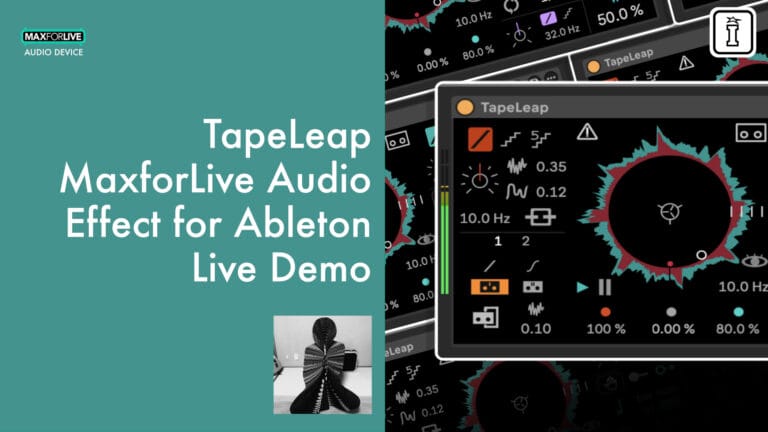
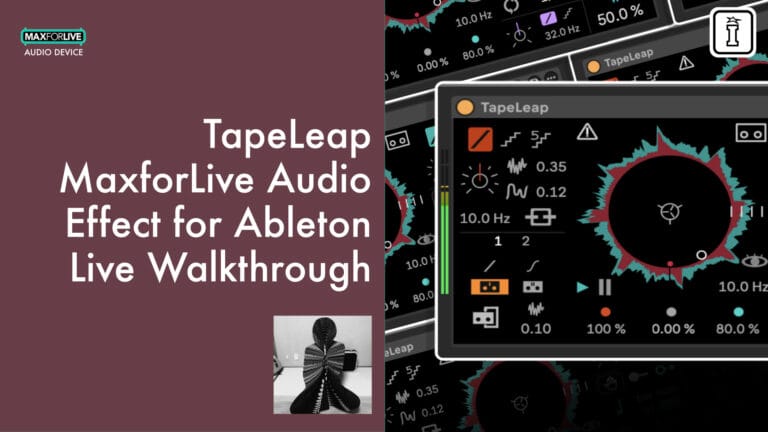
TapeLeap by Mudjaq
TAPE MANIPULATION BEYOND PHYSICAL LIMITS
MIX & MATCH SAVINGS: Add any three or more Mudjaq devices to your cart and save 20% automatically at checkout!
TapeLeap separates what real tape always kept linked. Recording and playback speeds operate independently, transforming this MaxforLive device into a hybrid delay, looper, pitch-shifter, and glitch machine that physical tape could never achieve.
Inside you’ll find:
- Independent recording pitch (0x to 4x) and playback pitch control (-4x to 4x speed)
- Three play modes: Reset, Delay, and Scratch
- Separate recording, overdub, and feedback controls with visual monitoring
- Four tape types with saturation and filtering
- Tape error system with slip and lack probability
- Time-stretch from 0x to 2x with granular control
- Flutter, wow, and LFO modulation
- High-pass and low-pass filtering in the feedback path
Record slow, play fast. Loop without erasing. Introduce deliberate errors. TapeLeap turns the constraints of vintage tape into unlimited creative potential.
Where chaos and control walk the edge together.
USER GUIDE: TapeLeap User Guide
Buying for someone?Send a gift card →
Additional information
| MaxforLive | Audio Devices |
|---|---|
| Ableton Live Compatibility | Ableton Live 11 Standard with MaxforLive, Ableton Live 11 Suite, Ableton Live 12 Standard with MaxforLive, Ableton Live 12 Suite |
| Min. Requirements | Ableton Live 11 Standard with MaxforLive Installed or Ableton Live 11 Suite |
| Controllers | Ableton Push THREE Controller, Ableton Push THREE Standalone, Ableton Push TWO |
| OS | Mac, Windows |
PRICE: £26.00
Product reviews
4.3 out of 5
3 reviews
How item rating is calculated
We show the average based on reviews. Only genuine reviews are displayed.
Sort by
December 15, 2025
This reviewer bought this product from our store.
Fun and Freaky delay.
Super fun and flexible overdubbing tape delay that actually works really well on Push 3 Standalone. Reminds me of something between Red Panda Tensor and Audio Damage Enso. Great for concrète! UI could be a deal-breaker or a benefit for some. I find it harder to use without labels.
Easy to use, fun to play with, looks like it could also be quite deep.
Maximum 5 secs loop (might be editable in Max?)
UI in Ableton Live could be a challenge with poor eyesight.
I recommend this product
July 3, 2026
This reviewer bought this product from our store.
really nice little unit
I recommend this product
December 8, 2025
This reviewer bought this product from our store.
Ambient must-have
One of Mudjaq's best. I bet it's inspired by kentaro's Helisert. Make sure to watch the walkthrough to see the possibilities you can make. So far I tried it with piano one shots and turning them into long drone pads. UI may be a bit confusing, but it follows the same pattern as other plugins from Mudjaq.
UI is fantastic
No labels to indicate which parameter is which
I recommend this product
TapeLeap by Mudjaq
Overview & Inspiration
TapeLeap is not a simple delay or looper. This MaxforLive device separates what traditional tape machines always kept linked: recording speed and playback speed operate independently, opening creative territory that physical tape could never reach.
The result is a hybrid instrument that functions as delay, looper, pitch-shifter, and glitch machine simultaneously. Record at one speed, play back at another, and watch as familiar sounds transform into something entirely new. With three distinct play modes, tape saturation modeling, and deliberate “error” features, TapeLeap turns the limitations of vintage tape into limitless creative potential.
Features & Highlights
Independent Pitch Control – Recording and playback speeds are completely decoupled. Slow down the recording speed while keeping playback at normal speed to raise pitch without changing timing. Enable PitchLink to synchronize both speeds for authentic tape behavior, or keep them separate for impossible pitch combinations. Flutter and wow controls add organic instability to the recording process.
Three Play Modes – Reset Mode lets you jump to any position on the tape with adjustable loop points. Delay Mode functions as a traditional delay with optional pitch changes when adjusting delay time. Scratch Mode enables DJ-style scratching with absolute or relative positioning, perfect for performance and sound design.
Recording, Overdub & Feedback – Control the balance between new recordings, overdubbed layers, and feedback with independent parameters. The visual display shows red for new recordings, gray for overdub retention, and green for feedback content. Set overdub to 100% with recording at 0% to use TapeLeap as a traditional looper without erasing previous material.
Tape Character & Degradation – Four tape types range from clean to heavily filtered saturation. Apply saturation and filtering to overdubs for accumulating degradation with each pass. Add white noise for authentic tape hiss. The “Broken” mode introduces downsample artifacts and click noise when changing recording speed for intentionally lo-fi results.
Tape Error System – Slip and Lack controls introduce controlled randomness. Slip causes the tape to momentarily jump and return, with adjustable probability, speed, and length. Lack creates dropout effects with configurable intensity. Both add organic imperfection that makes loops feel alive rather than mechanical.
Stretch & Granular Processing – Time-stretch playback from 0x to 2x speed without pitch change. Grain speed control determines the character of the stretching algorithm, from smooth to granular textures. Stretch is applied through the feedback path for accumulating time manipulation.
Filter & Output – High-pass and low-pass filters shape the wet signal (and feedback path). Independent dry and wet controls allow parallel processing. The Blink feature provides amplitude gating that also affects feedback behavior.
How to Use
Drop TapeLeap onto any audio track. Set your tape length in milliseconds or synced note values (note: changing tape length causes a click). Use the main display to monitor recording, overdub, and feedback levels visually.
For looping, set recording to 0% and overdub to 100% to preserve existing material. For degrading loops, increase recording while keeping some overdub and feedback. For pitch effects, experiment with different recording and playback speed combinations.
The three play modes suit different workflows: Reset Mode for triggered sample playback, Delay Mode for rhythmic echo effects, and Scratch Mode for performance manipulation. Combine with tape errors and stretch for evolving, unpredictable textures.
Ideal For
- Experimental producers exploring tape-based sound design
- Lo-fi and ambient artists seeking organic degradation and texture
- Sound designers creating evolving, unpredictable loops
- Live performers who want hands-on tape manipulation
- Anyone seeking creative delay and looper functionality beyond standard plugins
What’s Included
- TapeLeap MaxforLive device (.amxd)
- Complete user guide (PDF)
- Visual waveform display with L/C/R monitoring
Requirements
- Ableton Live 11 Standard (with MaxforLive installed) or Live 11 Suite or higher
- MaxforLive
- Mac or Windows
BUILD YOUR BUNDLE: Select three or more Mudjaq MaxforLive devices and unlock an instant 20% discount (applied automatically when you check out).
Whale | Pigra 2 | Swimmer | Metamor | View All Mudjaq Products
Frequently Asked Questions
A: TapeLeap is a MaxforLive tape-based delay and looper that separates recording and playback speeds for creative pitch and time manipulation. It features three play modes (Reset, Delay, Scratch), tape saturation modeling, deliberate error effects, and time-stretching capabilities.
A: Yes, TapeLeap is a MaxforLive device.
A: MaxforLive is a platform that integrates the visual programming environment Max with Ableton Live, allowing users to create and use custom audio, MIDI, and control devices.
A:
- Ableton Live 11 Standard with MaxforLive installed, or Ableton Live 11 Suite (or higher)
- MaxforLive
- Mac or Windows
A: You can explore more of Mudjaq’s tools and devices here: Mudjaq
Important Information
Initial Release – December 2025
Our Products are generally provided as Zip file downloads which in all cases will need to be extracted and saved to your hard drive prior to installation. Details on the different file type provided and what to do with them are below.
.alp Files – These are Ableton Live Packs and will either install directly into the Packs Section of the browser of Ableton Live or ask you to save them to your hard drive. For packs that install to the library, when you double click on them you will see a pop up window asking you to confirm that installation is ok as the files are described as “Legacy”. This is fine and you are ok to proceed, the packs are created using the format for an earlier version of Live and so remain compatible with the current version.
.amxd files – These are individual MaxforLive Devices and can be stored anywhere on your hard drive. We’d advise creating a folder for them and then adding that folder as a location within the Places section of Lives Browser.
END-USER LICENSE AGREEMENT FOR ISOTONIK STUDIOS SOFTWARE PRODUCTS.
PLEASE READ THE TERMS AND CONDITIONS OF THIS LICENSE AGREEMENT CAREFULLY BEFORE CONTINUING WITH THIS PROGRAM INSTALL.
This End-User License Agreement (referred to as “EULA”) is a legal agreement between an individual or a single entity (referred to as “LICENSEE”) and Isotonik Studios for the Isotonik Studios software product(s) which may include associated software components, media, printed materials, and “online” or electronic documentation (referred to as “SOFTWARE PRODUCT”). By installing, copying, or otherwise using the SOFTWARE PRODUCT, the LICENSEE agrees to be bound by the terms of this EULA.
This EULA represents the entire agreement concerning the program between the LICENSEE and Isotonik Studios and it supersedes any prior proposal, representation, or understanding between the parties. If the LICENSEE does not agree to the terms of this EULA, the LICENSEE should not install or use the SOFTWARE PRODUCT.
The SOFTWARE PRODUCT is protected by copyright laws and international copyright treaties, as well as other intellectual property laws and treaties. The SOFTWARE PRODUCT is licensed, not sold.
- GRANT OF LICENSE.
The SOFTWARE PRODUCT is licensed as follows:
(a) Installation and Use. Providing that the LICENSEE has paid any applicable license fees, Isotonik Studios grants the LICENSEE the right to install and use copies of the SOFTWARE PRODUCT on up to two computers in the LICENSEE’s possession that are running a validly licensed copy of the operating system for which the SOFTWARE PRODUCT was designed [e.g., Windows 10, macOS]. The computer(s) must be owned by the LICENSEE.
(b) Backup Copies. The LICENSEE may also make copies of the SOFTWARE PRODUCT as may be necessary for backup and archival purposes.
- DESCRIPTION OF OTHER RIGHTS AND LIMITATIONS.
(a) Maintenance of Copyright Notices. The LICENSEE must not remove or alter any copyright notices on any and all copies of the SOFTWARE PRODUCT.
(b) Distribution. The LICENSEE may not distribute registered copies of the SOFTWARE PRODUCT to third parties.
(c) Prohibition on Reverse Engineering, Decompilation, and Disassembly. The LICENSEE may not reverse engineer, decompile, or disassemble the SOFTWARE PRODUCT, except and only to the extent that such activity is expressly permitted by applicable law notwithstanding this limitation.
(d) Rental. The LICENSEE may not rent, lease, or lend the SOFTWARE PRODUCT.
(e) License transfer The LICENSEE may not transfer their license to the SOFTWARE PRODUCT to any third party. Any attempt to do so will be considered a violation of this EULA.
(f) Support Services. Isotonik Studios may provide the LICENSEE with support services related to the SOFTWARE PRODUCT for a period of 12 months following the date of purchase. Any supplemental software code provided to the LICENSEE as part of the Support Services shall be considered part of the SOFTWARE PRODUCT and subject to the terms and conditions of this EULA.
(g) Compliance with Applicable Laws. The LICENSEE must comply with all applicable laws regarding use of the SOFTWARE PRODUCT.
- TERMINATION Without prejudice to any other rights, Isotonik Studios may terminate this EULA if the LICENSEE fails to comply with the terms and conditions of this EULA. In such event, the LICENSEE must destroy all copies of the SOFTWARE PRODUCT in the LICENSEE’s possession.
- COPYRIGHT All title, including but not limited to copyrights, in and to the SOFTWARE PRODUCT and any copies thereof are owned by Isotonik Studios or its suppliers. All title and intellectual property rights in and to the content which may be accessed through use of the SOFTWARE PRODUCT is the property of the respective content owner and may be protected by applicable copyright or other intellectual property laws and treaties. This EULA grants the LICENSEE no rights to use such content. All rights not expressly granted are reserved by Isotonik Studios.
- NO WARRANTIES Isotonik Studios expressly disclaims any warranty for the SOFTWARE PRODUCT. The SOFTWARE PRODUCT is provided ‘As Is’ without any express or implied warranty of any kind, including but not limited to any warranties of merchantability, noninfringement, or fitness of a particular purpose. Isotonik Studios does not warrant or assume responsibility for the accuracy or completeness of any information, text, graphics, links or other items contained within the SOFTWARE PRODUCT. Isotonik Studios makes no warranties respecting any harm that may be caused by the transmission of a computer virus, worm, time bomb, logic bomb, or other such computer program. Isotonik Studios further expressly disclaims any warranty or representation to the LICENSEE or to any third party.
- LIMITATION OF LIABILITY In no event shall Isotonik Studios be liable for any damages (including, without limitation, lost profits, business interruption, or lost information) arising out of the LICENSEE’s use of or inability to use the SOFTWARE PRODUCT, even if Isotonik Studios has been advised of the possibility of such damages. In no event will Isotonik Studios be liable for loss of data or for indirect, special, incidental, consequential (including lost profit), or other damages based in contract, tort or otherwise. Isotonik Studios shall have no liability with respect to the content of the SOFTWARE PRODUCT or any part thereof, including but not limited to errors or omissions contained therein, libel, infringements of rights of publicity, privacy, trademark rights, business interruption, personal injury, loss of privacy, moral rights or the disclosure of confidential information.
More from Mudjaq

Frequently Bought Together
 -30%★ Popular
MonomonoConsolex8056 by MonomonoLive 11 & 12 · Max for Live Original price was: £50.00.£35.00Current price is: £35.00.
 ★ Popular
 ★ Popular