The Percolator by Chaos Culture | Do the thing
THE ULTIMATE MAXFORLIVE FX MODULE?!
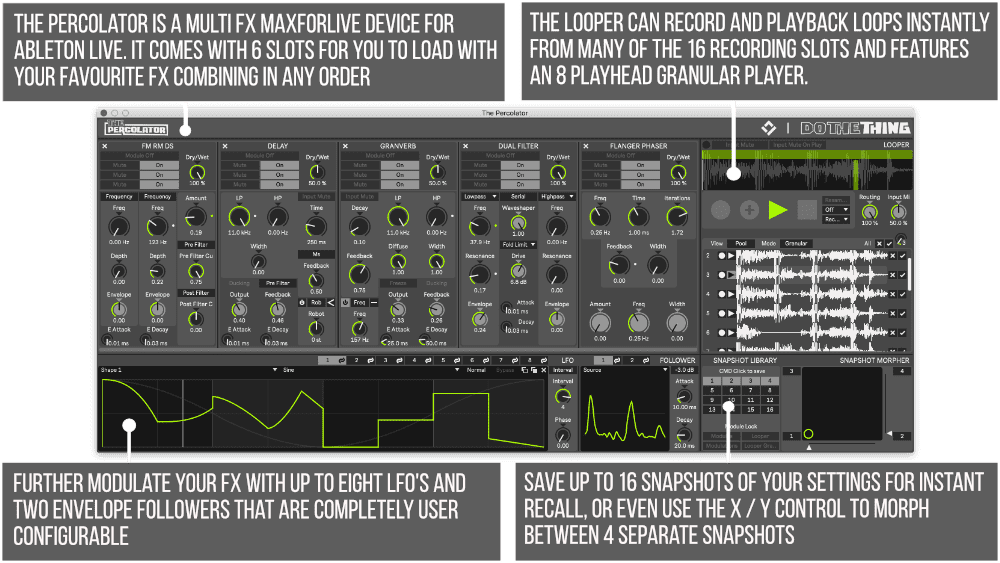
The Percolator is a versatile and powerful, highly performative, semi-modular audio multi-effect processor and loop sampler.
Encompassing 5 serial effect slots which can house a variety of included effect modules, Split Frequency Band Audio Routing, a Loop Sampler and Granular Player as well as a Modular Snapshot System with 4 way morphing, 8 LFOs and 2 Enveloper followers; The Percolator is a dynamic audio effect instrument, equally at home with sound design or more performative use.
USER GUIDE: The Percolator Version 1.1 Getting Started Guide
The Percolator by Chaos Culture | Do the thing
THE ULTIMATE MAXFORLIVE FX MODULE?!
The Percolator is a versatile and powerful, highly performative, semi-modular audio multi-effect processor and loop sampler.
Encompassing 5 serial effect slots which can house a variety of included effect modules, Split Frequency Band Audio Routing, a Loop Sampler and Granular Player as well as a Modular Snapshot System with 4 way morphing, 8 LFOs and 2 Enveloper followers; The Percolator is a dynamic audio effect instrument, equally at home with sound design or more performative use.
USER GUIDE: The Percolator Version 1.1 Getting Started Guide
Additional information
| MaxforLive | Audio Devices |
|---|---|
| Ableton Live Compatibility | Ableton Live 10 Standard with MaxforLive, Ableton Live 10 Suite, Ableton Live 11 Standard with MaxforLive, Ableton Live 11 Suite, Ableton Live 12 Standard with MaxforLive, Ableton Live 12 Suite |
| Min. Requirements | Ableton Live 10 Standard with MaxforLive Installed or Ableton Live 10 Suite |
| OS | Mac, Windows |
PRICE: £30.00
Product reviews
5 out of 5
5 reviews
How item rating is calculated
We show the average based on reviews. Only genuine reviews are displayed.
Sort by
March 12, 2025
This reviewer bought this product from our store.
Outstanding tool with exciting fx results.
Great power in developing complex fx creations.
It's one of my favorites.
December 12, 2022
This reviewer bought this product from our store.
very, very, very good
February 7, 2021
This reviewer bought this product from our store.
This is the greatest Looper I have ever seen. I can't believe how inexpensive this device is. Great job on the design and concept. So fun.
January 9, 2021
This reviewer bought this product from our store.
I'm in love with The Percolator already; as both a real-time effect and an insane granular sampler with the ability to snowball internal FX like an insane person, I've been using this to warp the living hell out of sounds and I'm always impressed with the end result. The level of workflow and control is balanced perfectly, and obviously the price-to-value ratio makes this a steal all on its own. This is obviously a developer worth supporting and I can't wait to see what else they come up with in the future!!
December 24, 2020
This reviewer bought this product from our store.
Percolator is outstanding. The quality of the effects and granular engine is superb and everything works seamlessly together with the modulation and morphing sections. Endless possibilities in a single device at a no-brainer pricepoint.
The Percolator by Chaos Culture | Do the thing
UPDATED FOR LIVE 11
Module Reset & Randomization
● Press Reset to reset the module to the default settings.
● Press Randomize to to randomize the module p arameters.
○ The randomization is done with unique algorithms for each module instead of true randomness, in order to increase the chances of a useful outcome. Volume controls are limited and filter cutoff frequencies are randomized in relation to each other to avoid pointless settings that would result in silence or sudden volume spikes.
Quantize Snapshot Recall
Added the ability to quantize snapshot recalling. This quantization works exactly how the quantization of the Looper does. If you recall a snapshot right on the beat or slightly after, it still counts as being “in time”. This helps with performative use of snapshot recall without having to focus on triggering it perfectly before the beat.
MIDI Trigger Snapshot Recall
(Live 11 only) Snapshots can now also be recalled via MIDI input for live performance use. Route any of Live’s MIDI track outputs to the MIDI input of the MIDI track hosting The Percolator device. MIDI note C3 will recall the first snapshot and consecutive notes above will trigger higher snapshot numbers. It’s suggested to not quantize snapshot recalling if the incoming MIDI data is already quantized.
Miscellaneous Improvements
● Updated The Percolator UI background colors.
● The title of the floating window now displays the device and track name, which updates automatically after renaming.
● Minor bugfixes for all GUI elements and the overall device from updating the underlying framework to the latest version.
THE PERCOLATOR
The Percolator is a versatile and powerful, highly performative, semi-modular audio multi-effect processor and loop sampler.
Encompassing 5 serial effect slots which can house a variety of included effect modules, Split Frequency Band Audio Routing, a Loop Sampler and Granular Player as well as a Modular Snapshot System with 4 way morphing, 8 LFOs and 2 Enveloper followers; The Percolator is a dynamic audio effect instrument, equally at home with sound design or more performative use.
The Percolator is designed for use with a wide range of material. Add lush modulation to pads and chords or completely rearrange and glitch drum breaks, stems or whole mixes.
Capture your performance instantly and painlessly with the Loop sampler, twist it further with the granular player and send it back through the effects chain for more processing and resampling.
Modulate everything from the onboard LFOs and Envelopes, enabling wild rhythmic bursts of processing.
Create dynamic real time performances and discover new patches with the Snapshot Library and XY Pad Snapshot Morpher.
Frequently Asked Questions
The Percolator requires Ableton Live 11 or later with Max for Live. It will not run on earlier versions of Live, so make sure your setup is up to date before purchasing.
You get a semi-modular multi-effect processor with 5 serial effect slots, a range of effect modules, split frequency band audio routing, a loop sampler, a granular player, 8 LFOs, 2 envelope followers, and a modular snapshot system with 4-way morphing.
The snapshot system lets you store and morph between up to 4 states simultaneously, and snapshot recall can be quantised to the beat so your transitions stay tight even under pressure. If you trigger a recall just after the beat, it still registers as in time, making it genuinely reliable for live use.
It is built with performance very much in mind. The quantised snapshot recall, 4-way morphing, and randomisation features make it well suited to both studio sound design and hands-on live sets.
Rather than applying true randomness, each module uses its own tailored randomisation algorithm to keep results musical and usable. Volume controls are kept sensible and filter frequencies are randomised relative to each other, so you will not end up with silence or unexpected volume spikes.
The Percolator works as a Max for Live audio effect, so it can be dropped onto any audio track, instrument track, or return track within Ableton Live. It is flexible enough to process anything from synths and drums to full stems.
Once downloaded, drag the Max for Live device into your Ableton Live User Library or directly onto a track. As long as Live 11 and Max for Live are installed and authorised, the device will load straight away with no additional setup required.
Important Information
Version 1.0.4 – Released 23rd December 2020
Module Reset & Randomization
● Press Reset to reset the module to the default settings.
● Press Randomize to to randomize the module p arameters.
○ The randomization is done with unique algorithms for each module instead of true randomness, in order to increase the chances of a useful outcome. Volume controls are limited and filter cutoff frequencies are randomized in relation to each other to avoid pointless settings that would result in silence or sudden volume spikes.
Quantize Snapshot Recall
Added the ability to quantize snapshot recalling. This quantization works exactly how the quantization of the Looper does. If you recall a snapshot right on the beat or slightly after, it still counts as being “in time”. This helps with performative use of snapshot recall without having to focus on triggering it perfectly before the beat.
MIDI Trigger Snapshot Recall
(Live 11 only) Snapshots can now also be recalled via MIDI input for live performance use. Route any of Live’s MIDI track outputs to the MIDI input of the MIDI track hosting The Percolator device. MIDI note C3 will recall the first snapshot and consecutive notes above will trigger higher snapshot numbers. It’s suggested to not quantize snapshot recalling if the incoming MIDI data is already quantized.
Miscellaneous Improvements
● Updated The Percolator UI background colors.
● The title of the floating window now displays the device and track name, which updates automatically after renaming.
● Minor bugfixes for all GUI elements and the overall device from updating the underlying framework to the latest version.
Version 1.0.2 – Released 23rd December 2020
– Max 8.1.3 and below were boosting the output signal by 6dB. This has now been fixed, but we advise everyone to use the latest Max version.
Version 1.0.1 – Released 22nd December 2020
Our Products are generally provided as Zip file downloads which in all cases will need to be extracted and saved to your hard drive prior to installation. Details on the different file type provided and what to do with them are below.
.alp Files – These are Ableton Live Packs and will either install directly into the Packs Section of the browser of Ableton Live or ask you to save them to your hard drive. For packs that install to the library, when you double click on them you will see a pop up window asking you to confirm that installation is ok as the files are described as “Legacy”. This is fine and you are ok to proceed, the packs are created using the format for an earlier version of Live and so remain compatible with the current version.
.amxd files – These are individual MaxforLive Devices and can be stored anywhere on your hard drive. We’d advise creating a folder for them and then adding that folder as a location within the Places section of Lives Browser.
END-USER LICENSE AGREEMENT FOR ISOTONIK STUDIOS SOFTWARE PRODUCTS.
PLEASE READ THE TERMS AND CONDITIONS OF THIS LICENSE AGREEMENT CAREFULLY BEFORE CONTINUING WITH THIS PROGRAM INSTALL.
This End-User License Agreement (referred to as “EULA”) is a legal agreement between an individual or a single entity (referred to as “LICENSEE”) and Isotonik Studios for the Isotonik Studios software product(s) which may include associated software components, media, printed materials, and “online” or electronic documentation (referred to as “SOFTWARE PRODUCT”). By installing, copying, or otherwise using the SOFTWARE PRODUCT, the LICENSEE agrees to be bound by the terms of this EULA.
This EULA represents the entire agreement concerning the program between the LICENSEE and Isotonik Studios and it supersedes any prior proposal, representation, or understanding between the parties. If the LICENSEE does not agree to the terms of this EULA, the LICENSEE should not install or use the SOFTWARE PRODUCT.
The SOFTWARE PRODUCT is protected by copyright laws and international copyright treaties, as well as other intellectual property laws and treaties. The SOFTWARE PRODUCT is licensed, not sold.
- GRANT OF LICENSE.
The SOFTWARE PRODUCT is licensed as follows:
(a) Installation and Use. Providing that the LICENSEE has paid any applicable license fees, Isotonik Studios grants the LICENSEE the right to install and use copies of the SOFTWARE PRODUCT on up to two computers in the LICENSEE’s possession that are running a validly licensed copy of the operating system for which the SOFTWARE PRODUCT was designed [e.g., Windows 10, macOS]. The computer(s) must be owned by the LICENSEE.
(b) Backup Copies. The LICENSEE may also make copies of the SOFTWARE PRODUCT as may be necessary for backup and archival purposes.
- DESCRIPTION OF OTHER RIGHTS AND LIMITATIONS.
(a) Maintenance of Copyright Notices. The LICENSEE must not remove or alter any copyright notices on any and all copies of the SOFTWARE PRODUCT.
(b) Distribution. The LICENSEE may not distribute registered copies of the SOFTWARE PRODUCT to third parties.
(c) Prohibition on Reverse Engineering, Decompilation, and Disassembly. The LICENSEE may not reverse engineer, decompile, or disassemble the SOFTWARE PRODUCT, except and only to the extent that such activity is expressly permitted by applicable law notwithstanding this limitation.
(d) Rental. The LICENSEE may not rent, lease, or lend the SOFTWARE PRODUCT.
(e) License transfer The LICENSEE may not transfer their license to the SOFTWARE PRODUCT to any third party. Any attempt to do so will be considered a violation of this EULA.
(f) Support Services. Isotonik Studios may provide the LICENSEE with support services related to the SOFTWARE PRODUCT for a period of 12 months following the date of purchase. Any supplemental software code provided to the LICENSEE as part of the Support Services shall be considered part of the SOFTWARE PRODUCT and subject to the terms and conditions of this EULA.
(g) Compliance with Applicable Laws. The LICENSEE must comply with all applicable laws regarding use of the SOFTWARE PRODUCT.
- TERMINATION Without prejudice to any other rights, Isotonik Studios may terminate this EULA if the LICENSEE fails to comply with the terms and conditions of this EULA. In such event, the LICENSEE must destroy all copies of the SOFTWARE PRODUCT in the LICENSEE’s possession.
- COPYRIGHT All title, including but not limited to copyrights, in and to the SOFTWARE PRODUCT and any copies thereof are owned by Isotonik Studios or its suppliers. All title and intellectual property rights in and to the content which may be accessed through use of the SOFTWARE PRODUCT is the property of the respective content owner and may be protected by applicable copyright or other intellectual property laws and treaties. This EULA grants the LICENSEE no rights to use such content. All rights not expressly granted are reserved by Isotonik Studios.
- NO WARRANTIES Isotonik Studios expressly disclaims any warranty for the SOFTWARE PRODUCT. The SOFTWARE PRODUCT is provided ‘As Is’ without any express or implied warranty of any kind, including but not limited to any warranties of merchantability, noninfringement, or fitness of a particular purpose. Isotonik Studios does not warrant or assume responsibility for the accuracy or completeness of any information, text, graphics, links or other items contained within the SOFTWARE PRODUCT. Isotonik Studios makes no warranties respecting any harm that may be caused by the transmission of a computer virus, worm, time bomb, logic bomb, or other such computer program. Isotonik Studios further expressly disclaims any warranty or representation to the LICENSEE or to any third party.
- LIMITATION OF LIABILITY In no event shall Isotonik Studios be liable for any damages (including, without limitation, lost profits, business interruption, or lost information) arising out of the LICENSEE’s use of or inability to use the SOFTWARE PRODUCT, even if Isotonik Studios has been advised of the possibility of such damages. In no event will Isotonik Studios be liable for loss of data or for indirect, special, incidental, consequential (including lost profit), or other damages based in contract, tort or otherwise. Isotonik Studios shall have no liability with respect to the content of the SOFTWARE PRODUCT or any part thereof, including but not limited to errors or omissions contained therein, libel, infringements of rights of publicity, privacy, trademark rights, business interruption, personal injury, loss of privacy, moral rights or the disclosure of confidential information.