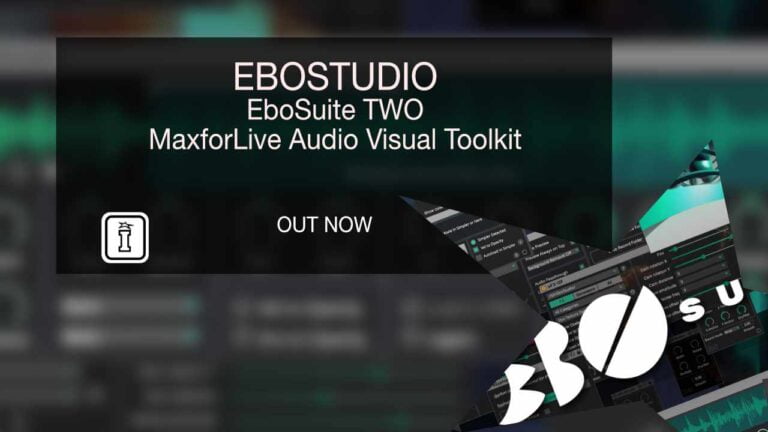
EboSuite TWO by EboStudio
WHAT IF ABLETON LIVE COULD DO VISUALS?
EboSuite transforms Ableton Live into a complete audio-visual production suite, unifying video and audio in one seamless creative workflow. Built on decades of innovation by EboStudio, this comprehensive MaxforLive suite delivers 56+ plug-ins that treat video exactly like audio—sample it, warp it, effect it, perform it.
Inside you’ll find:
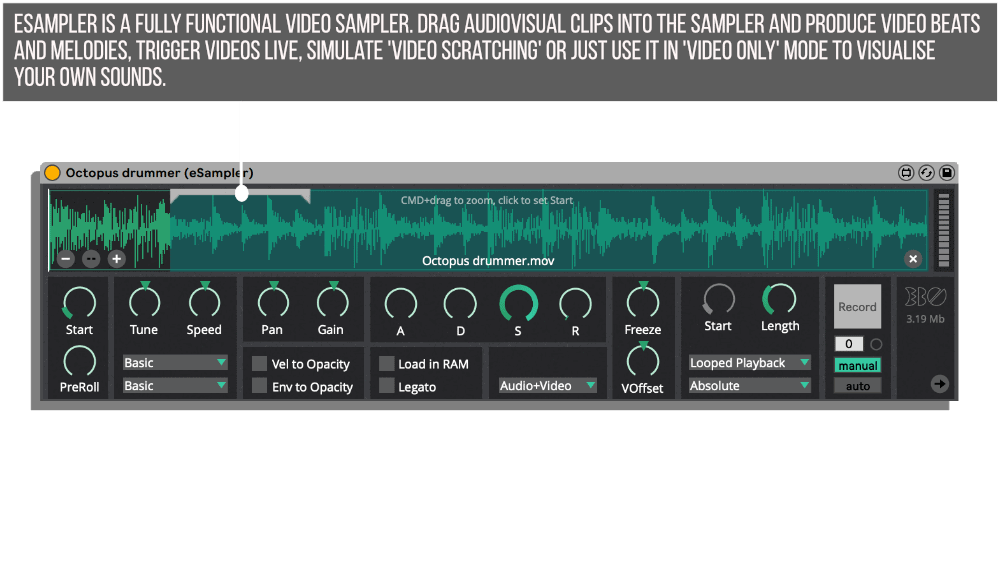
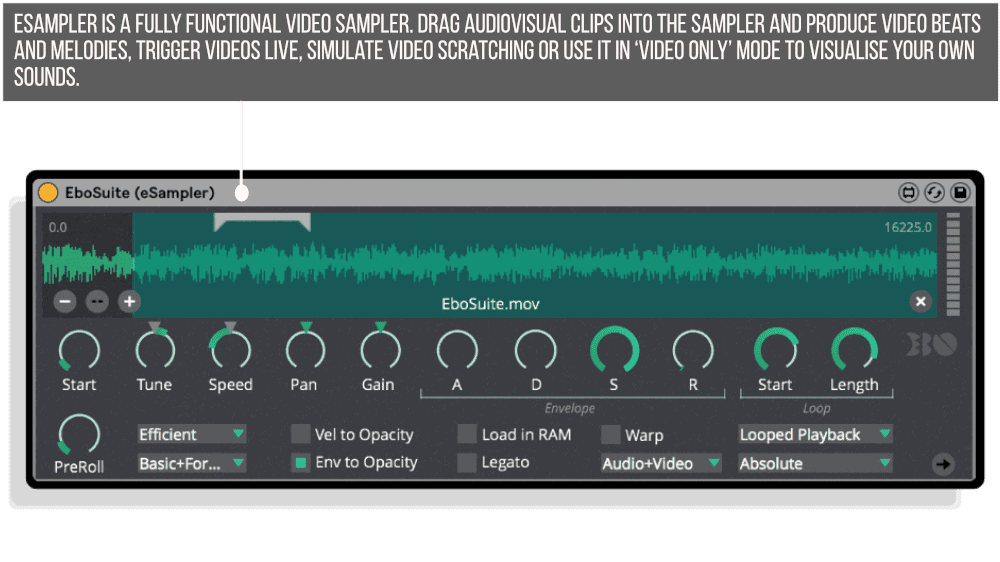
- Advanced video sampling with the eSampler—trigger, pitch, slice, and scratch video in real-time
- Video playback in Session and Arrangement View with full warp marker and loop control
- 2,000+ ISF visual effects and generators for unlimited creative possibilities (Mac)
- Live video recording with multi-camera support and instant integration (Mac)
- Text generation, blend modes, masking, feedback loops, and return track routing (Mac)
- Turn Live’s Simpler into a video sampler with the eSimpler plug-in
- Separate application architecture ensures maximum performance without affecting Live’s audio
From VJ performances to music video production, from visual music experiments to installation art, EboSuite provides professional-grade tools that feel completely native to Ableton Live users. If you know Live’s workflow, you already know EboSuite.
Available for Mac and Windows (Windows version has limited feature set; one license works for both platforms)
Requires Ableton Live 11+ and Max for Live
Decades of audio-visual innovation, refined into one intuitive suite.
DEMO VERSION: AVAILABLE HERE
USER GUIDE: CLICK HERE
Sale
EboSuite TWO by EboStudio
WHAT IF ABLETON LIVE COULD DO VISUALS?
EboSuite transforms Ableton Live into a complete audio-visual production suite, unifying video and audio in one seamless creative workflow. Built on decades of innovation by EboStudio, this comprehensive MaxforLive suite delivers 56+ plug-ins that treat video exactly like audio—sample it, warp it, effect it, perform it.
Inside you’ll find:
- Advanced video sampling with the eSampler—trigger, pitch, slice, and scratch video in real-time
- Video playback in Session and Arrangement View with full warp marker and loop control
- 2,000+ ISF visual effects and generators for unlimited creative possibilities (Mac)
- Live video recording with multi-camera support and instant integration (Mac)
- Text generation, blend modes, masking, feedback loops, and return track routing (Mac)
- Turn Live’s Simpler into a video sampler with the eSimpler plug-in
- Separate application architecture ensures maximum performance without affecting Live’s audio
From VJ performances to music video production, from visual music experiments to installation art, EboSuite provides professional-grade tools that feel completely native to Ableton Live users. If you know Live’s workflow, you already know EboSuite.
Available for Mac and Windows (Windows version has limited feature set; one license works for both platforms)
Requires Ableton Live 11+ and Max for Live
Decades of audio-visual innovation, refined into one intuitive suite.
DEMO VERSION: AVAILABLE HERE
USER GUIDE: CLICK HERE
Product reviews
4.7 out of 5
3 reviews
How item rating is calculated
We show the average based on reviews. Only genuine reviews are displayed.
Sort by
June 9, 2026
This reviewer bought this product from our store.
I'm starting to work with EboSuite, that it's real amazing.
Congratulations your work its fantastic.
I recommend this product
August 11, 2024
This reviewer bought this product from our store.
I love it! I also tested a competitor's product which was also great, but more expensive and had fewer "modules/plug-ins" (but the few that were there were particularly good...).
I had been thinking about testing the "EboSuite" for a long time. I then downloaded the trial version in order to compare it with the competitor's product that I had previously installed as a demo version.
I decided to go for the "EboSuite" because of the cheaper price (sale), the good tutorials, quick tips, examples and the many eFX plug-ins (33 of them).
If you are interested in creative videos, I can really recommend installing the demo version!
Somehow Ableton Live seems to be made for video with this software.
I had exactly the same effect when controlling our light show with "Show Buddy Active" with Ableton Live, which now also runs synchronously with the video stuff!
Of course, the music still comes (actually mainly) from Ableton...
December 12, 2024
This reviewer bought this product from our store.
This is the list of devices that are available in the Windows version of EboSuite:
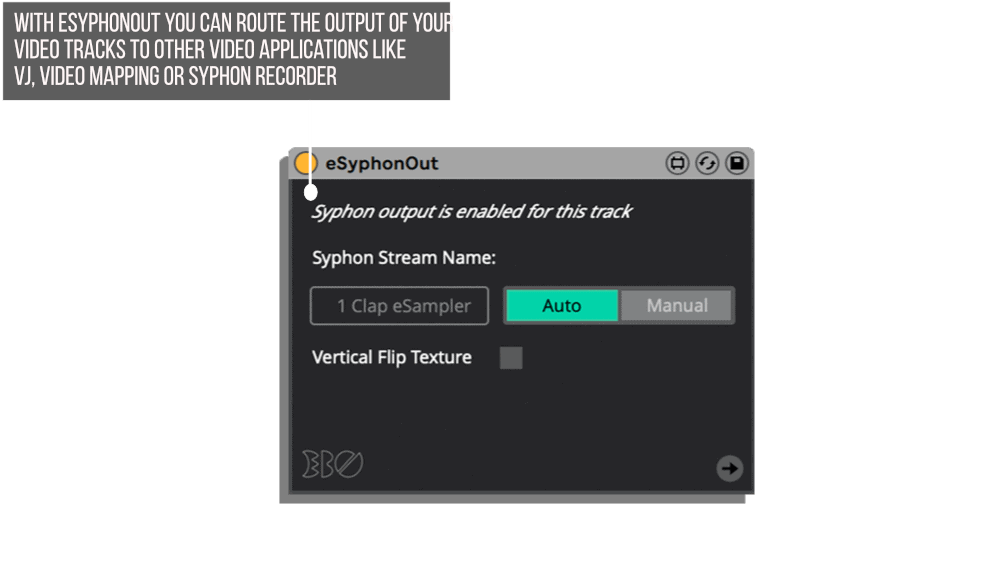
eSampler (limited functionality), eSession, eArrangement, eSimpler, eTrackTransform, ePoly, eVideoSend, eConvert, eOutput, eLoopStutter, eComper, eSamplerAnalyseSettings
This is a list of devices that are not available in the Windows version of EboSuite:
eISF, eVideoIn, eText, eFX, eFX-ISF, eBlend, eMask, eGroup, eCrossfade, eReturnTrack, eFeedback, eVideoReceive, eSampler - Mac only function (and its a HUGE one): Record video and use your recording immediately in your performance.
Its very cool to this this unit available at all, of course! But I would love to have several of the Mac Only features (specifically VideoIn). There is talk of onboarding more modules to Windows on their forum from several months ago with no recent activity. Im hoping they are still working on it. For now, you will pay full price but get less than half of the functionality if you are on Windows.
Reply from Jeroen (EboMan)
December 12, 2024
EboSuite TWO by EboStudio
What if your music software could create visuals too? EboSuite transforms Ableton Live into a complete audio-visual production suite, merging video and audio into a unified creative process. Built on decades of audio-visual innovation by EboStudio, this comprehensive set of 56+ MaxforLive plug-ins lets you create, sample, record, mix, and manipulate video with the same intuitive workflow you already know from working with audio.
From live performances to music video production, from VJ sets to experimental visual music, EboSuite provides professional-grade tools that treat video as a first-class citizen in your creative process. The plug-ins integrate seamlessly into Live’s interface while all video processing happens in a separate, optimized application for maximum performance and reliability.
Overview & Inspiration
EboSuite represents the culmination of EboStudio’s journey that began in 1995 with experimental video samplers and motion-tracking suits. Through prototypes like SenSei, DVJ Mixer, and countless innovations in audio-visual performance, the team refined their vision: create the ultimate instrument that unifies music and visuals in one seamless workflow.
The result is a suite that feels native to Ableton Live users. If you know how to work with audio clips, warping, effects chains, and Live’s mixer, you already know how to work with EboSuite’s video tools. This intuitive approach removes the technical barriers that traditionally separate audio and visual production.
Features & Highlights
Core Video Integration (Mac & Windows)
The foundation of EboSuite works across both platforms, bringing essential video capabilities to Ableton Live. The eSampler acts as your primary video instrument, letting you drag audio-visual clips into the sampler interface to trigger videos live, produce video beats and melodies, or simulate video scratching. Real-time time-stretching, warping, looping, one-shot playback, and slicing with the built-in audio analyzer give you complete control over timing and arrangement.
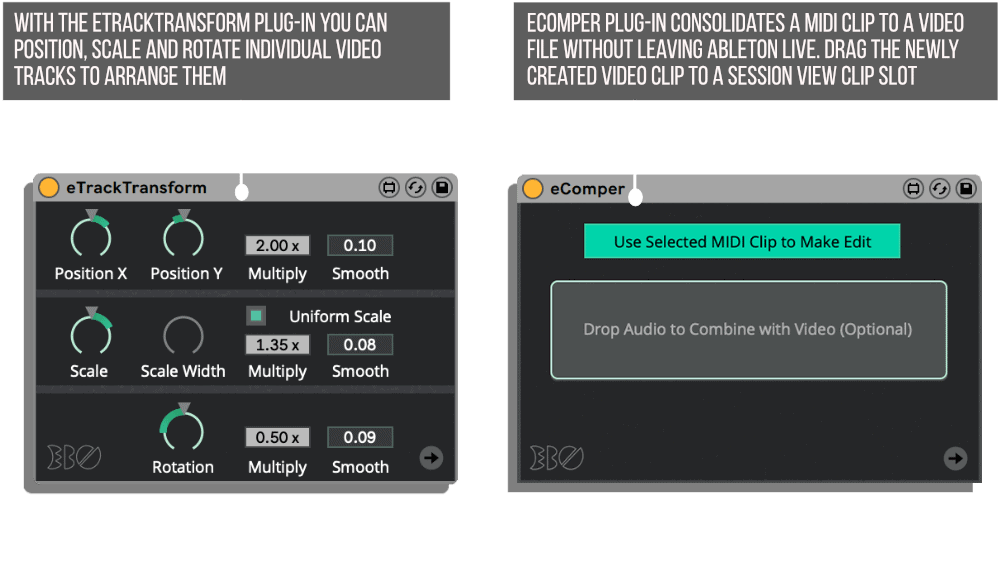
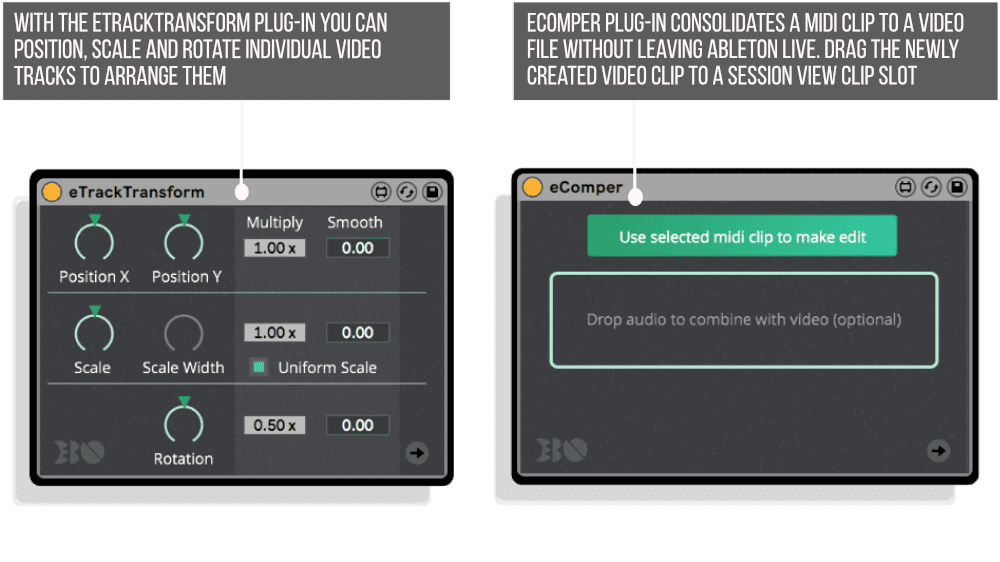
Video playback in Session View and Arrangement View works exactly like audio clips. Edit warp markers, set loop points, adjust start and end positions, and let Live’s audio mixer double as your video mixer. The eSimpler plug-in turns Live’s Simpler into a full video sampler, automatically syncing video playback with your audio samples. Position, scale, and rotate individual video tracks to create complex visual arrangements.
Mac-Exclusive Advanced Features
The Mac version unlocks EboSuite’s full creative potential with features that push visual production into new territory. ISF shader support gives you access to over 2,000 visual effects and generators from the ISF community, providing virtually unlimited creative possibilities. From image control utilities to creative distortion effects, luma/chroma keying, masking, blur, and beyond, these shaders integrate seamlessly with Live’s audio effects for sample-based audio-visual synthesis.
Live video recording transforms your performances into truly live experiences. Connect multiple webcams, iPhones, or iPads, record video on the fly, and use your recordings immediately in your set. The system includes automatic video slicing, background removal, and simultaneous multi-camera recording. The eText plug-in generates text overlays using clip names, making it easy to trigger titles and messages with any font, color, and effects.
Visual mixing capabilities include nine blend modes, masking and cropping tools, video feedback loops with ten feedback modes, and full support for grouping tracks, return tracks, and send/receive routing. Create polyscopic compositions with the ePoly plug-in controlling multiple eSamplers simultaneously. The eFeedback plug-in creates mesmerizing video feedback loops on the master track.
Format Support & Performance
EboSuite supports multiple video codecs including HAP, H264, and ProRes. The HAP codec, optimized for live video triggering and manipulation, can be encoded directly within Live using the eConvert plug-in (or eConvertBatch for multiple files on Windows). The separate EboSuite application handles all video processing outside Ableton Live, ensuring maximum performance and reliability without affecting Live’s audio engine.
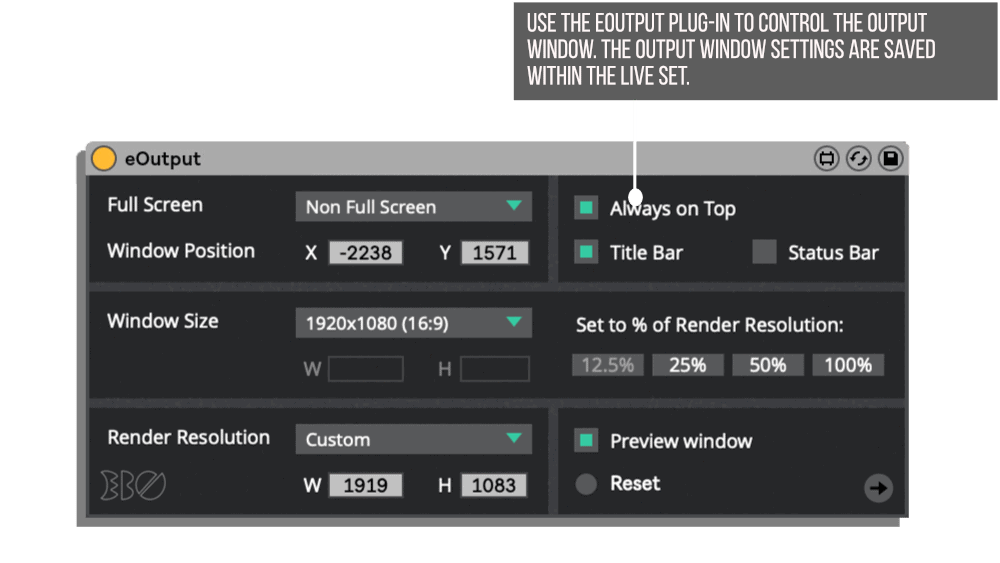
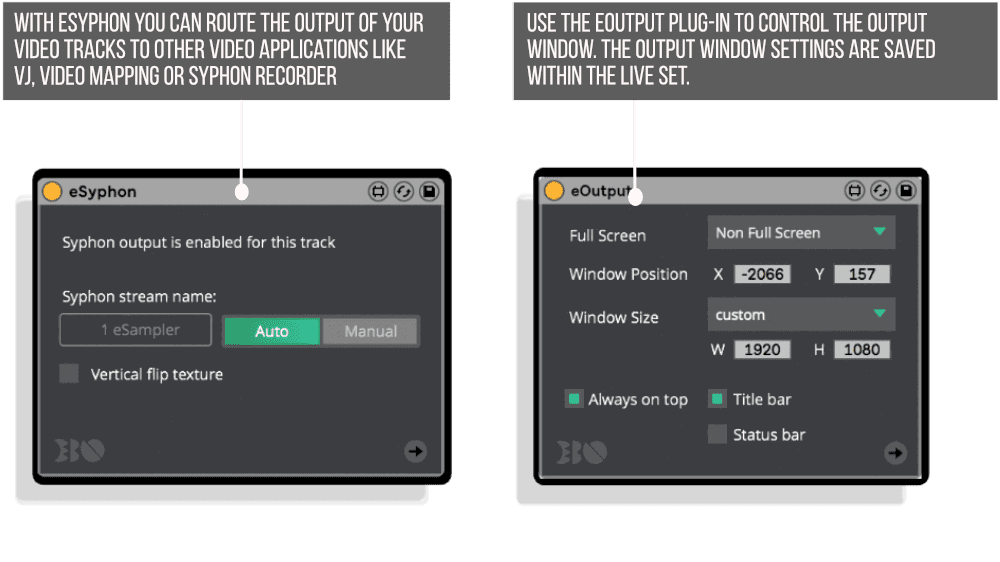
Video can be sent to external applications via Syphon (Mac) or Spout (Windows) for integration with VJ software, video mapping tools, or Max patches. The eOutput plug-in controls output windows with settings saved per Live Set, and includes preview windows for monitoring your mix on separate screens.
How to Use
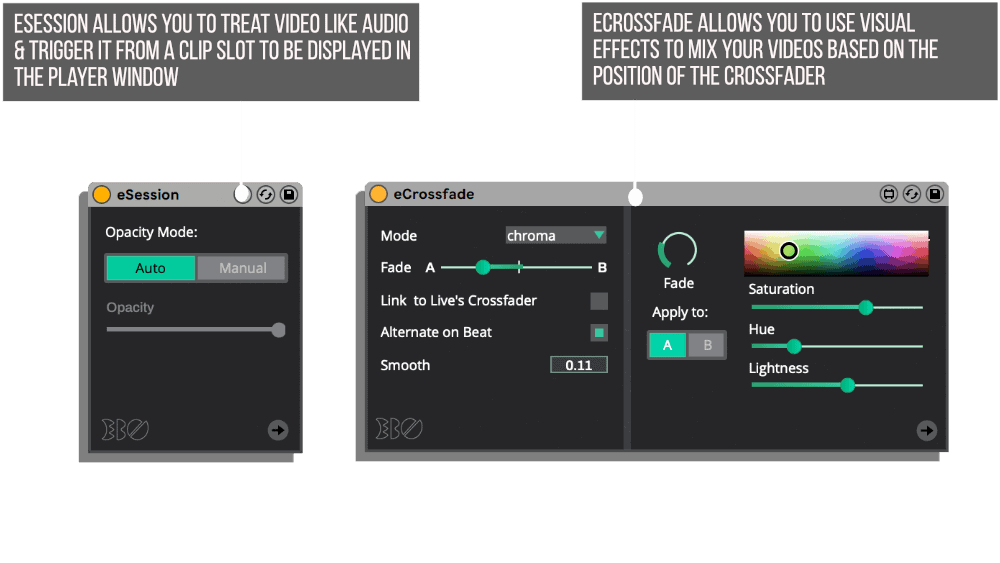
Getting started with EboSuite requires no special video editing knowledge. Add an eSession plug-in to an audio track and drag a video file into a clip slot in Session View. The video plays back synchronized with your audio, and you can edit it using the same warp markers, loop points, and clip editing tools you use for audio.
For video sampling, load the eSampler onto a MIDI track and drag audio-visual clips into the sampler interface. Trigger videos with MIDI notes, create video beats by slicing samples, or use the File Region Editor to manage and convert your video files to the HAP codec. The eSampler includes different pitch modes, velocity-to-opacity mapping, and AV ADSR envelopes for expressive performance control.
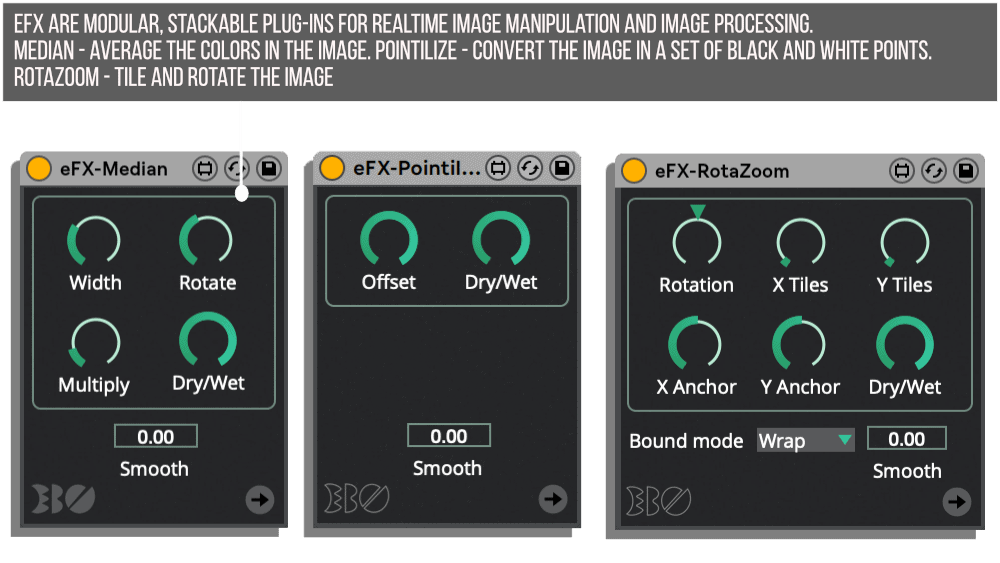
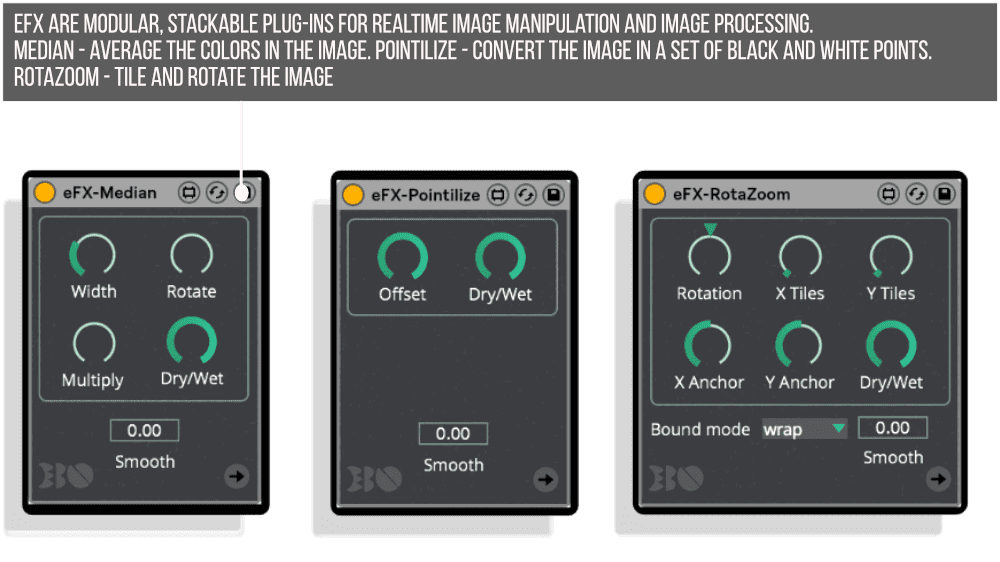
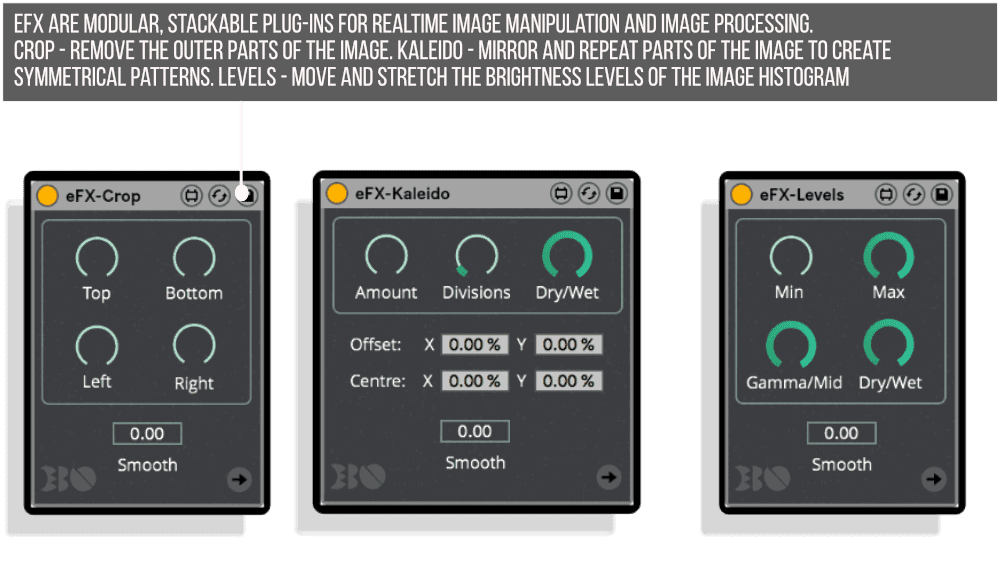
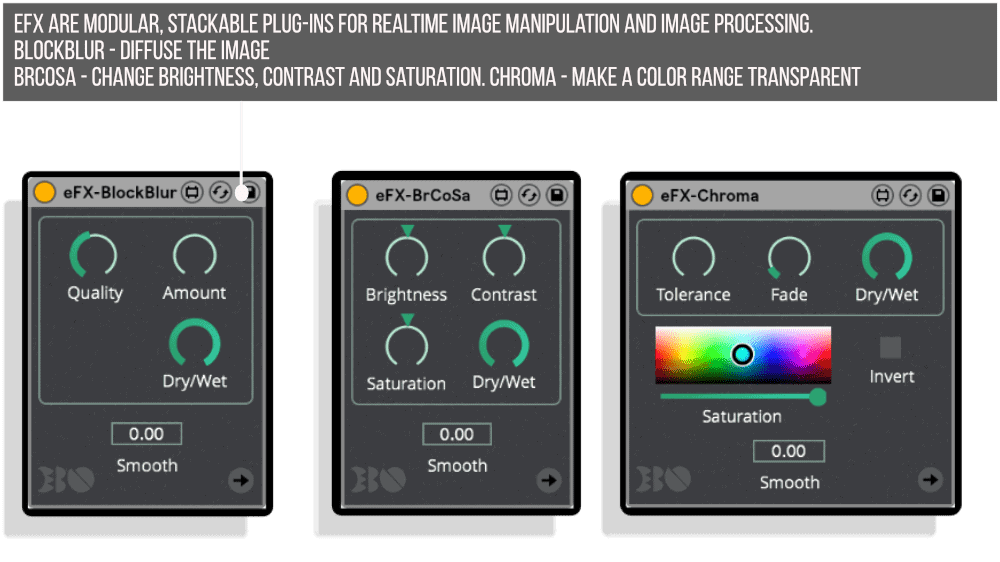
On Mac, add the eISF plug-in to access ISF shaders. Download shaders from isf.video and load them directly into the plug-in—the interface updates automatically. Chain multiple shaders together, combine them with Live’s audio effects, and automate all parameters for dynamic audio-visual effects. Use the eVideoIn plug-in to add live camera feeds, the eText plug-in for text overlays, and the various eFX plug-ins for real-time image manipulation.
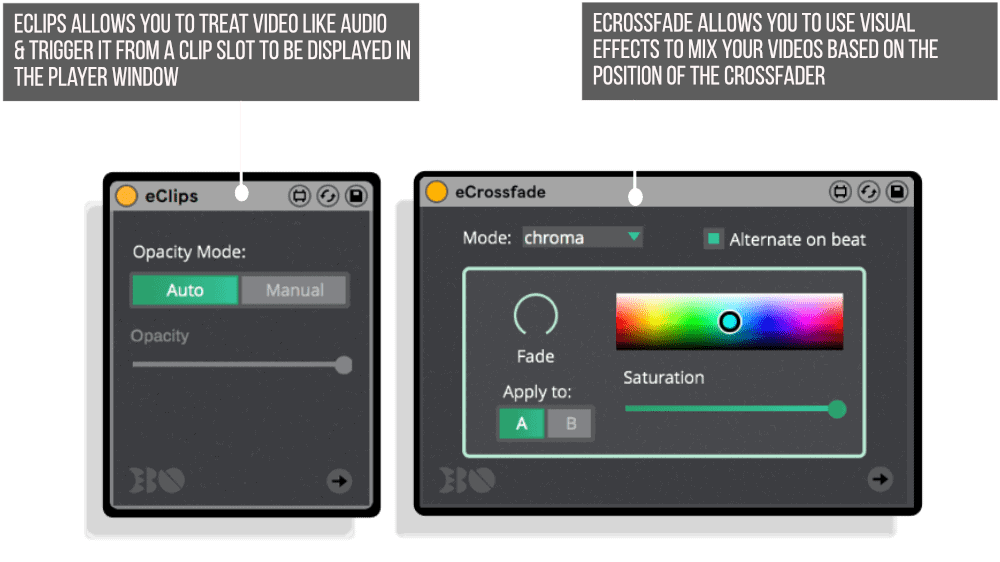
Build complex visual arrangements using eTrackTransform to position individual video tracks, eGroup to control grouped tracks together, and eReturnTrack to send video through Live’s return tracks with separate effect processing. The eCrossfade plug-in links to Live’s crossfader for smooth transitions between video tracks with blend modes and visual effects.
Ideal For
EboSuite serves VJs and live visual performers who need reliable, expressive control over video playback and manipulation in sync with music. Electronic music producers creating their own music videos will find the audio-visual workflow revolutionary. Audio-visual artists exploring visual music can leverage sample-based synthesis techniques with video. Live performers using Ableton Live can add synchronized visuals without learning separate VJ software.
The tools work equally well for installation artists creating interactive audio-visual experiences, experimental musicians pushing boundaries with video feedback and ISF shaders, and bedroom producers who want to add professional visual elements to their tracks. Anyone comfortable with Ableton Live’s workflow will feel at home with EboSuite’s interface.
What’s Included
EboSuite consists of 56+ MaxforLive plug-ins organized into five categories: Video Players (eSampler, eSession, eArrangement, eSimpler, eVideoIn), Visual Effects (31 eFX plug-ins, eISF, eFX-ISF, eMask), Video Mixing (eBlend, eCrossfade, eGroup, eReturnTrack, eFeedback), Utilities (eTrackTransform, ePoly, eOutput, eLoopStutter, eText), and Video Conversion (eConvert, eConvertBatch, eComper, eVideoSend, eVideoReceive).
The Mac version includes all plug-ins and features. The Windows version includes core video sampling, playback, and mixing tools but excludes ISF shader support, live video recording, text generation, and several advanced mixing features. One license key works for both Mac and Windows versions.
EboSuite includes 253 ISF shaders installed by default (Mac), extensive manual documentation, tutorial videos, and access to the EboSuite forum and Facebook community. A free trial version is available to test compatibility and explore features before purchase. EboStudio offers a 20% student discount with proof of enrollment.
Requirements
Mac: macOS 10.14 or higher, Ableton Live 11 or higher (64-bit), Max for Live (included in Live Suite)
Windows: Windows 10 or higher, Ableton Live 11 or higher (64-bit), Max for Live (included in Live Suite), Intel i7 processor or better, SSD drive, NVIDIA or AMD graphics card recommended, Hap-encoded video only
Note: Windows version has limited feature set compared to Mac version
Explore More
Frequently Asked Questions
A: EboSuite is a comprehensive set of 56+ MaxforLive plug-ins that transforms Ableton Live into an audio-visual production suite. It enables you to create, sample, record, mix, and manipulate video using the same intuitive workflow you’re familiar with from working with audio in Live.
A: Yes, EboSuite is a MaxforLive suite and requires Max for Live to function.
A: MaxforLive is a platform that integrates the visual programming environment Max with Ableton Live, allowing users to create and use custom audio, MIDI, and control devices.
A: One license key works for both Mac and Windows versions. The Mac version includes all features: ISF shader support (2,000+ effects/generators), live video recording, text generation, advanced video mixing, blend modes, masking, and return track routing. The Windows version includes core features: video sampling (eSampler with limited functionality), video playback in Session and Arrangement View, eSimpler integration, basic video mixing, Spout output, and video conversion. Windows requires Hap-encoded video only.
A: Yes, EboStudio offers a free trial version available for download HERE. The trial lets you explore all features and test compatibility with your system before purchasing.
A: You can explore more of EboStudio’s tools and devices here: EboStudio
Important Information
EboSuite 2.4 – Released February 2026
This update brings the following new additions/fixes to EboSuite:
- New feature: Reverse video playback in the eSampler! (Mac, Windows)
- New feature: eSampler auto convert (Mac) & auto analyze functionality (Mac, Windows)
- New feature: Automatable font presets in eText (Mac)
- Fix: Crash using Color Picker (Mac, Windows)
- Fix: Non-loading presets (Mac)
- Fix: eConvert issues (Mac)
V2.3.1 – Released December 2025
EboSuite for Mac:
- Integration with SenSei. Seamlessly stream EboSuite’s output into SenSei to mix and manipulate video in 3D and create 3D visuals
EboSuite for Windows:
- the version number is now 2.3, the same as the Mac version. Updates will be released simultaneously
- Integration with SenSei. Seamlessly stream EboSuite’s output into SenSei to mix and manipulate video in 3D and create 3D visuals
V1.0.0 – Initial Release – July 2024
Our Products are generally provided as Zip file downloads which in all cases will need to be extracted and saved to your hard drive prior to installation. Details on the different file type provided and what to do with them are below.
.alp Files – These are Ableton Live Packs and will either install directly into the Packs Section of the browser of Ableton Live or ask you to save them to your hard drive. For packs that install to the library, when you double click on them you will see a pop up window asking you to confirm that installation is ok as the files are described as “Legacy”. This is fine and you are ok to proceed, the packs are created using the format for an earlier version of Live and so remain compatible with the current version.
.amxd files – These are individual MaxforLive Devices and can be stored anywhere on your hard drive. We’d advise creating a folder for them and then adding that folder as a location within the Places section of Lives Browser.
END-USER LICENSE AGREEMENT FOR ISOTONIK STUDIOS SOFTWARE PRODUCTS.
PLEASE READ THE TERMS AND CONDITIONS OF THIS LICENSE AGREEMENT CAREFULLY BEFORE CONTINUING WITH THIS PROGRAM INSTALL.
This End-User License Agreement (referred to as “EULA”) is a legal agreement between an individual or a single entity (referred to as “LICENSEE”) and Isotonik Studios for the Isotonik Studios software product(s) which may include associated software components, media, printed materials, and “online” or electronic documentation (referred to as “SOFTWARE PRODUCT”). By installing, copying, or otherwise using the SOFTWARE PRODUCT, the LICENSEE agrees to be bound by the terms of this EULA.
This EULA represents the entire agreement concerning the program between the LICENSEE and Isotonik Studios and it supersedes any prior proposal, representation, or understanding between the parties. If the LICENSEE does not agree to the terms of this EULA, the LICENSEE should not install or use the SOFTWARE PRODUCT.
The SOFTWARE PRODUCT is protected by copyright laws and international copyright treaties, as well as other intellectual property laws and treaties. The SOFTWARE PRODUCT is licensed, not sold.
- GRANT OF LICENSE.
The SOFTWARE PRODUCT is licensed as follows:
(a) Installation and Use. Providing that the LICENSEE has paid any applicable license fees, Isotonik Studios grants the LICENSEE the right to install and use copies of the SOFTWARE PRODUCT on up to two computers in the LICENSEE’s possession that are running a validly licensed copy of the operating system for which the SOFTWARE PRODUCT was designed [e.g., Windows 10, macOS]. The computer(s) must be owned by the LICENSEE.
(b) Backup Copies. The LICENSEE may also make copies of the SOFTWARE PRODUCT as may be necessary for backup and archival purposes.
- DESCRIPTION OF OTHER RIGHTS AND LIMITATIONS.
(a) Maintenance of Copyright Notices. The LICENSEE must not remove or alter any copyright notices on any and all copies of the SOFTWARE PRODUCT.
(b) Distribution. The LICENSEE may not distribute registered copies of the SOFTWARE PRODUCT to third parties.
(c) Prohibition on Reverse Engineering, Decompilation, and Disassembly. The LICENSEE may not reverse engineer, decompile, or disassemble the SOFTWARE PRODUCT, except and only to the extent that such activity is expressly permitted by applicable law notwithstanding this limitation.
(d) Rental. The LICENSEE may not rent, lease, or lend the SOFTWARE PRODUCT.
(e) License transfer The LICENSEE may not transfer their license to the SOFTWARE PRODUCT to any third party. Any attempt to do so will be considered a violation of this EULA.
(f) Support Services. Isotonik Studios may provide the LICENSEE with support services related to the SOFTWARE PRODUCT for a period of 12 months following the date of purchase. Any supplemental software code provided to the LICENSEE as part of the Support Services shall be considered part of the SOFTWARE PRODUCT and subject to the terms and conditions of this EULA.
(g) Compliance with Applicable Laws. The LICENSEE must comply with all applicable laws regarding use of the SOFTWARE PRODUCT.
- TERMINATION Without prejudice to any other rights, Isotonik Studios may terminate this EULA if the LICENSEE fails to comply with the terms and conditions of this EULA. In such event, the LICENSEE must destroy all copies of the SOFTWARE PRODUCT in the LICENSEE’s possession.
- COPYRIGHT All title, including but not limited to copyrights, in and to the SOFTWARE PRODUCT and any copies thereof are owned by Isotonik Studios or its suppliers. All title and intellectual property rights in and to the content which may be accessed through use of the SOFTWARE PRODUCT is the property of the respective content owner and may be protected by applicable copyright or other intellectual property laws and treaties. This EULA grants the LICENSEE no rights to use such content. All rights not expressly granted are reserved by Isotonik Studios.
- NO WARRANTIES Isotonik Studios expressly disclaims any warranty for the SOFTWARE PRODUCT. The SOFTWARE PRODUCT is provided ‘As Is’ without any express or implied warranty of any kind, including but not limited to any warranties of merchantability, noninfringement, or fitness of a particular purpose. Isotonik Studios does not warrant or assume responsibility for the accuracy or completeness of any information, text, graphics, links or other items contained within the SOFTWARE PRODUCT. Isotonik Studios makes no warranties respecting any harm that may be caused by the transmission of a computer virus, worm, time bomb, logic bomb, or other such computer program. Isotonik Studios further expressly disclaims any warranty or representation to the LICENSEE or to any third party.
- LIMITATION OF LIABILITY In no event shall Isotonik Studios be liable for any damages (including, without limitation, lost profits, business interruption, or lost information) arising out of the LICENSEE’s use of or inability to use the SOFTWARE PRODUCT, even if Isotonik Studios has been advised of the possibility of such damages. In no event will Isotonik Studios be liable for loss of data or for indirect, special, incidental, consequential (including lost profit), or other damages based in contract, tort or otherwise. Isotonik Studios shall have no liability with respect to the content of the SOFTWARE PRODUCT or any part thereof, including but not limited to errors or omissions contained therein, libel, infringements of rights of publicity, privacy, trademark rights, business interruption, personal injury, loss of privacy, moral rights or the disclosure of confidential information.
More from EboStudio
 -47%
-47%EboStudioEboSuite & Sensei Bundle by EboStudioLive 11 & 12 · Max for Live Original price was: £298.00.£158.00Current price is: £158.00.
 -45%
-45%EboStudioSensei by EbostudioLive 11 & 12 · Max for Live Original price was: £166.00.£91.00Current price is: £91.00.
Frequently Bought Together