MIDI Filter Ten by LDM Design
FILTER, ROUTE & TRIGGER
MIX & MATCH DEAL: Choose any three or more LDM Design products and get 20% off your entire order – discount applies automatically at checkout.
Break out of Live’s transport limitations with 10 devices for filtering, routing, and triggering MIDI notes. Each device has a unique ID enabling MIDI routing from any point in any chain to any other device anywhere in your set, creating complex signal paths without duplicating tracks.
Inside you’ll find:
- MF Skipper: play first x notes from each selected number passing through
- MF NoteRange: filter by pitch range or single note value
- MF Velocity: filter by velocity range or single velocity value
- MF NoRepeat: block notes if previous note had same pitch
- MF Doubler: trigger second note from note-off message
- MF Following: allow note only after specific 1-3 note sequence
- MF Note: visual piano roll for intuitive note filtering
- MF Phraser: record sequences, trigger playback with any MIDI input
- MF Span: transport-synced gate based on sequence length proportions
- MF Allpass: routing hub device for multiple distribution paths
- MF Paramaster: MIDI-triggered incremental parameter changes (bonus device)
- Unique ID routing system connects devices across entire Live set
- Universal parameter triggering with AD envelope and range control
- MIDI Thru bypass mode for parameter triggering without note filtering
- IDs save with Live set – all routing connections persist
- Pattern recognition, sequence playback, conditional filtering
Every nth C3 note plays a chord. Specific velocity ranges trigger parameter sweeps. Notes following E3-B3-G3 fire bass hits. Route MIDI from any device to any other device anywhere in your project. All from a single source, no external routing required.
Requires: Ableton Live 10/11/12 Standard (with MaxforLive) or Suite | Mac & Windows
USER GUIDE: MIDI Filter TEN USER GUIDE
MIDI Filter Ten by LDM Design
FILTER, ROUTE & TRIGGER
MIX & MATCH DEAL: Choose any three or more LDM Design products and get 20% off your entire order – discount applies automatically at checkout.
Break out of Live’s transport limitations with 10 devices for filtering, routing, and triggering MIDI notes. Each device has a unique ID enabling MIDI routing from any point in any chain to any other device anywhere in your set, creating complex signal paths without duplicating tracks.
Inside you’ll find:
- MF Skipper: play first x notes from each selected number passing through
- MF NoteRange: filter by pitch range or single note value
- MF Velocity: filter by velocity range or single velocity value
- MF NoRepeat: block notes if previous note had same pitch
- MF Doubler: trigger second note from note-off message
- MF Following: allow note only after specific 1-3 note sequence
- MF Note: visual piano roll for intuitive note filtering
- MF Phraser: record sequences, trigger playback with any MIDI input
- MF Span: transport-synced gate based on sequence length proportions
- MF Allpass: routing hub device for multiple distribution paths
- MF Paramaster: MIDI-triggered incremental parameter changes (bonus device)
- Unique ID routing system connects devices across entire Live set
- Universal parameter triggering with AD envelope and range control
- MIDI Thru bypass mode for parameter triggering without note filtering
- IDs save with Live set – all routing connections persist
- Pattern recognition, sequence playback, conditional filtering
Every nth C3 note plays a chord. Specific velocity ranges trigger parameter sweeps. Notes following E3-B3-G3 fire bass hits. Route MIDI from any device to any other device anywhere in your project. All from a single source, no external routing required.
Requires: Ableton Live 10/11/12 Standard (with MaxforLive) or Suite | Mac & Windows
USER GUIDE: MIDI Filter TEN USER GUIDE
Additional information
| MaxforLive | MIDI Devices |
|---|---|
| Ableton Live Compatibility | Ableton Live 10 Standard with MaxforLive, Ableton Live 10 Suite, Ableton Live 11 Standard with MaxforLive, Ableton Live 11 Suite, Ableton Live 12 Standard with MaxforLive, Ableton Live 12 Suite |
| Min. Requirements | Ableton Live 10 Standard with MaxforLive Installed or Ableton Live 10 Suite |
| OS | Mac, Windows |
PRICE: £35.00
Product reviews
No reviews yet. Be the first to review this product.
MIDI Filter Ten by LDM Design
Overview & Inspiration
MIDI Filter TEN breaks you out of Live’s transport limitations with 10 specialized devices for filtering, routing, and triggering MIDI notes across your entire set. Each device has a unique ID, meaning MIDI can be routed from any point in any effect chain to any other device anywhere in your Live project, creating complex signal paths without duplicating tracks or daisy-chaining MIDI channels.
Traditional MIDI routing in Ableton Live requires sending MIDI from track to track, limiting your ability to create complex branching paths and conditional triggers. MIDI Filter TEN devices communicate via unique IDs that persist when you save your project. Drop MF Skipper on track one to let only the first note through. Route its output to MF Phraser on track seven to trigger a recorded sequence. Send the same original MIDI stream to MF Following on track three to trigger chords only when a specific note pattern occurs. All from a single MIDI source, no external routing required.
Every nth C3 note could play a chord from a set sequence. Specific velocity ranges could trigger parameter sweeps on a reverb send. Notes following E3-B3-G3 could fire off a bass hit. The filtering options range from simple pitch and velocity ranges to complex pattern recognition and sequence triggering. Combined with each device’s parameter mapping with AD envelope control, you can create performance-driven modulation systems that respond to your playing rather than running on automated LFOs.
The Unique ID Routing System
The revolutionary feature of MIDI Filter TEN is the ID-based routing system. When you load an MF device, it receives a unique identifier. Any other MF device in your set can then select that device’s ID as its MIDI input source, regardless of track position or signal chain order. This creates routing flexibility impossible with Live’s standard MIDI architecture.
Place MF Allpass at the start of your main MIDI track. It doesn’t filter anything but acts as a routing hub. Now any MF device on any track can select that Allpass device as its input source. You’ve created a central MIDI distribution point without needing to set up external MIDI routing or duplicate tracks. The ID routing saves with your Live set, so all connections are preserved when you close and reopen your project.
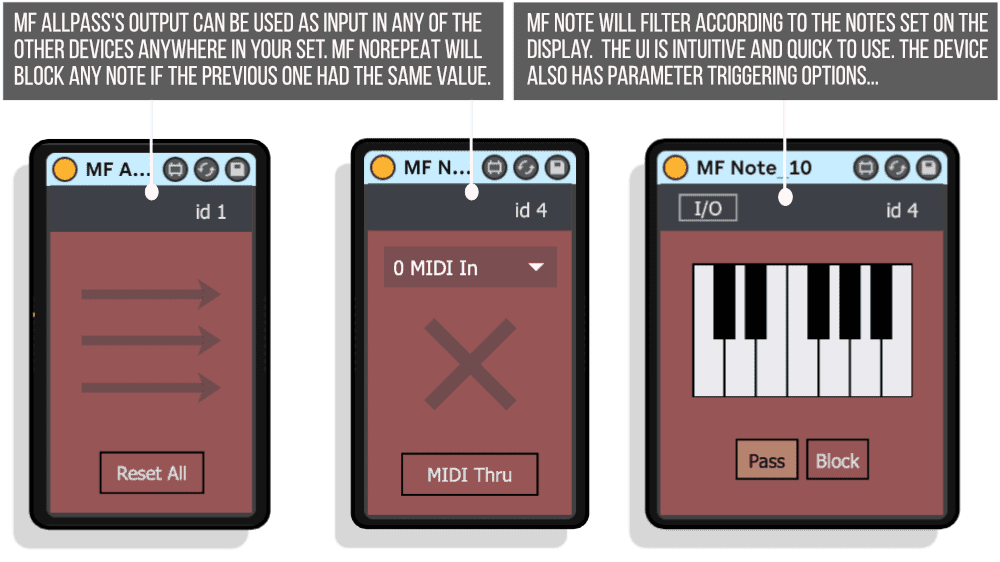
The I/O button on each device opens the routing and triggering section. The dropdown menu lists all MF devices in your set by their IDs. Select the device you want to receive MIDI from, and the routing is established. “0 MIDI” routes from the normal MIDI coming through that track’s chain. Any other ID number routes from that specific device’s output, letting you create multi-stage filtering chains that branch and converge across your entire project.
The 10 Filtering and Routing Devices
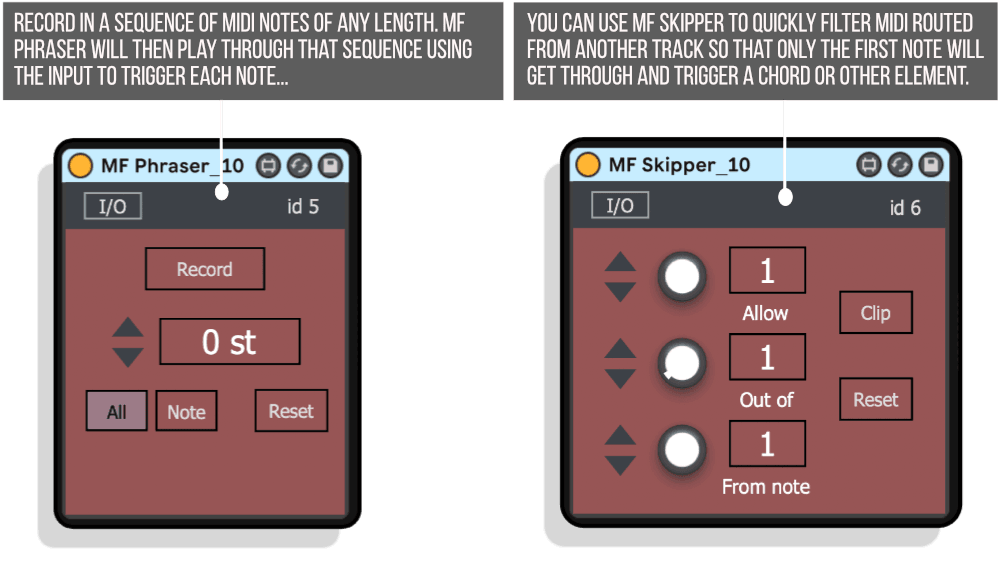
MF Skipper: Plays only the first x number of notes from each selected number of notes passing through. Set it to allow 1 note out of every 4, starting from the 2nd note. Filter MIDI routed from another track so only specific notes trigger chords or other elements. The reset function syncs to clip launch for loop-locked patterns. Use MIDI Thru mode to pass all notes through while still using filtered notes for parameter triggering.
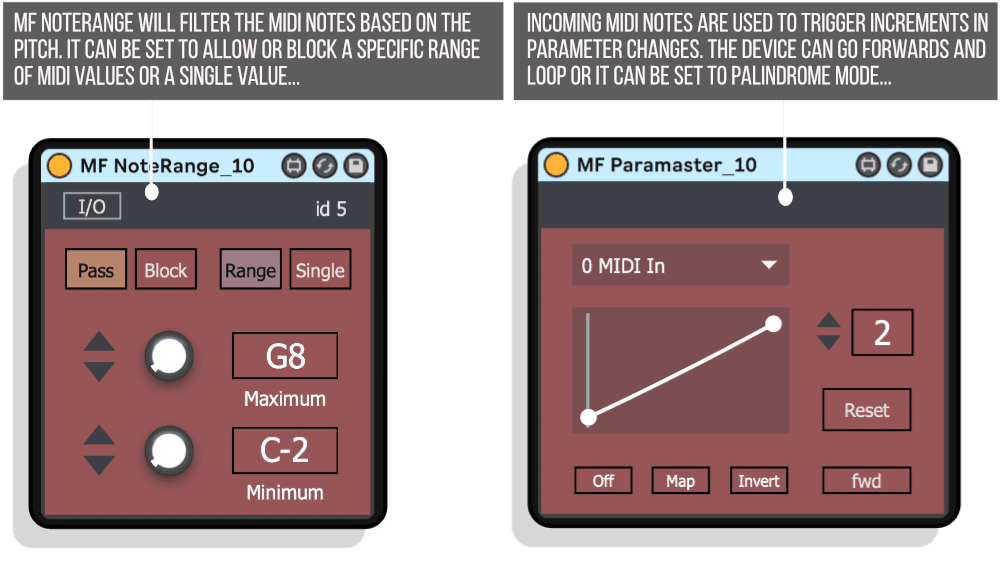
MF NoteRange: Filters MIDI notes based on pitch. Set it to allow or block a specific range or a single note value. Allow only C3 to trigger something specific while letting other notes pass through normally. Block a range of notes that would trigger unwanted samples. Use single-note mode to create dedicated trigger notes that fire off parameter changes anywhere in your set without affecting normal MIDI flow.
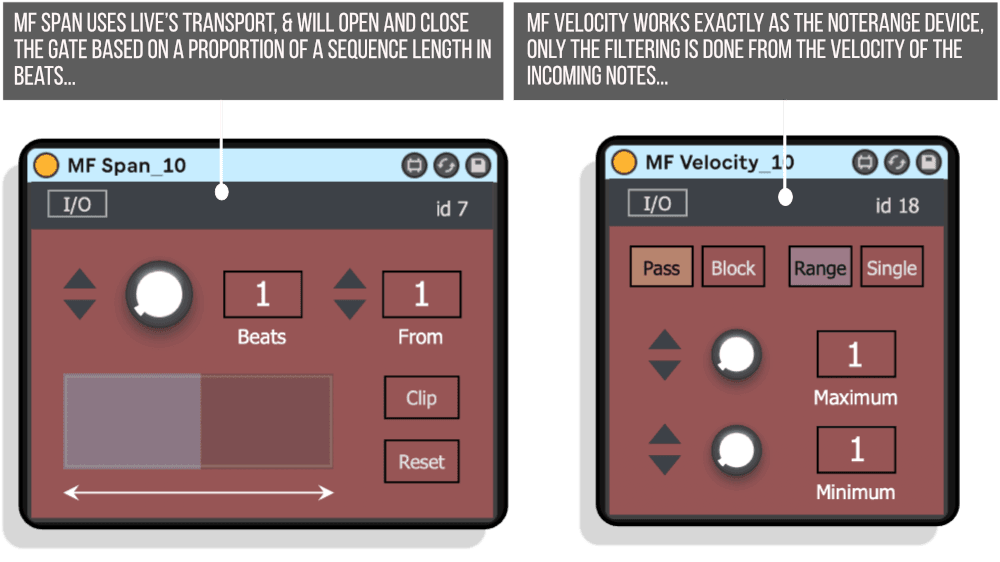
MF Velocity: Works identically to NoteRange but filters based on velocity values instead of pitch. Allow through or block a range of velocities or a single velocity value. Let only hard hits (velocity 100-127) trigger a particular instrument while softer playing goes to a different sound. Use low velocities to trigger subtle parameter shifts while high velocities create dramatic sweeps.
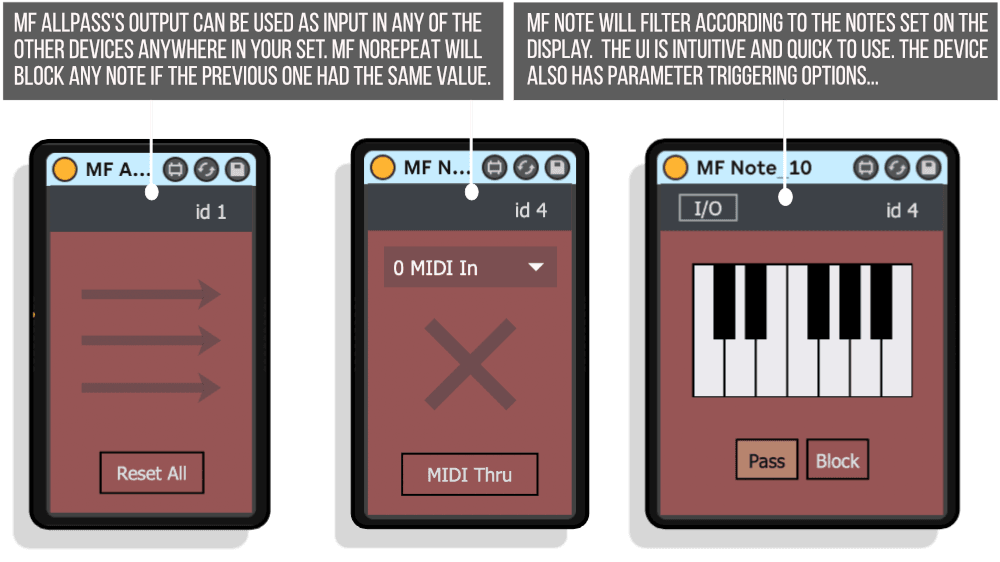
MF NoRepeat: Blocks any note if the previous note had the same pitch value. Perfect for live playing where repeated notes might trigger unintentionally, or for creating melodic patterns that force pitch variation. The device can take input from any other MF device in your set, and its output can be used as a source for other devices even when MIDI passes through the chain unfiltered.
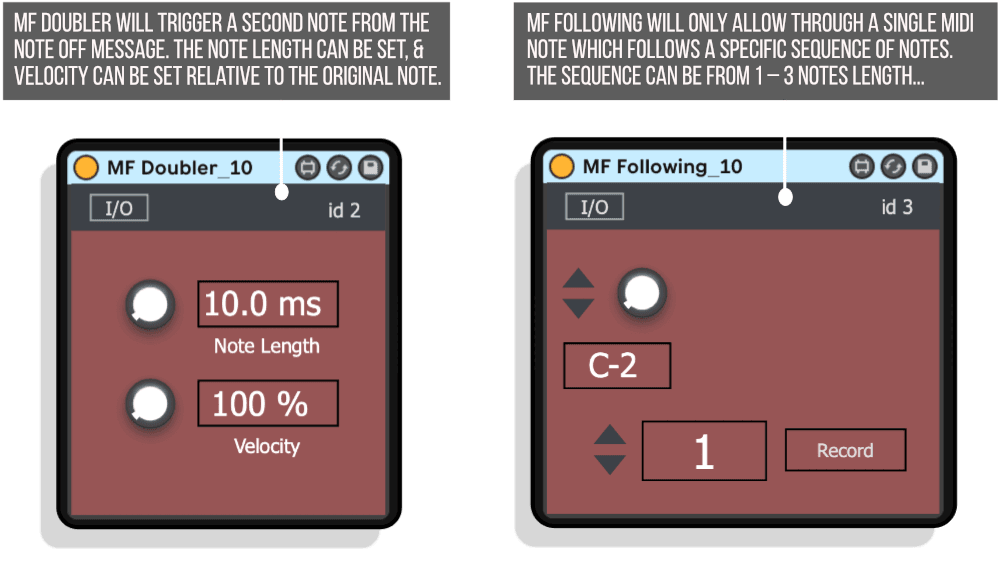
MF Doubler: Triggers a second note when the original note ends (note-off message). Set note length and velocity relative to the original note. Create automatic ghost notes, delayed doubling effects, or call-and-response patterns. The second note can have different velocity, creating dynamic variation where soft notes trigger loud echoes or vice versa.
MF Following: Allows through a single MIDI note only after a specific sequence of notes occurs. The sequence can be 1 to 3 notes long. If E3, then B3, then G3 come through, the next note passes. Essential for performance workflows where the number of notes might vary but specific melodic cues indicate transitions. Record sequences directly into the device or set them with knobs. Use this to trigger section changes, drop bass hits at specific moments, or fire off effects on musical cues.
MF Note: Filters according to notes set on a piano roll display. Similar to Live’s Scale MIDI effect but with faster, more intuitive UI and parameter triggering options. Click notes to allow or block them. Use Pass mode to let selected notes through, or Block mode to filter them out. Perfect for constraining external MIDI controllers to specific scales without transposition, or for creating triggered patterns that only respond to certain pitches.
MF Phraser: Record a sequence of MIDI notes of any length. The device plays through that recorded sequence, using incoming MIDI to trigger each successive note. Set it to respond to any incoming MIDI note or to one specific trigger note. Transpose the output relative to the recorded sequence. This turns any MIDI source into a step-through sequencer, perfect for creating melodic patterns triggered by drum hits or for building call-and-response systems between tracks.
MF Span: Uses Live’s transport to open and close a gate based on proportions of a sequence length in beats. Set it to open for 4 beats out of every 8, starting from beat 1. Change the slider in real-time to open the gate for different lengths, creating live note filtering that syncs to your project tempo. Useful for creating section variations without programming multiple MIDI clips. Reset function syncs to looped clip starts for locked patterns.
MF Allpass: Doesn’t filter or trigger anything itself but acts as a routing hub. Place it at the beginning of any MIDI effect chain, and its output becomes available as input for any other MF device anywhere in your set. This creates multiple routing paths from a single MIDI source without needing to duplicate tracks or route MIDI externally. Essential for complex filtering architectures where multiple devices process the same source differently.
MF Paramaster (Bonus): Incoming MIDI notes trigger incremental parameter changes. Set how many notes are required to go through the whole parameter range. The device can loop forward or use palindrome mode (reaching maximum then reversing direction). Create parameter sequences driven by your playing rather than automation, useful for filter sweeps, effect wet/dry changes, or any parameter that benefits from note-triggered modulation.
Parameter Triggering System
Most devices include parameter triggering capabilities in the I/O section. Click Map, then click any parameter anywhere in Live. The device triggers that parameter with a simple AD envelope whenever MIDI passes through (or when filtered conditions are met). The envelope includes adjustable curve selection and a range slider controlling which portion of the parameter’s full range gets modulated.
This creates performance-driven modulation distinct from automation or LFOs. Play a specific note, and a reverb wet/dry sweeps. Hit a certain velocity, and a filter opens. Complete a note pattern, and a delay feedback increases. The modulation stays musical because it’s tied to your performance rather than running on independent timers. Hold shift and drag the range slider to adjust only the top or bottom of the parameter range, fine-tuning the modulation amount.
The MIDI Thru button bypasses the device’s MIDI filtering while keeping parameter triggering active. This lets you use devices purely for their triggering capabilities without affecting note flow, creating complex modulation systems where specific MIDI conditions fire off parameter changes but all notes still reach their destinations.
Features & Highlights
Unique ID Routing System: Each device has a persistent ID allowing MIDI routing from any point in any chain to any other device anywhere in your Live set, breaking transport limitations.
10 Specialized Filtering Devices: Pitch-based, velocity-based, pattern-based, sequence-based, and timing-based filtering covering every common MIDI manipulation need.
Universal Parameter Triggering: Map any Live parameter to be modulated by MIDI passing through devices, with AD envelope shaping and range control.
MIDI Thru Bypass Mode: Pass MIDI through unfiltered while still using it for parameter triggering, separating note routing from modulation triggering.
MF Allpass Hub Device: Create central routing points without filtering, enabling complex multi-path MIDI distribution from single sources.
Pattern Recognition Filtering: MF Following detects specific note sequences before allowing MIDI through, perfect for performance-based triggers.
Recorded Sequence Playback: MF Phraser stores melodies and plays them back using any MIDI as trigger, converting rhythms to melodies and vice versa.
Transport-Synced Gating: MF Span uses Live’s tempo to create proportional note filtering that adapts to BPM changes.
Note Duplication with Velocity Control: MF Doubler creates second notes from note-off messages with independent velocity and timing.
Repeat Note Blocking: MF NoRepeat prevents successive identical notes from passing through, useful for live performance cleanup.
Visual Piano Roll Interface: MF Note provides intuitive note filtering with click-to-select interface faster than Live’s Scale device.
How to Use
Start simple. Drop MF NoteRange on a MIDI track. Set it to only allow C3 through. Play your keyboard – only C3 notes trigger the instrument. Open the I/O section, click Map, then click a filter cutoff parameter. Now C3 notes also sweep the filter. This is the basic workflow: filter MIDI, trigger parameters, or both.
Build complexity through routing. Place MF Allpass on your main performance track. On a second track with a bass instrument, add MF Skipper. Set its input to the Allpass device’s ID. Set it to allow 1 note out of every 4. Your bass now plays only every fourth note from your main performance, while your main track plays everything. Add MF Doubler to the bass track after MF Skipper. Now the bass plays every fourth note plus a ghost note when each note ends.
Create performance-based section triggers. Add MF Following to a track with chord instruments. Set it to recognize E3-B3-G3. Map a reverb send amount to its parameter trigger. Now when you play that specific melodic pattern, the reverb sweeps up, signaling a section change without touching any automation.
Use MF Phraser to convert drums to melody. Record a melodic sequence in MF Phraser. Set its input to receive from your drum track (using the ID routing). Set trigger mode to “All” so any drum hit advances the sequence. Your drums now trigger a melodic pattern, creating call-and-response between rhythm and pitch.
Ideal For
- Live performers who need complex MIDI routing without external controllers or elaborate track setups
- Electronic producers creating performance-driven modulation systems
- Anyone frustrated by Live’s linear MIDI routing and looking for flexible branching paths
- Experimental musicians using pattern recognition for compositional triggers
- Studio producers who want MIDI filtering more powerful than Live’s native MIDI effects
- Performers using single controllers to trigger multiple instruments with conditional routing
- Anyone who needs parameter changes triggered by specific MIDI conditions rather than automation
What’s Included
- MF Skipper: Pattern-based note filtering (.amxd)
- MF NoteRange: Pitch-based note filtering (.amxd)
- MF Velocity: Velocity-based note filtering (.amxd)
- MF NoRepeat: Repeated note blocking (.amxd)
- MF Doubler: Note-off triggered doubling (.amxd)
- MF Following: Sequence recognition filtering (.amxd)
- MF Note: Piano roll note filtering (.amxd)
- MF Phraser: Recorded sequence playback (.amxd)
- MF Span: Transport-synced gate filtering (.amxd)
- MF Allpass: Routing hub device (.amxd)
- MF Paramaster: MIDI-triggered parameter sequencer (.amxd, bonus)
- Comprehensive PDF user guide
- Mac and Windows compatible
- Requires Ableton Live 10/11/12 Standard (with MaxforLive) or Suite
Technical Notes
All devices are MaxforLive MIDI effects that process MIDI note data in real-time. The unique ID system uses Max’s send/receive architecture to enable cross-device communication without Live’s native MIDI routing. Device IDs are saved with your Live project, so all routing connections persist when closing and reopening sets. Multiple instances of the same device type can coexist, each with its own unique ID.
The devices add minimal latency and use low CPU resources. Parameter triggering uses Live’s standard MIDI mapping system, meaning triggered parameters can be automated and recorded. MIDI Thru mode processes MIDI normally through Live’s chain while still using the filtered output internally for parameter triggering and ID-based routing.
Explore More from LDM Design
Chance Pack FOUR | LP Pack | FRAKTOR | ADD | View All LDM Design Products
Frequently Asked Questions
A: MIDI Filter TEN is a collection of 10 MaxforLive MIDI devices (plus one bonus device) for filtering, routing, and triggering MIDI notes in Ableton Live. The pack includes devices for pitch-based filtering, velocity-based filtering, pattern recognition, sequence playback, note doubling, and more. The revolutionary feature is the unique ID routing system – each device receives a persistent ID that allows MIDI to be routed from any point in any effect chain to any other device anywhere in your Live set, creating complex signal paths without duplicating tracks or using external MIDI routing.
A: Yes, MIDI Filter TEN consists of MaxforLive devices.
A: MaxforLive is a platform that integrates the visual programming environment Max with Ableton Live, allowing users to create and use custom audio, MIDI, and control devices.
A: When you load any MF device, it receives a unique identifier. Any other MF device in your Live set can then select that device’s ID as its MIDI input source via a dropdown menu in the I/O section, regardless of track position or signal chain order. For example, you could place MF Skipper on track one, and MF Phraser on track seven could receive MIDI directly from the Skipper device, bypassing Live’s normal track-to-track routing. The IDs are saved with your Live set, so all routing connections persist when you close and reopen your project.
A: Most devices include a parameter triggering section in the I/O panel. Click Map, then click any parameter anywhere in Live (instruments, effects, sends, etc.). The device will then trigger that parameter with a simple AD envelope whenever MIDI passes through the device or when specific filtering conditions are met. You can adjust the envelope curve and set a range slider to control which portion of the parameter’s full range gets modulated. This creates performance-driven modulation tied to your playing rather than automated LFOs.
A: MIDI Thru mode bypasses the device’s MIDI filtering function while keeping parameter triggering active. This means all MIDI notes pass through the device unaffected, but the device still uses its filtering logic internally to determine when to trigger mapped parameters. This lets you create complex modulation systems where specific MIDI conditions fire off parameter changes without affecting the note flow to your instruments.
A: MF Allpass is a routing hub device that doesn’t filter or trigger anything itself. Place it at the beginning of any MIDI track, and its output becomes available as input for any other MF device anywhere in your set. This creates a central distribution point where multiple devices can receive MIDI from the same source without needing to duplicate tracks or set up external MIDI routing. It’s essential for complex filtering architectures where you want multiple devices processing the same MIDI source in different ways.
A: You can explore more of LDM Design’s tools and devices here: LDM Design
Important Information
V1.0.0 – Initial Release
Our Products are generally provided as Zip file downloads which in all cases will need to be extracted and saved to your hard drive prior to installation. Details on the different file type provided and what to do with them are below.
.alp Files – These are Ableton Live Packs and will either install directly into the Packs Section of the browser of Ableton Live or ask you to save them to your hard drive. For packs that install to the library, when you double click on them you will see a pop up window asking you to confirm that installation is ok as the files are described as “Legacy”. This is fine and you are ok to proceed, the packs are created using the format for an earlier version of Live and so remain compatible with the current version.
.amxd files – These are individual MaxforLive Devices and can be stored anywhere on your hard drive. We’d advise creating a folder for them and then adding that folder as a location within the Places section of Lives Browser.
END-USER LICENSE AGREEMENT FOR ISOTONIK STUDIOS SOFTWARE PRODUCTS.
PLEASE READ THE TERMS AND CONDITIONS OF THIS LICENSE AGREEMENT CAREFULLY BEFORE CONTINUING WITH THIS PROGRAM INSTALL.
This End-User License Agreement (referred to as “EULA”) is a legal agreement between an individual or a single entity (referred to as “LICENSEE”) and Isotonik Studios for the Isotonik Studios software product(s) which may include associated software components, media, printed materials, and “online” or electronic documentation (referred to as “SOFTWARE PRODUCT”). By installing, copying, or otherwise using the SOFTWARE PRODUCT, the LICENSEE agrees to be bound by the terms of this EULA.
This EULA represents the entire agreement concerning the program between the LICENSEE and Isotonik Studios and it supersedes any prior proposal, representation, or understanding between the parties. If the LICENSEE does not agree to the terms of this EULA, the LICENSEE should not install or use the SOFTWARE PRODUCT.
The SOFTWARE PRODUCT is protected by copyright laws and international copyright treaties, as well as other intellectual property laws and treaties. The SOFTWARE PRODUCT is licensed, not sold.
- GRANT OF LICENSE.
The SOFTWARE PRODUCT is licensed as follows:
(a) Installation and Use. Providing that the LICENSEE has paid any applicable license fees, Isotonik Studios grants the LICENSEE the right to install and use copies of the SOFTWARE PRODUCT on up to two computers in the LICENSEE’s possession that are running a validly licensed copy of the operating system for which the SOFTWARE PRODUCT was designed [e.g., Windows 10, macOS]. The computer(s) must be owned by the LICENSEE.
(b) Backup Copies. The LICENSEE may also make copies of the SOFTWARE PRODUCT as may be necessary for backup and archival purposes.
- DESCRIPTION OF OTHER RIGHTS AND LIMITATIONS.
(a) Maintenance of Copyright Notices. The LICENSEE must not remove or alter any copyright notices on any and all copies of the SOFTWARE PRODUCT.
(b) Distribution. The LICENSEE may not distribute registered copies of the SOFTWARE PRODUCT to third parties.
(c) Prohibition on Reverse Engineering, Decompilation, and Disassembly. The LICENSEE may not reverse engineer, decompile, or disassemble the SOFTWARE PRODUCT, except and only to the extent that such activity is expressly permitted by applicable law notwithstanding this limitation.
(d) Rental. The LICENSEE may not rent, lease, or lend the SOFTWARE PRODUCT.
(e) License transfer The LICENSEE may not transfer their license to the SOFTWARE PRODUCT to any third party. Any attempt to do so will be considered a violation of this EULA.
(f) Support Services. Isotonik Studios may provide the LICENSEE with support services related to the SOFTWARE PRODUCT for a period of 12 months following the date of purchase. Any supplemental software code provided to the LICENSEE as part of the Support Services shall be considered part of the SOFTWARE PRODUCT and subject to the terms and conditions of this EULA.
(g) Compliance with Applicable Laws. The LICENSEE must comply with all applicable laws regarding use of the SOFTWARE PRODUCT.
- TERMINATION Without prejudice to any other rights, Isotonik Studios may terminate this EULA if the LICENSEE fails to comply with the terms and conditions of this EULA. In such event, the LICENSEE must destroy all copies of the SOFTWARE PRODUCT in the LICENSEE’s possession.
- COPYRIGHT All title, including but not limited to copyrights, in and to the SOFTWARE PRODUCT and any copies thereof are owned by Isotonik Studios or its suppliers. All title and intellectual property rights in and to the content which may be accessed through use of the SOFTWARE PRODUCT is the property of the respective content owner and may be protected by applicable copyright or other intellectual property laws and treaties. This EULA grants the LICENSEE no rights to use such content. All rights not expressly granted are reserved by Isotonik Studios.
- NO WARRANTIES Isotonik Studios expressly disclaims any warranty for the SOFTWARE PRODUCT. The SOFTWARE PRODUCT is provided ‘As Is’ without any express or implied warranty of any kind, including but not limited to any warranties of merchantability, noninfringement, or fitness of a particular purpose. Isotonik Studios does not warrant or assume responsibility for the accuracy or completeness of any information, text, graphics, links or other items contained within the SOFTWARE PRODUCT. Isotonik Studios makes no warranties respecting any harm that may be caused by the transmission of a computer virus, worm, time bomb, logic bomb, or other such computer program. Isotonik Studios further expressly disclaims any warranty or representation to the LICENSEE or to any third party.
- LIMITATION OF LIABILITY In no event shall Isotonik Studios be liable for any damages (including, without limitation, lost profits, business interruption, or lost information) arising out of the LICENSEE’s use of or inability to use the SOFTWARE PRODUCT, even if Isotonik Studios has been advised of the possibility of such damages. In no event will Isotonik Studios be liable for loss of data or for indirect, special, incidental, consequential (including lost profit), or other damages based in contract, tort or otherwise. Isotonik Studios shall have no liability with respect to the content of the SOFTWARE PRODUCT or any part thereof, including but not limited to errors or omissions contained therein, libel, infringements of rights of publicity, privacy, trademark rights, business interruption, personal injury, loss of privacy, moral rights or the disclosure of confidential information.
MORE FROM LDM Design...
£18.00