O-blek by LDM Design
STOCHASTIC SEQUENCER
TRIPLE PACK SAVINGS: Add any three or more LDM Design products to your cart and save 20% automatically at checkout!
O-blek stores three complete sequences and uses Markov chain probability to determine which plays at each step, while six element sequencers with independent length controls create polyrhythmic complexity that evolves without static repetition.
Inside you’ll find:
- Three color-coded sequences (red, green, blue) with per-step probability control
- Markov node interface with visual probability sliders showing proportional likelihoods
- Six element sequencers: Velocity, Octave, Duration, Gate, Harmony, Parameter
- Independent sequence length and direction for each element (polyrhythmic phasing)
- Piano roll supporting 32 scales and modes with octave highlighting
- Velocity humanization with adjustable randomization per step
- Octave shift with secondary probability control (±3 octaves)
- Duration sequencing from 1/8 step to 4 steps for articulation control
- Binary gate sequencer for rhythmic rests and pattern variation
- Polyphonic harmony: add two notes per step with independent length
- Dual parameter mapping with smoothed value changes
- Ghost notes mode to view all sequences simultaneously
- Solo mode to lock and edit individual sequences
- Copy, randomize, and nudge functions for quick editing
- Sequence direction: forward, reverse, palindrome
- Swing control with 8th or 16th note timing
- Up to 64 steps per sequence
Set parts of the sequence to be fixed, other parts directed by probability. Elements phase against each other at different lengths. The melody cycles every 16 steps while velocity runs 12, octaves shift every 7, gates open at 5. Controlled chaos that feels composed, not random.
Requires: Ableton Live 10/11/12 Standard (with MaxforLive) or Suite | Mac & Windows
USER GUIDE: O-blek USER GUIDE

O-blek by LDM Design
STOCHASTIC SEQUENCER
TRIPLE PACK SAVINGS: Add any three or more LDM Design products to your cart and save 20% automatically at checkout!
O-blek stores three complete sequences and uses Markov chain probability to determine which plays at each step, while six element sequencers with independent length controls create polyrhythmic complexity that evolves without static repetition.
Inside you’ll find:
- Three color-coded sequences (red, green, blue) with per-step probability control
- Markov node interface with visual probability sliders showing proportional likelihoods
- Six element sequencers: Velocity, Octave, Duration, Gate, Harmony, Parameter
- Independent sequence length and direction for each element (polyrhythmic phasing)
- Piano roll supporting 32 scales and modes with octave highlighting
- Velocity humanization with adjustable randomization per step
- Octave shift with secondary probability control (±3 octaves)
- Duration sequencing from 1/8 step to 4 steps for articulation control
- Binary gate sequencer for rhythmic rests and pattern variation
- Polyphonic harmony: add two notes per step with independent length
- Dual parameter mapping with smoothed value changes
- Ghost notes mode to view all sequences simultaneously
- Solo mode to lock and edit individual sequences
- Copy, randomize, and nudge functions for quick editing
- Sequence direction: forward, reverse, palindrome
- Swing control with 8th or 16th note timing
- Up to 64 steps per sequence
Set parts of the sequence to be fixed, other parts directed by probability. Elements phase against each other at different lengths. The melody cycles every 16 steps while velocity runs 12, octaves shift every 7, gates open at 5. Controlled chaos that feels composed, not random.
Requires: Ableton Live 10/11/12 Standard (with MaxforLive) or Suite | Mac & Windows
USER GUIDE: O-blek USER GUIDE
Additional information
| MaxforLive | MIDI Devices, Sequencers |
|---|---|
| Ableton Live Compatibility | Ableton Live 10 Standard with MaxforLive, Ableton Live 10 Suite, Ableton Live 11 Standard with MaxforLive, Ableton Live 11 Suite, Ableton Live 12 Standard with MaxforLive, Ableton Live 12 Suite |
| Min. Requirements | Ableton Live 10 Standard with MaxforLive Installed or Ableton Live 10 Suite |
| OS | Mac, Windows |
PRICE: £24.00
Product reviews
5 out of 5
3 reviews
How item rating is calculated
We show the average based on reviews. Only genuine reviews are displayed.
Sort by
April 4, 2021
Absolutely love this device especially when paired with the chance packs! Looking forward to more releases! So much inspiration. Thanks!
May 28, 2019
This reviewer bought this product from our store.
Intuitive and versatile probability sequencer with a friendly interface, recommended.
January 5, 2019
This reviewer bought this product from our store.
Great for getting the creative juices flowing. One of the most interesting probability generators I've worked with.
O-blek by LDM Design
Overview & Inspiration
O-blek is a stochastic sequencer that uses Markov chain probability to determine which of three independent sequences plays at each step, while six element sequencers with individual length controls create polyrhythmic complexity that evolves organically without static repetition.
Traditional step sequencers play the same pattern every time through. O-blek stores three complete sequences (red, green, blue) and at each step, probability determines which sequence plays. Set step one to 70% red, 20% green, 10% blue. Most of the time it plays the red sequence’s note, occasionally green, rarely blue. Now add independent sequence lengths for velocity, octave shift, note duration, gate, harmony, and two mappable parameters. Your 16-step melody might have 12-step velocity, 9-step octave shifts, 7-step gates, and 13-step harmony. Every time through the sequence, elements phase against each other, creating evolving variations that feel composed rather than random.
This is controlled chaos. You define the note sequences, set probability weights for each step, and determine which elements follow the main sequence length versus running at their own independent lengths. The result is music that breathes with organic variation while staying within the compositional boundaries you’ve established. Lock certain elements to the main sequence for structural consistency. Unlock others for evolving complexity. The balance between fixed and probabilistic determines how much the sequence evolves versus repeats.
The Three-Sequence Probability System
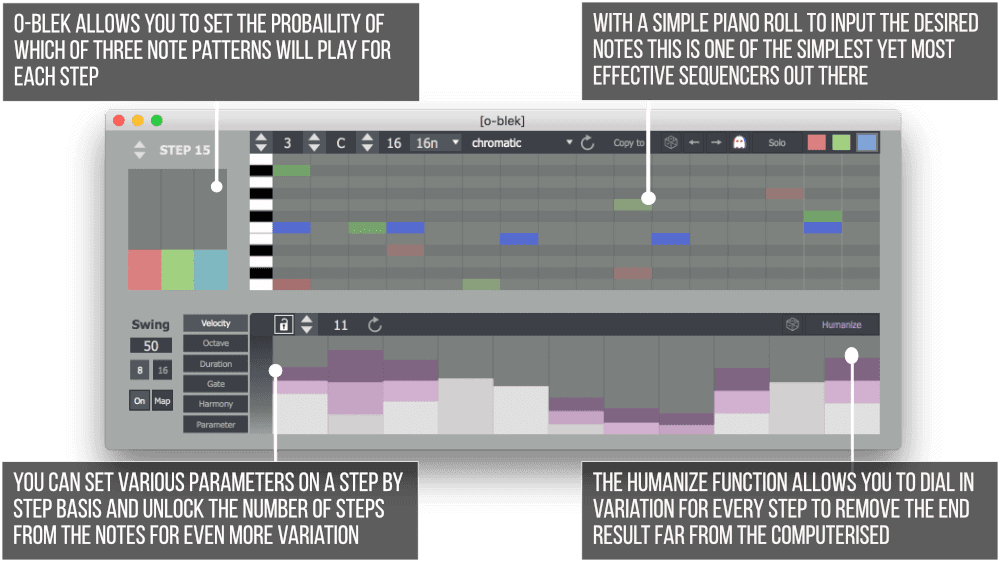
O-blek’s core innovation is storing three complete sequences and using Markov chain probability to select which plays at each step. Create three melodic variations in the piano roll by switching between red, green, and blue sequence select buttons. The red sequence might ascend, green might descend, blue might repeat a single note. At step one, set probability sliders to determine the likelihood of each sequence playing. The sliders show proportional probability, automatically adjusting when you change one so the total always equals 100%.
This visual approach makes probability intuitive. Pull the red slider high and the note from the red sequence plays most of the time. Push blue higher and suddenly that sequence dominates. Set all three equal for true randomness between variations. The Markov node approach means probability is per-step, not global. Step one might heavily favor red. Step five might be pure green. Step twelve could be evenly distributed. This granular control lets you program sections that stay stable followed by sections that branch into variations.
Select steps in the probability section directly or hold shift and click in the piano roll to jump to that step’s probability settings. The piano roll displays all three sequences with color coding, and ghost notes mode shows non-edited sequences in the background for context. Solo mode locks the device to the currently selected sequence for editing and auditioning without probability interference. Copy sequence function duplicates the current sequence to another color, useful for creating variations from a base pattern.
Piano Roll and Core Sequencing
The piano roll works like Ableton’s native version. Click to add or remove notes. This is fundamentally a monophonic sequencer (one note per step), though the harmony element sequencer adds polyphony. If a scale is set, the piano roll displays octaves with darker gray shading to visualize scale degrees. Choose from 32 different scales and modes including pentatonic minor, chromatic, major, and exotic modes. The root note and root octave controls set the lowest note in the piano roll’s range.
Sequence length can be set from 1 to 64 steps (or higher in the device parameters). Sequence speed determines step duration using standard note divisions. Direction controls play forwards, reverse, or palindrome (alternating forward/backward). These direction settings apply to the main piano roll and, by default, to all element sequencers unless individually unlocked. Randomize shuffles notes that are already placed without adding new ones. Nudge shifts the entire sequence left or right by one step. The menu bar provides quick access to all global sequence parameters.
Element Sequencers: Independent Polyrhythmic Control
Six element sequencers control aspects of the sequence beyond pitch. Each element has its own sequencer display accessed via tabs on the left. By default, all elements are locked to the piano roll, meaning they have the same step count and play direction. Unlock any element to give it independent length and direction, creating polyrhythmic relationships where elements phase against the main sequence and each other.
Velocity: Set velocity level for each step with gray bars. The humanize button adds randomization relative to the set velocity, shown with purple rectangles. Hold shift while dragging to adjust humanization amount without changing base velocity. This creates everything from subtle dynamic variation to completely different velocity levels on each pass. Velocity humanization is probability-based, so the amount changes each time the step plays.
Octave: Shift notes up or down by three octaves from the piano roll pitch. The octave sequencer includes a secondary probability view accessed by pressing the tab on the right. By default, octave shifts happen at 100% probability. Reduce this to make octave jumps occasional rather than constant. A step might be set to shift up one octave but only have 30% probability of actually shifting, creating melodic variations where notes sometimes jump registers.
Duration: Set note length independently from the piano roll. Values range from 1/8 of a step to 4 steps, allowing everything from staccato to legato overlapping notes. Duration sequencing creates rhythmic variation in how notes articulate. Your melodic sequence might stay constant while duration changes create different phrasing patterns. Unlock the duration sequencer from the main sequence to create complex rhythmic phasing where note lengths cycle at different rates than pitch.
Gate: Determines whether a step plays at all. Gates are binary (open or closed), shown as light or dark in the sequencer display. Use gate sequencing to create rests and rhythmic patterns that don’t require programming multiple MIDI clips. The gate can have independent length and direction, meaning your 16-step melody might have a 5-step gate pattern that creates evolving rhythmic holes in the sequence. Combined with probability, this generates rhythmic variations that never repeat the same way twice.
Harmony: Adds up to two additional notes per step to create chords. One note appears in green, the other in pink. Values are set in semitones relative to the original piano roll note, up to +12 semitones. This polyphonic approach means harmony can have independent sequence length, allowing chord notes to phase against the main melody. A 16-step melody with 11-step harmony creates chord patterns that shift position relative to the melodic sequence on each cycle, generating harmonic movement without programming different chord progressions.
Parameter: Sequence up to two parameters mapped to anything in Live. Click One or Two, press the Map button, then click any parameter. The parameter sequencer includes smoothing relative to step size, ensuring value changes are smooth from step to step rather than stepped. Use parameter sequencing to modulate filter cutoff, reverb wet/dry, delay feedback, synth parameters, or any mappable control. Each parameter can be toggled on/off and has independent sequence length for evolving modulation patterns.
Features & Highlights
Markov Chain Probability Control: Set per-step probability weights for which of three sequences plays, with visual sliders that automatically show proportional likelihoods.
Polyrhythmic Element Independence: Six element sequencers can each have different lengths and play directions, creating phasing relationships that generate evolving complexity.
Three Color-Coded Sequences: Red, green, and blue sequences each store complete melodic patterns, switchable for editing and combined via probability during playback.
Scale-Aware Piano Roll: Choose from 32 scales and modes with visual octave highlighting to compose within specific harmonic frameworks.
Velocity Humanization: Add controlled randomization to velocity levels for organic dynamic variation that changes with each pass through the sequence.
Octave Shift with Probability: Set octave transpositions with adjustable probability, creating melodic variations where notes occasionally jump registers.
Independent Duration Control: Sequence note lengths separately from pitch for rhythmic articulation that evolves independently.
Gate Sequencing: Program rests and rhythmic patterns with binary gates that can phase against the main melodic sequence.
Polyphonic Harmony Sequencer: Add up to two additional notes per step with independent sequence length for evolving chord patterns.
Dual Parameter Mapping: Sequence two Live parameters simultaneously with smoothing for evolving modulation tied to the sequence.
Ghost Notes and Solo Modes: View all three sequences simultaneously or lock to one for focused editing without probability interference.
Copy, Randomize, and Nudge: Quick editing functions for duplicating sequences between colors, shuffling existing notes, and shifting patterns left or right.
Swing Control: Apply groove with 8th or 16th note timing to add feel to the quantized sequence.
How to Use
Drop O-blek on a MIDI track before your instrument. Start by programming a simple melody in the red sequence. Switch to green and create a variation. Switch to blue and create another variation or a contrasting pattern. With three sequences programmed, open the probability section and adjust step-by-step weights. Set some steps to heavily favor one sequence. Set others to distribute probability evenly across all three. Play the sequence and watch how probability determines which melodic variation plays at each step.
Experiment with element sequencer lengths. Unlock velocity and set it to 12 steps while your main sequence is 16 steps. The velocity pattern now phases against the melody, creating dynamic variations that shift position on each cycle. Unlock octave and set it to 7 steps with occasional probability for shifts. The melody stays recognizable but occasionally jumps octaves in a pattern that evolves due to the length mismatch.
Use gate sequencing to create rhythmic rests. A 5-step gate pattern on a 16-step melody creates different hole patterns on each pass. Combine this with velocity humanization and probability-based octave shifts for sequences that never sound mechanical or exactly the same twice. Add harmony with independent length for chords that shift against the melody, creating harmonic movement without programming chord changes.
Map parameters to filter cutoff and resonance. Set one parameter to a long cycle (20+ steps) for slow evolution. Set the other to a short cycle (3-5 steps) for rapid modulation. The combination creates complex timbral movement that stays musical because it’s tied to the sequence’s rhythm rather than free-running LFOs.
Ideal For
- Generative music composers who want controlled algorithmic composition
- Electronic producers looking for sequences that evolve organically without static repetition
- Experimental musicians exploring polyrhythmic and polymetric relationships
- Ambient and IDM artists creating slowly evolving, non-repetitive patterns
- Anyone inspired by Markov chains and probability-based composition
- Producers who combine O-blek with Chance TEN for multi-layered probability workflows
- Live performers who want sequences that develop without manual clip launching
What’s Included
- O-blek: Stochastic sequencer (.amxd)
- Comprehensive PDF user guide with detailed explanations of all features
- Mac and Windows compatible
- Requires Ableton Live 10/11/12 Standard (with MaxforLive) or Suite
Technical Notes
O-blek is a MaxforLive MIDI effect that generates MIDI note data in real-time based on programmed sequences and probability settings. The device outputs standard MIDI, working with any instrument in Live including native devices, third-party plugins, and external hardware via MIDI routing. Sequence data saves with your Live project. All parameters are automatable via Live’s automation system.
The device uses minimal CPU and adds no latency to your MIDI signal chain. Multiple instances can run simultaneously on different tracks, each with independent sequences and probability settings. O-blek pairs exceptionally well with other LDM Design probability devices like Chance TEN, allowing you to layer probabilistic MIDI generation with probabilistic MIDI effects for deep generative workflows.
Explore More from LDM Design
Chance Pack FOUR | LP Pack | FRAKTOR | ADD | View All LDM Design Products
Frequently Asked Questions
A: O-blek is a MaxforLive stochastic sequencer that uses Markov chain probability to select which of three independent sequences plays at each step. The device features six element sequencers (Velocity, Octave, Duration, Gate, Harmony, and Parameter) that can each have independent sequence lengths and play directions, creating polyrhythmic relationships. This generates evolving, non-repetitive patterns where elements phase against each other while staying within compositional boundaries you define. Set per-step probability weights to control how often each sequence variation plays, creating everything from structured melodies with subtle variation to complex generative compositions.
A: Yes, O-blek is a MaxforLive device.
A: MaxforLive is a platform that integrates the visual programming environment Max with Ableton Live, allowing users to create and use custom audio, MIDI, and control devices.
A: O-blek stores three complete melodic sequences identified by color (red, green, blue). At each step in your sequence, you set probability weights that determine which of the three sequences will play. For example, at step one you might set 70% probability for red, 20% for green, and 10% for blue. Most of the time it plays the red sequence’s note, occasionally green, rarely blue. This creates melodic variation that feels composed rather than random, because you’ve defined all three melodic options and their relative likelihoods.
A: By default, all element sequencers (Velocity, Octave, Duration, Gate, Harmony, Parameter) are locked to the main piano roll’s length. If your main sequence is 16 steps, all elements run for 16 steps. When you unlock an element, it can have its own length – for example, a 12-step velocity pattern or a 7-step gate pattern. This creates polyrhythmic phasing where the element cycles at a different rate than the main melody, generating complex evolving variations as the patterns shift against each other on every pass.
A: O-blek’s piano roll is fundamentally monophonic (one note per step), but the Harmony element sequencer adds polyphony by triggering up to two additional notes per step. These harmony notes are set in semitones relative to the main note (up to +12), and the harmony sequencer can have independent length from the piano roll, creating chord patterns that evolve and shift position relative to the melody.
A: You can explore more of LDM Design’s tools and devices here: LDM Design
Important Information
V1.0.0 – Initial Release
Our Products are generally provided as Zip file downloads which in all cases will need to be extracted and saved to your hard drive prior to installation. Details on the different file type provided and what to do with them are below.
.alp Files – These are Ableton Live Packs and will either install directly into the Packs Section of the browser of Ableton Live or ask you to save them to your hard drive. For packs that install to the library, when you double click on them you will see a pop up window asking you to confirm that installation is ok as the files are described as “Legacy”. This is fine and you are ok to proceed, the packs are created using the format for an earlier version of Live and so remain compatible with the current version.
.amxd files – These are individual MaxforLive Devices and can be stored anywhere on your hard drive. We’d advise creating a folder for them and then adding that folder as a location within the Places section of Lives Browser.
END-USER LICENSE AGREEMENT FOR ISOTONIK STUDIOS SOFTWARE PRODUCTS.
PLEASE READ THE TERMS AND CONDITIONS OF THIS LICENSE AGREEMENT CAREFULLY BEFORE CONTINUING WITH THIS PROGRAM INSTALL.
This End-User License Agreement (referred to as “EULA”) is a legal agreement between an individual or a single entity (referred to as “LICENSEE”) and Isotonik Studios for the Isotonik Studios software product(s) which may include associated software components, media, printed materials, and “online” or electronic documentation (referred to as “SOFTWARE PRODUCT”). By installing, copying, or otherwise using the SOFTWARE PRODUCT, the LICENSEE agrees to be bound by the terms of this EULA.
This EULA represents the entire agreement concerning the program between the LICENSEE and Isotonik Studios and it supersedes any prior proposal, representation, or understanding between the parties. If the LICENSEE does not agree to the terms of this EULA, the LICENSEE should not install or use the SOFTWARE PRODUCT.
The SOFTWARE PRODUCT is protected by copyright laws and international copyright treaties, as well as other intellectual property laws and treaties. The SOFTWARE PRODUCT is licensed, not sold.
- GRANT OF LICENSE.
The SOFTWARE PRODUCT is licensed as follows:
(a) Installation and Use. Providing that the LICENSEE has paid any applicable license fees, Isotonik Studios grants the LICENSEE the right to install and use copies of the SOFTWARE PRODUCT on up to two computers in the LICENSEE’s possession that are running a validly licensed copy of the operating system for which the SOFTWARE PRODUCT was designed [e.g., Windows 10, macOS]. The computer(s) must be owned by the LICENSEE.
(b) Backup Copies. The LICENSEE may also make copies of the SOFTWARE PRODUCT as may be necessary for backup and archival purposes.
- DESCRIPTION OF OTHER RIGHTS AND LIMITATIONS.
(a) Maintenance of Copyright Notices. The LICENSEE must not remove or alter any copyright notices on any and all copies of the SOFTWARE PRODUCT.
(b) Distribution. The LICENSEE may not distribute registered copies of the SOFTWARE PRODUCT to third parties.
(c) Prohibition on Reverse Engineering, Decompilation, and Disassembly. The LICENSEE may not reverse engineer, decompile, or disassemble the SOFTWARE PRODUCT, except and only to the extent that such activity is expressly permitted by applicable law notwithstanding this limitation.
(d) Rental. The LICENSEE may not rent, lease, or lend the SOFTWARE PRODUCT.
(e) License transfer The LICENSEE may not transfer their license to the SOFTWARE PRODUCT to any third party. Any attempt to do so will be considered a violation of this EULA.
(f) Support Services. Isotonik Studios may provide the LICENSEE with support services related to the SOFTWARE PRODUCT for a period of 12 months following the date of purchase. Any supplemental software code provided to the LICENSEE as part of the Support Services shall be considered part of the SOFTWARE PRODUCT and subject to the terms and conditions of this EULA.
(g) Compliance with Applicable Laws. The LICENSEE must comply with all applicable laws regarding use of the SOFTWARE PRODUCT.
- TERMINATION Without prejudice to any other rights, Isotonik Studios may terminate this EULA if the LICENSEE fails to comply with the terms and conditions of this EULA. In such event, the LICENSEE must destroy all copies of the SOFTWARE PRODUCT in the LICENSEE’s possession.
- COPYRIGHT All title, including but not limited to copyrights, in and to the SOFTWARE PRODUCT and any copies thereof are owned by Isotonik Studios or its suppliers. All title and intellectual property rights in and to the content which may be accessed through use of the SOFTWARE PRODUCT is the property of the respective content owner and may be protected by applicable copyright or other intellectual property laws and treaties. This EULA grants the LICENSEE no rights to use such content. All rights not expressly granted are reserved by Isotonik Studios.
- NO WARRANTIES Isotonik Studios expressly disclaims any warranty for the SOFTWARE PRODUCT. The SOFTWARE PRODUCT is provided ‘As Is’ without any express or implied warranty of any kind, including but not limited to any warranties of merchantability, noninfringement, or fitness of a particular purpose. Isotonik Studios does not warrant or assume responsibility for the accuracy or completeness of any information, text, graphics, links or other items contained within the SOFTWARE PRODUCT. Isotonik Studios makes no warranties respecting any harm that may be caused by the transmission of a computer virus, worm, time bomb, logic bomb, or other such computer program. Isotonik Studios further expressly disclaims any warranty or representation to the LICENSEE or to any third party.
- LIMITATION OF LIABILITY In no event shall Isotonik Studios be liable for any damages (including, without limitation, lost profits, business interruption, or lost information) arising out of the LICENSEE’s use of or inability to use the SOFTWARE PRODUCT, even if Isotonik Studios has been advised of the possibility of such damages. In no event will Isotonik Studios be liable for loss of data or for indirect, special, incidental, consequential (including lost profit), or other damages based in contract, tort or otherwise. Isotonik Studios shall have no liability with respect to the content of the SOFTWARE PRODUCT or any part thereof, including but not limited to errors or omissions contained therein, libel, infringements of rights of publicity, privacy, trademark rights, business interruption, personal injury, loss of privacy, moral rights or the disclosure of confidential information.
MORE FROM LDM Design...
£18.00