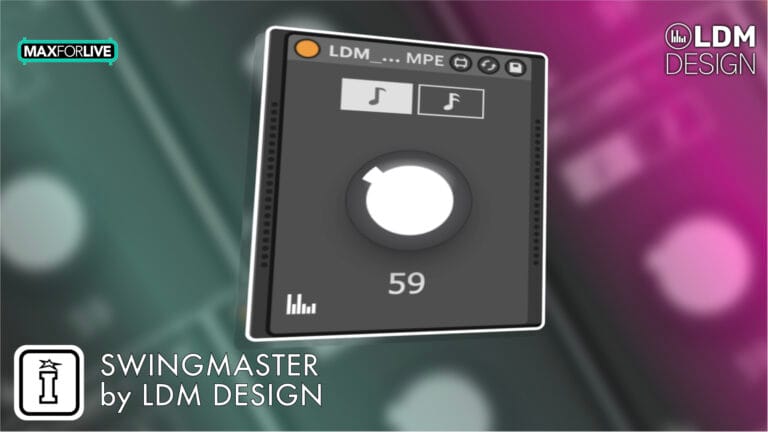

Swingmaster by LDM Design
ONE KNOB, EVERY TRACK
Adjusting swing across your entire Ableton project usually means diving into menus and changing settings clip-by-clip. Swingmaster solves this with elegant simplicity: place instances on your MIDI tracks, adjust the swing on any one instance, and all others instantly sync to match.
Inside you’ll find:
- Synced Instances — adjust any instance, all others immediately match for set-wide control
- 8th & 16th Note Modes — classic triplet-based shuffle or tighter rhythmic variations
- Full Automation Support — create dynamic groove changes throughout your track
- MIDI Mappable — map to hardware controllers for real-time performance control
- Works with Any MIDI — clips, external MIDI, sequencers, arpeggiators
- Instant Setup — drop on tracks, no routing or configuration required
- Per-Track Flexibility — place on some tracks but not others for selective groove
Perfect for producers seeking hardware-style global swing workflow, live performers needing real-time groove manipulation, or anyone frustrated by clip-by-clip swing adjustments. Swingmaster does one thing exceptionally well—it gives you instant, set-wide swing control from a single knob.
Requires Ableton Live 11/12 Standard with MaxforLive or Suite | Mac/Windows
Pay What You Want: Choose the amount that feels right for the value it brings to your workflow.
USER GUIDE: SwingMaster User Guide
Swingmaster by LDM Design
ONE KNOB, EVERY TRACK
Adjusting swing across your entire Ableton project usually means diving into menus and changing settings clip-by-clip. Swingmaster solves this with elegant simplicity: place instances on your MIDI tracks, adjust the swing on any one instance, and all others instantly sync to match.
Inside you’ll find:
- Synced Instances — adjust any instance, all others immediately match for set-wide control
- 8th & 16th Note Modes — classic triplet-based shuffle or tighter rhythmic variations
- Full Automation Support — create dynamic groove changes throughout your track
- MIDI Mappable — map to hardware controllers for real-time performance control
- Works with Any MIDI — clips, external MIDI, sequencers, arpeggiators
- Instant Setup — drop on tracks, no routing or configuration required
- Per-Track Flexibility — place on some tracks but not others for selective groove
Perfect for producers seeking hardware-style global swing workflow, live performers needing real-time groove manipulation, or anyone frustrated by clip-by-clip swing adjustments. Swingmaster does one thing exceptionally well—it gives you instant, set-wide swing control from a single knob.
Requires Ableton Live 11/12 Standard with MaxforLive or Suite | Mac/Windows
Pay What You Want: Choose the amount that feels right for the value it brings to your workflow.
USER GUIDE: SwingMaster User Guide
1962 in stock
Additional information
| MaxforLive | MIDI Devices |
|---|---|
| Ableton Live Compatibility | Ableton Live 11 Standard with MaxforLive, Ableton Live 11 Suite, Ableton Live 12 Standard with MaxforLive, Ableton Live 12 Suite |
| Min. Requirements | Ableton Live 11 Standard with MaxforLive Installed or Ableton Live 11 Suite |
| OS | Mac, Windows |
Product reviews
4.7 out of 5
7 reviews
How item rating is calculated
We show the average based on reviews. Only genuine reviews are displayed.
Sort by
December 4, 2025
This reviewer bought this product from our store.
Really good and easy way to swing!
I recommend this product
May 8, 2025
This reviewer bought this product from our store.
Does what it says on the tin!
March 25, 2025
This reviewer bought this product from our store.
While it's made a little redundant by Ableton's recent addition of the global groove amount control, Swingmaster still has plenty of uses. You can automate it, modulate it, and do those on a per-track basis instead of globally to all applicable clips.
November 15, 2024
This reviewer bought this product from our store.
Got to love a device that does what it needs to well, and no more. This has long been a nagging issue in my Ableton workflow, and I wished there was an easy solution to mimic hardware like, say, Elektron boxes. Now, there is!
November 5, 2024
This reviewer bought this product from our store.
Fantastic Tool for Adding Swing to Your Tracks!
I’ve been using the Swingmaster by LDM Design for a few weeks now, and it has completely transformed how I add swing to my Ableton Live projects. The device is incredibly easy to use—just adjust one instance, and it syncs across all tracks in your set. This feature alone saves so much time and effort.
The functionality is top-notch. It applies swing to any MIDI input, whether it’s external MIDI, sequencers, arpeggiators, or clips. The MIDI mapping feature is also a game-changer, allowing for instant set-wide control.
Overall, Swingmaster is a must-have for any musician looking to add a professional touch to their tracks. Highly recommend!
Swingmaster by LDM Design
Ableton Live has groove pools and per-clip groove settings, but adjusting swing across your entire project requires diving into menus, selecting clips, and making changes track by track. Swingmaster solves this with elegant simplicity: place an instance on each MIDI track you want to affect, then adjust the swing amount on any single instance. Every other instance immediately syncs to match, giving you instant, set-wide swing control from a single knob.
This straightforward MaxforLive MIDI effect does one thing exceptionally well—it provides quick, easy, global swing control without complex routing or menu diving. Whether you’re dialing in subtle groove or pushing triplet-based swing to extremes, Swingmaster lets you adjust the feel of your entire project in real-time with a single parameter change. It’s the kind of simple-but-powerful utility that becomes indispensable once you start using it.
Overview & The Problem It Solves
Adding swing to individual MIDI clips in Ableton is straightforward, but what if you want to adjust the swing amount across your entire project? You’d need to select each clip, adjust groove settings, and repeat the process every time you want to change the feel. Want to automate swing amount throughout your track? Good luck doing that per-clip without tedious automation across dozens of clips.
Hardware groove boxes like Elektron machines offer global swing controls—turn one knob, and the entire pattern’s swing changes instantly. Swingmaster brings this workflow to Ableton Live. Place instances on your MIDI tracks, and suddenly you have a single control point for swing across your entire set. Adjust one instance, and every other instance immediately matches. It’s global control without actual global architecture—just smart syncing between device instances.
How It Works – Synced Instances
The genius of Swingmaster lies in its instance syncing. When you place multiple Swingmaster devices across different MIDI tracks in your project, they automatically communicate with each other. Turn the swing knob on any instance, and all instances instantly update to match that value. It doesn’t matter which instance you adjust—they all stay synchronized.
This means you can place Swingmaster on ten MIDI tracks and control the swing for all of them by adjusting just one. Or place it on twenty tracks and still have single-knob control. The instances sync automatically when you add new ones, so there’s no setup process beyond dropping the device onto your tracks. Simple, elegant, effective.
8th and 16th Note Modes
Swingmaster offers two swing modes: 8th notes and 16th notes. Eighth note swing shifts every other eighth note, creating classic triplet-based shuffle feels—the foundation of jazz, hip-hop, and countless other groove-oriented styles. Sixteenth note swing shifts every other sixteenth note, producing tighter, more nuanced groove variations perfect for uptempo electronic music, drum programming, or hi-hat patterns.
Switch between modes depending on your musical context. Eighth note swing works beautifully for mid-tempo tracks where the groove sits on steady eighth-note pulses. Sixteenth note swing shines in faster tempos or when you need subtle rhythmic push-and-pull in busy hi-hat or percussion patterns. The mode selection affects all synced instances simultaneously, keeping your entire project’s swing character consistent.
Automation & Modulation
Here’s where Swingmaster truly shines compared to Ableton’s native groove controls. You can automate the swing amount throughout your track, creating dynamic groove changes that evolve as your music progresses. Start with tight, straight 16ths in the intro, gradually increase swing through the verse, then push to heavy triplet swing for the chorus. All automated from a single parameter.
You can also MIDI map the swing control to hardware controllers, enabling real-time groove manipulation during live performance. Map it to a knob on your MIDI controller and adjust swing expressively as you play, responding to the energy of the room or the feel of the moment. This hands-on control transforms swing from a static production choice into a dynamic performance element.
Even better—while the instances sync by default, you can place Swingmaster on some tracks but not others, giving you per-track control over which elements receive swing. Want your drums and bass to swing together while keeping synths and pads straight? Simple: place Swingmaster on drums and bass tracks only. This selective application gives you more control than a truly global swing would allow.
Works with Any MIDI Source
Swingmaster processes any MIDI passing through it, regardless of source. MIDI clips get swing applied to their note timing. External MIDI from hardware controllers or instruments gets swung before reaching your virtual instruments. Sequencers and arpeggiators (including MaxforLive devices like ADD or FRAKTOR) have their outputs shifted by Swingmaster’s groove.
This universal compatibility means Swingmaster integrates seamlessly into any workflow. Whether you’re programming clips, playing live MIDI, or using complex generative sequencers, Swingmaster adds groove to the output without requiring special routing or configuration. Just drop it in the MIDI chain, and it works.
Workflow Integration
Setting up Swingmaster is refreshingly simple. Insert an instance on each MIDI track where you want swing control. That’s it. No routing, no configuration, no complex setup. The instances automatically sync with each other, so the first adjustment you make affects all of them.
Want to add more tracks later? Just drop another Swingmaster instance on the new track, and it immediately syncs with the existing instances. Need to remove swing from a track? Delete or bypass that track’s Swingmaster instance. The device stays out of your way and requires minimal thought—exactly what a utility tool should do.
For projects where you want different swing amounts on different groups of tracks, you can work around the global sync by placing Swingmaster instances strategically. For example, put instances on your drum tracks and set them to one swing amount, then bypass them and manually adjust swing on other tracks separately. While the device is designed for set-wide control, creative routing still allows for grouped control when needed.
Creative Applications
Dynamic Groove Evolution: Automate swing amount from straight to heavily swung throughout your track, creating builds and releases based on rhythmic feel rather than just filter sweeps and volume.
Live Performance Control: Map swing to a MIDI controller knob for real-time groove manipulation during performances. Push swing hard during energetic sections, pull it back during breakdowns.
Genre-Appropriate Feels: Quickly dial in genre-specific swing amounts—subtle swing for house and techno, medium swing for hip-hop and funk, heavy swing for jazz-influenced productions. Adjust globally in seconds rather than clip-by-clip.
Hardware-Style Workflow: If you’re coming from hardware groove boxes where global swing is standard, Swingmaster brings that familiar workflow to Ableton. Place instances, adjust one knob, affect everything—just like your hardware.
Selective Groove Application: Place Swingmaster only on rhythmic elements (drums, bass, arps) while keeping pads and ambient elements straight for contrast between groovy and atmospheric layers.
How to Use
Insert Swingmaster as a MIDI effect on each track where you want swing control. The instances automatically sync with each other, so any adjustment you make to one affects all the others. Choose 8th or 16th note mode depending on your musical context, then adjust the swing amount to taste.
Automate the swing parameter to create dynamic groove changes throughout your track. MIDI map it to hardware controllers for live performance control. Add more instances to new tracks as your project grows—they’ll immediately sync with existing instances without configuration.
Ideal For
Producers seeking quick, easy set-wide swing control. Musicians coming from hardware groove boxes who expect global swing knobs. Live performers who want real-time groove manipulation during performances. Anyone frustrated by Ableton’s clip-by-clip groove workflow. Electronic producers working with quantized MIDI who want to add human feel and groove. Hip-hop and beat makers who need hands-on swing control.
What’s Included
- Swingmaster MaxforLive MIDI effect device
- Simple user guide with setup instructions
- Full automation and MIDI mapping support
- 8th and 16th note swing modes
- Compatible with Ableton Live 11 & 12 (Standard with MaxforLive or Suite)
Requirements
- Ableton Live 11 Standard with MaxforLive installed, or Ableton Live 11/12 Suite
- Mac or Windows operating system
Swingmaster by LDM Design solves a simple problem elegantly: it gives you instant, set-wide swing control without complex routing or menu diving. Place instances on your tracks, adjust one knob, and every instance syncs automatically. Automate it, MIDI map it, and transform groove from a static production choice into a dynamic performance element.
PAY WHAT YOU WANT
Swingmaster is available on a pay-what-you-want basis. Choose the amount that feels right for the value it brings to your workflow.
Explore More LDM Design Tools: reVel | preRoll | Palette | Trisektor | View All LDM Design Products
Frequently Asked Questions
A: Swingmaster is a MaxforLive MIDI effect that provides instant, set-wide swing control in Ableton Live. Place instances on multiple MIDI tracks, and they automatically sync with each other—adjust the swing amount on any single instance, and all other instances immediately match. This gives you global swing control from a single knob without complex routing. Features 8th and 16th note swing modes, full automation support, and MIDI mapping for real-time performance control.
A: Yes, Swingmaster is a MaxforLive device.
A: MaxforLive is a platform that integrates the visual programming environment Max with Ableton Live, allowing users to create and use custom audio, MIDI, and control devices.
A: When you place multiple Swingmaster instances across different MIDI tracks in your project, they automatically communicate and sync with each other. Turn the swing knob on any instance, and all instances instantly update to match that value. There’s no configuration required—just drop instances on tracks, and they sync automatically. New instances added later also sync with existing instances immediately.
A: By default, all Swingmaster instances sync to the same swing value for set-wide control. However, you can work around this by placing instances only on tracks you want to swing together, while leaving other tracks without Swingmaster. For example, place instances on drums and bass for synced swing, but leave pads and atmospheres straight by not adding instances to those tracks. You can also bypass instances on specific tracks to temporarily exclude them from the synced swing.
A: You can explore more of LDM Design’s tools and devices here: LDM Design
Important Information
Initial Release – October 2024
Our Products are generally provided as Zip file downloads which in all cases will need to be extracted and saved to your hard drive prior to installation. Details on the different file type provided and what to do with them are below.
.alp Files – These are Ableton Live Packs and will either install directly into the Packs Section of the browser of Ableton Live or ask you to save them to your hard drive. For packs that install to the library, when you double click on them you will see a pop up window asking you to confirm that installation is ok as the files are described as “Legacy”. This is fine and you are ok to proceed, the packs are created using the format for an earlier version of Live and so remain compatible with the current version.
.amxd files – These are individual MaxforLive Devices and can be stored anywhere on your hard drive. We’d advise creating a folder for them and then adding that folder as a location within the Places section of Lives Browser.
END-USER LICENSE AGREEMENT FOR ISOTONIK STUDIOS SOFTWARE PRODUCTS.
PLEASE READ THE TERMS AND CONDITIONS OF THIS LICENSE AGREEMENT CAREFULLY BEFORE CONTINUING WITH THIS PROGRAM INSTALL.
This End-User License Agreement (referred to as “EULA”) is a legal agreement between an individual or a single entity (referred to as “LICENSEE”) and Isotonik Studios for the Isotonik Studios software product(s) which may include associated software components, media, printed materials, and “online” or electronic documentation (referred to as “SOFTWARE PRODUCT”). By installing, copying, or otherwise using the SOFTWARE PRODUCT, the LICENSEE agrees to be bound by the terms of this EULA.
This EULA represents the entire agreement concerning the program between the LICENSEE and Isotonik Studios and it supersedes any prior proposal, representation, or understanding between the parties. If the LICENSEE does not agree to the terms of this EULA, the LICENSEE should not install or use the SOFTWARE PRODUCT.
The SOFTWARE PRODUCT is protected by copyright laws and international copyright treaties, as well as other intellectual property laws and treaties. The SOFTWARE PRODUCT is licensed, not sold.
- GRANT OF LICENSE.
The SOFTWARE PRODUCT is licensed as follows:
(a) Installation and Use. Providing that the LICENSEE has paid any applicable license fees, Isotonik Studios grants the LICENSEE the right to install and use copies of the SOFTWARE PRODUCT on up to two computers in the LICENSEE’s possession that are running a validly licensed copy of the operating system for which the SOFTWARE PRODUCT was designed [e.g., Windows 10, macOS]. The computer(s) must be owned by the LICENSEE.
(b) Backup Copies. The LICENSEE may also make copies of the SOFTWARE PRODUCT as may be necessary for backup and archival purposes.
- DESCRIPTION OF OTHER RIGHTS AND LIMITATIONS.
(a) Maintenance of Copyright Notices. The LICENSEE must not remove or alter any copyright notices on any and all copies of the SOFTWARE PRODUCT.
(b) Distribution. The LICENSEE may not distribute registered copies of the SOFTWARE PRODUCT to third parties.
(c) Prohibition on Reverse Engineering, Decompilation, and Disassembly. The LICENSEE may not reverse engineer, decompile, or disassemble the SOFTWARE PRODUCT, except and only to the extent that such activity is expressly permitted by applicable law notwithstanding this limitation.
(d) Rental. The LICENSEE may not rent, lease, or lend the SOFTWARE PRODUCT.
(e) License transfer The LICENSEE may not transfer their license to the SOFTWARE PRODUCT to any third party. Any attempt to do so will be considered a violation of this EULA.
(f) Support Services. Isotonik Studios may provide the LICENSEE with support services related to the SOFTWARE PRODUCT for a period of 12 months following the date of purchase. Any supplemental software code provided to the LICENSEE as part of the Support Services shall be considered part of the SOFTWARE PRODUCT and subject to the terms and conditions of this EULA.
(g) Compliance with Applicable Laws. The LICENSEE must comply with all applicable laws regarding use of the SOFTWARE PRODUCT.
- TERMINATION Without prejudice to any other rights, Isotonik Studios may terminate this EULA if the LICENSEE fails to comply with the terms and conditions of this EULA. In such event, the LICENSEE must destroy all copies of the SOFTWARE PRODUCT in the LICENSEE’s possession.
- COPYRIGHT All title, including but not limited to copyrights, in and to the SOFTWARE PRODUCT and any copies thereof are owned by Isotonik Studios or its suppliers. All title and intellectual property rights in and to the content which may be accessed through use of the SOFTWARE PRODUCT is the property of the respective content owner and may be protected by applicable copyright or other intellectual property laws and treaties. This EULA grants the LICENSEE no rights to use such content. All rights not expressly granted are reserved by Isotonik Studios.
- NO WARRANTIES Isotonik Studios expressly disclaims any warranty for the SOFTWARE PRODUCT. The SOFTWARE PRODUCT is provided ‘As Is’ without any express or implied warranty of any kind, including but not limited to any warranties of merchantability, noninfringement, or fitness of a particular purpose. Isotonik Studios does not warrant or assume responsibility for the accuracy or completeness of any information, text, graphics, links or other items contained within the SOFTWARE PRODUCT. Isotonik Studios makes no warranties respecting any harm that may be caused by the transmission of a computer virus, worm, time bomb, logic bomb, or other such computer program. Isotonik Studios further expressly disclaims any warranty or representation to the LICENSEE or to any third party.
- LIMITATION OF LIABILITY In no event shall Isotonik Studios be liable for any damages (including, without limitation, lost profits, business interruption, or lost information) arising out of the LICENSEE’s use of or inability to use the SOFTWARE PRODUCT, even if Isotonik Studios has been advised of the possibility of such damages. In no event will Isotonik Studios be liable for loss of data or for indirect, special, incidental, consequential (including lost profit), or other damages based in contract, tort or otherwise. Isotonik Studios shall have no liability with respect to the content of the SOFTWARE PRODUCT or any part thereof, including but not limited to errors or omissions contained therein, libel, infringements of rights of publicity, privacy, trademark rights, business interruption, personal injury, loss of privacy, moral rights or the disclosure of confidential information.
MORE FROM LDM Design...

£18.00
£22.00