reVel by LDM Design
VELOCITY THAT FLOWS WITH YOUR MUSIC
BUILD YOUR BUNDLE: Select three or more LDM Design products and unlock an instant 20% discount—applied automatically when you check out.
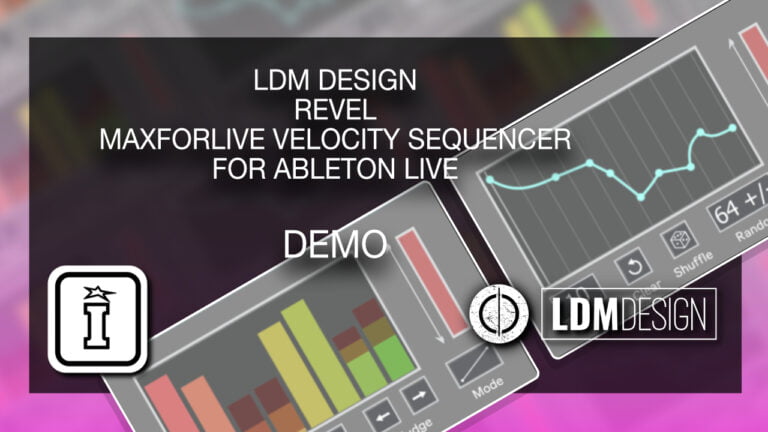
Stop manually drawing velocity values every time your rhythm changes. reVel sequences velocities intelligently with two distinct modes: step-based sequences up to 32 steps long, or time-based Function Mode that maintains dynamic flow regardless of note density.
Inside you'll find:
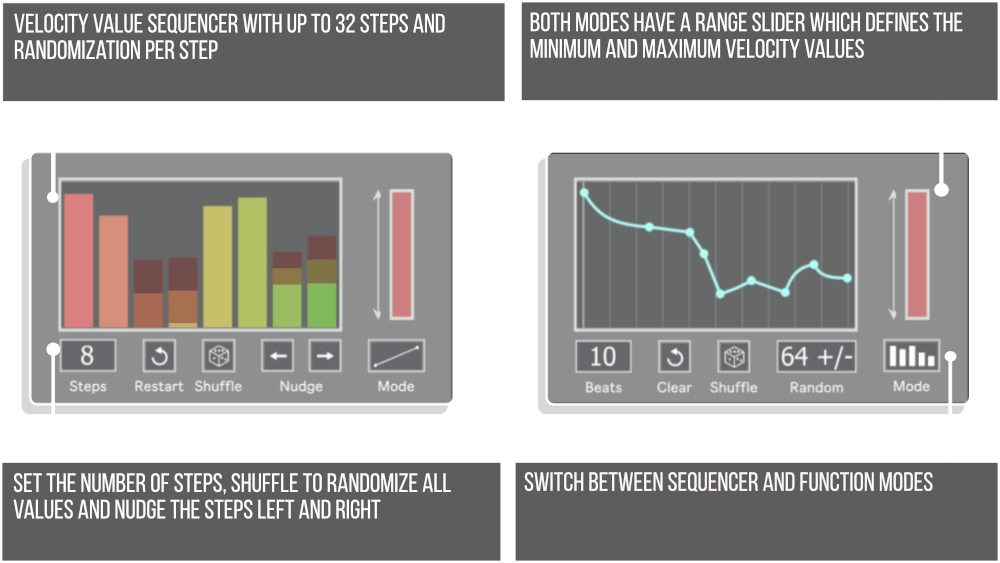
- Sequencer Mode — up to 32-step velocity patterns with per-step randomization
- Function Mode — time-based velocity curves that adapt to any note density
- Curved Value Changes — smooth crescendos, diminuendos, and custom dynamic shapes
- Per-Step Randomization — organic variation exactly where you need it (Sequencer Mode)
- Global Randomization — consistent variation across all notes (Function Mode)
- Shuffle — swing timing for groove-based velocity accents
- Nudge — shift velocity sequence forward or backward for timing offset effects
Perfect for humanized drum programming, dynamic build-ups, expressive synth lines, and groove-based accent patterns. Function Mode's time-based approach means you can freely edit rhythms without reprogramming velocities - your dynamics follow the music's emotional arc automatically.
Requires Ableton Live 11/12 Standard with MaxforLive or Suite | Mac/Windows
reVel by LDM Design
VELOCITY THAT FLOWS WITH YOUR MUSIC
BUILD YOUR BUNDLE: Select three or more LDM Design products and unlock an instant 20% discount—applied automatically when you check out.
Stop manually drawing velocity values every time your rhythm changes. reVel sequences velocities intelligently with two distinct modes: step-based sequences up to 32 steps long, or time-based Function Mode that maintains dynamic flow regardless of note density.
Inside you'll find:
- Sequencer Mode — up to 32-step velocity patterns with per-step randomization
- Function Mode — time-based velocity curves that adapt to any note density
- Curved Value Changes — smooth crescendos, diminuendos, and custom dynamic shapes
- Per-Step Randomization — organic variation exactly where you need it (Sequencer Mode)
- Global Randomization — consistent variation across all notes (Function Mode)
- Shuffle — swing timing for groove-based velocity accents
- Nudge — shift velocity sequence forward or backward for timing offset effects
Perfect for humanized drum programming, dynamic build-ups, expressive synth lines, and groove-based accent patterns. Function Mode's time-based approach means you can freely edit rhythms without reprogramming velocities - your dynamics follow the music's emotional arc automatically.
Requires Ableton Live 11/12 Standard with MaxforLive or Suite | Mac/Windows
Additional information
| MaxforLive | MIDI Devices, Sequencers |
|---|---|
| Ableton Live Compatibility | Ableton Live 11 Standard with MaxforLive, Ableton Live 11 Suite, Ableton Live 12 Standard with MaxforLive, Ableton Live 12 Suite |
| Min. Requirements | Ableton Live 11 Standard with MaxforLive Installed or Ableton Live 11 Suite |
| OS | Mac, Windows |
PRICE: £12.00
Product reviews
No reviews yet. Be the first to review this product.
reVel by LDM Design
Velocity programming can be tedious. Draw in 16 snare hits, then manually adjust each velocity value to create the right groove. What if your rhythm changes? Redraw all those velocities. What if you want natural variation? Hope your manual adjustments don’t sound robotic. reVel solves these problems with two intelligent sequencing modes that transform how you approach velocity programming in Ableton Live.
This expanded velocity sequencer offers step-based sequences up to 32 steps long, plus a unique Function mode that maintains velocity flow over time regardless of note density. Add per-step randomization for organic variation, use curved value changes for smooth crescendos and diminuendos, or leverage Shuffle and Nudge for groove-based timing adjustments. Whether you’re programming drums, sculpting synth dynamics, or adding expression to basslines, reVel ensures your velocities serve the music instead of fighting against it.
Overview & Two Sequencing Modes
reVel operates as a MIDI effect that intercepts incoming notes and replaces their velocity values according to your programmed sequence. The device offers two fundamentally different approaches to velocity sequencing, each solving different creative problems.
Sequencer Mode works like traditional step sequencers. Program a pattern up to 32 steps long, and each incoming note takes the velocity value of the next step in your sequence. Perfect for rhythmic patterns where you want specific velocity values on specific beats. Add per-step randomization amounts to introduce controlled variation, ensuring hi-hats never sound perfectly mechanical or snare hits always have natural dynamic variation.
Function Mode takes a completely different approach. Instead of assigning velocity to individual steps, you define how velocity should flow over a specific time duration (measured in beats). Program a curve that starts quiet, peaks in the middle, then fades back down, and reVel ensures that velocity shape happens over those beats regardless of how many notes occur during that time. Play four notes or forty notes in that section, the velocity envelope remains consistent.
Why Function Mode Changes Everything
Traditional step-based velocity sequencers fall apart when your note density varies. Imagine programming a 16-step velocity pattern for a hi-hat rhythm. If you then add extra notes for double-time sections or remove notes for breakdown sections, your velocity pattern no longer aligns with your rhythmic structure. Every time you change your rhythm, you need to reprogram velocities.
Function Mode solves this by maintaining velocity flow over time rather than per note. Set a crescendo over 4 beats, and whether you play 8 notes or 32 notes in those beats, the crescendo shape remains intact. This time-based approach means you can freely edit rhythms, add fills, or create variations without destroying your carefully crafted dynamics. Your velocity follows the music’s emotional arc rather than rigid step counts.
Function Mode includes curved value changes, so your velocity transitions can be linear, exponential, logarithmic, or any curve shape you need. Create smooth crescendos that gradually accelerate, or sudden dynamic shifts that peak quickly then decay slowly. The curve controls give you precise shaping over how velocity evolves across your time duration.
Randomization – Two Approaches
In Sequencer Mode, each step can have its own randomization amount. Step 1 might have no randomization (always plays the exact programmed velocity), while Step 5 could have 20% randomization (varies within a range around the programmed value), and Step 9 might have 50% randomization (wide variation). This per-step control lets you add organic variation exactly where you need it while keeping other hits consistent.
In Function Mode, randomization works globally across all notes. Set a global randomization amount, and every note that passes through gets varied within that range. Since Function Mode focuses on overall dynamic shape rather than individual note values, this global approach fits the time-based philosophy perfectly.
Shuffle & Nudge for Groove Control
Shuffle applies swing timing to your velocity sequence, shifting alternate steps forward or backward in time to create groove. Even if your MIDI notes are perfectly quantized, Shuffle makes your velocity accents land slightly off the grid, adding subtle humanization and rhythmic feel. Dial in just a touch of shuffle for gentle swing, or push it hard for pronounced triplet-based grooves.
Nudge shifts the entire velocity sequence forward or backward in time relative to your MIDI notes. Push the sequence slightly early, and velocity accents hit before the notes, creating anticipation. Pull it slightly late, and accents lag behind the notes, creating a laid-back feel. This timing offset between notes and velocity creates subtle groove variations that can dramatically change how your patterns feel.
Creative Applications
Humanized Drum Programming: Use Sequencer Mode with per-step randomization to ensure hi-hats never sound robotic. Program subtle velocity variations that repeat every 16 steps, creating natural-sounding groove patterns.
Dynamic Build-Ups: Switch to Function Mode and program a crescendo over 8 or 16 beats. As your track builds, velocity automatically increases over time, regardless of how dense or sparse your rhythm becomes. Perfect for creating tension before drops.
Expressive Synth Lines: Apply reVel to melodic sequences, using Function Mode to create velocity swells that breathe with your music. The curved value changes create smooth, musical dynamics impossible to achieve by manually drawing automation.
Shuffle-Based Grooves: Combine Sequencer Mode with Shuffle to create velocity patterns that swing against quantized MIDI notes. The velocity accents land off the grid while notes stay locked, creating groove tension that pushes and pulls against the beat.
Ghost Note Control: Program alternating loud and soft velocities in Sequencer Mode. Every other note becomes a ghost note, instantly adding groove to drum patterns and basslines. Adjust the sequence length to create polyrhythmic accent patterns.
How to Use
Insert reVel as a MIDI effect before any instrument in Ableton Live. Choose Sequencer Mode for step-based velocity control or Function Mode for time-based dynamic shaping. In Sequencer Mode, program your velocity values across up to 32 steps, then add per-step randomization where you want organic variation. In Function Mode, set your time duration (in beats) and program the velocity curve, then set global randomization amount.
Use Shuffle to add swing timing to your velocity sequence, and Nudge to shift the entire sequence forward or backward relative to your MIDI notes. All parameters are fully mappable to Push, MIDI controllers, or automation. Automate between different velocity patterns, modulate randomization amounts as your track evolves, or map sequence length to a controller for live performance variation.
Ideal For
Electronic producers programming drums and percussion with natural-sounding dynamics. Melodic producers who want expressive velocity curves on synth sequences. Live performers who need velocity patterns they can manipulate in real-time. Anyone frustrated by manually drawing velocity values for every rhythm change. Sound designers creating evolving dynamics that shift over time. Producers seeking humanization and groove in programmed parts.
What’s Included
- reVel MaxforLive MIDI effect device
- Full parameter mapping for Push and MIDI controllers
- Compatible with Ableton Live 11 & 12 (Standard with MaxforLive or Suite)
Requirements
- Ableton Live 11 Standard with MaxforLive installed, or Ableton Live 11/12 Suite
- Mac or Windows operating system
reVel by LDM Design transforms velocity programming from tedious manual work into intelligent, musical sequencing. Step-based or time-based, randomized or precise, with shuffle and nudge for groove control – this expanded velocity sequencer ensures your dynamics serve the music.
TRIPLE PACK SAVINGS
BUILD YOUR BUNDLE: Select three or more LDM Design products and unlock an instant 20% discount—applied automatically when you check out.
Explore More LDM Design Tools: Chance TEN | Chance Pack THREE | Gator | Trisektor | View All LDM Design Products
Frequently Asked Questions
A: reVel is a MaxforLive velocity sequencer featuring two distinct modes for intelligent velocity programming. Sequencer Mode offers step-based sequences up to 32 steps with per-step randomization, while Function Mode provides time-based velocity curves that maintain dynamic flow over a specified duration regardless of note density. Additional features include curved value changes, Shuffle for groove timing, and Nudge for timing offset effects. This expanded version from the original Chance 10 velocity sequencer transforms velocity programming from tedious manual work into musical, adaptive sequencing.
A: Yes, reVel is a MaxforLive device.
A: MaxforLive is a platform that integrates the visual programming environment Max with Ableton Live, allowing users to create and use custom audio, MIDI, and control devices.
A: Sequencer Mode works like traditional step sequencers – you program velocity values across up to 32 steps, and each incoming MIDI note takes the next velocity value in your sequence. It’s perfect for rhythmic patterns with specific velocity values per beat, and includes per-step randomization for organic variation. Function Mode takes a time-based approach – you define how velocity should flow over a specific duration (in beats) using curves, and reVel maintains that velocity shape regardless of how many notes occur during that time. This means you can freely edit rhythms without reprogramming velocities, as the dynamic flow adapts automatically to your note density.
A: Shuffle applies swing timing to your velocity sequence, shifting alternate steps forward or backward in time to create groove. This makes velocity accents land slightly off the grid even when your MIDI notes are perfectly quantized, adding humanization and rhythmic feel to your patterns.
A: You can explore more of LDM Design’s tools and devices here: LDM Design
Important Information
V1.0.0 – Initial Release – October 2023
Our Products are generally provided as Zip file downloads which in all cases will need to be extracted and saved to your hard drive prior to installation. Details on the different file type provided and what to do with them are below.
.alp Files – These are Ableton Live Packs and will either install directly into the Packs Section of the browser of Ableton Live or ask you to save them to your hard drive. For packs that install to the library, when you double click on them you will see a pop up window asking you to confirm that installation is ok as the files are described as “Legacy”. This is fine and you are ok to proceed, the packs are created using the format for an earlier version of Live and so remain compatible with the current version.
.amxd files – These are individual MaxforLive Devices and can be stored anywhere on your hard drive. We’d advise creating a folder for them and then adding that folder as a location within the Places section of Lives Browser.
END-USER LICENSE AGREEMENT FOR ISOTONIK STUDIOS SOFTWARE PRODUCTS.
PLEASE READ THE TERMS AND CONDITIONS OF THIS LICENSE AGREEMENT CAREFULLY BEFORE CONTINUING WITH THIS PROGRAM INSTALL.
This End-User License Agreement (referred to as “EULA”) is a legal agreement between an individual or a single entity (referred to as “LICENSEE”) and Isotonik Studios for the Isotonik Studios software product(s) which may include associated software components, media, printed materials, and “online” or electronic documentation (referred to as “SOFTWARE PRODUCT”). By installing, copying, or otherwise using the SOFTWARE PRODUCT, the LICENSEE agrees to be bound by the terms of this EULA.
This EULA represents the entire agreement concerning the program between the LICENSEE and Isotonik Studios and it supersedes any prior proposal, representation, or understanding between the parties. If the LICENSEE does not agree to the terms of this EULA, the LICENSEE should not install or use the SOFTWARE PRODUCT.
The SOFTWARE PRODUCT is protected by copyright laws and international copyright treaties, as well as other intellectual property laws and treaties. The SOFTWARE PRODUCT is licensed, not sold.
- GRANT OF LICENSE.
The SOFTWARE PRODUCT is licensed as follows:
(a) Installation and Use. Providing that the LICENSEE has paid any applicable license fees, Isotonik Studios grants the LICENSEE the right to install and use copies of the SOFTWARE PRODUCT on up to two computers in the LICENSEE’s possession that are running a validly licensed copy of the operating system for which the SOFTWARE PRODUCT was designed [e.g., Windows 10, macOS]. The computer(s) must be owned by the LICENSEE.
(b) Backup Copies. The LICENSEE may also make copies of the SOFTWARE PRODUCT as may be necessary for backup and archival purposes.
- DESCRIPTION OF OTHER RIGHTS AND LIMITATIONS.
(a) Maintenance of Copyright Notices. The LICENSEE must not remove or alter any copyright notices on any and all copies of the SOFTWARE PRODUCT.
(b) Distribution. The LICENSEE may not distribute registered copies of the SOFTWARE PRODUCT to third parties.
(c) Prohibition on Reverse Engineering, Decompilation, and Disassembly. The LICENSEE may not reverse engineer, decompile, or disassemble the SOFTWARE PRODUCT, except and only to the extent that such activity is expressly permitted by applicable law notwithstanding this limitation.
(d) Rental. The LICENSEE may not rent, lease, or lend the SOFTWARE PRODUCT.
(e) License transfer The LICENSEE may not transfer their license to the SOFTWARE PRODUCT to any third party. Any attempt to do so will be considered a violation of this EULA.
(f) Support Services. Isotonik Studios may provide the LICENSEE with support services related to the SOFTWARE PRODUCT for a period of 12 months following the date of purchase. Any supplemental software code provided to the LICENSEE as part of the Support Services shall be considered part of the SOFTWARE PRODUCT and subject to the terms and conditions of this EULA.
(g) Compliance with Applicable Laws. The LICENSEE must comply with all applicable laws regarding use of the SOFTWARE PRODUCT.
- TERMINATION Without prejudice to any other rights, Isotonik Studios may terminate this EULA if the LICENSEE fails to comply with the terms and conditions of this EULA. In such event, the LICENSEE must destroy all copies of the SOFTWARE PRODUCT in the LICENSEE’s possession.
- COPYRIGHT All title, including but not limited to copyrights, in and to the SOFTWARE PRODUCT and any copies thereof are owned by Isotonik Studios or its suppliers. All title and intellectual property rights in and to the content which may be accessed through use of the SOFTWARE PRODUCT is the property of the respective content owner and may be protected by applicable copyright or other intellectual property laws and treaties. This EULA grants the LICENSEE no rights to use such content. All rights not expressly granted are reserved by Isotonik Studios.
- NO WARRANTIES Isotonik Studios expressly disclaims any warranty for the SOFTWARE PRODUCT. The SOFTWARE PRODUCT is provided ‘As Is’ without any express or implied warranty of any kind, including but not limited to any warranties of merchantability, noninfringement, or fitness of a particular purpose. Isotonik Studios does not warrant or assume responsibility for the accuracy or completeness of any information, text, graphics, links or other items contained within the SOFTWARE PRODUCT. Isotonik Studios makes no warranties respecting any harm that may be caused by the transmission of a computer virus, worm, time bomb, logic bomb, or other such computer program. Isotonik Studios further expressly disclaims any warranty or representation to the LICENSEE or to any third party.
- LIMITATION OF LIABILITY In no event shall Isotonik Studios be liable for any damages (including, without limitation, lost profits, business interruption, or lost information) arising out of the LICENSEE’s use of or inability to use the SOFTWARE PRODUCT, even if Isotonik Studios has been advised of the possibility of such damages. In no event will Isotonik Studios be liable for loss of data or for indirect, special, incidental, consequential (including lost profit), or other damages based in contract, tort or otherwise. Isotonik Studios shall have no liability with respect to the content of the SOFTWARE PRODUCT or any part thereof, including but not limited to errors or omissions contained therein, libel, infringements of rights of publicity, privacy, trademark rights, business interruption, personal injury, loss of privacy, moral rights or the disclosure of confidential information.
More from LDM Design
Frequently Bought Together