Circuit Editor PRO by Sigabort
UPGRADE TO RANDOMISE & MORPH
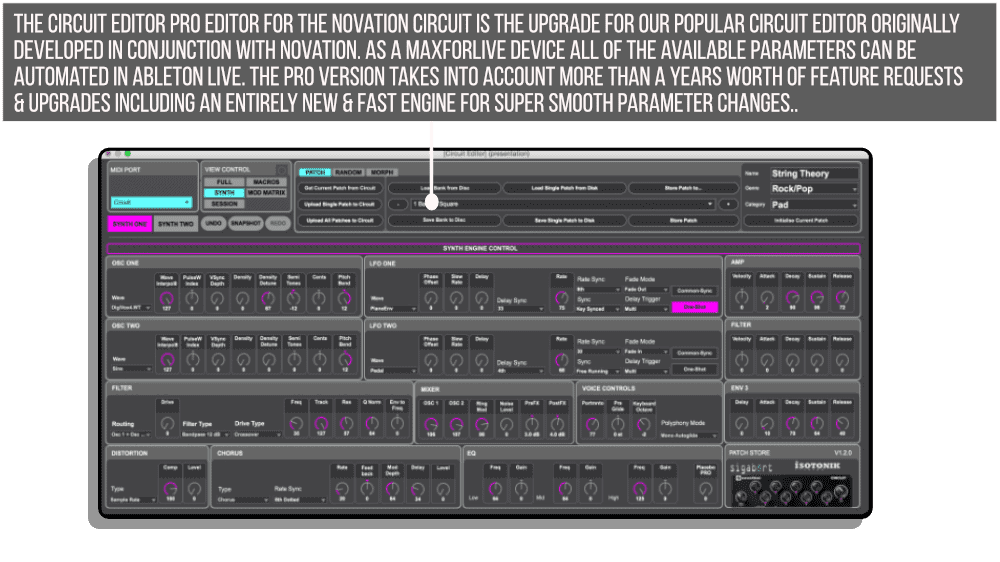
Step up to the Circuit Editor PRO! Upgraded based on users requests and rebuilt from scratch to cope with the demands of automation in Ableton Live.
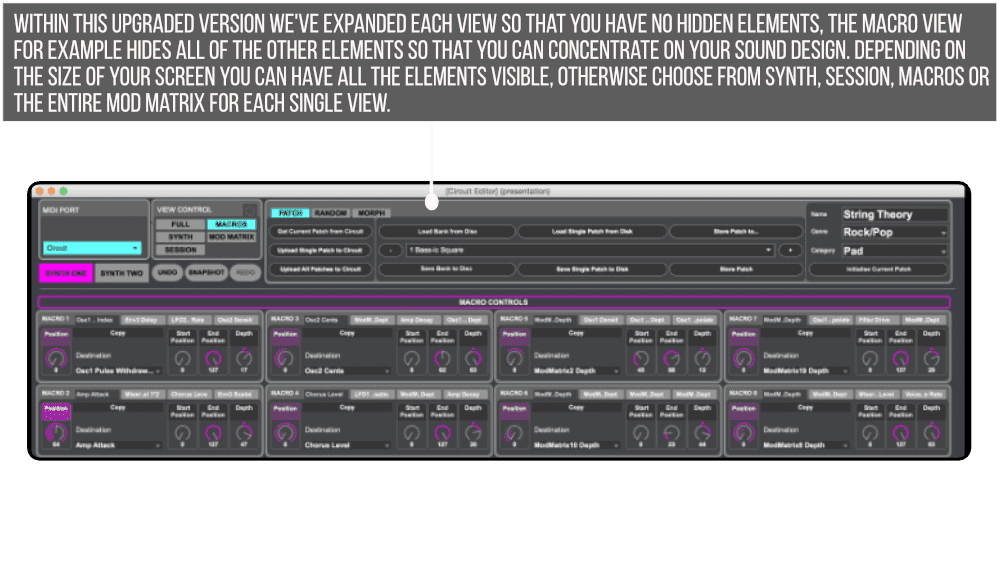
We’ve also added a completely expanded view for all parameters with no tabbed interfaces, a morph between two patches function and finally intelligent randomisation for instant patch creation on the Novation Circuit.
USER GUIDE: ShiftSynth1's Advanced Circuit Editor PRO USER GUIDE
Circuit Editor PRO by Sigabort
UPGRADE TO RANDOMISE & MORPH
Step up to the Circuit Editor PRO! Upgraded based on users requests and rebuilt from scratch to cope with the demands of automation in Ableton Live.
We’ve also added a completely expanded view for all parameters with no tabbed interfaces, a morph between two patches function and finally intelligent randomisation for instant patch creation on the Novation Circuit.
USER GUIDE: ShiftSynth1's Advanced Circuit Editor PRO USER GUIDE
Additional information
| Synth Compatibility | Novation Circuit Original |
|---|
PRICE: £25.00
Product reviews
No reviews yet. Be the first to review this product.
Circuit Editor PRO by Sigabort
PLEASE NOTE: THIS PRODUCT IS NOT COMPATIBLE WITH CIRCUIT TRACKS AND WILL NOT BE UPDATED
When Novation gave us the go ahead to continue developing the Novation Circuit Editor for ourselves we polled the Facebook Users group for what they’d like to see added… Obviously some requests we can’t help with, the Circuit Editor PRO can’t find you a wife nor make you more popular! (We can’t do anything about Panning or add more destinations to the Macro Control either)
The engine of the free version is good but not up to the rigour of automation from Ableton Live. So we re-wrote it from scratch, making all of the elements controllable by clip envelope including both Synth Engines not just the one in focus!
The more advanced Novation Circuit users will appreciate this means that a parameter can be automated over any length of time enabling the Circuit to become a Drone Engine, in fact unlink the automation envelopes in a clip and have euclidean style automation to really mix things up…
With our new engine we’re able to do more as well…
From a workflow point of view hovering over any of the titles will change them to a RESET label, a click and release will set the parameter or entire section to it’s initial values… Hold down SHIFT and hover though, and the title will change to RANDOM… And that’s where the fun starts!!
Our Randomisation Engine will allow an intelligent randomisation of the currently selected patch, you can define which elements are randomised (down to individual Mod Matrix Slots) and then choose how the random formula is applied…
And whilst you can randomise the Macro’s sometimes you just want to bring some order to the chaos, and so you can now copy a single Macro and Paste it to a different position, or copy all 8 macros and paste them in a new preset… Or even paste them to all presets in one click!!
PLEASE NOTE – Upload/downloading samples and sessions is not supported by the Circuit Editor PRO as Novation has not made the specification for these operations public.
The Download includes files for the MaxforLive, Mac and Windows Standalone Versions…
Frequently Asked Questions
No, Circuit Editor PRO is not compatible with the Circuit Tracks and there are no plans to update it for that hardware. It is designed specifically for the original Novation Circuit.
The PRO version has been rebuilt from scratch to handle Ableton Live automation properly, meaning all parameters across both Synth Engines can be controlled via clip envelopes. It also adds intelligent randomisation, a morph between two patches function, and a fully expanded parameter view with no tabbed interfaces.
The morph function allows you to blend between two saved patches on the Novation Circuit, giving you smooth transitions between sounds. It is a great tool for live performance and sound design exploration.
The randomisation engine generates usable patch variations intelligently rather than producing random noise, making it a practical tool for quick patch creation and inspiration on the Circuit.
Yes, unlike the free version which only exposed the Synth Engine currently in focus, Circuit Editor PRO makes all parameters across both Synth Engines available for clip envelope automation in Ableton Live.
You will need Ableton Live with Max for Live installed, as well as an original Novation Circuit. Make sure your Circuit is connected via USB before launching the device.
After purchase you will receive a download from Isotonik Studios. Simply drag the Max for Live device into your Ableton Live set or place it in your User Library for easy access going forward.
Important Information
More from Sigabort





 -43%
-43%SigabortP2D Session2 + by SigabortLive 10 & 11 · Max for Live Original price was: £70.00.£40.00Current price is: £40.00.
Frequently Bought Together