
Place it on a track and set your preferences
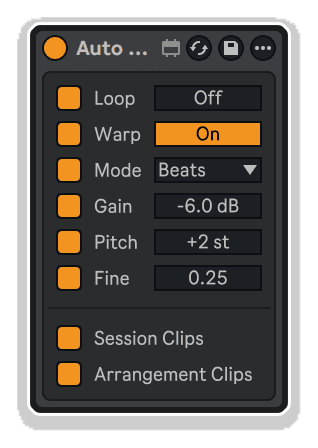
Now when you create each new clip it'll inherit your chosen options
Transform Ableton Live’s buried functions into instant one-click actions. Advanced Toolbar Buttons 2 by killihu puts clip parameters, scene capture modes, global track controls, loop manipulation, and theme switching into a customizable floating toolbar that positions anywhere on your screen—no menu diving, no wasted clicks.
Inside you’ll find:
Create task-specific layouts, switch between laptop and desktop configurations, map presets to keyboard shortcuts, and eliminate the friction between creative intention and technical execution. Includes comprehensive 21-page PDF manual and killihu Device Tool application for theme switching and menu bar integration.
Compatible with Ableton Live 10, 11, and 12. Windows only (limited Mac functionality available in version 1.0).
Transform Ableton Live’s buried functions into instant one-click actions. Advanced Toolbar Buttons 2 by killihu puts clip parameters, scene capture modes, global track controls, loop manipulation, and theme switching into a customizable floating toolbar that positions anywhere on your screen—no menu diving, no wasted clicks.
Inside you’ll find:
Create task-specific layouts, switch between laptop and desktop configurations, map presets to keyboard shortcuts, and eliminate the friction between creative intention and technical execution. Includes comprehensive 21-page PDF manual and killihu Device Tool application for theme switching and menu bar integration.
Compatible with Ableton Live 10, 11, and 12. Windows only (limited Mac functionality available in version 1.0).
Buying for someone?Send a gift card →
| MaxforLive | Control Devices |
|---|---|
| Ableton Live Compatibility | Ableton Live 11 Standard with MaxforLive, Ableton Live 11 Suite, Ableton Live 12 Standard with MaxforLive, Ableton Live 12 Suite |
| Min. Requirements | Ableton Live 11 Standard with MaxforLive Installed or Ableton Live 11 Suite |
| OS | Mac, Windows |
One of Best Ableton Live add-on!
Overview & Inspiration
Why waste time manually adjusting warp modes, gain levels, and transposition settings for every single clip you add to a project?
Auto Clip Props by killihu eliminates repetitive clip property adjustments by automatically applying your chosen settings to every clip on a track—both existing clips and new clips dragged, recorded, or moved into position. Set your percussion tracks to Beats warp mode, instrument tracks to Complex, vocal tracks to warping disabled, all with persistent automation that works throughout your project setup phase.
This MaxforLive utility device transforms tedious manual configuration into set-it-and-forget-it workflow acceleration. Define absolute values for loop activation, warping, warp mode, gain, pitch transposition (semitones and cents), then watch as every clip on the track instantly conforms to your specifications. Perfect for establishing consistent sonic foundations before diving into individual clip refinements.
Features & Highlights
Automatic Clip Property Assignment – Set clip properties once and Auto Clip Props applies them automatically to all clips on the track—both existing clips and any new clips dragged from the browser, recorded, or repositioned. No more repetitive manual adjustments across dozens of clips.
Independent Property Activation Controls – Each property (Loop, Warp, Mode, Gain, Pitch, Fine) features its own activation toggle, allowing selective automation of only the parameters you need. Deactivate controls you don’t want automated while maintaining active automation for others.
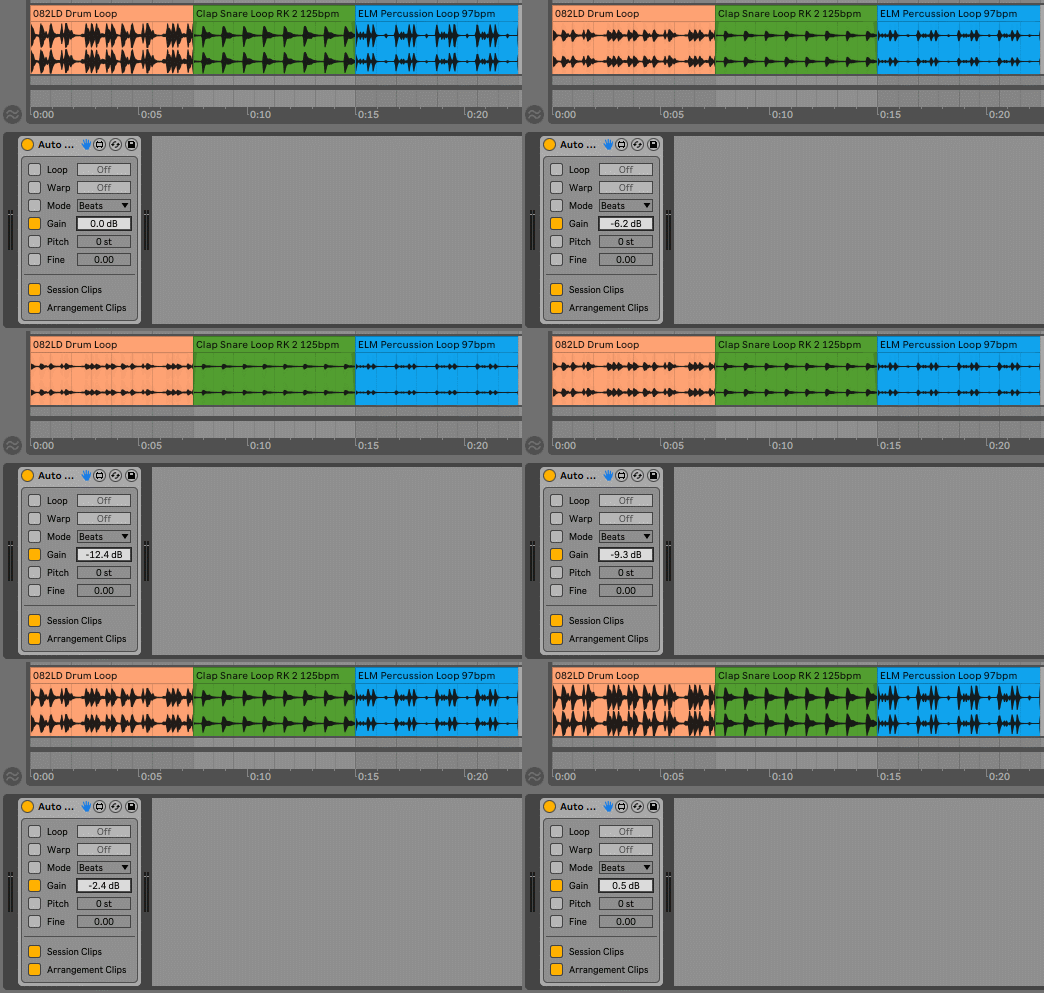
Absolute Value Assignment – All property values are absolute, not relative. Setting Gain to -6.0 dB assigns that exact value to every clip on the track rather than reducing each clip’s existing gain by 6 dB. This ensures consistent starting points for all clips before individual refinement.
Loop Activation Control – Automatically enable the Loop switch for all clips on the track, eliminating the need to manually activate looping for each individual clip—particularly useful for drum loops, percussion layers, and repetitive musical elements.
Warp Toggle Automation – Enable or disable warping for all clips on the track automatically. Perfect for vocal recording tracks where warping should remain disabled, or for ensuring all percussion elements remain tempo-synced with warping enabled.
Warp Mode Selection – Choose from all available Ableton Live warp modes (Beats, Tones, Texture, Re-Pitch, Complex, Complex Pro) and apply automatically to all clips. Set percussion tracks to Beats, melodic content to Complex, ambient textures to Texture—all without touching individual clip settings.
Gain Control – Set absolute gain values in decibels for all clips on the track. Establish consistent volume starting points across sample libraries, recorded takes, or imported stems before performing individual clip volume adjustments.
Pitch Transposition (Semitones) – Apply consistent semitone transposition to all clips on the track, useful for quickly auditioning melodic content in different keys or establishing harmonic relationships across multiple sample-based tracks.
Fine Pitch Control (Cents) – Precise cent-based transposition (100 cents = 1 semitone) for subtle pitch adjustments across all clips. Perfect for detuning effects, slight pitch corrections, or achieving specific tonal relationships.
Session and Arrangement View Controls – Independent toggles for applying automation to Session View clips and Arrangement View clips. Control which view’s clips receive automatic property assignment based on your current workflow focus.
Real-Time Application – Auto Clip Props monitors clip additions and position changes continuously. As soon as a clip is added or moved on the track, the device automatically applies all activated property values—maintaining consistency without manual intervention.
How to Use
Load Auto Clip Props onto any audio track in your project. Activate the property controls you want to automate by clicking the toggle switches on the left side of each parameter. Deactivated controls will not apply their values to clips.
Set your desired property values: enable Loop if you want all clips to loop automatically, activate Warp and select the appropriate Mode for your track type (Beats for drums, Complex for full mixes, Texture for atmospheric content), adjust Gain to establish consistent volume starting points, set Pitch and Fine controls for transposition.
Enable Session Clips to apply automation to clips in Session View, enable Arrangement Clips for Arrangement View clips, or activate both for comprehensive track-wide automation.
As you add new clips to the track—either by dragging from the browser, recording new takes, or moving existing clips—Auto Clip Props automatically applies all activated property values. The device also updates all existing clips on the track whenever a clip is added or repositioned.
Use multiple instances of Auto Clip Props on different tracks to establish track-specific clip behaviors. For example: percussion tracks with Beats warp mode and -3 dB gain, instrument tracks with Complex mode and 0 dB gain, vocal tracks with warping disabled.
Once you’ve established your project foundation and added your initial content, deactivate or remove the device to regain independent control over individual clip properties for detailed mixing and arrangement work.
Performance Considerations: The device applies values to all clips on the track whenever any clip is added or moved, which can impact performance on tracks with many clips. If GUI responsiveness slows when adjusting Gain, Pitch, or Fine controls, click the control and type the desired value numerically rather than dragging with the mouse. Avoid using excessive instances across many tracks simultaneously.
Session View Limitation: In Session View, Auto Clip Props detects clips in the first 64 slots. Clips added or moved beyond slot 64 will not receive automatic property assignment.
Ideal For
What’s Included
Requirements
Explore More
Advanced Toolbar Buttons 2 | Clipboard Device | Session Clips | Device Navigator | View All killihu Products
A: Auto Clip Props is a MaxforLive utility device that automatically assigns clip properties (loop activation, warping, warp mode, gain, pitch transposition) to all clips on a track—both existing clips and new clips added through dragging, recording, or repositioning.
A: Yes, Auto Clip Props is a MaxforLive device.
A: MaxforLive is a platform that integrates the visual programming environment Max with Ableton Live, allowing users to create and use custom audio, MIDI, and control devices.
A: Auto Clip Props uses absolute value assignment, not relative adjustments. For example, setting Gain to -6.0 dB assigns that exact value to every clip on the track, rather than reducing each clip’s existing gain by 6 dB. This ensures all clips start at identical property values before individual refinement.
A: Yes, you can use multiple instances across different tracks to establish track-specific clip behaviors. For example, percussion tracks can automatically receive Beats warp mode while instrument tracks receive Complex mode. However, avoid using excessive instances as performance may be impacted when many clips are present.
A: In Session View, Auto Clip Props detects clips in the first 64 slots only—clips beyond slot 64 won’t receive automatic property assignment. Additionally, on tracks with many clips, adjusting Gain, Pitch, or Fine controls may slow GUI responsiveness; in these cases, click the control and type values numerically rather than dragging with the mouse.
A: You can explore more of killihu’s tools and devices here: killihu
Initial Release – November 2024
Our Products are generally provided as Zip file downloads which in all cases will need to be extracted and saved to your hard drive prior to installation. Details on the different file type provided and what to do with them are below.
.alp Files – These are Ableton Live Packs and will either install directly into the Packs Section of the browser of Ableton Live or ask you to save them to your hard drive. For packs that install to the library, when you double click on them you will see a pop up window asking you to confirm that installation is ok as the files are described as “Legacy”. This is fine and you are ok to proceed, the packs are created using the format for an earlier version of Live and so remain compatible with the current version.
.amxd files – These are individual MaxforLive Devices and can be stored anywhere on your hard drive. We’d advise creating a folder for them and then adding that folder as a location within the Places section of Lives Browser.
END-USER LICENSE AGREEMENT FOR ISOTONIK STUDIOS SOFTWARE PRODUCTS.
PLEASE READ THE TERMS AND CONDITIONS OF THIS LICENSE AGREEMENT CAREFULLY BEFORE CONTINUING WITH THIS PROGRAM INSTALL.
This End-User License Agreement (referred to as “EULA”) is a legal agreement between an individual or a single entity (referred to as “LICENSEE”) and Isotonik Studios for the Isotonik Studios software product(s) which may include associated software components, media, printed materials, and “online” or electronic documentation (referred to as “SOFTWARE PRODUCT”). By installing, copying, or otherwise using the SOFTWARE PRODUCT, the LICENSEE agrees to be bound by the terms of this EULA.
This EULA represents the entire agreement concerning the program between the LICENSEE and Isotonik Studios and it supersedes any prior proposal, representation, or understanding between the parties. If the LICENSEE does not agree to the terms of this EULA, the LICENSEE should not install or use the SOFTWARE PRODUCT.
The SOFTWARE PRODUCT is protected by copyright laws and international copyright treaties, as well as other intellectual property laws and treaties. The SOFTWARE PRODUCT is licensed, not sold.
The SOFTWARE PRODUCT is licensed as follows:
(a) Installation and Use. Providing that the LICENSEE has paid any applicable license fees, Isotonik Studios grants the LICENSEE the right to install and use copies of the SOFTWARE PRODUCT on up to two computers in the LICENSEE’s possession that are running a validly licensed copy of the operating system for which the SOFTWARE PRODUCT was designed [e.g., Windows 10, macOS]. The computer(s) must be owned by the LICENSEE.
(b) Backup Copies. The LICENSEE may also make copies of the SOFTWARE PRODUCT as may be necessary for backup and archival purposes.
(a) Maintenance of Copyright Notices. The LICENSEE must not remove or alter any copyright notices on any and all copies of the SOFTWARE PRODUCT.
(b) Distribution. The LICENSEE may not distribute registered copies of the SOFTWARE PRODUCT to third parties.
(c) Prohibition on Reverse Engineering, Decompilation, and Disassembly. The LICENSEE may not reverse engineer, decompile, or disassemble the SOFTWARE PRODUCT, except and only to the extent that such activity is expressly permitted by applicable law notwithstanding this limitation.
(d) Rental. The LICENSEE may not rent, lease, or lend the SOFTWARE PRODUCT.
(e) License transfer The LICENSEE may not transfer their license to the SOFTWARE PRODUCT to any third party. Any attempt to do so will be considered a violation of this EULA.
(f) Support Services. Isotonik Studios may provide the LICENSEE with support services related to the SOFTWARE PRODUCT for a period of 12 months following the date of purchase. Any supplemental software code provided to the LICENSEE as part of the Support Services shall be considered part of the SOFTWARE PRODUCT and subject to the terms and conditions of this EULA.
(g) Compliance with Applicable Laws. The LICENSEE must comply with all applicable laws regarding use of the SOFTWARE PRODUCT.
 ★ Popular
Join the list for fresh Max for Live devices, sound packs and offers. No spam, unsubscribe anytime.

Curated Ableton Live, Max for Live & sound-design tools from the world's best independent developers.
Trusted by thousands of music producers worldwide