Modulat by Chaos Culture - Live 12
THE ULTIMATE MAXFORLIVE BUILDING BLOCKS
UPDATED FOR LIVE 12: with new Modulate Module!
Modulat is a MaxforLive Toolkit of prebuilt modules that you can use to effect parameters, output audio and generally be awesome.
Spawn a module from the menu and connect it up using patch cords, this is MaxforLive without the coding!
USER GUIDE: CC Modulat Manual
Sale
Modulat by Chaos Culture - Live 12
THE ULTIMATE MAXFORLIVE BUILDING BLOCKS
UPDATED FOR LIVE 12: with new Modulate Module!
Modulat is a MaxforLive Toolkit of prebuilt modules that you can use to effect parameters, output audio and generally be awesome.
Spawn a module from the menu and connect it up using patch cords, this is MaxforLive without the coding!
USER GUIDE: CC Modulat Manual
Product reviews
FEATURES
5 out of 5
18 reviews
How item rating is calculated
We show the average based on reviews. Only genuine reviews are displayed.
Sort by
September 1, 2025
This reviewer bought this product from our store.
This is hands down the single best m4l modulator, or more accurately modulation environment, that I have ever seen! What a treat to find this, an absolute game changer for Ableton. I am curious about why it installs as a legacy pack when it's updated for Live 12 though. Regardless, A++++ I can not recommend this enough, it will change the way you create music in Ableton Live. Thanks!
Reply from Chaos Culture
September 2, 2025
June 20, 2025
This reviewer bought this product from our store.
Incredible playground for all sorts of elaborate modulation inside Ableton. It adds so much to Ableton and unlocks so many new creative possibilities.
February 26, 2025
This reviewer bought this product from our store.
It's so amazing that I can only say one thing : this is the best Ableton thing that I ever bought.
December 28, 2024
This reviewer bought this product from our store.
Modulat is amazing. I thought it would take months to learn and use, but it's the perfect combination of power and usability. I made a great sounding patch immediately after reading the manual and watching the demo videos. It's very useful and completely changes Ableton for me. Thanks a bunch!! Sebastian is one of my favorite developers for a reason!!
September 14, 2024
This reviewer bought this product from our store.
Modulat is insanely powerful and easy to use. You won't need anything else for modulations
Modulat by Chaos Culture - Live 12
UPDATED FOR LIVE 12
With the addition of a new module called Modulate, which makes use of the new modulation capabilities in Live 12. This module won’t show up if you’re using Live 11 or below. It behaves similarly to the Remote module, but instead of taking full control over the parameter in Live, it can still be moved, automated or controlled with a Remote module or other devices.
MODULAT FEATURES
Formerly known as Signal, Modulat is a toolbox of modules that can be connected together to create or modify signals from Ableton Live, transform and output them as Audio or control for parameters. Begin by spawning modules from the menu and then connect them with patch cords by clicking on each modules inputs (left) and outputs (right). You can click on any output to monitor its signal within the scope and all modules run at audio rate. Use the Audio In & Out Modules to exchange signals between devices or to send & receive control voltage.
Modulat is a node based / modular playground for control signals such as LFOs, envelopes and automations. Most Max for Live control devices have a lot of issues and limit the possibilities by completely taking over the control of a parameter in Live. Signal uses audio signals for all its calculations and lets you route them however you want giving you a lot more options while keeping the highest quality possible along with staying sample accurate.
Additionally it eliminates chain mapping, where you would use an LFO on another one. Since every mapping in Live introduces a delay as well as CPU usage, chain mapping is not useful at all. With Modulat you only need one mapping to make everything possible. You can always add another signal and keep expanding the setup. Especially by using multiple instances you can use Lives own routing to mix control signals, record them and play them back in any way using the session view, the Looper device or simply by triggering them using Simpler/Sampler.
Additionally Modulat is the only device on the market that provides a workaround to control parameters in sync with Live by compensating for the delay. You can find out more about this workaround on page 10 of the user guide linked below.
The modules in Modulat are versatile, you don’t need a lot of them to create something useful. With a lot of additional features that haven’t been done before, bypassing mapped parameters for example, Signal is the ultimate control device.
With the flexibility Modulat becomes a meta language, you can basically create your own control devices exactly how you like it without actually having to program them in Max. Signal takes away all the work of getting the basics to work and leaves you only with the decision making.
MODULAT MODULES
INPUTS & OUTPUTS
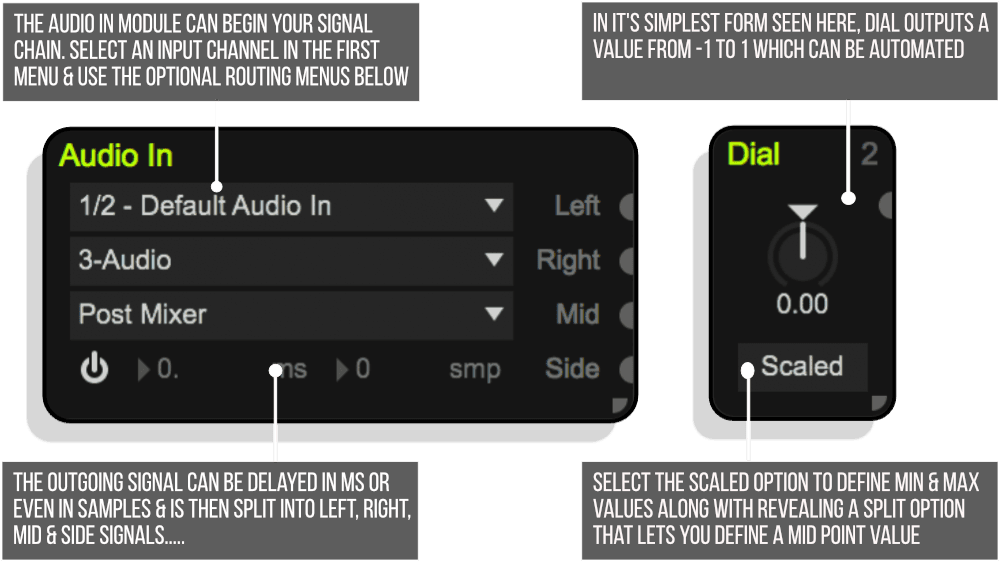
Audio In / Out – Receive and send audio using the device inputs and outputs.
Dial – This module simply outputs the dial value, which can be automated.
MIDI In / Out – Receives and sends MIDI data.
Note In – Receives MIDI notes and outputs a trigger, pitch and velocity signal.
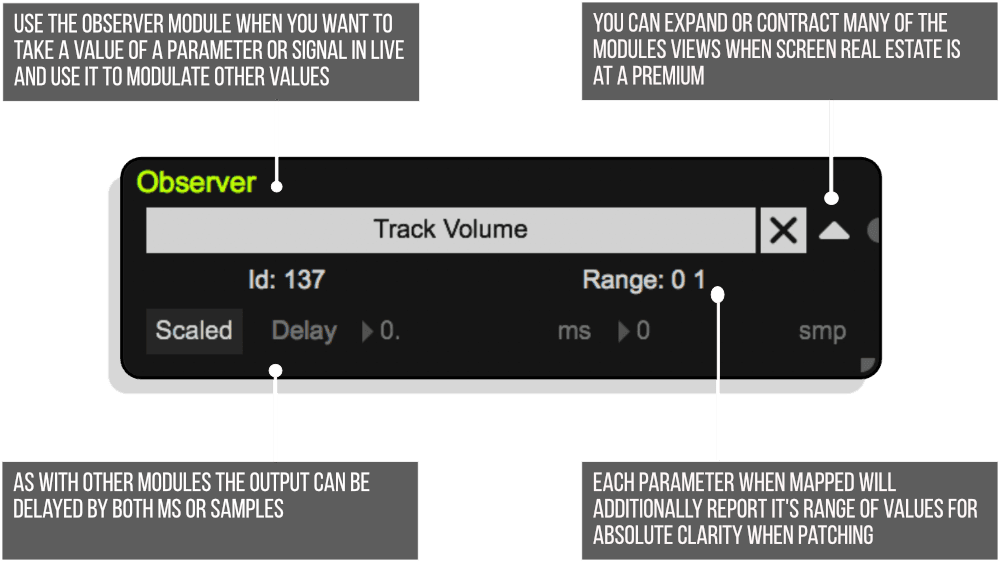
Observer – This module outputs the value of any parameter in Live.
Remote – Controls parameters in Live with the incoming signal.
Note Out module:
- Outputs MIDI Notes with a trigger, pitch value and velocity value signals.
- Similar to the Note In module, pitch and velocity values can be scaled (-1 to 1) or raw (0 to 127). Because of rounding errors when dealing with floating point values, it is advised to use raw values for the pitch.
- This module is able to prevent any incoming MIDI notes from being send out by default. This way you can mix the Note Out notes with the already existing notes or not.
Route module:
- Up to 8 inputs and outputs can be routed in any way imaginable doing a drag and drop on the input and output names within very similar to how inputs and outputs of modules can be connected. Click on a connection to delete it and click on an input or output to delete all of its connections.
- You can switch between different setups or routing combinations with the setup number at the top making it possible to change the routing of other modules dynamically. The maximum amount of setup numbers can be set as well. It is advised to not use high values unless actually needed as high values will increase the loading time for Modulat slightly.
- The DSP part of the module is being compiled on the fly to ensure efficiency. If an input, output or a setup number isn’t used, the CPU usage will not increase. You can use this module for very simple tasks such as a gate without having to worry about wasting CPU usage on all of the other things the module could do.
- Copy and paste works as usual across different Modulat instances and even carries over to other Livesets.
GENERATORS
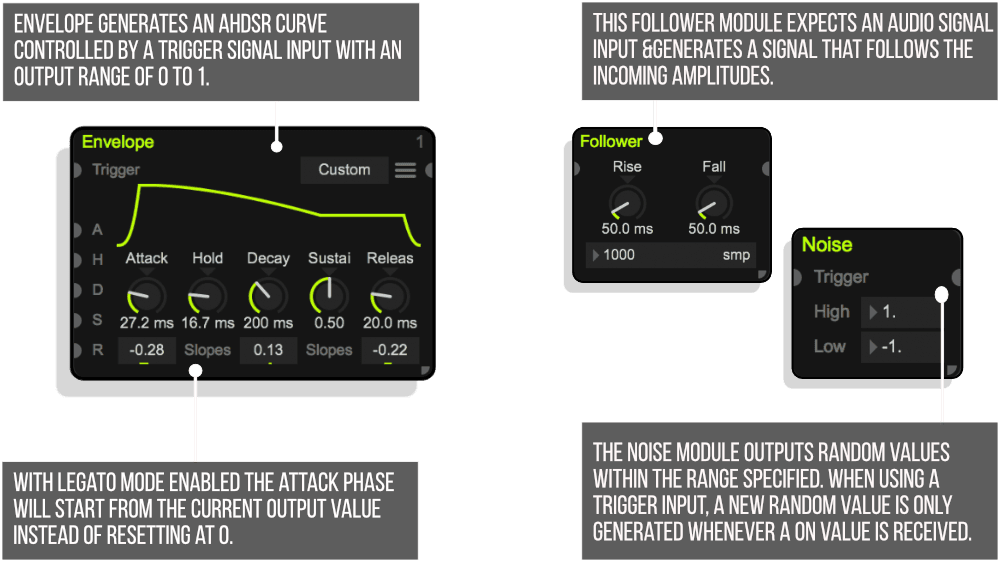
Envelope – Generates an AHDSR curve controlled by a trigger signal input with an output range of 0 to 1.
Follower – This module expects an audio signal input and generates a signal that follows the incoming amplitudes.
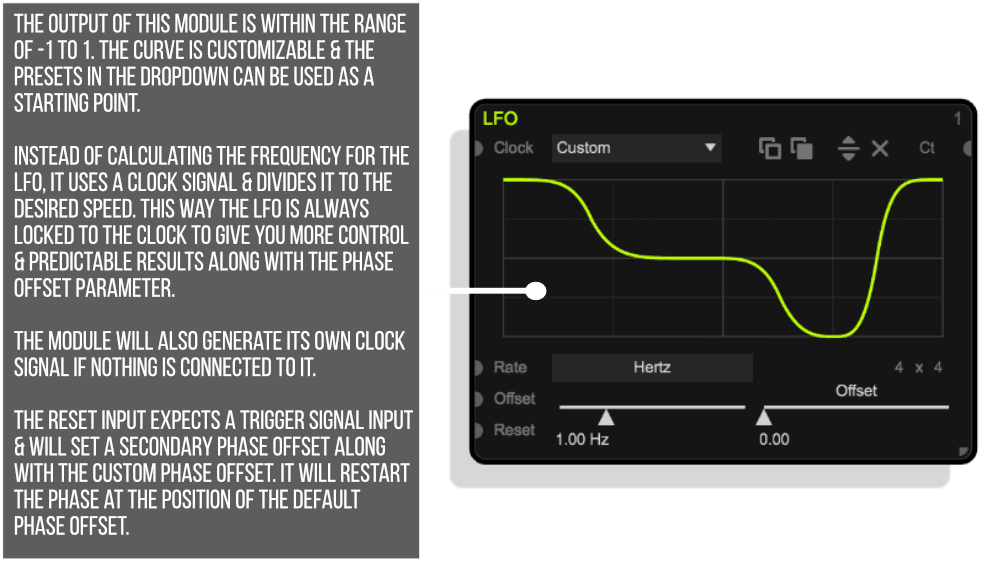
LFO – The curve is customizable and the presets in the list above can be used as a starting point.
Noise – This module outputs random values within the range specified (including the low and high values themselves).
Step – This module is basically a step sequencer. It allows the use of curves and all kind of shapes, but with the dials at the bottom it is designed to be used as a step sequencer.
TRANSFORMERS
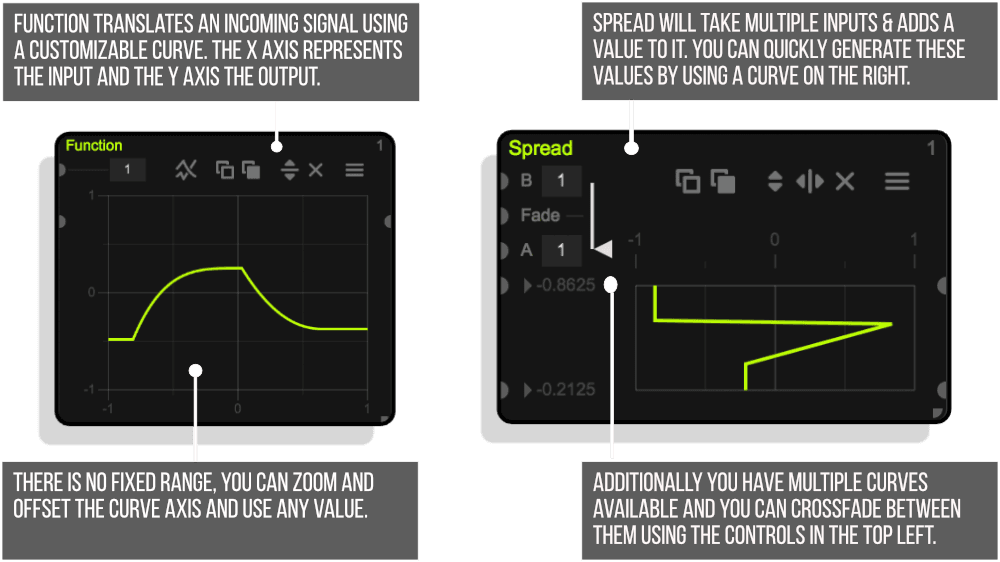
Function – This module translates an incoming signal using a customizable curve.
Spread – This module will take multiple inputs and adds a value to it speci#ed with the number directly next to the input.
EFFECTS
Jitter – This module creates a jitter signal with a customizable frequency, which you can then mix together with other signals.
Smooth – This module takes a signal and smoothes it out to avoid quick movements.
TIMING
Clock – This module generates a clock signal that loops after a set amount of bars.
Counter – Whenever this module receives a trigger ON value it will count the Milliseconds, samples or beats (quarter notes / clock signal) that have passed.
Delay – This module can delay a signal with positive values as well as negative, which will add latency.
Swing – With this module you can apply swing onto any signal.
Static Delay – An incoming signal can be delayed without the ability to automate the delay time. This has the advantage of using a more efficient method for delaying and is suggested to use when no automation is needed. These two controls for milliseconds and samples are already included in most input and output modules. This module simply allows you to use them anywhere in the signal flow.
Trigger Delay – Trigger signals can be delayed with any delay module, but by using this module the three trigger states are separated and delayed individually.
Trigger Duration – This module can limit the duration of trigger signals with a minimum and maximum length that can be speci+ed in milliseconds or samples. Both the minimum and maximum values can be controlled in audio rate by connecting signals into the module inputs. To deactivate the maximum limitation entirely with a signal, make sure the signal is 0 since a value of 0 will deactivate the limitation just as the activation buttons would.
BASICS
Math – You can perform basic math operations by selecting a method in the drop down.
Movement – This module analyses an incoming signal and reports its movement.
Range – The incoming signal will be kept within a customizable range.
Scale – This module allows you to scale a signal by using 4 reference points. If the module receives the value speci#ed in the top left, it will result in the value shown in the top right. The same goes for the bottom two values.
ROUTING
Mix – This module simply mixes multiple signals together.
Trigger Merge – This simple module will analyse multiple trigger signals and create a single.
PLEASE NOTE: Users of Live 10.0.5 and below (also Live 9) need to manually connect Live to the latest version of Max 8, details Are in the installation section towards the bottom of this page.
Modulat 1.250 – released 8/03/2023
– Added a new module called Modulate, which makes use of the new modulation capabilities in Live 12. This module won’t show up if you’re using Live 11 or below. It behaves similarly to the Remote module, but instead of taking full control over the parameter in Live, it can still be moved, automated or controlled with a Remote module or other devices.
– Fixed an issue, which sometimes caused Live to crash when the Modulat window is being closed.
– Updated various graphics.
Modulat 1.247 – Released 4/08/2023
– Fixed cursor interactions with specific GUI elements.
– This update marks the end of support for Live 9. Version 1.246 is still available for download, but starting with this version we can unfortunately only provide updates for Live 10 and newer.
Our Products are generally provided as Zip file downloads which in all cases will need to be extracted and saved to your hard drive prior to installation. Details on the different file type provided and what to do with them are below.
.alp Files – These are Ableton Live Packs and will either install directly into the Packs Section of the browser of Ableton Live or ask you to save them to your hard drive. For packs that install to the library, when you double click on them you will see a pop up window asking you to confirm that installation is ok as the files are described as “Legacy”. This is fine and you are ok to proceed, the packs are created using the format for an earlier version of Live and so remain compatible with the current version.
.amxd files – These are individual MaxforLive Devices and can be stored anywhere on your hard drive. We’d advise creating a folder for them and then adding that folder as a location within the Places section of Lives Browser.
END-USER LICENSE AGREEMENT FOR ISOTONIK STUDIOS SOFTWARE PRODUCTS.
PLEASE READ THE TERMS AND CONDITIONS OF THIS LICENSE AGREEMENT CAREFULLY BEFORE CONTINUING WITH THIS PROGRAM INSTALL.
This End-User License Agreement (referred to as “EULA”) is a legal agreement between an individual or a single entity (referred to as “LICENSEE”) and Isotonik Studios for the Isotonik Studios software product(s) which may include associated software components, media, printed materials, and “online” or electronic documentation (referred to as “SOFTWARE PRODUCT”). By installing, copying, or otherwise using the SOFTWARE PRODUCT, the LICENSEE agrees to be bound by the terms of this EULA.
This EULA represents the entire agreement concerning the program between the LICENSEE and Isotonik Studios and it supersedes any prior proposal, representation, or understanding between the parties. If the LICENSEE does not agree to the terms of this EULA, the LICENSEE should not install or use the SOFTWARE PRODUCT.
The SOFTWARE PRODUCT is protected by copyright laws and international copyright treaties, as well as other intellectual property laws and treaties. The SOFTWARE PRODUCT is licensed, not sold.
- GRANT OF LICENSE.
The SOFTWARE PRODUCT is licensed as follows:
(a) Installation and Use. Providing that the LICENSEE has paid any applicable license fees, Isotonik Studios grants the LICENSEE the right to install and use copies of the SOFTWARE PRODUCT on up to two computers in the LICENSEE’s possession that are running a validly licensed copy of the operating system for which the SOFTWARE PRODUCT was designed [e.g., Windows 10, macOS]. The computer(s) must be owned by the LICENSEE.
(b) Backup Copies. The LICENSEE may also make copies of the SOFTWARE PRODUCT as may be necessary for backup and archival purposes.
- DESCRIPTION OF OTHER RIGHTS AND LIMITATIONS.
(a) Maintenance of Copyright Notices. The LICENSEE must not remove or alter any copyright notices on any and all copies of the SOFTWARE PRODUCT.
(b) Distribution. The LICENSEE may not distribute registered copies of the SOFTWARE PRODUCT to third parties.
(c) Prohibition on Reverse Engineering, Decompilation, and Disassembly. The LICENSEE may not reverse engineer, decompile, or disassemble the SOFTWARE PRODUCT, except and only to the extent that such activity is expressly permitted by applicable law notwithstanding this limitation.
(d) Rental. The LICENSEE may not rent, lease, or lend the SOFTWARE PRODUCT.
(e) License transfer The LICENSEE may not transfer their license to the SOFTWARE PRODUCT to any third party. Any attempt to do so will be considered a violation of this EULA.
(f) Support Services. Isotonik Studios may provide the LICENSEE with support services related to the SOFTWARE PRODUCT for a period of 12 months following the date of purchase. Any supplemental software code provided to the LICENSEE as part of the Support Services shall be considered part of the SOFTWARE PRODUCT and subject to the terms and conditions of this EULA.
(g) Compliance with Applicable Laws. The LICENSEE must comply with all applicable laws regarding use of the SOFTWARE PRODUCT.
- TERMINATION Without prejudice to any other rights, Isotonik Studios may terminate this EULA if the LICENSEE fails to comply with the terms and conditions of this EULA. In such event, the LICENSEE must destroy all copies of the SOFTWARE PRODUCT in the LICENSEE’s possession.
- COPYRIGHT All title, including but not limited to copyrights, in and to the SOFTWARE PRODUCT and any copies thereof are owned by Isotonik Studios or its suppliers. All title and intellectual property rights in and to the content which may be accessed through use of the SOFTWARE PRODUCT is the property of the respective content owner and may be protected by applicable copyright or other intellectual property laws and treaties. This EULA grants the LICENSEE no rights to use such content. All rights not expressly granted are reserved by Isotonik Studios.
- NO WARRANTIES Isotonik Studios expressly disclaims any warranty for the SOFTWARE PRODUCT. The SOFTWARE PRODUCT is provided ‘As Is’ without any express or implied warranty of any kind, including but not limited to any warranties of merchantability, noninfringement, or fitness of a particular purpose. Isotonik Studios does not warrant or assume responsibility for the accuracy or completeness of any information, text, graphics, links or other items contained within the SOFTWARE PRODUCT. Isotonik Studios makes no warranties respecting any harm that may be caused by the transmission of a computer virus, worm, time bomb, logic bomb, or other such computer program. Isotonik Studios further expressly disclaims any warranty or representation to the LICENSEE or to any third party.
- LIMITATION OF LIABILITY In no event shall Isotonik Studios be liable for any damages (including, without limitation, lost profits, business interruption, or lost information) arising out of the LICENSEE’s use of or inability to use the SOFTWARE PRODUCT, even if Isotonik Studios has been advised of the possibility of such damages. In no event will Isotonik Studios be liable for loss of data or for indirect, special, incidental, consequential (including lost profit), or other damages based in contract, tort or otherwise. Isotonik Studios shall have no liability with respect to the content of the SOFTWARE PRODUCT or any part thereof, including but not limited to errors or omissions contained therein, libel, infringements of rights of publicity, privacy, trademark rights, business interruption, personal injury, loss of privacy, moral rights or the disclosure of confidential information.
Frequently Asked Questions
Not at all. Modulat is designed specifically so you can build complex signal chains without writing a single line of code. You simply spawn modules from the menu and connect them using patch cords by clicking inputs and outputs.
Modulat works with Live 11 and above, though the new Modulate module is exclusive to Live 12 and will not appear if you are running an earlier version. You will also need a copy of Max for Live, either via Live Suite or as a separate add-on.
The Remote module takes full control of a parameter, whereas the new Modulate module uses Live 12’s modulation system, meaning the parameter can still be moved manually, automated, or controlled by other devices at the same time. It gives you far more flexibility when layering control sources.
Modulat is useful for creating custom LFOs, envelope followers, signal routers, and other modulation sources that control parameters across your Live set. You can also output audio signals, making it a versatile tool for both sound design and performance.
It is a toolkit of prebuilt modules that all live within the Modulat environment. You spawn whichever modules you need, connect them together, and build your own custom signal chains from the ground up.
Yes, you can click on any output to monitor its signal directly within the device, which makes it straightforward to check what each part of your chain is doing as you build it.
Yes, Modulat was formerly known as Signal and has been updated and renamed, with the addition of the new Modulate module being the headline change for Live 12 users.