Random Launcher by Killihu
CONTROLLED CHAOS FOR SESSION VIEW—WHERE RANDOMNESS MEETS INTENTION
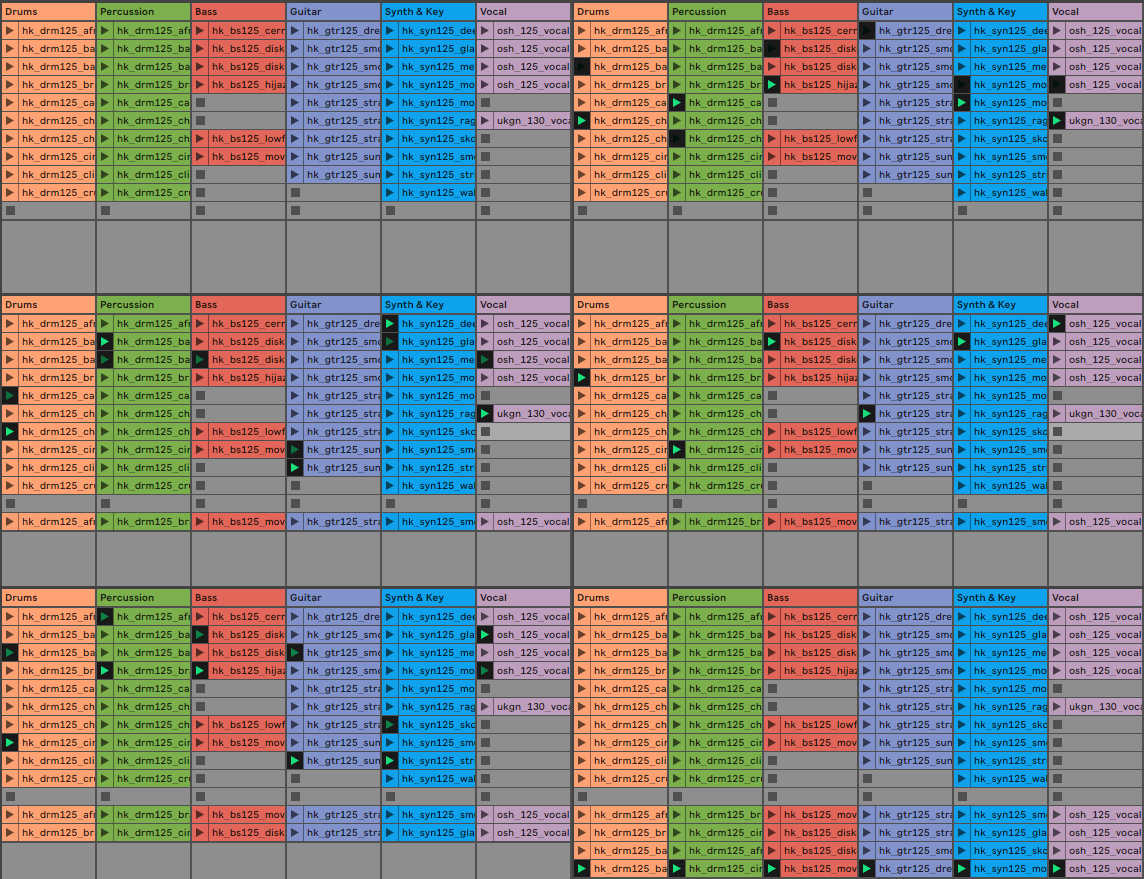
Break free from linear scene triggering with Random Launcher by killihu—a MaxforLive device that randomly launches clips across multiple tracks simultaneously, creating instant arrangement variations and spontaneous combinations.
Define your track and scene ranges, choose your randomization mode, and let controlled unpredictability transform your Session View performances.
Inside you’ll find:
- Random clip triggering across multiple tracks simultaneously
- Customizable track range (define first and last tracks)
- Customizable scene range (define top and bottom scenes)
- Two randomization modes: Standard (allows repeats) and No Repeat (cycles through all clips before repeating)
- Smart empty slot detection—only triggers actual clips
- One-click scene capture to preserve spontaneous combinations
- Get Clips memory system for efficient performance
- Mappable Random, Capture, and Get Clips buttons
- Optional mapping mode to manage undo history
- Use silent MIDI or -inf audio clips to create intentional “rest” possibilities
- Compatible with Live 10, 11, and 12
- Complete PDF reference manual included
Turn Session View into a generative performance instrument—every launch brings new possibilities.
USER GUIDE: Random Launcher 1.2
Random Launcher by Killihu
CONTROLLED CHAOS FOR SESSION VIEW—WHERE RANDOMNESS MEETS INTENTION
Break free from linear scene triggering with Random Launcher by killihu—a MaxforLive device that randomly launches clips across multiple tracks simultaneously, creating instant arrangement variations and spontaneous combinations.
Define your track and scene ranges, choose your randomization mode, and let controlled unpredictability transform your Session View performances.
Inside you’ll find:
- Random clip triggering across multiple tracks simultaneously
- Customizable track range (define first and last tracks)
- Customizable scene range (define top and bottom scenes)
- Two randomization modes: Standard (allows repeats) and No Repeat (cycles through all clips before repeating)
- Smart empty slot detection—only triggers actual clips
- One-click scene capture to preserve spontaneous combinations
- Get Clips memory system for efficient performance
- Mappable Random, Capture, and Get Clips buttons
- Optional mapping mode to manage undo history
- Use silent MIDI or -inf audio clips to create intentional “rest” possibilities
- Compatible with Live 10, 11, and 12
- Complete PDF reference manual included
Turn Session View into a generative performance instrument—every launch brings new possibilities.
USER GUIDE: Random Launcher 1.2
Buying for someone?Send a gift card →
Additional information
| MaxforLive | Control Devices |
|---|---|
| Ableton Live Compatibility | Ableton Live 10 Standard with MaxforLive, Ableton Live 10 Suite, Ableton Live 11 Standard with MaxforLive, Ableton Live 11 Suite, Ableton Live 12 Standard with MaxforLive, Ableton Live 12 Suite |
| Min. Requirements | Ableton Live 10 Standard with MaxforLive Installed or Ableton Live 10 Suite |
| OS | Mac, Windows |
PRICE: £8.00
Product reviews
No reviews yet. Be the first to review this product.
Random Launcher by Killihu
Overview & Inspiration
What if you could break free from linear scene triggering and inject spontaneity into your Session View performances? What if every launch became an unpredictable journey through your arrangement possibilities?
Random Launcher by killihu transforms Session View into a generative performance instrument, randomly triggering clips across multiple tracks simultaneously based on customizable ranges. It’s the controlled chaos your live sets have been missing—perfect for creating unexpected combinations, exploring new arrangements, or simply breaking out of creative routines.
This MaxforLive utility turns your carefully crafted Session View clips into a dynamic playground where serendipity meets intention, giving you instant access to arrangement variations you might never have discovered manually.
Features & Highlights
Simultaneous Multi-Track Random Triggering – Launch clips across multiple tracks at once, creating instant arrangement variations by randomly selecting from your defined track and scene ranges.
Flexible Range Control – Define exactly which tracks (first to last) and scenes (top to bottom) participate in random launching, giving you precise control over the scope of unpredictability.
Smart Empty Slot Handling – The device intelligently ignores empty clip slots, only triggering actual content. Use silent MIDI clips or audio clips with -inf volume to create intentional “rest” possibilities in your random selections.
Two Randomization Modes – Choose Standard mode (allows repeating the currently playing clip) or No Repeat mode (ensures each clip plays before any repeat, cycling through all clips on a track before retriggering).
One-Click Scene Capture – Instantly create a new scene at the end of your scene list containing copies of all currently playing clips, then launch it immediately without audible interruption—perfect for preserving spontaneous combinations.
Mappable Controls – Assign Random and Capture buttons to keyboard shortcuts or MIDI controllers for hands-free performance control. Optional mapping mode prevents cluttering Live’s undo history during mouse operation while maintaining key/MIDI mappings.
Get Clips Memory System – Rather than continuously analyzing Session View (which would be CPU-intensive), Random Launcher memorizes your clip layout when you click Get Clips, ensuring fast, efficient performance during live use.
How to Use
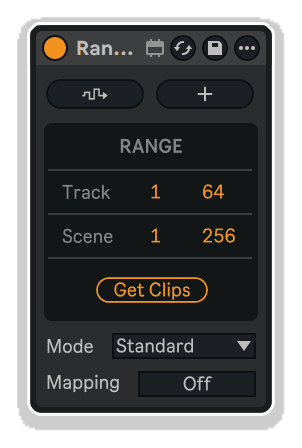
Drop Random Launcher onto any track in your Session View. Use the Track range controls to define which tracks participate (set first and last track numbers), then use the Scene controls to define the vertical range (top and bottom scene numbers).
Click the Get Clips button to memorize all existing clips within your defined range. The device will ignore empty slots and only consider actual clip content. If you add, remove, or rearrange clips within the range, click Get Clips again to update the device’s memory.
Select your randomization mode: Standard allows the currently playing clip to potentially trigger again, while No Repeat ensures all clips on each track play before any repeats. Click the Random button (or trigger via mapped key/MIDI) to launch a random combination of clips across your defined tracks and scenes.
Use the Capture button to save any combination you discover—it creates a new scene at the end of your scene list with copies of all currently playing clips, then launches it seamlessly. This lets you preserve spontaneous moments for later recall or further development.
Enable the Mapping switch to assign Random, Capture, and Get Clips buttons to keyboard shortcuts or MIDI controllers. You can then disable the Mapping switch to prevent mouse clicks from adding steps to Live’s undo history while keeping your key/MIDI mappings active.
Ideal For
- Live performers seeking spontaneity and unpredictability in Session View
- Electronic musicians exploring generative composition approaches
- DJs who want to break out of predictable set patterns
- Producers discovering new arrangement combinations through randomization
- Improvisers building dynamic, evolving performances
- Anyone frustrated by linear scene triggering limitations
What’s Included
- Random Launcher MaxforLive device (.amxd)
- Complete PDF reference manual
- Random clip triggering across multiple tracks
- Customizable track and scene range controls
- Two randomization modes: Standard and No Repeat
- One-click scene capture for preserving combinations
- Smart empty slot detection
- Mappable Random, Capture, and Get Clips buttons
- Optional mapping mode to manage undo history
- Efficient clip memory system
Requirements
- Ableton Live 10 Standard (with MaxforLive) or Ableton Live 10 Suite or higher
- Ableton Live 11/12 Standard (with MaxforLive) or Suite also supported
- MaxforLive 8+
- Compatible with both Mac and Windows
Explore More
Sequencer Ki | Control Matrix | Scene Browser | Duplicator | View All killihu Products
Frequently Asked Questions
A: Random Launcher is a MaxforLive device that randomly triggers clips across multiple tracks simultaneously in Session View, with customizable track and scene ranges, two randomization modes, scene capture functionality, and mappable controls for spontaneous, generative performances.
A: Yes, Random Launcher is a MaxforLive device.
A: MaxforLive is a platform that integrates the visual programming environment Max with Ableton Live, allowing users to create and use custom audio, MIDI, and control devices.
A: Use the track and scene range controls to exclude tracks or scenes from random triggering. Additionally, the device only triggers existing clips—empty slots are automatically ignored. To create intentional “rest” possibilities where no sound plays, use empty MIDI clips or audio clips with volume set to -inf within your range.
A: Standard mode allows the currently playing clip to potentially trigger again immediately. No Repeat mode ensures that once a clip plays, it won’t trigger again until all other clips on that track have played at least once—essentially cycling through your entire clip collection before allowing any repeats.
A: Rather than continuously monitoring Session View (which would consume CPU), Random Launcher memorizes your clip layout when you click Get Clips. This ensures fast, efficient performance. If you add, remove, or rearrange clips within your defined range, simply click Get Clips again to update the device’s memory.
A: By default, the Random and Capture buttons aren’t mappable to avoid cluttering Live’s undo history with extra steps. Enable the Mapping switch to assign these buttons to keyboard shortcuts or MIDI controllers. Once mapped, you can disable the switch—your mappings remain active, but mouse clicks won’t add undo steps, giving you the best of both worlds.
A: You can explore more of killihu’s tools and devices here: killihu
Important Information
v1.2 New features and improvements:
– Changes to ensure No Repeat mode works in all situations.
– More precise reset of No Repeat mode when using the Get Clips button.
– Modified GUI to adapt to the new rack design in Live version 12.2.
Initial Release – November 2024
Our Products are generally provided as Zip file downloads which in all cases will need to be extracted and saved to your hard drive prior to installation. Details on the different file type provided and what to do with them are below.
.alp Files – These are Ableton Live Packs and will either install directly into the Packs Section of the browser of Ableton Live or ask you to save them to your hard drive. For packs that install to the library, when you double click on them you will see a pop up window asking you to confirm that installation is ok as the files are described as “Legacy”. This is fine and you are ok to proceed, the packs are created using the format for an earlier version of Live and so remain compatible with the current version.
.amxd files – These are individual MaxforLive Devices and can be stored anywhere on your hard drive. We’d advise creating a folder for them and then adding that folder as a location within the Places section of Lives Browser.
END-USER LICENSE AGREEMENT FOR ISOTONIK STUDIOS SOFTWARE PRODUCTS.
PLEASE READ THE TERMS AND CONDITIONS OF THIS LICENSE AGREEMENT CAREFULLY BEFORE CONTINUING WITH THIS PROGRAM INSTALL.
This End-User License Agreement (referred to as “EULA”) is a legal agreement between an individual or a single entity (referred to as “LICENSEE”) and Isotonik Studios for the Isotonik Studios software product(s) which may include associated software components, media, printed materials, and “online” or electronic documentation (referred to as “SOFTWARE PRODUCT”). By installing, copying, or otherwise using the SOFTWARE PRODUCT, the LICENSEE agrees to be bound by the terms of this EULA.
This EULA represents the entire agreement concerning the program between the LICENSEE and Isotonik Studios and it supersedes any prior proposal, representation, or understanding between the parties. If the LICENSEE does not agree to the terms of this EULA, the LICENSEE should not install or use the SOFTWARE PRODUCT.
The SOFTWARE PRODUCT is protected by copyright laws and international copyright treaties, as well as other intellectual property laws and treaties. The SOFTWARE PRODUCT is licensed, not sold.
- GRANT OF LICENSE.
The SOFTWARE PRODUCT is licensed as follows:
(a) Installation and Use. Providing that the LICENSEE has paid any applicable license fees, Isotonik Studios grants the LICENSEE the right to install and use copies of the SOFTWARE PRODUCT on up to two computers in the LICENSEE’s possession that are running a validly licensed copy of the operating system for which the SOFTWARE PRODUCT was designed [e.g., Windows 10, macOS]. The computer(s) must be owned by the LICENSEE.
(b) Backup Copies. The LICENSEE may also make copies of the SOFTWARE PRODUCT as may be necessary for backup and archival purposes.
- DESCRIPTION OF OTHER RIGHTS AND LIMITATIONS.
(a) Maintenance of Copyright Notices. The LICENSEE must not remove or alter any copyright notices on any and all copies of the SOFTWARE PRODUCT.
(b) Distribution. The LICENSEE may not distribute registered copies of the SOFTWARE PRODUCT to third parties.
(c) Prohibition on Reverse Engineering, Decompilation, and Disassembly. The LICENSEE may not reverse engineer, decompile, or disassemble the SOFTWARE PRODUCT, except and only to the extent that such activity is expressly permitted by applicable law notwithstanding this limitation.
(d) Rental. The LICENSEE may not rent, lease, or lend the SOFTWARE PRODUCT.
(e) License transfer The LICENSEE may not transfer their license to the SOFTWARE PRODUCT to any third party. Any attempt to do so will be considered a violation of this EULA.
(f) Support Services. Isotonik Studios may provide the LICENSEE with support services related to the SOFTWARE PRODUCT for a period of 12 months following the date of purchase. Any supplemental software code provided to the LICENSEE as part of the Support Services shall be considered part of the SOFTWARE PRODUCT and subject to the terms and conditions of this EULA.
(g) Compliance with Applicable Laws. The LICENSEE must comply with all applicable laws regarding use of the SOFTWARE PRODUCT.
- TERMINATION Without prejudice to any other rights, Isotonik Studios may terminate this EULA if the LICENSEE fails to comply with the terms and conditions of this EULA. In such event, the LICENSEE must destroy all copies of the SOFTWARE PRODUCT in the LICENSEE’s possession.
- COPYRIGHT All title, including but not limited to copyrights, in and to the SOFTWARE PRODUCT and any copies thereof are owned by Isotonik Studios or its suppliers. All title and intellectual property rights in and to the content which may be accessed through use of the SOFTWARE PRODUCT is the property of the respective content owner and may be protected by applicable copyright or other intellectual property laws and treaties. This EULA grants the LICENSEE no rights to use such content. All rights not expressly granted are reserved by Isotonik Studios.
- NO WARRANTIES Isotonik Studios expressly disclaims any warranty for the SOFTWARE PRODUCT. The SOFTWARE PRODUCT is provided ‘As Is’ without any express or implied warranty of any kind, including but not limited to any warranties of merchantability, noninfringement, or fitness of a particular purpose. Isotonik Studios does not warrant or assume responsibility for the accuracy or completeness of any information, text, graphics, links or other items contained within the SOFTWARE PRODUCT. Isotonik Studios makes no warranties respecting any harm that may be caused by the transmission of a computer virus, worm, time bomb, logic bomb, or other such computer program. Isotonik Studios further expressly disclaims any warranty or representation to the LICENSEE or to any third party.
- LIMITATION OF LIABILITY In no event shall Isotonik Studios be liable for any damages (including, without limitation, lost profits, business interruption, or lost information) arising out of the LICENSEE’s use of or inability to use the SOFTWARE PRODUCT, even if Isotonik Studios has been advised of the possibility of such damages. In no event will Isotonik Studios be liable for loss of data or for indirect, special, incidental, consequential (including lost profit), or other damages based in contract, tort or otherwise. Isotonik Studios shall have no liability with respect to the content of the SOFTWARE PRODUCT or any part thereof, including but not limited to errors or omissions contained therein, libel, infringements of rights of publicity, privacy, trademark rights, business interruption, personal injury, loss of privacy, moral rights or the disclosure of confidential information.
More from Killihu
 ★ Popular
Frequently Bought Together