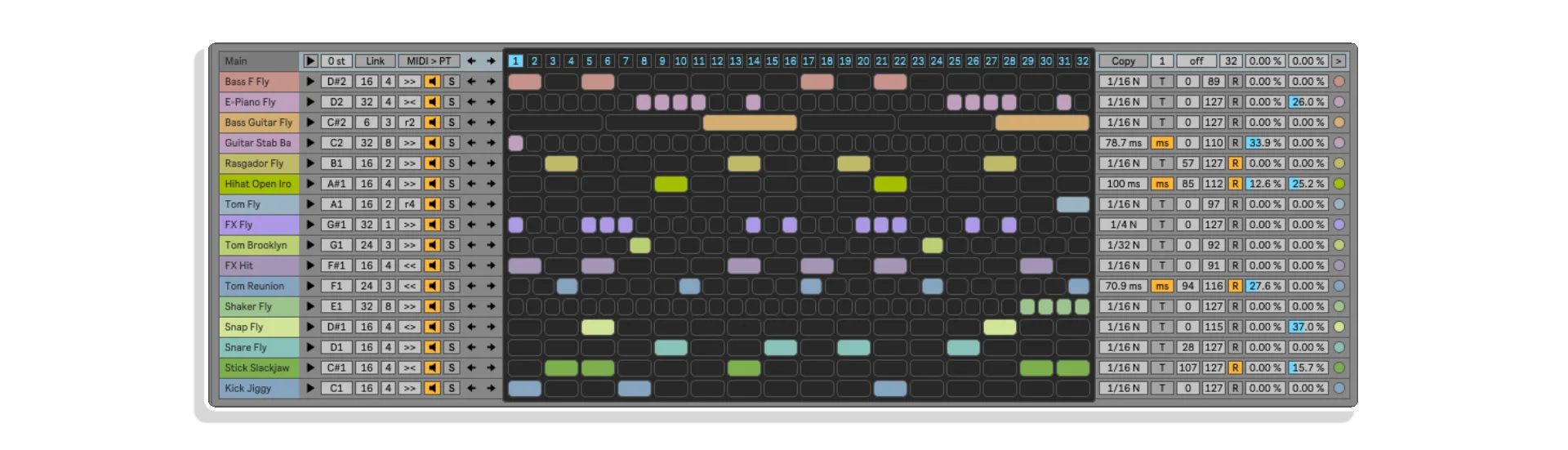
Sequencer-Ki by KILLIHU
16 TRACKS. 32 ENVELOPES. INFINITE RHYTHMIC POSSIBILITIES.
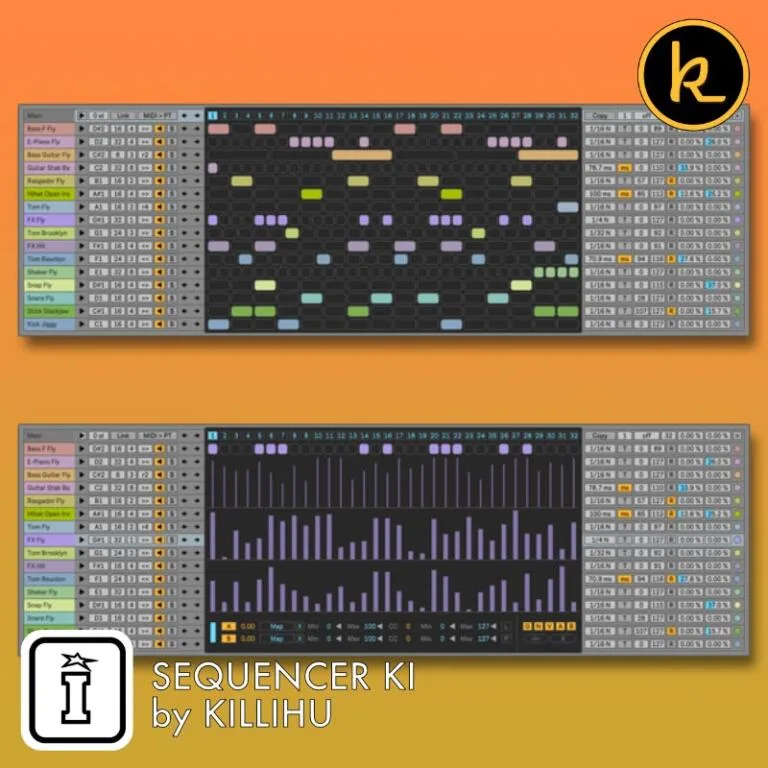
Transform Ableton Live into a generative sequencing powerhouse with Sequencer-Ki by killihu—a comprehensive 16-track step sequencer featuring independent playback modes, probability control, 32 modulation envelopes, and 32 pattern storage slots.
Build evolving polyrhythms, automate parameters in real-time, and explore generative composition with hardware-inspired workflow and deep Live integration.
Inside you’ll find:
- 16 independent sequencer tracks (2-32 steps each)
- 32 modulation envelope lanes (2 per track) with parameter mapping and MIDI CC output
- Eight playback modes per track: Forward, Backward, Ping-Pong, Ping-Pong Reversed, plus four random variations
- Per-track probability control affecting steps and envelope lanes independently
- Envelope Lane B can control per-step probability for complex rhythmic variations
- Adjustable step speed: 1-8 steps per beat including triplets
- Beat-synced or time-based note length with random variation range
- Independent velocity min/max settings with randomization
- Per-track swing with random swing amount for organic timing
- 32 pattern storage slots with MIDI note triggering (C1-G3)
- Automatic random pattern switching at definable intervals
- Selectable MIDI output notes (C-2 to G8) with master transpose
- Link mode: edit Track 1 to update all tracks simultaneously
- Copy/paste entire tracks or individual lanes (notes, velocity, envelopes)
- Parameter locking system prevents unwanted randomization
- Global and per-track randomization with selective control
- Export sequences to MIDI clips and automation
- Drum Rack name auto-import for quick setup
- Scalable interface: 100%-200% zoom in 10% increments
- Adaptive color themes matching Live’s interface
- Complete 26-page PDF reference manual
Hardware sequencer power meets Live workflow integration—where every track evolves independently.
USER GUIDE: Sequencer-Ki 1.3
Sequencer-Ki by KILLIHU
16 TRACKS. 32 ENVELOPES. INFINITE RHYTHMIC POSSIBILITIES.
Transform Ableton Live into a generative sequencing powerhouse with Sequencer-Ki by killihu—a comprehensive 16-track step sequencer featuring independent playback modes, probability control, 32 modulation envelopes, and 32 pattern storage slots.
Build evolving polyrhythms, automate parameters in real-time, and explore generative composition with hardware-inspired workflow and deep Live integration.
Inside you’ll find:
- 16 independent sequencer tracks (2-32 steps each)
- 32 modulation envelope lanes (2 per track) with parameter mapping and MIDI CC output
- Eight playback modes per track: Forward, Backward, Ping-Pong, Ping-Pong Reversed, plus four random variations
- Per-track probability control affecting steps and envelope lanes independently
- Envelope Lane B can control per-step probability for complex rhythmic variations
- Adjustable step speed: 1-8 steps per beat including triplets
- Beat-synced or time-based note length with random variation range
- Independent velocity min/max settings with randomization
- Per-track swing with random swing amount for organic timing
- 32 pattern storage slots with MIDI note triggering (C1-G3)
- Automatic random pattern switching at definable intervals
- Selectable MIDI output notes (C-2 to G8) with master transpose
- Link mode: edit Track 1 to update all tracks simultaneously
- Copy/paste entire tracks or individual lanes (notes, velocity, envelopes)
- Parameter locking system prevents unwanted randomization
- Global and per-track randomization with selective control
- Export sequences to MIDI clips and automation
- Drum Rack name auto-import for quick setup
- Scalable interface: 100%-200% zoom in 10% increments
- Adaptive color themes matching Live’s interface
- Complete 26-page PDF reference manual
Hardware sequencer power meets Live workflow integration—where every track evolves independently.
USER GUIDE: Sequencer-Ki 1.3
Additional information
| MaxforLive | Control Devices |
|---|---|
| Ableton Live Compatibility | Ableton Live 10 Standard with MaxforLive, Ableton Live 10 Suite, Ableton Live 11 Standard with MaxforLive, Ableton Live 11 Suite, Ableton Live 12 Standard with MaxforLive, Ableton Live 12 Suite |
| Min. Requirements | Ableton Live 10 Standard with MaxforLive Installed or Ableton Live 10 Suite |
| OS | Mac, Windows |
PRICE: £33.00
Product reviews
5 out of 5
1 review
How item rating is calculated
We show the average based on reviews. Only genuine reviews are displayed.
Sort by
December 2, 2025
This reviewer bought this product from our store.
The best M4L sequencer I know !
I spent quite some time searching for a M4L sequencer based on a grid, like you can find in classical drum machines. To my surprise, it was very difficult to find anything valuable (I found maybe 2-3 challengers, not more).
In few words, I didn't find anything better than the Sequencer-Ki.
I already bought some Killihu devices before, and I love them all : coding is efficient and elegant, CPU use is good, they are stable, regularly updated (this is so rare in this field that it deserves to be noticed !), ergonomy is great and these devices always fix some issues with a good and original idea.
This sequencer is as great as I expected, and you've got plenty of great features. The only thing I miss would be a way to play the patterns sequentially (instead of randomly or via midi notes).
But it's only a little issue. This device is clearly amazing !
Fully featured, stable, regularly updated, CPU efficient, clever ergonomy
I'd like to play the patterns sequentially, instead of randomly or via midi notes...
I recommend this product
Sequencer-Ki by KILLIHU
Overview & Inspiration
What if you could build evolving rhythms where every track moves independently, every parameter responds to probability, and every envelope transforms your sound in real-time?
Sequencer-Ki by killihu is a comprehensive 16-track step sequencer for Ableton Live that transcends traditional drum programming. With 32 modulation envelopes, multiple playback modes, and per-track probability control, it transforms Live into a generative composition powerhouse where rhythm, melody, and parameter automation converge.
This MaxforLive sequencer gives you the creative flexibility of hardware sequencers like the Elektron series while maintaining seamless integration with Live’s workflow—perfect for evolving techno, generative ambient, polyrhythmic experimentation, or any genre that demands intricate, evolving sequences.
Features & Highlights
16 Independent Sequencer Tracks – Each track features adjustable length (2-32 steps), speed (1-8 steps per beat including triplets), eight playback modes (forward, backward, ping-pong, four random variations), and individual probability, velocity, note length, and swing controls.
32 Modulation Envelope Lanes – Two envelope lanes per track can map to any Live parameter, output MIDI CC messages, control per-step probability, or modulate note length—all with adjustable smoothing for seamless transitions or stepped modulation.
Comprehensive Probability System – Per-track trigger probability affects steps, Envelope Lane A, and Envelope Lane B independently. Use Envelope Lane B to create per-step probability patterns for ultimate rhythmic variation control.
Eight Playback Modes Per Track – Forward, Backward, Ping-Pong, Ping-Pong Reversed, plus four intelligent random modes: fast random (tempo-independent), synced random, no-repeat random (cycles through all steps), and proximity random (triggers nearby steps).
Advanced Note Control – Beat-synced or time-based note length with random variation range, independent velocity min/max settings with randomization, per-track swing with random swing amount, and selectable MIDI output notes (C-2 to G8) with master transpose (-64 to +64).
32 Pattern Storage – Store complete sequencer states with MIDI note triggering (C1 to G3) or automatic random pattern switching at definable intervals (1/4, 1/2, 1, 2 bars) within adjustable min/max pattern ranges.
Flexible Track Management – Copy/paste entire tracks or individual lanes (notes, velocity, envelopes), lock parameters to prevent randomization, move sequences left/right, solo/mute tracks, and auto-rename from Drum Rack pad names.
Link Mode – Change parameters on Track 1 to simultaneously update all 16 tracks, streamlining global adjustments for steps, playback modes, note length, velocity, swing, and lock states.
Comprehensive Randomization – Global or per-track randomization with selective parameter locking (Grid, Notes, Velocity, Envelope A, Envelope B), plus random color generation for visual organization.
Export Capabilities – Record sequences to MIDI clips via track-to-track routing, export envelope automation as MIDI CC or Live automation data for permanent integration into arrangements.
Adaptive Interface – Scalable zoom (100% to 200% in 10% increments), on-top window mode, automatic color theme matching, and Extra view mode revealing advanced controls including random note length and probability switches.
How to Use
Drop Sequencer-Ki onto a MIDI track and click Open to display the sequencer window. Click Main to view all 16 tracks simultaneously, or select individual tracks to access their envelope lanes. Draw steps by clicking in the grid, then adjust each track’s length, speed (steps per beat), and playback mode.
Select a track to access its two envelope lanes. Click Map on either lane, then click any Live parameter to create modulation assignments. Set Min/Max ranges to define modulation depth, adjust Smoothing for glide between values, and enable MIDI CC output (1-127) for controlling external hardware or additional parameters simultaneously.
Configure probability settings to determine how often steps and envelope lanes trigger. Enable the “P” switch on Envelope Lane B to use it for per-step probability control, creating complex rhythmic variations that evolve over time.
Use note length controls to set duration in beat-synced or time-based (ms) modes. Enable random note length with the R button and set range values for organic timing variations. Adjust velocity min/max and enable random velocity for dynamic expression.
Enable Link mode to make changes on Track 1 that propagate to all tracks simultaneously—perfect for quick global adjustments. Use Track Move and Main Move to shift sequences horizontally, exploring rhythmic variations without redrawing patterns.
Store patterns by changing the pattern selector—switching patterns automatically saves your current state. Copy patterns to other slots, or enable random pattern switching with definable intervals for generative performances. Use MIDI notes (C1-G3) to trigger pattern changes remotely.
Enable Extra view to access random note length controls, probability switches for fine-tuning which parameters are affected by probability, and lock parameters (G/N/V/A/B) to protect specific data from randomization or reset operations.
Ideal For
- Techno and electronic music producers building evolving, polyrhythmic sequences
- Experimental musicians exploring generative composition approaches
- Live performers who need pattern-based MIDI control with remote triggering
- Sound designers automating complex parameter modulation schemes
- Producers seeking hardware sequencer flexibility within Live’s workflow
- Anyone frustrated by Live’s built-in MIDI sequencing limitations
What’s Included
- Sequencer-Ki MaxforLive device (.amxd)
- Complete PDF reference manual (26 pages)
- 16 independent sequencer tracks with 2-32 steps each
- 32 modulation envelope lanes (2 per track)
- Eight playback modes including four random variations
- Per-track probability, velocity, note length, and swing controls
- 32 pattern storage slots with MIDI triggering
- Parameter mapping to any Live control
- MIDI CC output (1-127) from envelope lanes
- Copy/paste tracks and individual lanes
- Global and per-track randomization with parameter locking
- Link mode for simultaneous multi-track editing
- Scalable interface (100%-200% zoom)
- Export to MIDI clips and automation
- Drum Rack name auto-import
- Adaptive color themes matching Live’s interface
Requirements
- Ableton Live 10 Standard (with MaxforLive) or Ableton Live 10 Suite
- MaxforLive 8+
- Compatible with both Mac and Windows
- Note: Computers meeting minimum Live 10 requirements may experience drawing delays on envelope lanes
Explore More
Mapper Ki | Control Matrix | Random Launcher | InScale | View All killihu Products
Frequently Asked Questions
A: Sequencer-Ki is a comprehensive 16-track MaxforLive step sequencer featuring independent playback modes, 32 modulation envelopes, per-track probability control, 32 pattern storage, and deep parameter automation—transforming Ableton Live into a generative composition powerhouse.
A: Yes, Sequencer-Ki is a MaxforLive device.
A: MaxforLive is a platform that integrates the visual programming environment Max with Ableton Live, allowing users to create and use custom audio, MIDI, and control devices.
A: Each of the 16 tracks has two envelope lanes (Envelope Lane A and B). These can map to any automatable Live parameter, send MIDI CC messages (1-127), control note length, or control per-step probability. Envelope lanes feature adjustable smoothing (0-1), independent Min/Max ranges, and can be copied between tracks. You can map parameters and send MIDI CC simultaneously from the same envelope.
A: Each track offers eight playback modes: Forward (standard progression), Backward (reverse), Ping-Pong (forward then backward), Ping-Pong Reversed (backward then forward), Fast Random (tempo-independent), Synced Random (tempo-matched), No Repeat Random (cycles through all steps before repeating), and Proximity Random (triggers steps near the last triggered step).
A: Each track has adjustable trigger probability (0-100%) that can independently affect steps, Envelope Lane A, and Envelope Lane B via three toggle switches. Additionally, enabling the “P” switch causes Envelope Lane B to control per-step probability, allowing you to draw complex probability patterns where different steps have different trigger chances.
A: Yes, each track outputs a selectable MIDI note (C-2 to G8), perfect for triggering hardware drum machines, samplers, or individual drum pads. The master transpose function (-64 to +64 semitones) shifts all tracks simultaneously, and envelope lanes can send MIDI CC for controlling external parameters.
A: Create a new MIDI track in Live, set its input to the track containing Sequencer-Ki (Post FX), enable monitoring, and press record. This captures both note sequences and MIDI CC automation. Envelope automation can be exported as MIDI CC and then copied to Live’s automation lanes for permanent integration.
A: You can explore more of killihu’s tools and devices here: killihu
Important Information
v1.3.1 Bugfixes:
– Previously, the background color did not automatically match the Live color theme.
v1.3 New features and improvements:
– Modified GUI to adapt to the new rack design in Live version 12.2, does not change the operation of the device. You can rename the AMXD file to the same name as the previous version, for compatibility with older projects.
v1.2.2 Bugfixes:
- Fixed a bug introduced in the 11.3.20 Live update that caused the velocity lane to not have the correct length in some cases.
v1.2.1 Bugfixes:
- Fixed a bug introduced in the 11.2.10 Live update that caused the colors of tracks, step lanes, and automation lanes to not display.
v1.2 New features and improvements:
- The trigger probability also affects envelope lanes.
- More steps per beat (3 and 6) to be able to play triplets.
- 3 new random play modes.
- Smooth automation. It is now possible to smooth the values sent by the envelope lanes.
- Solo button for all tracks.
- Muting a track now sends a note off message.
- Option to color all tracks to the same color.
- The rack button to open the sequencer is now mappable.
- When the link button is enabled, changes to the first track also control the mute buttons, solo buttons, and probability switches for all tracks.
- Updated PDF manual.
v1.2 Bugfixes:
- Fixed a bug that caused the mapping buttons to appear with a black background color when reopening a project.
- Fixed some internal color references to make plugin colors better match Ableton Live custom color themes.
v1.1 New features and improvements:
- Probability per step. Random adjustment per track and individual adjustment for each step using envelope lane B.
- Different playback modes per track: Forward / Backward / Ping-Pong / Ping-Pong Reversed / Random.
- Copy/Paste data between tracks (notes and envelopes). Envelopes can be copied and pasted into any other envelope.
- Resize sequencer window. Zoom levels: 100% / 110% / 120% / 130% / 140% / 150% / 160% / 170% / 180% / 190% / 200%.
- Auto-rename tracks based on Ableton Live Drum Rack names.
- Random Note Length between 0 ms and 1000 ms.
- The Link button allows changing more parameters at the same time.
- Clearer indication of which parameters are locked.
v1.1 Bugfixes:
- Fixed a bug that made the Swing control at 100% equal to 0%.
- Fixed the height of some controls when automating them with Ableton Live automation.
v1.0 – Initial release
Our Products are generally provided as Zip file downloads which in all cases will need to be extracted and saved to your hard drive prior to installation. Details on the different file type provided and what to do with them are below.
.alp Files – These are Ableton Live Packs and will either install directly into the Packs Section of the browser of Ableton Live or ask you to save them to your hard drive. For packs that install to the library, when you double click on them you will see a pop up window asking you to confirm that installation is ok as the files are described as “Legacy”. This is fine and you are ok to proceed, the packs are created using the format for an earlier version of Live and so remain compatible with the current version.
.amxd files – These are individual MaxforLive Devices and can be stored anywhere on your hard drive. We’d advise creating a folder for them and then adding that folder as a location within the Places section of Lives Browser.
END-USER LICENSE AGREEMENT FOR ISOTONIK STUDIOS SOFTWARE PRODUCTS.
PLEASE READ THE TERMS AND CONDITIONS OF THIS LICENSE AGREEMENT CAREFULLY BEFORE CONTINUING WITH THIS PROGRAM INSTALL.
This End-User License Agreement (referred to as “EULA”) is a legal agreement between an individual or a single entity (referred to as “LICENSEE”) and Isotonik Studios for the Isotonik Studios software product(s) which may include associated software components, media, printed materials, and “online” or electronic documentation (referred to as “SOFTWARE PRODUCT”). By installing, copying, or otherwise using the SOFTWARE PRODUCT, the LICENSEE agrees to be bound by the terms of this EULA.
This EULA represents the entire agreement concerning the program between the LICENSEE and Isotonik Studios and it supersedes any prior proposal, representation, or understanding between the parties. If the LICENSEE does not agree to the terms of this EULA, the LICENSEE should not install or use the SOFTWARE PRODUCT.
The SOFTWARE PRODUCT is protected by copyright laws and international copyright treaties, as well as other intellectual property laws and treaties. The SOFTWARE PRODUCT is licensed, not sold.
- GRANT OF LICENSE.
The SOFTWARE PRODUCT is licensed as follows:
(a) Installation and Use. Providing that the LICENSEE has paid any applicable license fees, Isotonik Studios grants the LICENSEE the right to install and use copies of the SOFTWARE PRODUCT on up to two computers in the LICENSEE’s possession that are running a validly licensed copy of the operating system for which the SOFTWARE PRODUCT was designed [e.g., Windows 10, macOS]. The computer(s) must be owned by the LICENSEE.
(b) Backup Copies. The LICENSEE may also make copies of the SOFTWARE PRODUCT as may be necessary for backup and archival purposes.
- DESCRIPTION OF OTHER RIGHTS AND LIMITATIONS.
(a) Maintenance of Copyright Notices. The LICENSEE must not remove or alter any copyright notices on any and all copies of the SOFTWARE PRODUCT.
(b) Distribution. The LICENSEE may not distribute registered copies of the SOFTWARE PRODUCT to third parties.
(c) Prohibition on Reverse Engineering, Decompilation, and Disassembly. The LICENSEE may not reverse engineer, decompile, or disassemble the SOFTWARE PRODUCT, except and only to the extent that such activity is expressly permitted by applicable law notwithstanding this limitation.
(d) Rental. The LICENSEE may not rent, lease, or lend the SOFTWARE PRODUCT.
(e) License transfer The LICENSEE may not transfer their license to the SOFTWARE PRODUCT to any third party. Any attempt to do so will be considered a violation of this EULA.
(f) Support Services. Isotonik Studios may provide the LICENSEE with support services related to the SOFTWARE PRODUCT for a period of 12 months following the date of purchase. Any supplemental software code provided to the LICENSEE as part of the Support Services shall be considered part of the SOFTWARE PRODUCT and subject to the terms and conditions of this EULA.
(g) Compliance with Applicable Laws. The LICENSEE must comply with all applicable laws regarding use of the SOFTWARE PRODUCT.
- TERMINATION Without prejudice to any other rights, Isotonik Studios may terminate this EULA if the LICENSEE fails to comply with the terms and conditions of this EULA. In such event, the LICENSEE must destroy all copies of the SOFTWARE PRODUCT in the LICENSEE’s possession.
- COPYRIGHT All title, including but not limited to copyrights, in and to the SOFTWARE PRODUCT and any copies thereof are owned by Isotonik Studios or its suppliers. All title and intellectual property rights in and to the content which may be accessed through use of the SOFTWARE PRODUCT is the property of the respective content owner and may be protected by applicable copyright or other intellectual property laws and treaties. This EULA grants the LICENSEE no rights to use such content. All rights not expressly granted are reserved by Isotonik Studios.
- NO WARRANTIES Isotonik Studios expressly disclaims any warranty for the SOFTWARE PRODUCT. The SOFTWARE PRODUCT is provided ‘As Is’ without any express or implied warranty of any kind, including but not limited to any warranties of merchantability, noninfringement, or fitness of a particular purpose. Isotonik Studios does not warrant or assume responsibility for the accuracy or completeness of any information, text, graphics, links or other items contained within the SOFTWARE PRODUCT. Isotonik Studios makes no warranties respecting any harm that may be caused by the transmission of a computer virus, worm, time bomb, logic bomb, or other such computer program. Isotonik Studios further expressly disclaims any warranty or representation to the LICENSEE or to any third party.
- LIMITATION OF LIABILITY In no event shall Isotonik Studios be liable for any damages (including, without limitation, lost profits, business interruption, or lost information) arising out of the LICENSEE’s use of or inability to use the SOFTWARE PRODUCT, even if Isotonik Studios has been advised of the possibility of such damages. In no event will Isotonik Studios be liable for loss of data or for indirect, special, incidental, consequential (including lost profit), or other damages based in contract, tort or otherwise. Isotonik Studios shall have no liability with respect to the content of the SOFTWARE PRODUCT or any part thereof, including but not limited to errors or omissions contained therein, libel, infringements of rights of publicity, privacy, trademark rights, business interruption, personal injury, loss of privacy, moral rights or the disclosure of confidential information.
More from Killihu
 ★ Popular
Frequently Bought Together