Subtraction Engine V2 by Manifest Audio
ADDITION BY SUBTRACTION – UNLOCK INFINITE VARIATIONS THROUGH STRATEGIC MUTING
MAKE YOUR OWN TRIPLE PACK: Buy any three or more Manifest Audio products at the same time and get a 20% Discount (automatically applied at checkout)
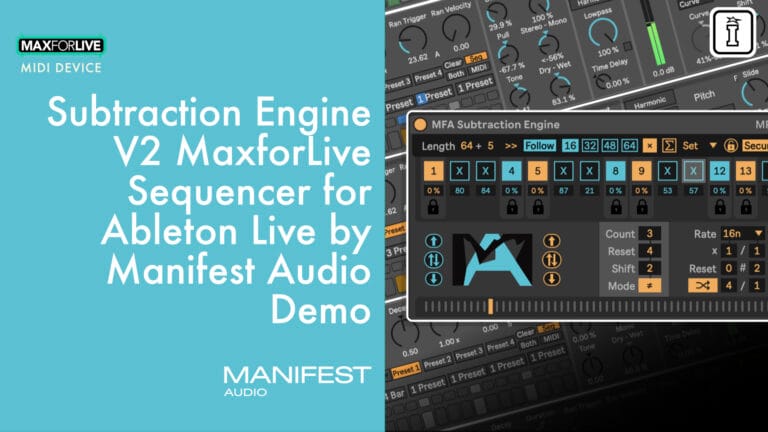
Sometimes the most powerful creative tool isn’t what you add—it’s what you take away. Subtraction Engine by Ableton Certified Trainer Noah Pred is a generative MaxforLive MIDI performance effect that transforms existing sequences by strategically muting steps, creating instant variations, building tension, and unlocking hidden rhythmic and melodic possibilities.
Feed any MIDI into Subtraction Engine and sculpt it in real-time with up to 64-step control, manual or automatic randomization, and sophisticated probability controls. Lock certain steps to keep them steady while everything else evolves around them. Generate compelling patterns using Euclidean or count-based programming, then randomize from there—or reset back to your starting point whenever you want.
Inside you’ll find:
- Up to 64-step mute sequencer with polyrhythmic options
- Manual Dice and Auto Dice randomization modes
- Global and individual step probability controls
- Lock function to exempt specific steps from randomization
- Euclidean and count-based pattern generation
- Weighted randomization with directional bias
- Multiple play directions: forward, reverse, circular, randomized
- X-Relay integration for routing muted notes anywhere in your set
- 16 included presets for instant inspiration
- Full Info View annotations and comprehensive manual
Perfect for electronic music producers, live performers, and anyone who wants to add evolving variation to MIDI sequences without pre-programming every detail. Less is more—and Subtraction Engine proves it.
Requires Ableton Live Suite 12.1.x or higher with MaxforLive 9.0.x or higher (Live 11 compatible).
USER GUIDE: MFA Subtraction Engine v2 License + Manual
Sale
Subtraction Engine V2 by Manifest Audio
ADDITION BY SUBTRACTION – UNLOCK INFINITE VARIATIONS THROUGH STRATEGIC MUTING
MAKE YOUR OWN TRIPLE PACK: Buy any three or more Manifest Audio products at the same time and get a 20% Discount (automatically applied at checkout)
Sometimes the most powerful creative tool isn’t what you add—it’s what you take away. Subtraction Engine by Ableton Certified Trainer Noah Pred is a generative MaxforLive MIDI performance effect that transforms existing sequences by strategically muting steps, creating instant variations, building tension, and unlocking hidden rhythmic and melodic possibilities.
Feed any MIDI into Subtraction Engine and sculpt it in real-time with up to 64-step control, manual or automatic randomization, and sophisticated probability controls. Lock certain steps to keep them steady while everything else evolves around them. Generate compelling patterns using Euclidean or count-based programming, then randomize from there—or reset back to your starting point whenever you want.
Inside you’ll find:
- Up to 64-step mute sequencer with polyrhythmic options
- Manual Dice and Auto Dice randomization modes
- Global and individual step probability controls
- Lock function to exempt specific steps from randomization
- Euclidean and count-based pattern generation
- Weighted randomization with directional bias
- Multiple play directions: forward, reverse, circular, randomized
- X-Relay integration for routing muted notes anywhere in your set
- 16 included presets for instant inspiration
- Full Info View annotations and comprehensive manual
Perfect for electronic music producers, live performers, and anyone who wants to add evolving variation to MIDI sequences without pre-programming every detail. Less is more—and Subtraction Engine proves it.
Requires Ableton Live Suite 12.1.x or higher with MaxforLive 9.0.x or higher (Live 11 compatible).
USER GUIDE: MFA Subtraction Engine v2 License + Manual
Additional information
| MaxforLive | MIDI Devices |
|---|---|
| Ableton Live Compatibility | Ableton Live 12 Standard with MaxforLive, Ableton Live 12 Suite |
PRICE: Original price was: £18.00.£14.00Current price is: £14.00.
Product reviews
No reviews yet. Be the first to review this product.
Subtraction Engine V2 by Manifest Audio
Overview & Inspiration
Less is more. Addition by subtraction. Sometimes the path to creative breakthrough isn’t adding more, it’s strategically removing what doesn’t serve the groove.
Subtraction Engine is a generative MaxforLive MIDI performance effect created by Ableton Certified Trainer Noah Pred that transforms the way you approach rhythm and melody. This isn’t about building sequences from scratch, it’s about sculpting them from existing material, muting specific steps to create variations, build tension, and unlock new expressions hidden within your MIDI.
Feed any MIDI sequence into Subtraction Engine and watch it come alive with infinite permutations. Whether you’re working with drums, melodies, or harmonies, this device gives you surgical control over which notes pass through and which get muted, manually or automatically.
Features & Highlights
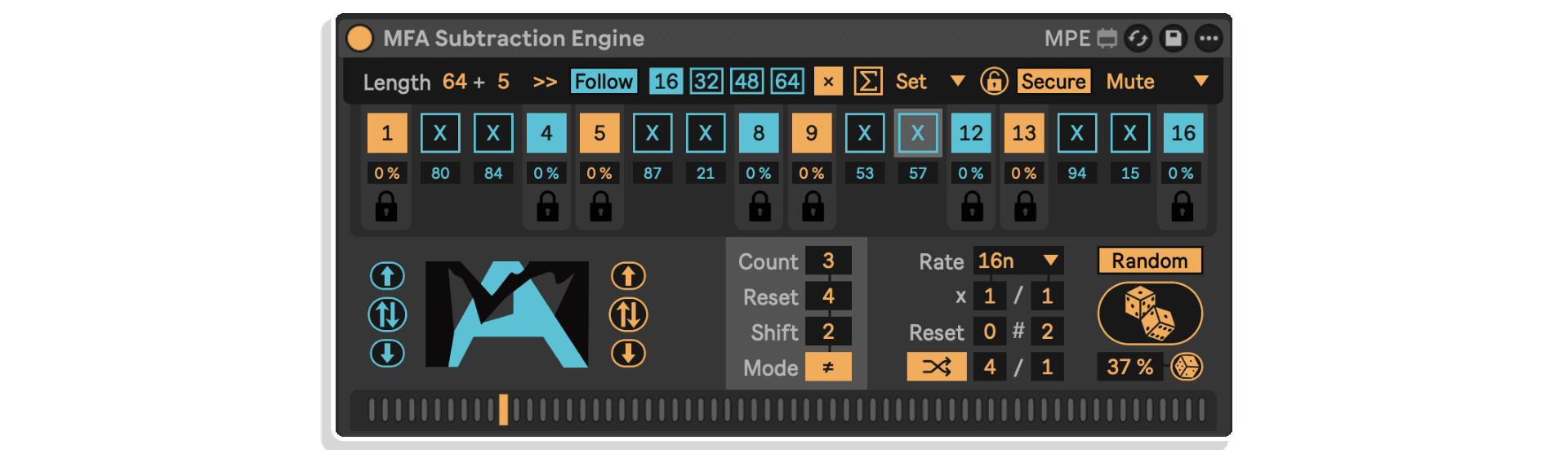
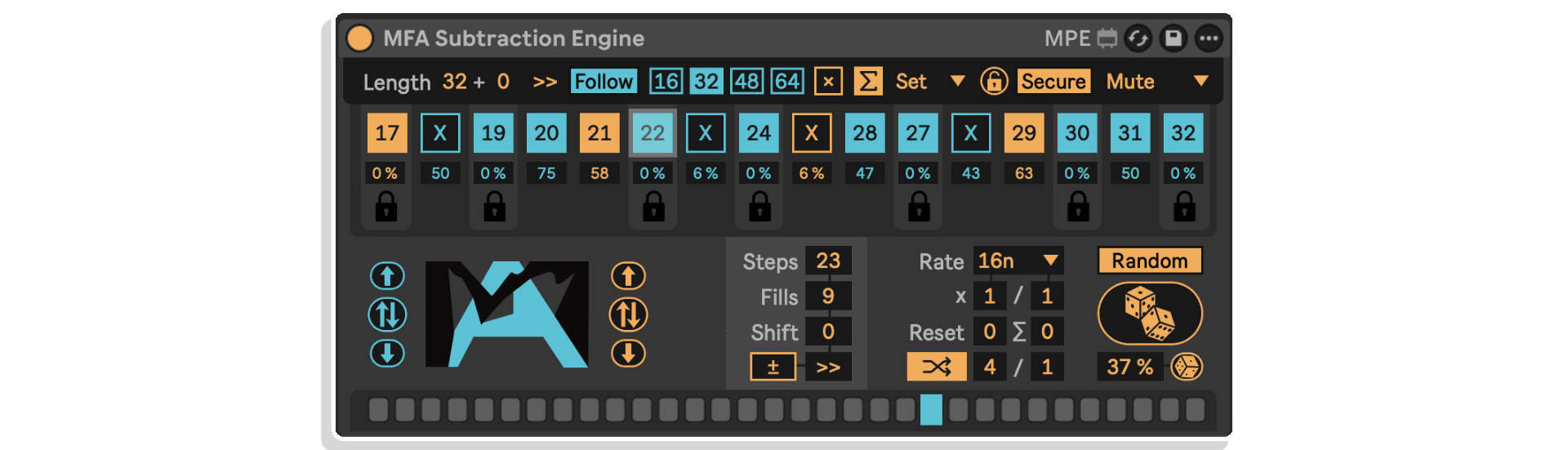
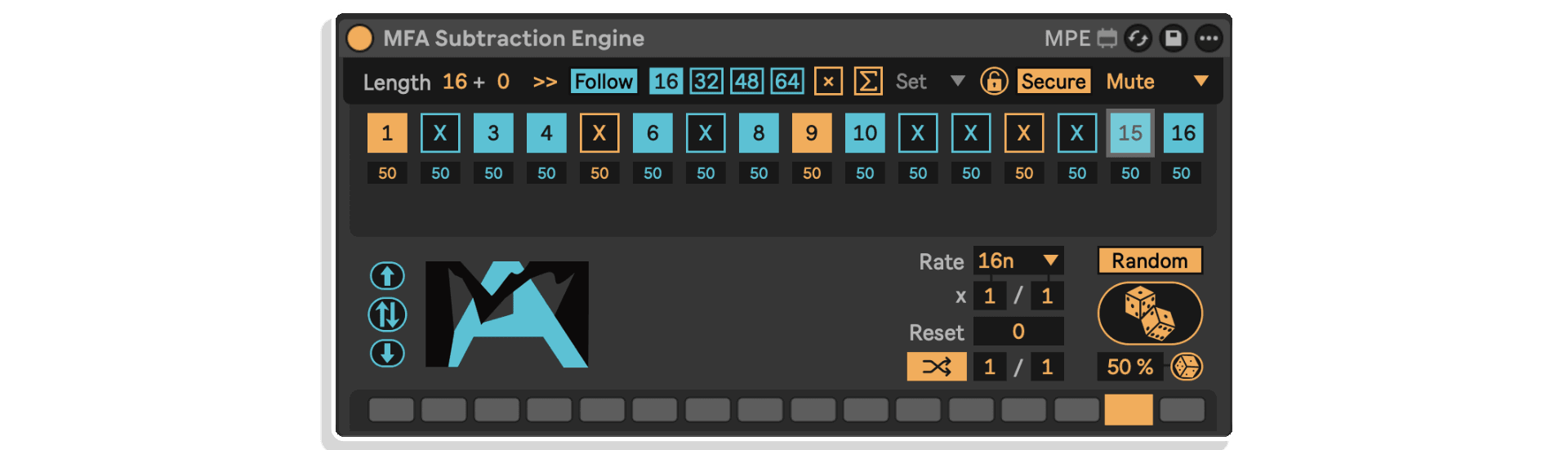
Up to 64-Step Control – Work with patterns from 1 to 64 steps, with polyrhythmic options that let shorter cycles repeat within longer ones for evolving, dynamic sequences.
Manual & Auto Dice Randomization – Click the Dice button to instantly generate new step mute patterns, or enable Auto Dice mode to automatically randomize at specified intervals (measured in bars). Perfect for continuous evolution in live performance or studio experimentation.
Global & Individual Probability Control – The Global Probability Amount slider controls randomization likelihood for all steps simultaneously. But you can also set individual step probabilities—giving you precise control over which steps are more or less likely to change.
Lock Function – Set any step’s probability to 0% to lock it, exempting it from randomization entirely. This lets you anchor certain rhythmic or melodic elements while everything else shifts around them. Perfect for keeping kick drums steady while hi-hats evolve, or locking chord roots while upper voices vary.
Euclidean & Count-Based Programming – Generate compelling starting points using Euclidean sequencing or count-based patterns. Set the number of steps, fills, shifts, and inversions, then randomize from there, or reset back to your Euclidean foundation at any time.
Weighted Randomization Modes – Choose between Random mode (where percentages determine likelihood of change) or Weighted mode (where higher values bias steps toward “on” and lower values bias toward “off”). This gives you directional control over how randomization affects your patterns.
Multiple Play Directions – Select forward, reverse, circular, or randomized playback to completely transform how your sequence unfolds over time.
X-Relay Integration – Route muted steps anywhere in your Live set using the included X-Relay utility. Instead of simply silencing notes, send them to different instruments, effects, or MIDI destinations for complex layering possibilities.
Secure & Override Modes – In Secure mode, locked steps remain untouched during global randomization. Switch to Override mode to force all steps—even locked ones—to respond to the Global Randomization Amount slider.
Visual Playhead Indicator – Always know where you are in the 64-step cycle with the real-time playhead display that tracks Live’s transport.
How to Use
Place Subtraction Engine on any MIDI track before your instrument. It processes incoming MIDI, so make sure a MIDI clip is playing or generative MIDI devices are feeding it notes.
Start by clicking individual step toggles to manually design a mute pattern, or click the Dice button to instantly generate a random variation. Use the Global Probability slider to control how likely steps are to flip when randomized. Reduce individual step probabilities to 0% to lock them in place.
Enable Auto Dice mode to automatically generate new patterns at specified intervals, perfect for live performance or creating evolving arrangements. Experiment with Euclidean and Count modes to quickly generate musical starting points, then randomize from there.
Adjust the pattern length (up to 64 steps), set polyrhythmic rates, choose play direction, and route muted notes via X-Relay for maximum creative flexibility. Save your favorite configurations as presets for instant recall.
Ideal For
- Electronic music producers working with techno, house, ambient, IDM, and experimental genres
- Live performers who want dynamic, evolving sequences without pre-programming every variation
- Producers experiencing creative blocks, instant inspiration through controlled randomization
- Sound designers exploring generative and algorithmic composition techniques
- Anyone who wants to add variation, tension, and surprise to existing MIDI sequences
- Modular-minded musicians who appreciate Euclidean sequencing and polyrhythmic patterns
What’s Included
- MFA Subtraction Engine.amxd MaxforLive MIDI Effect device
- 16 included .adv presets for instant creative starting points
- X-Relay utility for advanced MIDI routing of muted steps
- Full Info View annotations for parameter guidance
- Comprehensive PDF manual with visual guides and FAQ
Requirements
- Ableton Live Suite 12.1.x or higher (Live 11 compatible but Live 12 recommended)
- MaxforLive 9.0.x or higher
- Mac or Windows operating system
MAKE YOUR OWN TRIPLE PACK: Buy any three or more Manifest Audio products at the same time and get a 20% Discount (automatically applied at checkout)
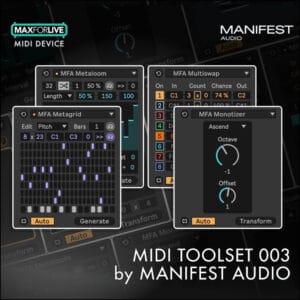
MIDI Toolset 001 | MIDI Toolset 002 | MIDI Toolset 003 | View All Manifest Audio Products
Frequently Asked Questions
A: Subtraction Engine is a generative MaxforLive MIDI performance effect created by Ableton Certified Trainer Noah Pred that mutes steps of incoming MIDI sequences to create variations, build tension, and experiment with different rhythmic and melodic expressions. It features up to 64-step control, manual and automatic randomization, Euclidean sequencing, and sophisticated probability controls.
A: Yes, Subtraction Engine is a MaxforLive device.
A: MaxforLive is a platform that integrates the visual programming environment Max with Ableton Live, allowing users to create and use custom audio, MIDI, and control devices.
A:
- Ableton Live Suite 12.1.x or higher (Live 11 compatible but Live 12 recommended)
- MaxforLive 9.0.x or higher
- Mac or Windows operating system
A: No, Subtraction Engine processes existing MIDI rather than generating it. You’ll need to trigger a MIDI clip or use generative MIDI devices before Subtraction Engine in your signal chain so it has incoming MIDI to process.
A: You can explore more of Manifest Audio’s tools and devices here: Manifest Audio
Important Information
V2 – Released November 2025
Our Products are generally provided as Zip file downloads which in all cases will need to be extracted and saved to your hard drive prior to installation. Details on the different file type provided and what to do with them are below.
.alp Files – These are Ableton Live Packs and will either install directly into the Packs Section of the browser of Ableton Live or ask you to save them to your hard drive. For packs that install to the library, when you double click on them you will see a pop up window asking you to confirm that installation is ok as the files are described as “Legacy”. This is fine and you are ok to proceed, the packs are created using the format for an earlier version of Live and so remain compatible with the current version.
.amxd files – These are individual MaxforLive Devices and can be stored anywhere on your hard drive. We’d advise creating a folder for them and then adding that folder as a location within the Places section of Lives Browser.
END-USER LICENSE AGREEMENT FOR ISOTONIK STUDIOS SOFTWARE PRODUCTS.
PLEASE READ THE TERMS AND CONDITIONS OF THIS LICENSE AGREEMENT CAREFULLY BEFORE CONTINUING WITH THIS PROGRAM INSTALL.
This End-User License Agreement (referred to as “EULA”) is a legal agreement between an individual or a single entity (referred to as “LICENSEE”) and Isotonik Studios for the Isotonik Studios software product(s) which may include associated software components, media, printed materials, and “online” or electronic documentation (referred to as “SOFTWARE PRODUCT”). By installing, copying, or otherwise using the SOFTWARE PRODUCT, the LICENSEE agrees to be bound by the terms of this EULA.
This EULA represents the entire agreement concerning the program between the LICENSEE and Isotonik Studios and it supersedes any prior proposal, representation, or understanding between the parties. If the LICENSEE does not agree to the terms of this EULA, the LICENSEE should not install or use the SOFTWARE PRODUCT.
The SOFTWARE PRODUCT is protected by copyright laws and international copyright treaties, as well as other intellectual property laws and treaties. The SOFTWARE PRODUCT is licensed, not sold.
- GRANT OF LICENSE.
The SOFTWARE PRODUCT is licensed as follows:
(a) Installation and Use. Providing that the LICENSEE has paid any applicable license fees, Isotonik Studios grants the LICENSEE the right to install and use copies of the SOFTWARE PRODUCT on up to two computers in the LICENSEE’s possession that are running a validly licensed copy of the operating system for which the SOFTWARE PRODUCT was designed [e.g., Windows 10, macOS]. The computer(s) must be owned by the LICENSEE.
(b) Backup Copies. The LICENSEE may also make copies of the SOFTWARE PRODUCT as may be necessary for backup and archival purposes.
- DESCRIPTION OF OTHER RIGHTS AND LIMITATIONS.
(a) Maintenance of Copyright Notices. The LICENSEE must not remove or alter any copyright notices on any and all copies of the SOFTWARE PRODUCT.
(b) Distribution. The LICENSEE may not distribute registered copies of the SOFTWARE PRODUCT to third parties.
(c) Prohibition on Reverse Engineering, Decompilation, and Disassembly. The LICENSEE may not reverse engineer, decompile, or disassemble the SOFTWARE PRODUCT, except and only to the extent that such activity is expressly permitted by applicable law notwithstanding this limitation.
(d) Rental. The LICENSEE may not rent, lease, or lend the SOFTWARE PRODUCT.
(e) License transfer The LICENSEE may not transfer their license to the SOFTWARE PRODUCT to any third party. Any attempt to do so will be considered a violation of this EULA.
(f) Support Services. Isotonik Studios may provide the LICENSEE with support services related to the SOFTWARE PRODUCT for a period of 12 months following the date of purchase. Any supplemental software code provided to the LICENSEE as part of the Support Services shall be considered part of the SOFTWARE PRODUCT and subject to the terms and conditions of this EULA.
(g) Compliance with Applicable Laws. The LICENSEE must comply with all applicable laws regarding use of the SOFTWARE PRODUCT.
- TERMINATION Without prejudice to any other rights, Isotonik Studios may terminate this EULA if the LICENSEE fails to comply with the terms and conditions of this EULA. In such event, the LICENSEE must destroy all copies of the SOFTWARE PRODUCT in the LICENSEE’s possession.
- COPYRIGHT All title, including but not limited to copyrights, in and to the SOFTWARE PRODUCT and any copies thereof are owned by Isotonik Studios or its suppliers. All title and intellectual property rights in and to the content which may be accessed through use of the SOFTWARE PRODUCT is the property of the respective content owner and may be protected by applicable copyright or other intellectual property laws and treaties. This EULA grants the LICENSEE no rights to use such content. All rights not expressly granted are reserved by Isotonik Studios.
- NO WARRANTIES Isotonik Studios expressly disclaims any warranty for the SOFTWARE PRODUCT. The SOFTWARE PRODUCT is provided ‘As Is’ without any express or implied warranty of any kind, including but not limited to any warranties of merchantability, noninfringement, or fitness of a particular purpose. Isotonik Studios does not warrant or assume responsibility for the accuracy or completeness of any information, text, graphics, links or other items contained within the SOFTWARE PRODUCT. Isotonik Studios makes no warranties respecting any harm that may be caused by the transmission of a computer virus, worm, time bomb, logic bomb, or other such computer program. Isotonik Studios further expressly disclaims any warranty or representation to the LICENSEE or to any third party.
- LIMITATION OF LIABILITY In no event shall Isotonik Studios be liable for any damages (including, without limitation, lost profits, business interruption, or lost information) arising out of the LICENSEE’s use of or inability to use the SOFTWARE PRODUCT, even if Isotonik Studios has been advised of the possibility of such damages. In no event will Isotonik Studios be liable for loss of data or for indirect, special, incidental, consequential (including lost profit), or other damages based in contract, tort or otherwise. Isotonik Studios shall have no liability with respect to the content of the SOFTWARE PRODUCT or any part thereof, including but not limited to errors or omissions contained therein, libel, infringements of rights of publicity, privacy, trademark rights, business interruption, personal injury, loss of privacy, moral rights or the disclosure of confidential information.