The Console 40 by Monomono brings SSL 4000-modelled EQs, compression, and saturation to the Ableton Push 3 standalone as Max for Live devices. Here is an honest, unsponsored walkthrough of the full bundle in action.
One of the Push 3 standalone’s biggest limitations is its inability to load third-party VST plug-ins, which puts classic analogue console sounds firmly out of reach. Console 40 by Monomono closes that gap with a set of Max for Live devices modelled on the SSL 4000 console, covering EQ, dynamics, saturation, and the legendary G Bus compressor — all confirmed to run on the Push 3 standalone without crackles or CPU drama.
What it does
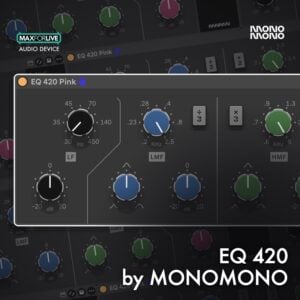
Console 40 is a bundle of five Max for Live modules, each targeting a different stage of the mixing chain. The EQ devices — the 424 black, 420 pink, and 422 pink — are modelled on the SSL 4000’s characteristic EQ circuit, with four bands, switchable bell and shelf filters, and a high-pass filter. Monomono have added their own touches on top: a high-pass resonance dial that produces a usable bass boost not found on the original hardware, and a mid-side mode on both the 424 black and 422 pink that lets you EQ the stereo field independently.
The Dynamic 432 combines an SSL-style compressor with an expander that functions as a gate, adding transient accent and punch to drums and percussion. The Bus 442 saturation module is deliberately stripped back — a single bias dial and a clip switch — generating primarily second-order harmonics that add warmth and body to bass, vocals, and the full mix without muddying the picture. Rounding things off is the G Bus compressor, complete with threshold, ratio, attack, release, sidechain low-frequency filtering, a high shelf, and its own bias and clip controls for additional harmonic colour on the master bus.
All five devices are built for CPU efficiency, which matters enormously on the Push 3 standalone’s modest processor. The EQ modules all run at under half a millisecond of latency, making them viable for tracking live instruments through the Push 3’s built-in audio interface as well as mixing.
How to use it
- Loading devices quickly: In the Push 3 device browser, go to Filter, scroll to Creator, and select User. This filters out all built-in Ableton devices and shows only the Max for Live devices you have installed, including the Console 40 modules.
- EQ 424 black on drums: Open the Filters section and sweep the high-pass frequency to clean up low-end rumble. Raise the HP resonance dial to introduce a controlled bass boost at the cutoff point. Use the Lows band with bell or shelf to shape the low end, the low-mid and high-mid bands for tonal detail, and the Highs band for air. Switch to mid-side mode to treat the centre and sides of stereo sources separately.
- EQ 422 pink on keys and stereo sources: Select the 422 rather than the 420 if you need the filter section and mid-side mode. Engage mid-side, monitor the sides in isolation, trim low-end build-up from the sides, and add a small high-frequency lift before blending back in.
- Dynamic 432 on the drum bus: Set the compressor threshold until gain reduction is visible, then add makeup gain for consistent level. Move to the expander section and raise the threshold and range to accent transients, then pull the release down to taste. Use the output control to compensate for any overall volume increase.
- Bus 442 saturation on individual tracks and the master: Place it on the drum bus, bass, or any channel that needs warmth. Raise the Bias dial gradually to increase harmonic content. Engage Clip to introduce soft clipping when peaks hit the ceiling, adding crunch without hard distortion.
- G Bus compressor on the master bus: Set threshold and ratio for mild gain reduction — typically 2 to 4 dB — and adjust attack and release to taste. Use the sidechain low-frequency filter to prevent kick energy from pumping the compressor. Add Bias and Clip sparingly for extra cohesion and crunch on the final mix.
Why it matters
The Push 3 standalone is a capable self-contained instrument, but the absence of VST support has always meant compromising on mix processing. Console 40 removes that compromise for anyone who wants the SSL 4000 character in their workflow. The combination of low CPU overhead, sub-millisecond latency, and a complete signal chain from EQ through to master bus compression means a full mix session on the Push 3 standalone is now a practical proposition rather than a workaround. For producers who want to mix away from a computer screen and work with hands-on hardware, this bundle makes that workflow genuinely viable.