Brian Funk shows how to capture any real-world space as an impulse response and load it straight into Ableton’s Hybrid Reverb — turning claps, car boots, and cathedrals into unique reverb sounds.
Every room, stairwell, and cathedral has a sound all of its own. In this Music Production Club live session, Ableton Certified Trainer Brian Funk walks through how to capture those spaces as impulse responses and load them directly into Ableton Live’s Hybrid Reverb — giving you reverbs that no preset library can replicate.
What It Does
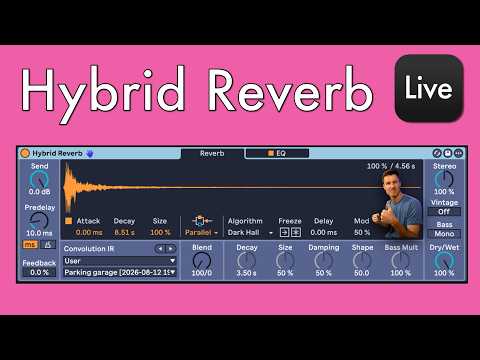
Hybrid Reverb combines two distinct reverb engines inside a single device: a convolution engine that uses a recorded audio sample (an impulse response, or IR) to model the acoustic character of a real space, and an algorithmic engine that generates reverb through DSP. The two engines can run in series, in parallel, or independently, with a blend control to dial in the mix between them.
Loading your own IR is as straightforward as dragging an audio file onto the convolution section. Once loaded, controls for size, decay, and attack let you reshape the character of the space — stretching or compressing it well beyond what the original recording sounded like. Brian demonstrates this with IRs captured in a Spanish cathedral, a hotel stairway, and a parking garage outside Ableton HQ, as well as more experimental sources including field recordings and even a hand clap in John Lennon’s childhood home.
The algorithmic engine adds a further layer of creative options. Modes such as Dark Hall, Shimmer, and several pitched variants can be blended with your custom IR, so a single device can sit anywhere between naturalistic room ambience and full sci-fi texture. Brian also shows how a Grain Delay inserted after Hybrid Reverb can replicate a shimmer reverb effect on any signal by pitching the feedback loop upward with each repeat.
How to Use It
- Record your impulse response: In the space you want to capture, make a short, sharp transient sound — a hand clap, finger snap, or snare hit. A fast attack and quick decay give the clearest IR. Record this to audio on your phone or in Live.
- Trim the recording: In the Ableton arrangement view, crop the clip down to just the transient and its tail, removing any background noise or unwanted sounds before or after the clap.
- Drop it into Hybrid Reverb: Drag the trimmed audio file directly onto the convolution section of Hybrid Reverb. The device will load it as your active IR straight away.
- Choose your routing: Use the mode selector to set the device to Convolution only, Algorithm only, Serial (convolution feeds into algorithmic), or Parallel (both run simultaneously and blend together).
- Shape the sound: Adjust Size, Decay, and Attack on the convolution side to alter the character of the space. Size appears to pitch-shift the sample as it scales, so small values give a tighter, brighter result and large values produce slower, lower-pitched tails.
- Add the algorithmic engine: If using Serial or Parallel mode, select an algorithm — Dark Hall, Shimmer, and others are available — and use the blend control to mix it against the convolution signal.
- Go experimental: Try unconventional sources such as field recordings, instrument samples, or textural audio. Rain recordings, bird sounds, and synthesiser textures all produce usable and surprising results when treated as IRs.
- Target specific drum hits: Drop Hybrid Reverb inside a Drum Rack audio effect chain to apply a custom IR to a single drum sound — snare or clap — rather than the whole kit.
Why It Matters
Custom impulse responses turn Hybrid Reverb into a genuinely personal tool. Rather than reaching for the same factory presets as everyone else, you can build a library of spaces from your own travels, your studio, or even objects and recordings that have nothing to do with rooms at all. The combination of a convolution engine and a full algorithmic section in one device means those captures can be pushed far beyond realism — into textural, pitched, and rhythmic territory that sits somewhere between reverb, sampling, and sound design. It is a workflow that rewards curiosity and rewards producers who pay attention to the acoustic world around them.