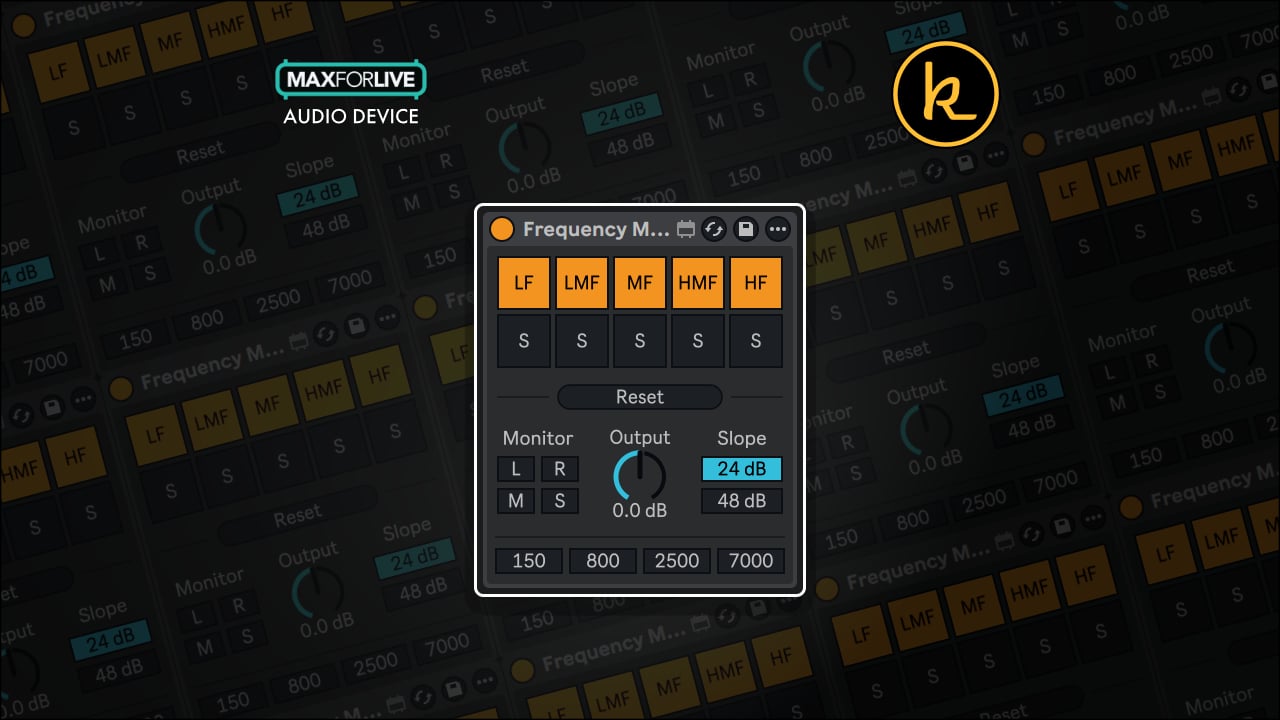
Frequency Monitor by KILLIHU
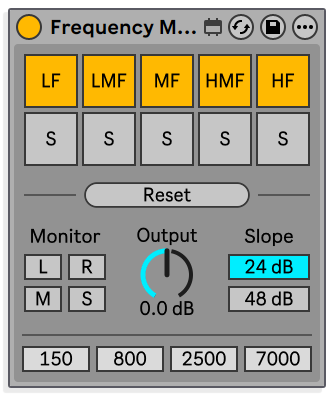
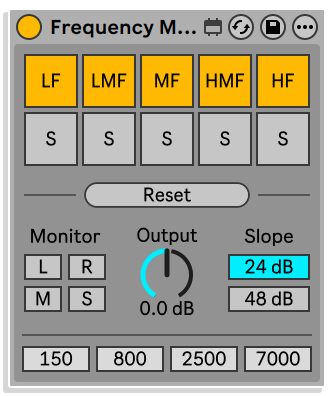
5-BAND FREQUENCY MONITORING FOR ABLETON LIVE Frequency Monitor is a free Max for Live audio device that splits your signal into five configurable bands, each with independent mute and solo controls. Use it as a listening and diagnosis tool on any track or master bus, with zero effect on the signal when no band is isolated. Pinpoint mud in the low-mids, hear what is happening above 7 kHz, and make faster, more confident tonal decisions. • 5-Band Monitoring: Independent mute and solo buttons for each band, with configurable crossover points. • Transparent Passthrough: When no band is isolated, filters deactivate completely and the input and output signals are identical. • Filter Slope: Selectable 24 dB/oct or 48 dB/oct slope per crossover. • Channel Isolation: Monitor Left, Right, Mid, or Side independently for precise stereo and mid/side diagnosis. • Fully Mappable: All controls are mappable, so you can integrate it into your existing workflow without menu diving.
Buying for someone?Send a gift card →

Killihu
killihu is an audio developer focused primarily on developing resources for Ableton Live.
View all products by KillihuOverview
5-band frequency diagnosis for any mix
Every mix has problem areas that are hard to hear in context. Frequency Monitor gives you a fast, low-friction way to isolate and listen to any part of the spectrum, whether you are hunting mud in the low-mids or checking air above 7 kHz. Drop it on a track or the master bus, and when no band is active the signal passes through completely unchanged, which means you can leave it in place throughout your session without touching the mix.
Five bands with configurable crossover points and a choice of 24 dB/oct or 48 dB/oct filter slopes give you enough resolution for meaningful tonal judgement. Mute or solo any band to hear it in isolation, and use the Left, Right, Mid, or Side channel options to dig into the stereo field. All controls are mappable, so your preferred bands and monitoring modes are always a push away.
- 5-band frequency monitoring tool with independent mute and solo buttons per band
- Configurable crossover points across all five bands
- Selectable filter slope: 24 dB/oct or 48 dB/oct
- Isolated channel monitoring: Left, Right, Mid, or Side
- Transparent passthrough when no band is isolated: filters deactivate and input and output signals are identical
- Designed as a listening and diagnosis tool, for example identifying mud in the low-mids or checking content above 7 kHz
- Safe to leave on any track or master bus without affecting the signal during normal playback
- All controls are mappable for seamless workflow integration
- Max for Live Audio Effect .amxd device
Free for subscribers
Frequency Monitor is free when you join, and so are 9 more
Every subscriber gets these for free, including Isotonik FX, Live Scratcher and Modular Series LE Part ONE. You also hear about new releases and deals first.
Just your email. No spam, unsubscribe anytime.


Reviews
No reviews yet. Be the first to review this product.
Frequency Monitor
Five-band frequency monitoring tool for mixing
Use Frequency Monitor as a listening and diagnosis tool to identify tonal issues across five bands. When no band is isolated, filters are deactivated and the signal passes through unchanged, so it is safe to leave on any track or master bus.
Important Information
INSTALLATION
Our Products are generally provided as Zip file downloads which in all cases will need to be extracted and saved to your hard drive prior to installation. Details on the different file type provided and what to do with them are below.
.alp Files – These are Ableton Live Packs and will either install directly into the Packs Section of the browser of Ableton Live or ask you to save them to your hard drive. For packs that install to the library, when you double click on them you will see a pop up window asking you to confirm that installation is ok as the files are described as “Legacy”. This is fine and you are ok to proceed, the packs are created using the format for an earlier version of Live and so remain compatible with the current version.
.amxd files – These are individual MaxforLive Devices and can be stored anywhere on your hard drive. We’d advise creating a folder for them and then adding that folder as a location within the Places section of Lives Browser.
LICENSE
END-USER LICENSE AGREEMENT FOR ISOTONIK STUDIOS SOFTWARE PRODUCTS.
PLEASE READ THE TERMS AND CONDITIONS OF THIS LICENSE AGREEMENT CAREFULLY BEFORE CONTINUING WITH THIS PROGRAM INSTALL.
This End-User License Agreement (referred to as “EULA”) is a legal agreement between an individual or a single entity (referred to as “LICENSEE”) and Isotonik Studios for the Isotonik Studios software product(s) which may include associated software components, media, printed materials, and “online” or electronic documentation (referred to as “SOFTWARE PRODUCT”). By installing, copying, or otherwise using the SOFTWARE PRODUCT, the LICENSEE agrees to be bound by the terms of this EULA.
This EULA represents the entire agreement concerning the program between the LICENSEE and Isotonik Studios and it supersedes any prior proposal, representation, or understanding between the parties. If the LICENSEE does not agree to the terms of this EULA, the LICENSEE should not install or use the SOFTWARE PRODUCT.
The SOFTWARE PRODUCT is protected by copyright laws and international copyright treaties, as well as other intellectual property laws and treaties. The SOFTWARE PRODUCT is licensed, not sold.
- GRANT OF LICENSE.
The SOFTWARE PRODUCT is licensed as follows:
(a) Installation and Use. Providing that the LICENSEE has paid any applicable license fees, Isotonik Studios grants the LICENSEE the right to install and use copies of the SOFTWARE PRODUCT on up to two computers in the LICENSEE’s possession that are running a validly licensed copy of the operating system for which the SOFTWARE PRODUCT was designed [e.g., Windows 10, macOS]. The computer(s) must be owned by the LICENSEE.
(b) Backup Copies. The LICENSEE may also make copies of the SOFTWARE PRODUCT as may be necessary for backup and archival purposes.
- DESCRIPTION OF OTHER RIGHTS AND LIMITATIONS.
(a) Maintenance of Copyright Notices. The LICENSEE must not remove or alter any copyright notices on any and all copies of the SOFTWARE PRODUCT.
(b) Distribution. The LICENSEE may not distribute registered copies of the SOFTWARE PRODUCT to third parties.
(c) Prohibition on Reverse Engineering, Decompilation, and Disassembly. The LICENSEE may not reverse engineer, decompile, or disassemble the SOFTWARE PRODUCT, except and only to the extent that such activity is expressly permitted by applicable law notwithstanding this limitation.
(d) Rental. The LICENSEE may not rent, lease, or lend the SOFTWARE PRODUCT.
(e) License transfer The LICENSEE may not transfer their license to the SOFTWARE PRODUCT to any third party. Any attempt to do so will be considered a violation of this EULA.
(f) Support Services. Isotonik Studios may provide the LICENSEE with support services related to the SOFTWARE PRODUCT for a period of 12 months following the date of purchase. Any supplemental software code provided to the LICENSEE as part of the Support Services shall be considered part of the SOFTWARE PRODUCT and subject to the terms and conditions of this EULA.
(g) Compliance with Applicable Laws. The LICENSEE must comply with all applicable laws regarding use of the SOFTWARE PRODUCT.
- TERMINATION Without prejudice to any other rights, Isotonik Studios may terminate this EULA if the LICENSEE fails to comply with the terms and conditions of this EULA. In such event, the LICENSEE must destroy all copies of the SOFTWARE PRODUCT in the LICENSEE’s possession.
- COPYRIGHT All title, including but not limited to copyrights, in and to the SOFTWARE PRODUCT and any copies thereof are owned by Isotonik Studios or its suppliers. All title and intellectual property rights in and to the content which may be accessed through use of the SOFTWARE PRODUCT is the property of the respective content owner and may be protected by applicable copyright or other intellectual property laws and treaties. This EULA grants the LICENSEE no rights to use such content. All rights not expressly granted are reserved by Isotonik Studios.
- NO WARRANTIES Isotonik Studios expressly disclaims any warranty for the SOFTWARE PRODUCT. The SOFTWARE PRODUCT is provided ‘As Is’ without any express or implied warranty of any kind, including but not limited to any warranties of merchantability, noninfringement, or fitness of a particular purpose. Isotonik Studios does not warrant or assume responsibility for the accuracy or completeness of any information, text, graphics, links or other items contained within the SOFTWARE PRODUCT. Isotonik Studios makes no warranties respecting any harm that may be caused by the transmission of a computer virus, worm, time bomb, logic bomb, or other such computer program. Isotonik Studios further expressly disclaims any warranty or representation to the LICENSEE or to any third party.
- LIMITATION OF LIABILITY In no event shall Isotonik Studios be liable for any damages (including, without limitation, lost profits, business interruption, or lost information) arising out of the LICENSEE’s use of or inability to use the SOFTWARE PRODUCT, even if Isotonik Studios has been advised of the possibility of such damages. In no event will Isotonik Studios be liable for loss of data or for indirect, special, incidental, consequential (including lost profit), or other damages based in contract, tort or otherwise. Isotonik Studios shall have no liability with respect to the content of the SOFTWARE PRODUCT or any part thereof, including but not limited to errors or omissions contained therein, libel, infringements of rights of publicity, privacy, trademark rights, business interruption, personal injury, loss of privacy, moral rights or the disclosure of confidential information.
Frequently Asked Questions
What is Frequency Monitor?
Frequency Monitor is a free Max for Live audio device that splits your signal into five configurable frequency bands, each with independent mute and solo controls. It is designed as a listening and diagnosis tool for mixing, not as a multi-band splitter for processing chains.
Will it colour or affect my signal when I am not using it?
No. When no band is muted or soloed, the filters are fully deactivated and the input and output signals are identical. You can leave it on any track or master bus throughout your session without affecting the mix.
Is it phase accurate when I isolate a band?
Not fully. When you mute or solo a band, the crossover filters enter the signal path. Magnitude stays flat but phase is not preserved, so the remaining bands are phase-shifted relative to the original. Use it for tonal and spectral judgement rather than as a phase-accurate reference.
Which versions of Ableton Live does it support?
Frequency Monitor works with Ableton Live 10, 11, and 12 Standard with Max for Live, or Suite. It runs on both Mac and Windows.
Can I map the controls to hardware or Ableton's macro knobs?
Yes. All controls in Frequency Monitor are mappable, so you can assign bands, crossover points, filter slopes, and channel modes to any MIDI controller or macro knob in your setup.
What channel monitoring modes are available?
You can monitor the Left, Right, Mid, or Side channel independently, which makes it useful for diagnosing stereo and mid/side balance as well as standard frequency issues.
In Depth
What Frequency Monitor Does
Frequency Monitor is a free Max for Live audio device that splits your signal into five frequency bands so you can listen to each one in isolation. It is designed as a listening and diagnosis tool, not a multiband processor. Load it on any track or the master bus and use it to answer specific questions: is there mud building up in the low-mids, or what exactly is happening above 7 kHz? Those questions become easy to answer when you can mute or solo the precise band you need to hear.
How It Works in Your Session
When no band is isolated, the input and output signals are identical. The filters are deactivated, which means you can leave Frequency Monitor on a track or the master bus without touching the signal at all. It sits there silently until you need it. The moment you solo or mute a band, the crossover filters engage so you can hear that region clearly. Because the magnitude response stays flat while phase is not preserved across bands, the tool is best used for tonal and spectral judgement rather than as a phase-accurate reference. That distinction matters, and the developer is clear about it.
Five Bands, Full Control
Each of the five bands has its own independent mute and solo buttons, so you can focus on one region or compare two at a time. The crossover points are configurable, which means you set the band boundaries to match the specific problem you are investigating rather than working around fixed splits. Filter slope is selectable between 24 dB per octave and 48 dB per octave, giving you a choice between a gentler transition and a tighter, more surgical division between bands.
Isolated Channel Monitoring
Frequency Monitor also lets you select which part of the stereo field you are examining. You can monitor the Left channel, Right channel, Mid, or Side independently. That makes it straightforward to check whether a problem lives in the stereo centre, is appearing only on one side, or is hiding in the side signal where it can be easy to miss on a full mix.
Mappable and Unobtrusive
All controls are mappable, so you can assign mute and solo buttons to a controller and move through bands without touching the mouse. Because the device is completely transparent when idle, there is no reason to remove it between sessions. Leave it in place, reach for it when a mix moment calls for a closer look, and take it off the table as soon as you have your answer.
More from Killihu