Bridge by Riccardo Sellan
REMOTE CONTROL FOR ABLETON LIVE VIA ANY BROWSER Bridge is a Max for Live device that runs a local web server, letting you control your Live Set from any browser on your network. Reach it from the same computer, or open it on a phone or tablet by scanning a built-in QR code. No external apps, no custom configuration required. • Web-based control surface: Control your Live Set from any device on the same network via a browser at a local URL or scanned QR code • Customisable canvas: Build multi-page control surfaces by adding, moving, resizing and recolouring sliders, toggles and menus for any track parameter, device or global control • Scene snapshots: Save and recall full project-state snapshots, with granular exclusion settings to keep saves fast and focused

Riccardo Sellan
Riccardo Sellan is a sound artist and audio developer interested in the intersection of art and technology.
View all products by Riccardo SellanOverview
Control Ableton Live from any browser on your network
Every producer knows the feeling: you are across the room, mid-session, and reaching back to the laptop breaks the flow. Bridge puts your Live Set in any browser on your network, on a phone, a tablet, or a second machine, with no external apps, no MIDI bridges, and no custom configuration. Drop the device and connect. Your control surface is live in seconds.
- Web-based control surface: control your Live Set from any device on the same network via a browser at a local URL or scanned QR code
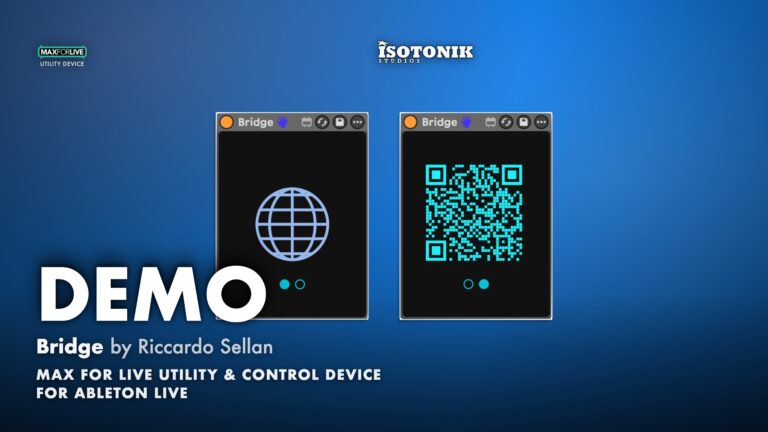
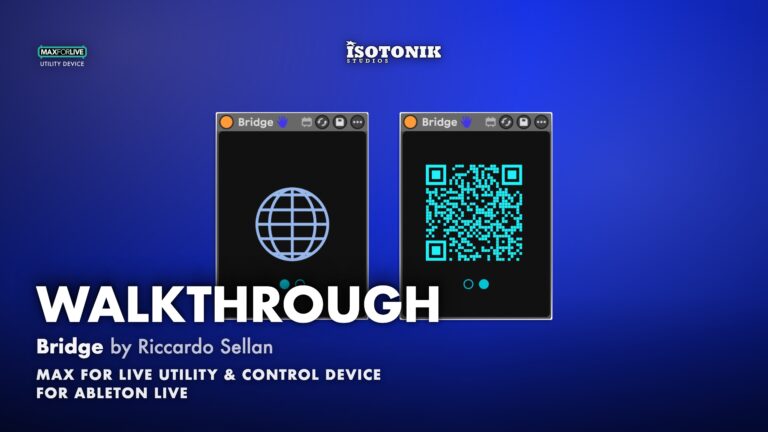
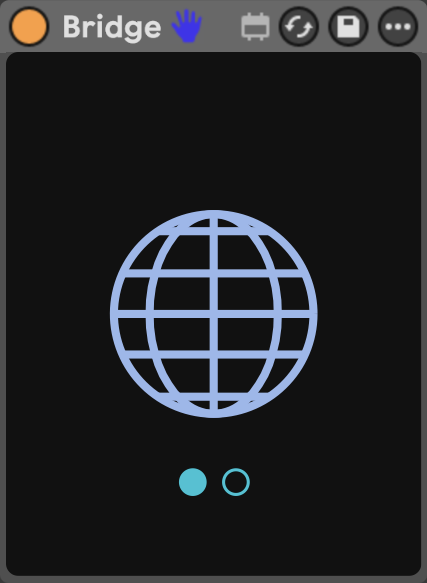
- Built-in local web server runs on port 7900 inside a deliberately minimal Max for Live device, with a globe icon to open the interface and a QR code display for instant phone and tablet connection
- Customisable drag-and-drop canvas: build multi-page control surfaces by adding, moving, resizing and recolouring sliders, toggles and menus for any track parameter, device or global control
- Full parameter coverage across Mixer controls (Volume, Pan, Mute, Solo), Sends, individual device parameters, Clips, and global session controls including Play, Stop, Record, Metronome, Overdub and BPM
- Multiple parameter types: continuous sliders (vertical or horizontal), on/off toggles, fixed-option menus, triggers, and read-only displays for Time Position and Bars that update automatically during playback
- Page-based layout system keeps large sessions organised, with each page holding its own independent set of parameters, all saved with your Ableton project
- Clean performance Control mode hides the sidebar and editing tools, leaving only your parameters ready to use from the other side of the room
- Scene snapshots: save and recall full project-state snapshots, with granular exclusion settings for Clips, Sends, Devices, Mixer settings, individual tracks or individual parameters to keep saves fast and focused
- Refresh and diagnostics: a blinking Refresh icon signals when tracks, return tracks, devices or scenes have changed in Live, with a Log panel for error messages and a connection state indicator
- Max for Live Audio Effect .amxd device
- User manual (PDF)
Free for subscribers
Join the list and get 8 free downloads, including 6 Max for Live devices
Subscribers get Isotonik FX, Live Scratcher, Modular Series LE Part ONE, Modular Series LE Part TWO and more for free. You also hear about new releases and deals first.
Just your email. No spam, unsubscribe anytime.


Reviews
No reviews yet. Be the first to review this product.
Bridge
Local Web Server Control Surface for Ableton Live
Bridge is a Max for Live device that runs a local web server, turning any browser into a fully customisable remote control surface for your Live Set. Load the device, open the web interface, and operate Ableton from another computer, a phone, or a tablet over your local network, with no external applications, no MIDI bridges, and no custom configuration required.
QR Code
Instant Mobile Connection via QR Scan
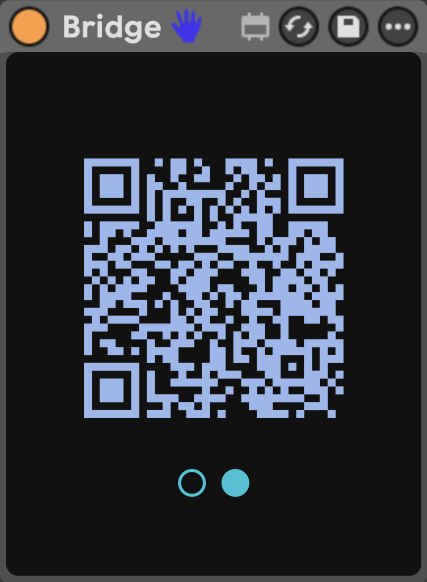
A switch on the Max for Live device flips the display to a QR code, letting a phone or tablet connect to your control surface instantly by scanning, with no typing, no setup, and no separate app.
Important Information
INSTALLATION
Our Products are generally provided as Zip file downloads which in all cases will need to be extracted and saved to your hard drive prior to installation. Details on the different file type provided and what to do with them are below.
.alp Files – These are Ableton Live Packs and will either install directly into the Packs Section of the browser of Ableton Live or ask you to save them to your hard drive. For packs that install to the library, when you double click on them you will see a pop up window asking you to confirm that installation is ok as the files are described as “Legacy”. This is fine and you are ok to proceed, the packs are created using the format for an earlier version of Live and so remain compatible with the current version.
.amxd files – These are individual MaxforLive Devices and can be stored anywhere on your hard drive. We’d advise creating a folder for them and then adding that folder as a location within the Places section of Lives Browser.
LICENSE
END-USER LICENSE AGREEMENT FOR ISOTONIK STUDIOS SOFTWARE PRODUCTS.
PLEASE READ THE TERMS AND CONDITIONS OF THIS LICENSE AGREEMENT CAREFULLY BEFORE CONTINUING WITH THIS PROGRAM INSTALL.
This End-User License Agreement (referred to as “EULA”) is a legal agreement between an individual or a single entity (referred to as “LICENSEE”) and Isotonik Studios for the Isotonik Studios software product(s) which may include associated software components, media, printed materials, and “online” or electronic documentation (referred to as “SOFTWARE PRODUCT”). By installing, copying, or otherwise using the SOFTWARE PRODUCT, the LICENSEE agrees to be bound by the terms of this EULA.
This EULA represents the entire agreement concerning the program between the LICENSEE and Isotonik Studios and it supersedes any prior proposal, representation, or understanding between the parties. If the LICENSEE does not agree to the terms of this EULA, the LICENSEE should not install or use the SOFTWARE PRODUCT.
The SOFTWARE PRODUCT is protected by copyright laws and international copyright treaties, as well as other intellectual property laws and treaties. The SOFTWARE PRODUCT is licensed, not sold.
- GRANT OF LICENSE.
The SOFTWARE PRODUCT is licensed as follows:
(a) Installation and Use. Providing that the LICENSEE has paid any applicable license fees, Isotonik Studios grants the LICENSEE the right to install and use copies of the SOFTWARE PRODUCT on up to two computers in the LICENSEE’s possession that are running a validly licensed copy of the operating system for which the SOFTWARE PRODUCT was designed [e.g., Windows 10, macOS]. The computer(s) must be owned by the LICENSEE.
(b) Backup Copies. The LICENSEE may also make copies of the SOFTWARE PRODUCT as may be necessary for backup and archival purposes.
- DESCRIPTION OF OTHER RIGHTS AND LIMITATIONS.
(a) Maintenance of Copyright Notices. The LICENSEE must not remove or alter any copyright notices on any and all copies of the SOFTWARE PRODUCT.
(b) Distribution. The LICENSEE may not distribute registered copies of the SOFTWARE PRODUCT to third parties.
(c) Prohibition on Reverse Engineering, Decompilation, and Disassembly. The LICENSEE may not reverse engineer, decompile, or disassemble the SOFTWARE PRODUCT, except and only to the extent that such activity is expressly permitted by applicable law notwithstanding this limitation.
(d) Rental. The LICENSEE may not rent, lease, or lend the SOFTWARE PRODUCT.
(e) License transfer The LICENSEE may not transfer their license to the SOFTWARE PRODUCT to any third party. Any attempt to do so will be considered a violation of this EULA.
(f) Support Services. Isotonik Studios may provide the LICENSEE with support services related to the SOFTWARE PRODUCT for a period of 12 months following the date of purchase. Any supplemental software code provided to the LICENSEE as part of the Support Services shall be considered part of the SOFTWARE PRODUCT and subject to the terms and conditions of this EULA.
(g) Compliance with Applicable Laws. The LICENSEE must comply with all applicable laws regarding use of the SOFTWARE PRODUCT.
- TERMINATION Without prejudice to any other rights, Isotonik Studios may terminate this EULA if the LICENSEE fails to comply with the terms and conditions of this EULA. In such event, the LICENSEE must destroy all copies of the SOFTWARE PRODUCT in the LICENSEE’s possession.
- COPYRIGHT All title, including but not limited to copyrights, in and to the SOFTWARE PRODUCT and any copies thereof are owned by Isotonik Studios or its suppliers. All title and intellectual property rights in and to the content which may be accessed through use of the SOFTWARE PRODUCT is the property of the respective content owner and may be protected by applicable copyright or other intellectual property laws and treaties. This EULA grants the LICENSEE no rights to use such content. All rights not expressly granted are reserved by Isotonik Studios.
- NO WARRANTIES Isotonik Studios expressly disclaims any warranty for the SOFTWARE PRODUCT. The SOFTWARE PRODUCT is provided ‘As Is’ without any express or implied warranty of any kind, including but not limited to any warranties of merchantability, noninfringement, or fitness of a particular purpose. Isotonik Studios does not warrant or assume responsibility for the accuracy or completeness of any information, text, graphics, links or other items contained within the SOFTWARE PRODUCT. Isotonik Studios makes no warranties respecting any harm that may be caused by the transmission of a computer virus, worm, time bomb, logic bomb, or other such computer program. Isotonik Studios further expressly disclaims any warranty or representation to the LICENSEE or to any third party.
- LIMITATION OF LIABILITY In no event shall Isotonik Studios be liable for any damages (including, without limitation, lost profits, business interruption, or lost information) arising out of the LICENSEE’s use of or inability to use the SOFTWARE PRODUCT, even if Isotonik Studios has been advised of the possibility of such damages. In no event will Isotonik Studios be liable for loss of data or for indirect, special, incidental, consequential (including lost profit), or other damages based in contract, tort or otherwise. Isotonik Studios shall have no liability with respect to the content of the SOFTWARE PRODUCT or any part thereof, including but not limited to errors or omissions contained therein, libel, infringements of rights of publicity, privacy, trademark rights, business interruption, personal injury, loss of privacy, moral rights or the disclosure of confidential information.
Frequently Asked Questions
What is Bridge?
Bridge is a Max for Live device that runs a web server on your local network. Once loaded into your Live Set, it lets you control Ableton Live remotely from any browser, on the same computer or on another device such as a phone or tablet connected to the same network.
What do I need to run Bridge?
Bridge requires Ableton Live 12 Standard with Max for Live or Suite, and Max 9. It runs on both Mac and Windows. If you are using an older version of Ableton Live, make sure you have updated to the latest version of Max before loading the device.
Can I use Bridge from my phone or tablet?
Yes. Make sure your phone or tablet is connected to the same Wi-Fi network as the computer running Ableton Live. You can type the machine’s IP address into any browser, or use the built-in QR code in the device to connect instantly.
Can Bridge connect over the internet?
Connecting over the internet is possible but not available out of the box. It requires additional network setup, for example through an overlay network such as Tailscale or ZeroTier.
Does my control surface layout save with my project?
Yes. Everything you build in the Edit view, including pages, parameter positions, sizes, colours and labels, is saved within your Ableton Live project file.
What should I do if the web interface does not open?
If the interface does not open on the same computer, another application may be using port 7900. Quit that application and reload the Bridge device. If you cannot reach it from a phone or tablet, check that the device is on the same network and that your firewall allows incoming connections for Ableton Live.
In Depth
Control Ableton Live from Any Device on Your Network
Bridge is a Max for Live device that turns any browser into a remote control surface for your Live Set. Load the device, open the web interface, and you can operate Ableton from another computer, a phone, or a tablet, all over your local network. No external applications, no MIDI bridges, no custom configuration. Drop the device and connect.
Two Parts, One Workflow
Bridge has two components. The Max for Live device sits in your session and runs a local web server on port 7900. It stays deliberately minimal: a globe icon opens the interface in your default browser, and a switch below flips the display to a QR code so a phone or tablet can connect instantly by scanning. The web interface is where all the work happens, and everything you build there is saved with your Ableton Live project.
Build Your Own Control Surface in Edit Mode
The Edit section is a drag-and-drop canvas where you choose exactly which parameters to expose. The sidebar lists every track in your Live Set, colour-coded to match Ableton, and lets you browse each track’s Mixer controls (Volume, Pan, Mute, Solo), Sends, Devices with their individual parameters, and Clips. A Global tab covers session-wide controls: Play, Stop, Record, Metronome, Overdub, BPM, and more. Click the plus icon next to any parameter and it appears on the canvas. From there you can drag it to any position, resize it from the corner, and hover over it to access colour, orientation, and label options.
Parameter Types
Sliders handle continuous values such as volume, pan, and frequency. They can be oriented vertically or horizontally, renamed by clicking the label, and set to precise values by clicking the number. Toggles control on/off states like Mute, Solo, Record, and Play, and light up when active. Menus handle parameters with a fixed set of options. Some parameters offer an additional selector to choose whether they behave as a Toggle, Menu, or Trigger. Read-only displays show Time Position in minutes and seconds, and Bars as bar and beat, updating automatically during playback.
Pages Keep Large Sessions Organised
The Edit canvas is organised into pages. Each page has its own layout and set of parameters, so you can build separate control surfaces for different parts of your session. Add a page with the plus button, rename it by clicking its name, and delete it with the adjacent cross. Everything is saved with your project, which means your control surface is ready the next time you open the set.
Control Mode for Performance
When your layout is ready, switch to Control mode. The sidebar and editing tools disappear, leaving only your parameters. This is the performance view: clean, uncluttered, and ready to use from the other side of the room.
Scene Snapshots
The Scene section lets you save a snapshot of your Live Set’s current state and recall it at any time. Click the plus button to store the current state as a new Scene, then click the play button on any Scene to recall it. Scenes can be reordered by dragging, renamed, or overwritten with a fresh state. A settings panel lets you exclude specific elements from Scenes: Clips, Sends, Devices, Mixer settings, individual tracks, or individual parameters. A dot next to each track shows at a glance whether it is fully included, partially excluded, or excluded entirely. As a best practice, exclude anything that does not change between Scenes, because smaller Scenes save and recall faster, particularly in large projects.
Refresh and Diagnostics
The web interface does not update automatically when tracks, return tracks, devices, or scenes are added or removed in Live. A blinking Refresh icon signals that something has changed. Click it to rescan the Live Set and load the changes. A Log panel displays error messages and diagnostic information, and a connection state indicator shows whether the interface is currently linked to Ableton.
System Requirements
Bridge requires Ableton Live 12 Standard with Max for Live, or Suite, running on Mac or Windows. Max 9 is required. If you are on an older version of Ableton Live, update to the latest version of Max before loading the device.
More from Riccardo Sellan