

OsTIruston by Killihu
WHY CLICK THROUGH TABS TO SEE YOUR SYNTH PARAMETERS?
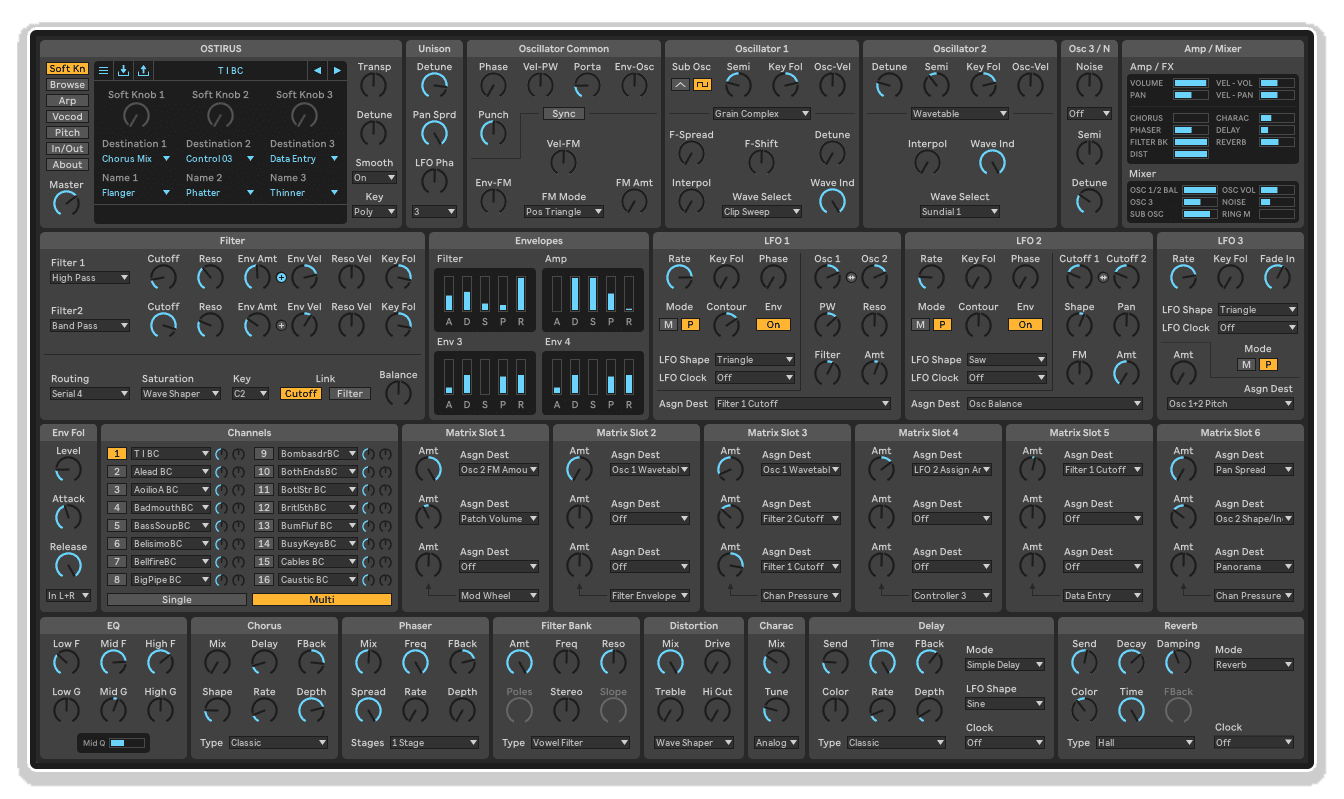
OsTIruston by killihu is a free visual skin for the OsTIrus VST synthesizer that displays almost all controls on screen simultaneously. No more tab switching, no more hunting for parameters, no more losing sight of your patch architecture while navigating menus.
Inside you'll find:
- Complete parameter visibility (oscillators, filters, envelopes, LFOs, effects, modulation matrix)
- Ableton Live-inspired visual design for seamless workspace integration
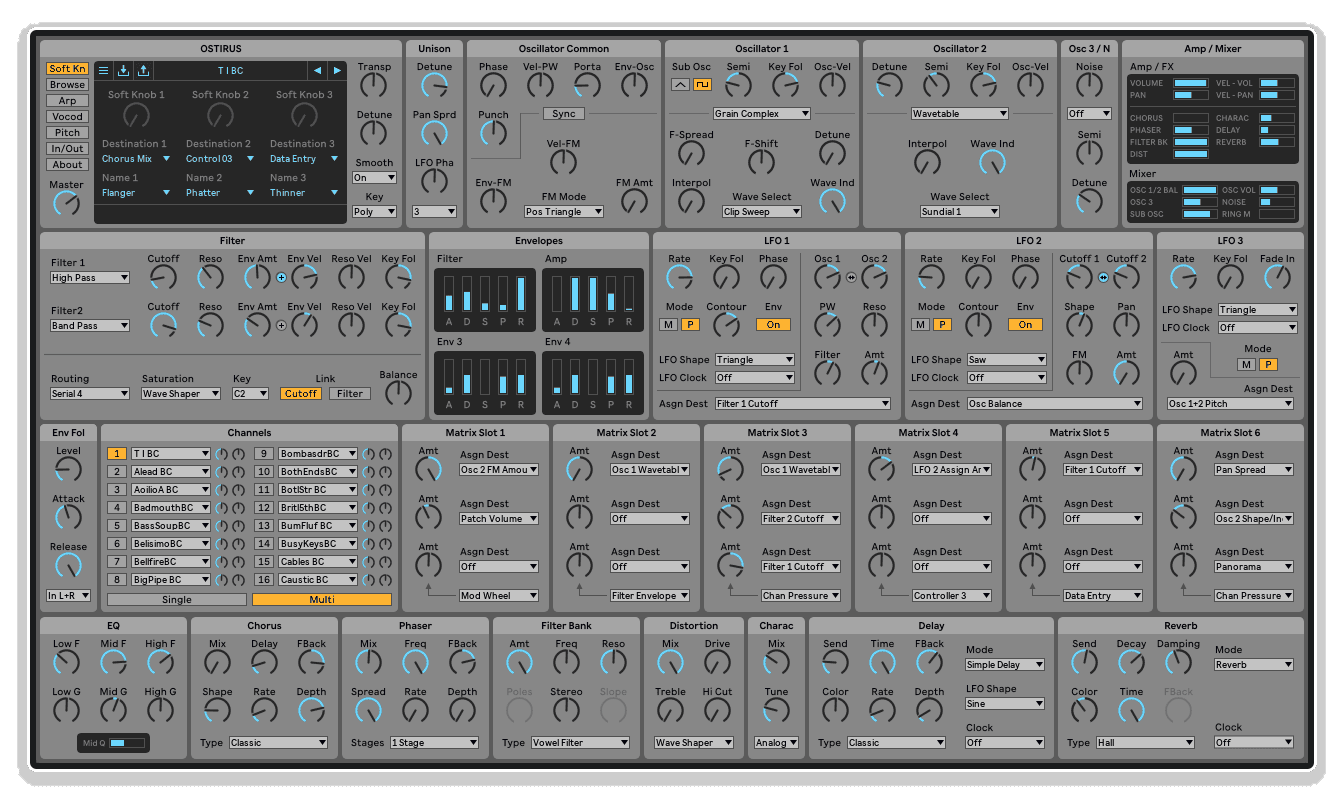
- Two professional color themes (Dark and Light)
- Organized control layout grouped by function
- Modulation matrix visible alongside source and destination parameters
- Optimized for preset designers needing full parameter overview
- Educational value for teaching and learning synthesis concepts
- Reduced cognitive load during complex sound design
- Single-screen interface eliminates navigation friction
- Simple installation (copy folders to OsTIrus skins directory)
- FREE download (pay what you want)
Essential for preset designers documenting OsTIrus patches, sound designers working with complex modulation, Ableton Live users wanting visual consistency, synthesis educators teaching signal flow, and anyone frustrated with tab-based plugin interfaces.
FREE skin for OsTIrus VST synthesizer (Mac & Windows)
OsTIruston by Killihu
WHY CLICK THROUGH TABS TO SEE YOUR SYNTH PARAMETERS?
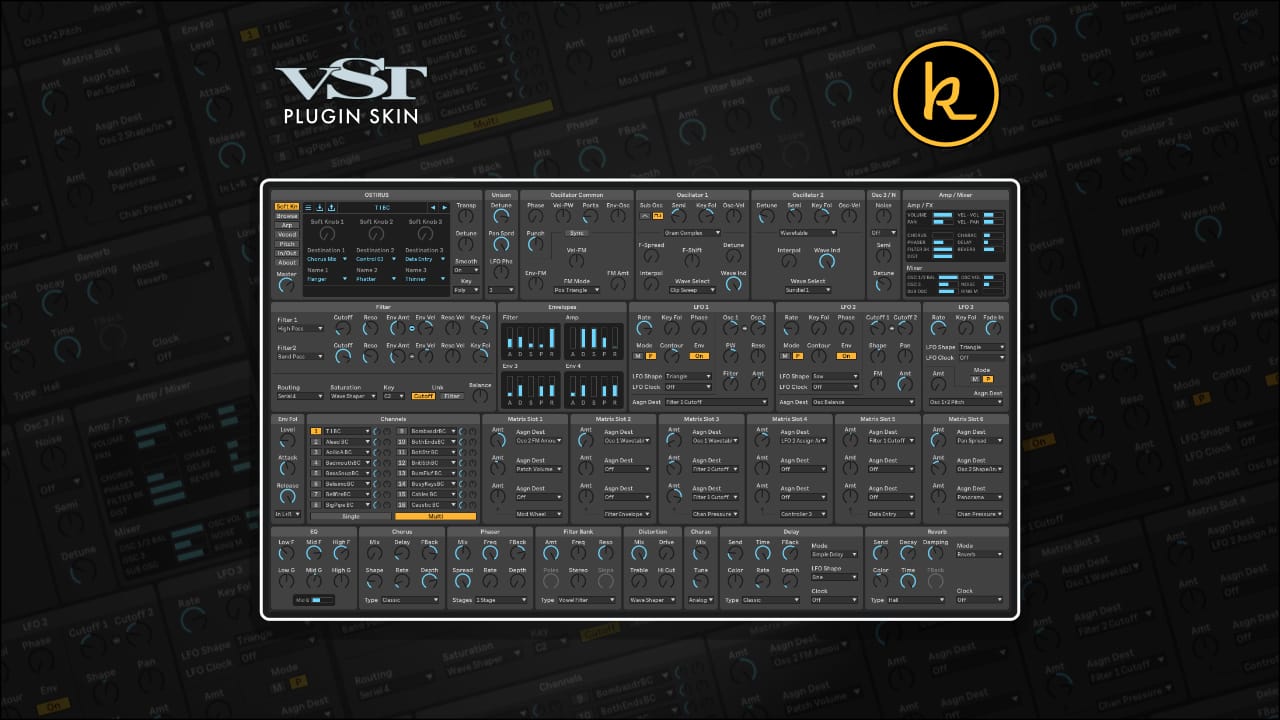
OsTIruston by killihu is a free visual skin for the OsTIrus VST synthesizer that displays almost all controls on screen simultaneously. No more tab switching, no more hunting for parameters, no more losing sight of your patch architecture while navigating menus.
Inside you'll find:
- Complete parameter visibility (oscillators, filters, envelopes, LFOs, effects, modulation matrix)
- Ableton Live-inspired visual design for seamless workspace integration
- Two professional color themes (Dark and Light)
- Organized control layout grouped by function
- Modulation matrix visible alongside source and destination parameters
- Optimized for preset designers needing full parameter overview
- Educational value for teaching and learning synthesis concepts
- Reduced cognitive load during complex sound design
- Single-screen interface eliminates navigation friction
- Simple installation (copy folders to OsTIrus skins directory)
- FREE download (pay what you want)
Essential for preset designers documenting OsTIrus patches, sound designers working with complex modulation, Ableton Live users wanting visual consistency, synthesis educators teaching signal flow, and anyone frustrated with tab-based plugin interfaces.
FREE skin for OsTIrus VST synthesizer (Mac & Windows)
Buying for someone?Send a gift card →
Additional information
| VST Category | VST Skins |
|---|---|
| Min. Requirements | OsTIrus VST v2.11 |
| OS | Mac, Windows |
Product reviews
5 out of 5
6 reviews
How item rating is calculated
We show the average based on reviews. Only genuine reviews are displayed.
Sort by
September 29, 2026
This reviewer bought this product from our store.
Everything is right there. But…. I have a small screen and scaling on 100 %.
Everything is too small. I think it will look great on scale 175 maybe
I recommend this product
Reply from Killihu
September 29, 2026
May 18, 2026
This reviewer bought this product from our store.
Nice helpful skin to provide better overview of (nearly all) synth parameters in a single view, rather than native tabbed view approach
I recommend this product
April 24, 2026
This reviewer bought this product from our store.
Fantastic looking skin for a fantastic product
Fantastic looking skin for a fantastic product. Great work all round
Appearance and access of controls
I recommend this product
April 23, 2026
This reviewer bought this product from our store.
Is very nice!!
Colors
Nothing
I recommend this product
April 23, 2026
This reviewer bought this product from our store.
Fantastic Skin for an iconic synth, thank you
awesome design
I recommend this product
OsTIruston by Killihu
OsTIrus is a powerful virtual analog synthesizer with deep modulation capabilities, but its default interface scatters controls across multiple tabs and menus, forcing constant navigation that interrupts sound design flow. Finding the right parameter means clicking through screens, losing visual context of your overall patch architecture, and breaking the creative connection between intention and execution. OsTIruston eliminates this friction by displaying almost every control simultaneously on a single, unified interface.
This isn’t just a cosmetic refresh. OsTIruston is a complete GUI redesign that fundamentally changes how you interact with OsTIrus. See all oscillators, filters, envelopes, LFOs, and modulation routings at once without switching views. The layout is designed to match Ableton Live’s visual language, creating seamless integration when OsTIrus sits alongside Live’s native devices. Dark and Light themes ensure compatibility with your workspace preferences and reduce eye strain during extended sound design sessions.
Whether you’re designing presets professionally and need comprehensive parameter overview, exploring modulation possibilities and want to see all routing options simultaneously, teaching synthesis concepts and require students to visualize complete signal flow, or simply prefer working with all controls visible rather than hunting through tabbed interfaces, OsTIruston transforms OsTIrus from a tab-heavy synthesizer into an at-a-glance sound design powerhouse.
Features & Highlights
Complete Parameter Visibility: Almost all OsTIrus controls appear on screen simultaneously. Oscillators, filters, amplifier, envelopes, LFOs, effects, and modulation matrix – everything is visible without scrolling or tab switching. This comprehensive overview lets you understand patch architecture at a glance and make informed sound design decisions without navigating hidden menus.
Ableton Live Visual Integration: The design language matches Live’s aesthetic with clean typography, organized control grouping, and visual hierarchy that feels native to Ableton’s ecosystem. When OsTIrus appears in your plugin window, it looks and feels like part of Live rather than a foreign interface that clashes with your workspace.
Preset Designer Workflow: If you create and sell OsTIrus presets, OsTIruston becomes an essential tool. See every parameter value immediately, understand modulation routings without detective work, and document your patches visually with screenshots that show complete settings. The all-on-screen approach eliminates the guesswork inherent in multi-tab preset design.
Two Professional Color Themes: Dark theme provides low-contrast, eye-friendly aesthetics for extended sessions and matches Ableton Live’s dark interface. Light theme offers high-contrast clarity for bright environments and matches Live’s light theme when using that workflow preference. Switch between themes to match your workspace lighting conditions or personal visual preferences.
Organized Control Layout: Controls are grouped logically by function. Oscillator sections cluster together, filter controls occupy dedicated areas, modulation sources appear near their destinations, and effects sit in clearly delineated zones. This functional organization reduces the visual distance between related parameters, speeding up workflow and reducing cognitive load during complex sound design.
Modulation Matrix Visibility: One of OsTIrus’s most powerful features is its modulation system. OsTIruston ensures the modulation matrix remains visible alongside source and destination parameters, letting you see cause-and-effect relationships without mental gymnastics or constant tab switching. This visibility is crucial for understanding and creating complex modulation patches.
Educational Value: For synthesis educators and students, OsTIruston provides a complete visual map of subtractive synthesis signal flow. Point to oscillators, trace signal path through filters, show envelope relationships to amplitude and filter cutoff, and demonstrate LFO effects – all visible simultaneously. The pedagogical advantage over tab-based interfaces is substantial.
How to Use
Download the OsTIruston skin package and extract the ZIP file. You’ll find two folders: “OsTIruston Dark” and “OsTIruston Light.” Navigate to Documents/The Usual Suspects/OsTIrus/skins/ on your computer (create the skins folder if it doesn’t exist). Copy both theme folders into the skins directory.
Activating the Skin:
Open OsTIrus in your DAW. Access OsTIrus’s skin selection menu (typically found in the plugin’s preferences or settings). Select either “OsTIruston Dark” or “OsTIruston Light” from the available skins list. The interface immediately updates to the new skin. You can switch between themes at any time without affecting your patches or presets.
Working with the Interface:
All controls function identically to the default OsTIrus interface – OsTIruston only changes visual presentation, not parameter behavior or sound engine characteristics. The comprehensive layout means less clicking and more direct manipulation. Adjust oscillator waveforms while watching filter cutoff settings. Modify envelope attack times while observing LFO rates. Design complex patches with full context always visible.
Preset Design Workflow:
When creating presets for sale or sharing, OsTIruston’s all-visible interface dramatically accelerates documentation and quality control. Open a preset, instantly see all parameter values, identify which modulation sources affect which destinations, and document the complete patch configuration with a single screenshot. This workflow is impossible with tab-based interfaces that require multiple captures to show complete settings.
Teaching and Learning:
Educators can use OsTIruston to demonstrate synthesis concepts with complete transparency. Show students how filter resonance interacts with envelope modulation while the oscillator settings remain visible. Trace signal flow from sound source through processing to output without switching screens. Students learn faster when they see the complete picture rather than fragmented views.
Ideal For
Preset Designers: Create, document, and quality-check OsTIrus presets with complete parameter visibility. Reduce preset design time, eliminate parameter-hunting frustration, and produce more consistent, well-documented sound banks.
Sound Designers: Work faster with all controls visible simultaneously. Understand complex patches immediately, make informed modulation routing decisions, and maintain creative flow without interface navigation interrupting your process.
Ableton Live Users: Integrate OsTIrus visually with your Live workflow. The matching aesthetic reduces visual jarring when switching between native Live devices and OsTIrus, creating a more cohesive production environment.
Synthesis Educators: Teach subtractive synthesis with a complete visual reference. Students see all elements simultaneously, understanding signal flow and parameter relationships more quickly than with fragmented tab-based interfaces.
Producers Who Prefer Visual Clarity: If you find tab-based plugin interfaces frustrating and prefer seeing everything at once, OsTIruston transforms OsTIrus into the kind of interface you’ve wanted – comprehensive, clear, and designed for direct manipulation rather than navigation.
What’s Included
- OsTIruston Dark theme (folder containing all skin files)
- OsTIruston Light theme (folder containing all skin files)
- Complete parameter visibility in single-screen layout
- Ableton Live-inspired visual design
- Organized control grouping by function
- Modulation matrix visibility alongside parameters
- FREE download (pay what you want)
Requirements
- OsTIrus VST synthesizer (by The Usual Suspects)
- Mac or Windows operating system
- DAW or host application that supports VST plugins
- Installation: Copy skin folders to Documents/The Usual Suspects/OsTIrus/skins/
Explore More
Single Mapper | Control Matrix | Notes Frequency Pro | Advanced Toolbar Buttons 2 | MKT Mapper | View All killihu Products
Frequently Asked Questions
A: OsTIruston is a free visual skin for the OsTIrus VST synthesizer by The Usual Suspects. It redesigns the interface to display almost all controls on screen simultaneously, eliminating tab switching and parameter hunting. It includes Dark and Light themes designed to match Ableton Live’s visual aesthetic, making it particularly useful for preset designers, sound designers, and educators.
A: You need the OsTIrus VST synthesizer installed on your Mac or Windows computer, plus a DAW or host application that supports VST plugins. The skin files are installed by copying the OsTIruston Dark and OsTIruston Light folders to Documents/The Usual Suspects/OsTIrus/skins/ on your system.
A: No. OsTIruston only changes the visual presentation and layout of OsTIrus’s interface. All parameters function identically to the default skin, and the sound engine is completely unaffected. Your existing presets and patches work exactly as before, just with a different visual interface.
A: Yes! OsTIruston is a completely free download with pay-what-you-want pricing. You can explore more of killihu’s tools and resources here: killihu
Important Information
Initial Release – April 2026
END-USER LICENSE AGREEMENT FOR ISOTONIK STUDIOS SOFTWARE PRODUCTS.
PLEASE READ THE TERMS AND CONDITIONS OF THIS LICENSE AGREEMENT CAREFULLY BEFORE CONTINUING WITH THIS PROGRAM INSTALL.
This End-User License Agreement (referred to as “EULA”) is a legal agreement between an individual or a single entity (referred to as “LICENSEE”) and Isotonik Studios for the Isotonik Studios software product(s) which may include associated software components, media, printed materials, and “online” or electronic documentation (referred to as “SOFTWARE PRODUCT”). By installing, copying, or otherwise using the SOFTWARE PRODUCT, the LICENSEE agrees to be bound by the terms of this EULA.
This EULA represents the entire agreement concerning the program between the LICENSEE and Isotonik Studios and it supersedes any prior proposal, representation, or understanding between the parties. If the LICENSEE does not agree to the terms of this EULA, the LICENSEE should not install or use the SOFTWARE PRODUCT.
The SOFTWARE PRODUCT is protected by copyright laws and international copyright treaties, as well as other intellectual property laws and treaties. The SOFTWARE PRODUCT is licensed, not sold.
- GRANT OF LICENSE.
The SOFTWARE PRODUCT is licensed as follows:
(a) Installation and Use. Providing that the LICENSEE has paid any applicable license fees, Isotonik Studios grants the LICENSEE the right to install and use copies of the SOFTWARE PRODUCT on up to two computers in the LICENSEE’s possession that are running a validly licensed copy of the operating system for which the SOFTWARE PRODUCT was designed [e.g., Windows 10, macOS]. The computer(s) must be owned by the LICENSEE.
(b) Backup Copies. The LICENSEE may also make copies of the SOFTWARE PRODUCT as may be necessary for backup and archival purposes.
- DESCRIPTION OF OTHER RIGHTS AND LIMITATIONS.
(a) Maintenance of Copyright Notices. The LICENSEE must not remove or alter any copyright notices on any and all copies of the SOFTWARE PRODUCT.
(b) Distribution. The LICENSEE may not distribute registered copies of the SOFTWARE PRODUCT to third parties.
(c) Prohibition on Reverse Engineering, Decompilation, and Disassembly. The LICENSEE may not reverse engineer, decompile, or disassemble the SOFTWARE PRODUCT, except and only to the extent that such activity is expressly permitted by applicable law notwithstanding this limitation.
(d) Rental. The LICENSEE may not rent, lease, or lend the SOFTWARE PRODUCT.
(e) License transfer The LICENSEE may not transfer their license to the SOFTWARE PRODUCT to any third party. Any attempt to do so will be considered a violation of this EULA.
(f) Support Services. Isotonik Studios may provide the LICENSEE with support services related to the SOFTWARE PRODUCT for a period of 12 months following the date of purchase. Any supplemental software code provided to the LICENSEE as part of the Support Services shall be considered part of the SOFTWARE PRODUCT and subject to the terms and conditions of this EULA.
(g) Compliance with Applicable Laws. The LICENSEE must comply with all applicable laws regarding use of the SOFTWARE PRODUCT.
- TERMINATION Without prejudice to any other rights, Isotonik Studios may terminate this EULA if the LICENSEE fails to comply with the terms and conditions of this EULA. In such event, the LICENSEE must destroy all copies of the SOFTWARE PRODUCT in the LICENSEE’s possession.
- COPYRIGHT All title, including but not limited to copyrights, in and to the SOFTWARE PRODUCT and any copies thereof are owned by Isotonik Studios or its suppliers. All title and intellectual property rights in and to the content which may be accessed through use of the SOFTWARE PRODUCT is the property of the respective content owner and may be protected by applicable copyright or other intellectual property laws and treaties. This EULA grants the LICENSEE no rights to use such content. All rights not expressly granted are reserved by Isotonik Studios.
- NO WARRANTIES Isotonik Studios expressly disclaims any warranty for the SOFTWARE PRODUCT. The SOFTWARE PRODUCT is provided ‘As Is’ without any express or implied warranty of any kind, including but not limited to any warranties of merchantability, noninfringement, or fitness of a particular purpose. Isotonik Studios does not warrant or assume responsibility for the accuracy or completeness of any information, text, graphics, links or other items contained within the SOFTWARE PRODUCT. Isotonik Studios makes no warranties respecting any harm that may be caused by the transmission of a computer virus, worm, time bomb, logic bomb, or other such computer program. Isotonik Studios further expressly disclaims any warranty or representation to the LICENSEE or to any third party.
- LIMITATION OF LIABILITY In no event shall Isotonik Studios be liable for any damages (including, without limitation, lost profits, business interruption, or lost information) arising out of the LICENSEE’s use of or inability to use the SOFTWARE PRODUCT, even if Isotonik Studios has been advised of the possibility of such damages. In no event will Isotonik Studios be liable for loss of data or for indirect, special, incidental, consequential (including lost profit), or other damages based in contract, tort or otherwise. Isotonik Studios shall have no liability with respect to the content of the SOFTWARE PRODUCT or any part thereof, including but not limited to errors or omissions contained therein, libel, infringements of rights of publicity, privacy, trademark rights, business interruption, personal injury, loss of privacy, moral rights or the disclosure of confidential information.
More from Killihu
Frequently Bought Together
 -30%
-30%