Single Mapper by KILLIHU
WHY SHOULD EVERY PARAMETER RESPOND LINEARLY?
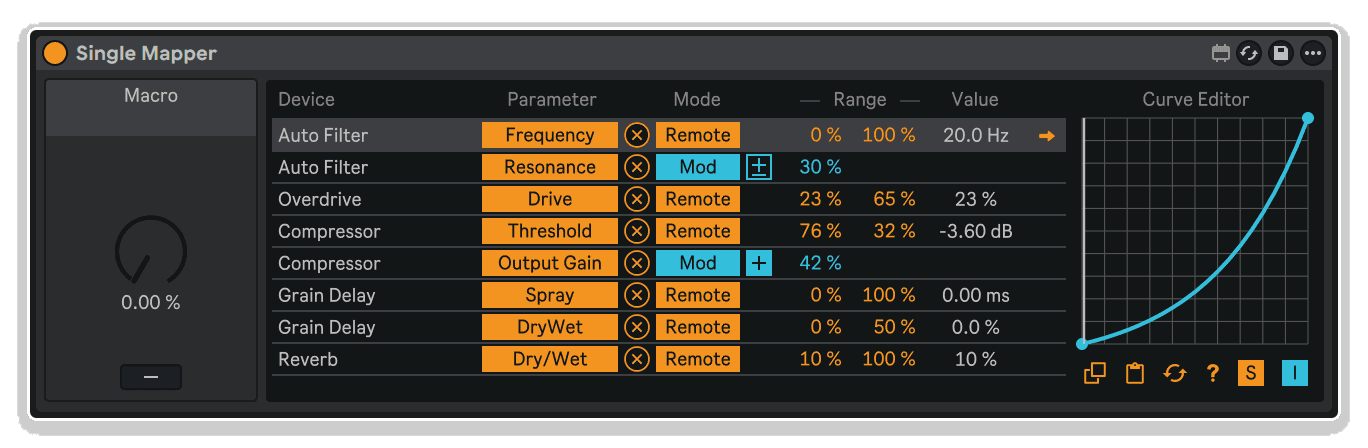
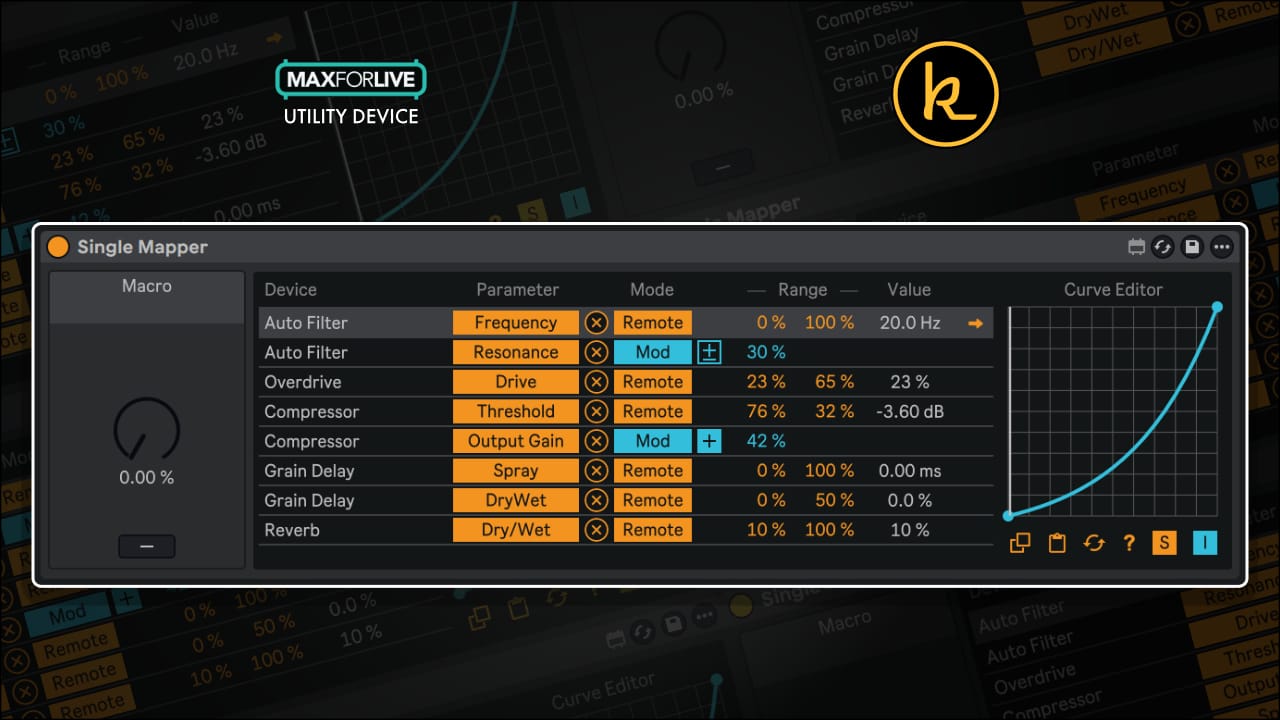
Single Mapper by killihu transforms parameter mapping in Ableton Live by adding custom curve editing to every control relationship. Shape exponential filter sweeps, logarithmic volume fades, smooth S-curve transitions, or completely custom responses - all with real-time value feedback showing exactly where each parameter sits along its curve.
Inside you'll find:
- Custom curve editor for each parameter mapping slot
- Global curve editor affecting all mappings simultaneously
- Real-time numerical value display for all mapped parameters
- Effects rack macro control integration for enhanced rack workflow
- Multiple destination parameters from a single source control
- Visual curve editing with adjustable control points
- Support for linear, exponential, logarithmic, S-curve, stepped, and custom response shapes
- Interactive control descriptions in Live's Info View
- Standalone or rack-integrated workflow options
- Free lifetime updates included
Perfect for performance-oriented producers designing expressive macro controls, sound designers crafting precise multi-parameter relationships, mixing engineers building smooth automation curves, and anyone who needs parameters to respond musically rather than mathematically.
MaxforLive utility device for Ableton Live 12 (Mac & Windows)
Single Mapper by KILLIHU
WHY SHOULD EVERY PARAMETER RESPOND LINEARLY?
Single Mapper by killihu transforms parameter mapping in Ableton Live by adding custom curve editing to every control relationship. Shape exponential filter sweeps, logarithmic volume fades, smooth S-curve transitions, or completely custom responses - all with real-time value feedback showing exactly where each parameter sits along its curve.
Inside you'll find:
- Custom curve editor for each parameter mapping slot
- Global curve editor affecting all mappings simultaneously
- Real-time numerical value display for all mapped parameters
- Effects rack macro control integration for enhanced rack workflow
- Multiple destination parameters from a single source control
- Visual curve editing with adjustable control points
- Support for linear, exponential, logarithmic, S-curve, stepped, and custom response shapes
- Interactive control descriptions in Live's Info View
- Standalone or rack-integrated workflow options
- Free lifetime updates included
Perfect for performance-oriented producers designing expressive macro controls, sound designers crafting precise multi-parameter relationships, mixing engineers building smooth automation curves, and anyone who needs parameters to respond musically rather than mathematically.
MaxforLive utility device for Ableton Live 12 (Mac & Windows)
Buying for someone?Send a gift card →
Additional information
| MaxforLive | Control Devices |
|---|---|
| Ableton Live Compatibility | Ableton Live 12 Standard with MaxforLive, Ableton Live 12 Suite |
| Min. Requirements | Ableton Live 12 with MaxforLive Installed |
| OS | Mac, Windows |
PRICE: £6.00
Product reviews
No reviews yet. Be the first to review this product.
Single Mapper by KILLIHU
Linear parameter relationships limit expression. Every modulation source moves in a straight line from minimum to maximum, every macro control scales proportionally, every mapping responds predictably. Single Mapper breaks those limitations by adding custom curves to every parameter mapping you create.
This isn’t just another macro control device. Single Mapper transforms how parameters respond to modulation by inserting editable curves between sources and destinations. Map a single control to multiple parameters, then shape how each one responds using individual curve editors. Create exponential filter sweeps that accelerate dramatically in the upper range. Design logarithmic volume faders that maintain perceptual linearity. Build S-curve responses that ease in and out of transitions smoothly. All while watching real-time value feedback that shows exactly where each mapped parameter sits along its custom curve.
Whether you’re designing complex performance macros with multiple destinations, adding expressive curves to effects rack controls, creating dynamic modulation responses that evolve non-linearly, or simply fine-tuning how individual parameters scale across their range, Single Mapper gives you the precision control that Ableton’s native mapping can’t provide.
Features & Highlights
Custom Curve Editing Per Mapping: Every parameter mapping gets its own editable curve that shapes how the destination responds to the source control. Click and drag points on the curve editor to create linear, exponential, logarithmic, S-curve, stepped, or completely custom response shapes. The visual editor makes complex curve relationships immediately understandable.
Real-Time Value Display: See the current value of every mapped parameter displayed numerically in the device interface. No more guessing where a parameter sits or calculating percentages mentally. The value feedback updates in real-time as you adjust controls, showing exactly what’s happening at every point along the curve.
Effects Rack Integration: Place Single Mapper after an effects rack and map its control to a rack macro. Now that macro control gains custom curve shaping for every parameter mapped within Single Mapper. This effectively adds curve editing capability to Ableton’s native macro system, expanding its power dramatically without changing your existing workflow.
Multiple Mapping Slots: Control multiple destination parameters simultaneously from a single source, with each destination getting its own independent curve. Create performance macros that affect filter cutoff, resonance, drive, and output level all at once, with each parameter responding according to its own carefully shaped curve for maximum musical expression.
Global Curve Editor: Apply a master curve that affects all mapping slots simultaneously, multiplying with their individual curves for compound response shapes. Use the global curve to add overall character to a complex multi-parameter mapping, or to quickly test different response profiles across all destinations before fine-tuning individual curves.
Precise Curve Point Editing: Click anywhere on a curve to add control points, drag them to reshape the response, and delete them when they’re no longer needed. The curve editor provides fine-grained control over exactly how parameters scale across their range, with smooth interpolation between points for musical results.
Visual Workflow: Everything happens visually in the curve editor interface. See your curve shapes immediately, understand parameter relationships at a glance, and make adjustments with direct manipulation rather than numerical entry. The visual approach makes complex mapping relationships comprehensible even for users who aren’t comfortable with mathematical curve descriptions.
How to Use
Insert Single Mapper on any MIDI or audio track in your Live set. The device can be used standalone with direct parameter mapping, or integrated with effects rack macro controls for enhanced rack-based workflows.
Standalone Mapping Workflow:
Map the main control in Single Mapper to any source you want to use as a modulation input – a MIDI controller knob, Push encoder, or automation parameter. Then map parameters from other devices to Single Mapper’s mapping slots. Each mapped parameter appears with its own curve editor and value display. Adjust the curve for each mapping slot to control how that parameter responds to the source control.
Effects Rack Integration:
Create an effects rack and add devices with parameters you want to control. Place Single Mapper after the rack (or inside it). Map a macro control from the rack to Single Mapper’s main control input. Now map parameters from within the rack (or from other devices) to Single Mapper’s mapping slots. The macro control now drives all mapped parameters through Single Mapper’s custom curves, effectively adding curve editing to the macro system.
Creating Custom Curves:
Click anywhere on a curve editor line to add a control point. Drag the point vertically to change output values at that position, or horizontally to move it along the input range. Add multiple points to create complex curves with different behaviors in different regions. Right-click or delete points to remove them. The curve automatically interpolates smoothly between points.
Common Curve Shapes:
Exponential curves (steep at the top, gentle at the bottom) work well for filter cutoffs, giving you more control in the useful midrange. Logarithmic curves (gentle at the top, steep at the bottom) are ideal for volume and gain controls, maintaining perceptual linearity. S-curves provide smooth acceleration and deceleration, perfect for transitions and automation moves that need to ease in and out. Stepped curves create quantized responses for switching between discrete values.
Using the Global Curve:
The global curve editor affects all mapping slots simultaneously, multiplying with each slot’s individual curve. Use it to add overall shaping to a complex multi-parameter mapping, or to quickly audition different response profiles. For example, apply a global exponential curve to make all mapped parameters accelerate in the upper range, while individual curves still provide specific shaping for each destination.
Monitoring Values:
Watch the numerical value displays for each mapped parameter as you adjust the source control. The values update in real-time, showing exactly where each parameter sits. This is especially useful when fine-tuning curves – you can see precisely what value you’re hitting at any point, allowing for accurate calibration of specific thresholds or ranges.
Ideal For
Performance-Oriented Producers: Design expressive macro controls for live performance where parameters need to respond musically rather than linearly. Create filter sweeps that accelerate dramatically, distortion drives that ease in smoothly, or reverb sends that scale perceptually rather than mathematically.
Sound Designers: Craft precise parameter relationships for complex patches where multiple controls need coordinated but non-linear responses. Shape how modulation sources affect multiple destinations simultaneously with independent curve control for each target parameter.
Mixing Engineers: Build custom control curves for automation that ease in and out of transitions smoothly, or create utility mappings where one control affects multiple mix parameters with carefully balanced relative scaling across their ranges.
Modular-Style Workflow Users: Add the curve shaping capability found in hardware and software modular systems to Ableton Live’s parameter mapping. Create voltage-style response curves for audio-rate modulation effects or control-rate parameter changes.
Educators & Students: Teach and learn the concept of parameter response curves with visual, interactive editing. Demonstrate how different curve shapes affect musical results, and why linear mapping isn’t always the most musical approach to parameter control.
What’s Included
- Single Mapper MaxforLive device (AMXD file)
- Multiple parameter mapping slots with individual curve editors
- Global curve editor affecting all mappings simultaneously
- Real-time parameter value display
- Effects rack macro control integration
- Visual curve editing with adjustable control points
- Interactive control descriptions (displayed in Live’s Info View on hover)
- Free lifetime updates
Requirements
- Ableton Live 12 with Max for Live
- Mac or Windows operating system
Explore More
Control Matrix | Master Pitch Pro | Session Clips | Device Navigator | inScale | View All killihu Products
Frequently Asked Questions
A: Single Mapper is a MaxforLive utility device that extends Ableton Live’s parameter mapping system by adding custom curve editing to each mapping relationship. It includes individual curve editors for each mapped parameter, a global curve editor affecting all mappings, real-time value display, and integration with effects rack macro controls for enhanced workflow.
A: Yes, Single Mapper is a MaxforLive device and requires Ableton Live 12 with Max for Live installed.
A: MaxforLive is a platform that integrates the visual programming environment Max with Ableton Live, allowing users to create and use custom audio, MIDI, and control devices. It extends Live’s capabilities with powerful utilities like Single Mapper that add functionality not available in the native application.
A: Place Single Mapper after an effects rack (or inside it) and map a rack macro control to Single Mapper’s main input. Then map destination parameters to Single Mapper’s mapping slots. The macro control now drives all mapped parameters through Single Mapper’s custom curves, effectively adding curve editing capability to Ableton’s native macro system.
A: You can explore more of killihu’s tools and devices here: killihu
Important Information
v1.0 – Initial release – February 2026
Our Products are generally provided as Zip file downloads which in all cases will need to be extracted and saved to your hard drive prior to installation. Details on the different file type provided and what to do with them are below.
.alp Files – These are Ableton Live Packs and will either install directly into the Packs Section of the browser of Ableton Live or ask you to save them to your hard drive. For packs that install to the library, when you double click on them you will see a pop up window asking you to confirm that installation is ok as the files are described as “Legacy”. This is fine and you are ok to proceed, the packs are created using the format for an earlier version of Live and so remain compatible with the current version.
.amxd files – These are individual MaxforLive Devices and can be stored anywhere on your hard drive. We’d advise creating a folder for them and then adding that folder as a location within the Places section of Lives Browser.
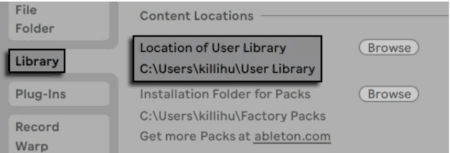
Unzip the ZIP file and copy the plugin amxd file to your User Library folder. There are two ways to find where your User Library is located: Go to Preferences – Library – Location of User Library
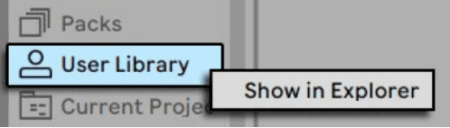
Or [right-click] on the User Library in the Browser – Show in Explorer
The device uses an external Max component. To install on Mac, the following steps must be followed.
Copy the file 11live.tools.mxo to the folder: /users/shared/Max 8/Library/ Open the Terminal utility and type: xattr -d -r com.apple.quarantine “/users/shared/Max 8/Library/”
It is also possible to use this folder: /users//Documents/Max 8/Library/
In the Terminal utility write the same but changing the folder path: xattr -d -r com.apple.quarantine “/users//Documents/Max 8/Library/”
11live.tools.mxo is an external Max components created by 11olsen. On his website you will find very interesting material for the development of Max devices – https://www.11olsen.de/max-msp-externals
More information about the use of external components of Max and Mac security in the following link.
END-USER LICENSE AGREEMENT FOR ISOTONIK STUDIOS SOFTWARE PRODUCTS.
PLEASE READ THE TERMS AND CONDITIONS OF THIS LICENSE AGREEMENT CAREFULLY BEFORE CONTINUING WITH THIS PROGRAM INSTALL.
This End-User License Agreement (referred to as “EULA”) is a legal agreement between an individual or a single entity (referred to as “LICENSEE”) and Isotonik Studios for the Isotonik Studios software product(s) which may include associated software components, media, printed materials, and “online” or electronic documentation (referred to as “SOFTWARE PRODUCT”). By installing, copying, or otherwise using the SOFTWARE PRODUCT, the LICENSEE agrees to be bound by the terms of this EULA.
This EULA represents the entire agreement concerning the program between the LICENSEE and Isotonik Studios and it supersedes any prior proposal, representation, or understanding between the parties. If the LICENSEE does not agree to the terms of this EULA, the LICENSEE should not install or use the SOFTWARE PRODUCT.
The SOFTWARE PRODUCT is protected by copyright laws and international copyright treaties, as well as other intellectual property laws and treaties. The SOFTWARE PRODUCT is licensed, not sold.
- GRANT OF LICENSE.
The SOFTWARE PRODUCT is licensed as follows:
(a) Installation and Use. Providing that the LICENSEE has paid any applicable license fees, Isotonik Studios grants the LICENSEE the right to install and use copies of the SOFTWARE PRODUCT on up to two computers in the LICENSEE’s possession that are running a validly licensed copy of the operating system for which the SOFTWARE PRODUCT was designed [e.g., Windows 10, macOS]. The computer(s) must be owned by the LICENSEE.
(b) Backup Copies. The LICENSEE may also make copies of the SOFTWARE PRODUCT as may be necessary for backup and archival purposes.
- DESCRIPTION OF OTHER RIGHTS AND LIMITATIONS.
(a) Maintenance of Copyright Notices. The LICENSEE must not remove or alter any copyright notices on any and all copies of the SOFTWARE PRODUCT.
(b) Distribution. The LICENSEE may not distribute registered copies of the SOFTWARE PRODUCT to third parties.
(c) Prohibition on Reverse Engineering, Decompilation, and Disassembly. The LICENSEE may not reverse engineer, decompile, or disassemble the SOFTWARE PRODUCT, except and only to the extent that such activity is expressly permitted by applicable law notwithstanding this limitation.
(d) Rental. The LICENSEE may not rent, lease, or lend the SOFTWARE PRODUCT.
(e) License transfer The LICENSEE may not transfer their license to the SOFTWARE PRODUCT to any third party. Any attempt to do so will be considered a violation of this EULA.
(f) Support Services. Isotonik Studios may provide the LICENSEE with support services related to the SOFTWARE PRODUCT for a period of 12 months following the date of purchase. Any supplemental software code provided to the LICENSEE as part of the Support Services shall be considered part of the SOFTWARE PRODUCT and subject to the terms and conditions of this EULA.
(g) Compliance with Applicable Laws. The LICENSEE must comply with all applicable laws regarding use of the SOFTWARE PRODUCT.
- TERMINATION Without prejudice to any other rights, Isotonik Studios may terminate this EULA if the LICENSEE fails to comply with the terms and conditions of this EULA. In such event, the LICENSEE must destroy all copies of the SOFTWARE PRODUCT in the LICENSEE’s possession.
- COPYRIGHT All title, including but not limited to copyrights, in and to the SOFTWARE PRODUCT and any copies thereof are owned by Isotonik Studios or its suppliers. All title and intellectual property rights in and to the content which may be accessed through use of the SOFTWARE PRODUCT is the property of the respective content owner and may be protected by applicable copyright or other intellectual property laws and treaties. This EULA grants the LICENSEE no rights to use such content. All rights not expressly granted are reserved by Isotonik Studios.
- NO WARRANTIES Isotonik Studios expressly disclaims any warranty for the SOFTWARE PRODUCT. The SOFTWARE PRODUCT is provided ‘As Is’ without any express or implied warranty of any kind, including but not limited to any warranties of merchantability, noninfringement, or fitness of a particular purpose. Isotonik Studios does not warrant or assume responsibility for the accuracy or completeness of any information, text, graphics, links or other items contained within the SOFTWARE PRODUCT. Isotonik Studios makes no warranties respecting any harm that may be caused by the transmission of a computer virus, worm, time bomb, logic bomb, or other such computer program. Isotonik Studios further expressly disclaims any warranty or representation to the LICENSEE or to any third party.
- LIMITATION OF LIABILITY In no event shall Isotonik Studios be liable for any damages (including, without limitation, lost profits, business interruption, or lost information) arising out of the LICENSEE’s use of or inability to use the SOFTWARE PRODUCT, even if Isotonik Studios has been advised of the possibility of such damages. In no event will Isotonik Studios be liable for loss of data or for indirect, special, incidental, consequential (including lost profit), or other damages based in contract, tort or otherwise. Isotonik Studios shall have no liability with respect to the content of the SOFTWARE PRODUCT or any part thereof, including but not limited to errors or omissions contained therein, libel, infringements of rights of publicity, privacy, trademark rights, business interruption, personal injury, loss of privacy, moral rights or the disclosure of confidential information.
More from Killihu



 ★ Popular
Frequently Bought Together