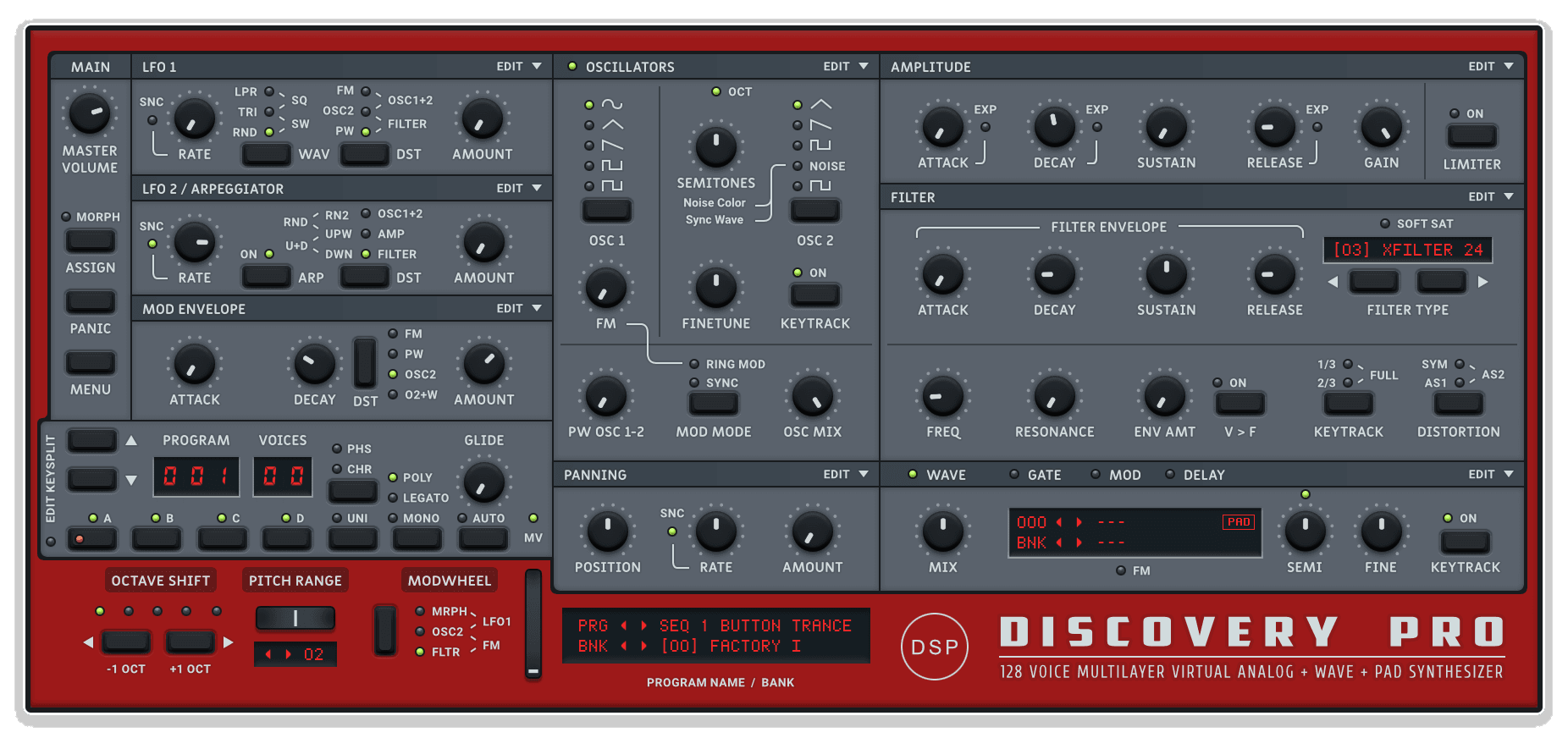
Discovery Pro v8 Plain by Killihu
WHY SHOULD YOUR SYNTH GUI DISTRACT FROM SOUND DESIGN?
Discovery Pro v8 Plain by killihu is a free flat-design skin for discoDSP Discovery Pro that strips away visual decoration in favor of functional clarity. No gradients, no pseudo-3D effects, no ornate graphics - just clean, minimalist controls that reduce eye strain and keep focus on parameters.
Inside you'll find:
- Complete flat design aesthetic (no gradients or 3D effects)
- Simplified control graphics for reduced visual complexity
- Single focused color theme optimized for readability
- Reduced eye strain during extended sound design sessions
- Identical control layout to default Discovery Pro (muscle memory intact)
- Compatible with Discovery Pro v8.12+ skin engine
- Modern software aesthetic matching contemporary DAW design
- Improved visibility in bright studio environments
- Lightweight visual processing for faster parameter scanning
- Simple installation (copy folder to Discovery Pro skins directory)
- FREE download (pay what you want)
Essential for minimalist design enthusiasts, users experiencing eye strain from complex plugin graphics, producers working in bright environments, modern workflow integrators wanting visual consistency, and anyone who prefers focus-oriented interfaces that stay out of the way.
FREE skin for discoDSP Discovery Pro v8.14+ (Mac & Windows)
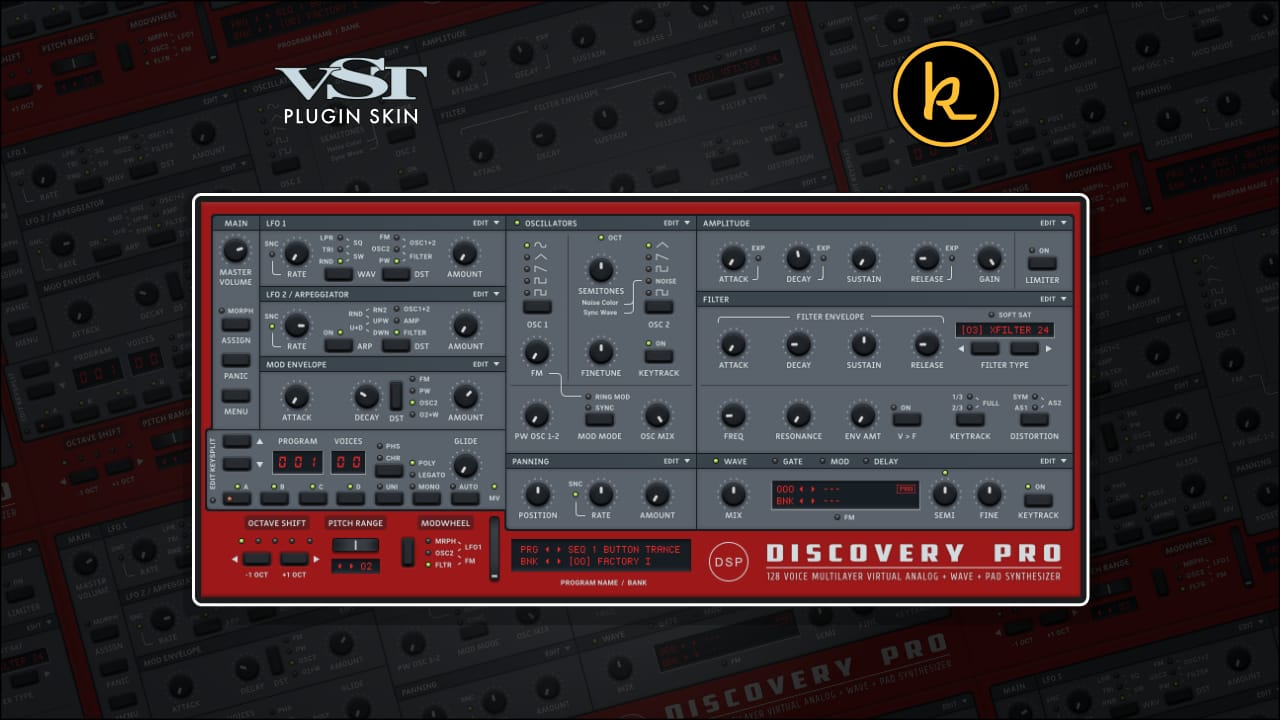
Discovery Pro v8 Plain by Killihu
WHY SHOULD YOUR SYNTH GUI DISTRACT FROM SOUND DESIGN?
Discovery Pro v8 Plain by killihu is a free flat-design skin for discoDSP Discovery Pro that strips away visual decoration in favor of functional clarity. No gradients, no pseudo-3D effects, no ornate graphics - just clean, minimalist controls that reduce eye strain and keep focus on parameters.
Inside you'll find:
- Complete flat design aesthetic (no gradients or 3D effects)
- Simplified control graphics for reduced visual complexity
- Single focused color theme optimized for readability
- Reduced eye strain during extended sound design sessions
- Identical control layout to default Discovery Pro (muscle memory intact)
- Compatible with Discovery Pro v8.12+ skin engine
- Modern software aesthetic matching contemporary DAW design
- Improved visibility in bright studio environments
- Lightweight visual processing for faster parameter scanning
- Simple installation (copy folder to Discovery Pro skins directory)
- FREE download (pay what you want)
Essential for minimalist design enthusiasts, users experiencing eye strain from complex plugin graphics, producers working in bright environments, modern workflow integrators wanting visual consistency, and anyone who prefers focus-oriented interfaces that stay out of the way.
FREE skin for discoDSP Discovery Pro v8.14+ (Mac & Windows)
Buying for someone?Send a gift card →
Additional information
| VST Category | VST Skins |
|---|---|
| Min. Requirements | discoDSP Discovery Pro VST v8.14 |
| OS | Mac, Windows |
Product reviews
5 out of 5
1 review
How item rating is calculated
We show the average based on reviews. Only genuine reviews are displayed.
Sort by
April 19, 2026
This reviewer bought this product from our store.
Nice!
That way, the synth is much easier to read!
I recommend this product
Discovery Pro v8 Plain by Killihu
Visual complexity in plugin interfaces creates cognitive overhead. Ornate graphics, pseudo-3D knobs, textured backgrounds, and elaborate styling demand visual processing power that should be focused on sound design decisions. Discovery Pro’s default interface leans toward visual richness with detailed graphics that can feel heavy during extended sessions. Discovery Pro v8 Plain strips away visual decoration in favor of functional clarity, delivering a clean, flat design that reduces eye strain and keeps focus on parameters rather than aesthetics.
This isn’t about removing features or hiding controls. Discovery Pro v8 Plain maintains the complete Discovery Pro interface layout with every parameter, knob, slider, and button in its original position. The transformation is purely visual: flat color fields replace gradients and textures, clean typography replaces ornate fonts, and simplified control graphics replace detailed knob designs. The result is an interface that feels lighter, faster to scan, and easier on the eyes during marathon sound design sessions.
Whether you prefer minimalist design aesthetics over decorative interfaces, work in bright environments where high-contrast flat design improves visibility, experience eye fatigue from visually complex plugin GUIs, or simply want your plugins to match modern flat design trends found in contemporary software and operating systems, Discovery Pro v8 Plain transforms one of the most feature-rich virtual analog synthesizers into a visually streamlined sound design tool.
Features & Highlights
Flat Design Aesthetic: Every visual element has been redesigned with flat design principles. No gradients, no pseudo-3D effects, no unnecessary textures or decorative elements. Just clean, functional controls with clear visual hierarchy. This approach reduces visual noise and lets you focus on parameter values and sound design decisions rather than parsing ornate graphics.
Reduced Eye Strain: Extended sound design sessions with visually complex interfaces can cause eye fatigue. Discovery Pro v8 Plain’s simplified graphics, consistent color palette, and flat visual style reduce the visual processing demands on your eyes. Work longer with less fatigue, particularly in bright studio environments or during daylight sessions where high contrast improves readability.
Compatible with Discovery Pro v8 Skin Engine: Built specifically for Discovery Pro version 8.12 and later (v8.14 required for installation), this skin takes advantage of the improved skin engine introduced in recent updates. The implementation is optimized for performance and visual quality, ensuring smooth operation without interface lag or rendering issues.
Single Focused Color Theme: Unlike previous multi-theme skin packs, Discovery Pro v8 Plain delivers one carefully considered color scheme. This focused approach ensures visual consistency and avoids the decision paralysis that can come with multiple theme options. The chosen palette balances readability, reduced eye strain, and modern aesthetic sensibilities.
Identical Control Layout: Every knob, slider, button, and parameter occupies exactly the same position as in the default Discovery Pro interface. Your muscle memory remains intact – you don’t need to relearn the synth layout. Only the visual presentation changes, not the functional organization or parameter placement.
Modern Software Aesthetic: The flat design style aligns with contemporary interface trends found in modern DAWs, operating systems, and professional software. If you prefer the clean aesthetic of tools like Ableton Live 11/12, Logic Pro X, or Bitwig Studio, Discovery Pro v8 Plain brings that visual language to Discovery Pro.
Lightweight Visual Processing: Simpler graphics mean less visual complexity for your brain to process. When scanning the interface for specific parameters or understanding patch architecture, flat design’s clear visual hierarchy speeds recognition and reduces the mental effort required to locate and interpret controls.
How to Use
Download the Discovery Pro v8 Plain skin package and extract the ZIP file. Locate the “Discovery Pro v8 Plain” folder inside. Navigate to Documents/discoDSP/Discovery Pro/skins/ on your computer (create the skins folder if it doesn’t exist). Copy the “Discovery Pro v8 Plain” folder into the skins directory.
Activating the Skin:
Open Discovery Pro in your DAW. Access Discovery Pro’s skin selection menu (typically found in the plugin’s settings or preferences panel). Select “Discovery Pro v8 Plain” from the available skins list. The interface immediately updates to the flat design aesthetic. You can switch back to the default skin or try other installed skins at any time without affecting your patches or presets.
Working with the Interface:
All controls function identically to the default Discovery Pro interface. Discovery Pro v8 Plain only changes visual presentation – parameter behavior, sound engine characteristics, and preset compatibility remain unchanged. The flat design simply provides an alternative visual experience for users who prefer minimalist aesthetics or find the simplified graphics easier on their eyes.
Integration with Your Workflow:
If your DAW uses flat design (Ableton Live 11/12, Bitwig Studio, FL Studio 20+), Discovery Pro v8 Plain creates better visual consistency across your plugin collection. The reduced visual weight means Discovery Pro feels less intrusive in your workspace, blending more naturally with modern interface aesthetics rather than standing out as visually distinct.
Ideal For
Minimalist Design Enthusiasts: If you gravitate toward clean, simple interfaces over ornate, decorated GUIs, Discovery Pro v8 Plain delivers the aesthetic you prefer. Enjoy using Discovery Pro’s powerful synthesis engine without visual clutter.
Users Experiencing Eye Strain: Complex plugin graphics can contribute to visual fatigue during long sessions. The flat design reduces visual processing demands, potentially easing eye strain for producers who spend extended periods working with synthesizers.
Bright Environment Producers: If your studio has significant natural light or bright overhead lighting, flat design’s high-contrast approach often improves readability compared to textured, gradient-heavy interfaces that can be harder to read in bright conditions.
Modern Workflow Integrators: Users running contemporary DAWs with flat design aesthetics (Live 11/12, Bitwig, modern FL Studio) who want their third-party plugins to match the visual language of their primary production environment.
Focus-Oriented Sound Designers: If you find yourself distracted by elaborate plugin graphics and prefer interfaces that stay out of the way visually, letting you concentrate on sound rather than aesthetics, Discovery Pro v8 Plain removes visual interference.
What’s Included
- Discovery Pro v8 Plain skin (folder containing all skin files)
- Flat design aesthetic with no gradients or 3D effects
- Simplified control graphics for reduced visual complexity
- Single focused color theme optimized for readability
- Identical control layout to default Discovery Pro interface
- Compatible with Discovery Pro v8.12+ skin engine
- FREE download (pay what you want)
Requirements
- discoDSP Discovery Pro v8.14 or later
- Mac or Windows operating system
- DAW or host application that supports VST plugins
- Installation: Copy skin folder to Documents/discoDSP/Discovery Pro/skins/
Explore More
OsTIruston | inScale | Control Matrix | Clipboard Device | Session Clips | View All killihu Products
Frequently Asked Questions
A: Discovery Pro v8 Plain is a free flat-design skin for the discoDSP Discovery Pro synthesizer. It redesigns the interface with simplified graphics, removing gradients, 3D effects, and ornate styling in favor of clean, minimalist controls. The skin reduces visual complexity and eye strain while maintaining the exact same control layout as the default interface.
A: You need discoDSP Discovery Pro version 8.14 or later installed on your Mac or Windows computer. The skin files are installed by copying the “Discovery Pro v8 Plain” folder to Documents/discoDSP/Discovery Pro/skins/ on your system.
A: No. Discovery Pro v8 Plain only changes the visual presentation of Discovery Pro’s interface. All parameters function identically, the sound engine is completely unaffected, and your existing presets and patches work exactly as before. It’s purely an aesthetic change for users who prefer flat design over the default visual style.
A: Yes! You can switch between Discovery Pro v8 Plain and the default skin (or any other installed skins) at any time through Discovery Pro’s skin selection menu. Switching skins doesn’t affect your patches, presets, or sound – it only changes the visual appearance.
A: Yes! Discovery Pro v8 Plain is a completely free download with pay-what-you-want pricing. You can explore more of killihu’s tools and resources here: killihu
Important Information
Initial Release – April 2026
END-USER LICENSE AGREEMENT FOR ISOTONIK STUDIOS SOFTWARE PRODUCTS.
PLEASE READ THE TERMS AND CONDITIONS OF THIS LICENSE AGREEMENT CAREFULLY BEFORE CONTINUING WITH THIS PROGRAM INSTALL.
This End-User License Agreement (referred to as “EULA”) is a legal agreement between an individual or a single entity (referred to as “LICENSEE”) and Isotonik Studios for the Isotonik Studios software product(s) which may include associated software components, media, printed materials, and “online” or electronic documentation (referred to as “SOFTWARE PRODUCT”). By installing, copying, or otherwise using the SOFTWARE PRODUCT, the LICENSEE agrees to be bound by the terms of this EULA.
This EULA represents the entire agreement concerning the program between the LICENSEE and Isotonik Studios and it supersedes any prior proposal, representation, or understanding between the parties. If the LICENSEE does not agree to the terms of this EULA, the LICENSEE should not install or use the SOFTWARE PRODUCT.
The SOFTWARE PRODUCT is protected by copyright laws and international copyright treaties, as well as other intellectual property laws and treaties. The SOFTWARE PRODUCT is licensed, not sold.
- GRANT OF LICENSE.
The SOFTWARE PRODUCT is licensed as follows:
(a) Installation and Use. Providing that the LICENSEE has paid any applicable license fees, Isotonik Studios grants the LICENSEE the right to install and use copies of the SOFTWARE PRODUCT on up to two computers in the LICENSEE’s possession that are running a validly licensed copy of the operating system for which the SOFTWARE PRODUCT was designed [e.g., Windows 10, macOS]. The computer(s) must be owned by the LICENSEE.
(b) Backup Copies. The LICENSEE may also make copies of the SOFTWARE PRODUCT as may be necessary for backup and archival purposes.
- DESCRIPTION OF OTHER RIGHTS AND LIMITATIONS.
(a) Maintenance of Copyright Notices. The LICENSEE must not remove or alter any copyright notices on any and all copies of the SOFTWARE PRODUCT.
(b) Distribution. The LICENSEE may not distribute registered copies of the SOFTWARE PRODUCT to third parties.
(c) Prohibition on Reverse Engineering, Decompilation, and Disassembly. The LICENSEE may not reverse engineer, decompile, or disassemble the SOFTWARE PRODUCT, except and only to the extent that such activity is expressly permitted by applicable law notwithstanding this limitation.
(d) Rental. The LICENSEE may not rent, lease, or lend the SOFTWARE PRODUCT.
(e) License transfer The LICENSEE may not transfer their license to the SOFTWARE PRODUCT to any third party. Any attempt to do so will be considered a violation of this EULA.
(f) Support Services. Isotonik Studios may provide the LICENSEE with support services related to the SOFTWARE PRODUCT for a period of 12 months following the date of purchase. Any supplemental software code provided to the LICENSEE as part of the Support Services shall be considered part of the SOFTWARE PRODUCT and subject to the terms and conditions of this EULA.
(g) Compliance with Applicable Laws. The LICENSEE must comply with all applicable laws regarding use of the SOFTWARE PRODUCT.
- TERMINATION Without prejudice to any other rights, Isotonik Studios may terminate this EULA if the LICENSEE fails to comply with the terms and conditions of this EULA. In such event, the LICENSEE must destroy all copies of the SOFTWARE PRODUCT in the LICENSEE’s possession.
- COPYRIGHT All title, including but not limited to copyrights, in and to the SOFTWARE PRODUCT and any copies thereof are owned by Isotonik Studios or its suppliers. All title and intellectual property rights in and to the content which may be accessed through use of the SOFTWARE PRODUCT is the property of the respective content owner and may be protected by applicable copyright or other intellectual property laws and treaties. This EULA grants the LICENSEE no rights to use such content. All rights not expressly granted are reserved by Isotonik Studios.
- NO WARRANTIES Isotonik Studios expressly disclaims any warranty for the SOFTWARE PRODUCT. The SOFTWARE PRODUCT is provided ‘As Is’ without any express or implied warranty of any kind, including but not limited to any warranties of merchantability, noninfringement, or fitness of a particular purpose. Isotonik Studios does not warrant or assume responsibility for the accuracy or completeness of any information, text, graphics, links or other items contained within the SOFTWARE PRODUCT. Isotonik Studios makes no warranties respecting any harm that may be caused by the transmission of a computer virus, worm, time bomb, logic bomb, or other such computer program. Isotonik Studios further expressly disclaims any warranty or representation to the LICENSEE or to any third party.
- LIMITATION OF LIABILITY In no event shall Isotonik Studios be liable for any damages (including, without limitation, lost profits, business interruption, or lost information) arising out of the LICENSEE’s use of or inability to use the SOFTWARE PRODUCT, even if Isotonik Studios has been advised of the possibility of such damages. In no event will Isotonik Studios be liable for loss of data or for indirect, special, incidental, consequential (including lost profit), or other damages based in contract, tort or otherwise. Isotonik Studios shall have no liability with respect to the content of the SOFTWARE PRODUCT or any part thereof, including but not limited to errors or omissions contained therein, libel, infringements of rights of publicity, privacy, trademark rights, business interruption, personal injury, loss of privacy, moral rights or the disclosure of confidential information.
More from Killihu


Frequently Bought Together
 Sale
SaleAqusmatiq AudioDedalus Delay VST by Aqusmatiq AudioLive 10 & 11 & 12 Price range: £0.00 through £26.00