UtiliKit by NOISS COKO
CAN YOU TRUST WHAT YOU CAN’T MEASURE?
FREE FOR TWO WEEKS FOLLOWING RELEASE!
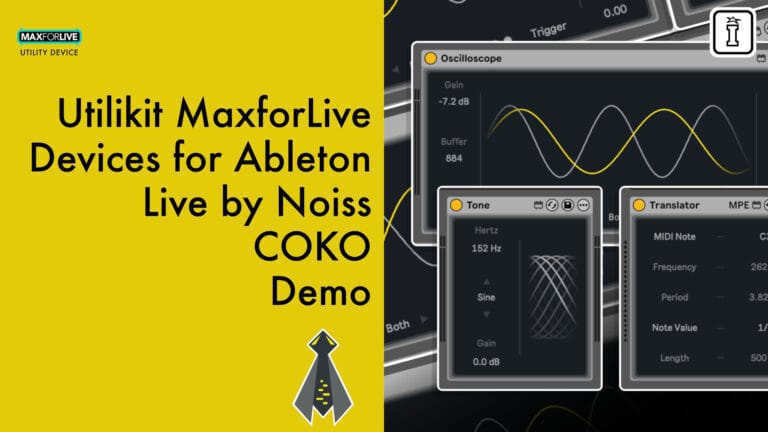
Precision matters when technical decisions shape your sound. UtiliKit brings signal visualization, calibration tones, and musical mathematics directly into Ableton Live, replacing guesswork with measurement. Three MaxforLive utilities built for testing, analysis, and exact calculations.
Inside you’ll find:
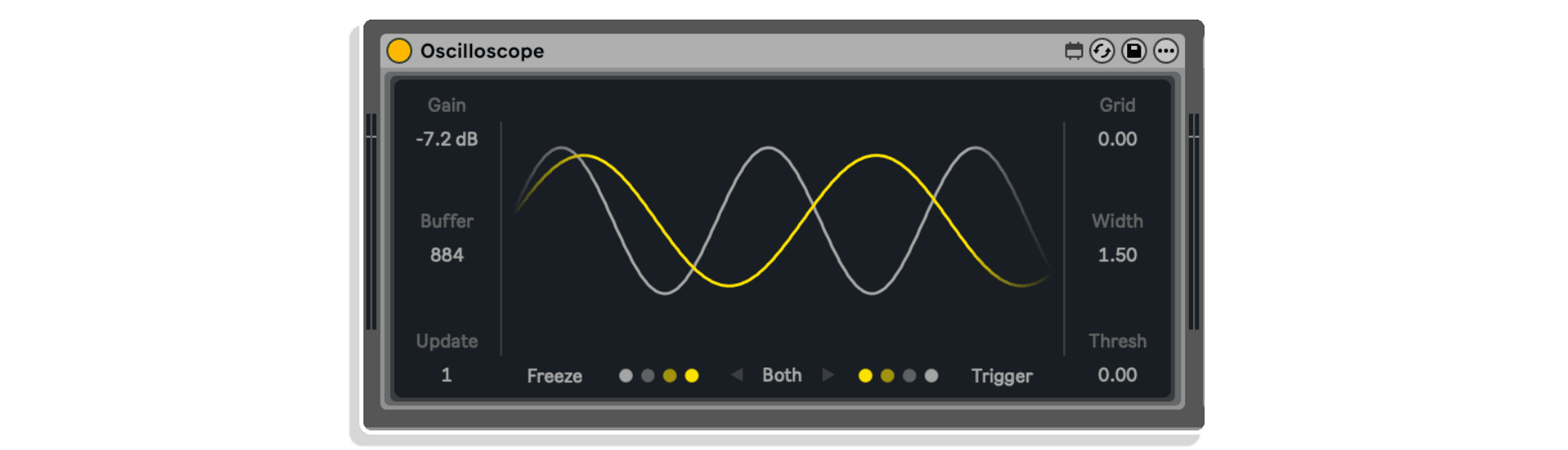
- Scope: High-resolution oscilloscope with History and Trigger modes, adjustable buffer size and refresh rate, stereo visualization, freeze function, and floating high-res window for detailed waveform analysis
- Tone: Dual-source signal generator delivering sine waves (20Hz-20kHz) and filtered white noise for calibration, level matching, and frequency response testing
- Translator: Musical-to-technical conversion utility that transforms MIDI notes into frequency/period values and note durations into millisecond measurements for precise effect timing
- Full Push integration for hands-on parameter control across all three devices
Test signals, measure waveforms, calculate timings. UtiliKit delivers the technical foundation for Ableton Live 11.3.43+ (Mac & Windows, Max 9.1.2 required).
USER GUIDE: UtiliKit v1.0 - User Manual
UtiliKit by NOISS COKO
CAN YOU TRUST WHAT YOU CAN’T MEASURE?
FREE FOR TWO WEEKS FOLLOWING RELEASE!
Precision matters when technical decisions shape your sound. UtiliKit brings signal visualization, calibration tones, and musical mathematics directly into Ableton Live, replacing guesswork with measurement. Three MaxforLive utilities built for testing, analysis, and exact calculations.
Inside you’ll find:
- Scope: High-resolution oscilloscope with History and Trigger modes, adjustable buffer size and refresh rate, stereo visualization, freeze function, and floating high-res window for detailed waveform analysis
- Tone: Dual-source signal generator delivering sine waves (20Hz-20kHz) and filtered white noise for calibration, level matching, and frequency response testing
- Translator: Musical-to-technical conversion utility that transforms MIDI notes into frequency/period values and note durations into millisecond measurements for precise effect timing
- Full Push integration for hands-on parameter control across all three devices
Test signals, measure waveforms, calculate timings. UtiliKit delivers the technical foundation for Ableton Live 11.3.43+ (Mac & Windows, Max 9.1.2 required).
USER GUIDE: UtiliKit v1.0 - User Manual


Product reviews
5 out of 5
4 reviews
How item rating is calculated
We show the average based on reviews. Only genuine reviews are displayed.
Sort by
September 28, 2026
everyday utilities
The name says it all: a suite of professional tools for studio work. As an educator, I use them constantly in my classes—they are excellent for teaching.
Professional visual information for music producers and Ableton users.
nothing
I recommend this product
Reply from Noiss COKO
September 28, 2026
April 19, 2026
This reviewer bought this product from our store.
Aesthetics and effectivity
Love the oscillator, I really recommend it!
Fantastic visualization!
None
I recommend this product
April 18, 2026
This reviewer bought this product from our store.
Best new audio toolkit.
Tools I'll use daily.
I recommend this product
April 17, 2026
This reviewer bought this product from our store.
Easy to find a corner for this straightforward utility set.
The oscilloscope is the most useful for me, I liked the freeze setting, the threshold setting and the bigger pop-out window. The note value translator, if you don't have one, is handy.
I recommend this product
UtiliKit by NOISS COKO
Testing and calibration in Ableton Live often means guesswork, approximation, and visual estimation. You’re tweaking EQ curves without knowing exact frequencies, setting delay times by ear, calibrating levels without proper reference tones. UtiliKit changes that equation entirely. This three-device MaxforLive pack brings precision measurement, signal visualization, and musical mathematics directly into your Live set, transforming technical workflows from guesswork into certainty.
Developed by Barcelona-based NOISS COKO (Javier Salthú), UtiliKit delivers the kind of analytical tools typically found in dedicated test equipment or external applications, now native to your DAW. Whether you’re fine-tuning compressor timings to match song tempo, analyzing waveforms for clipping or phase issues, calibrating gain staging across your signal chain, or converting musical values into precise technical measurements, these three utilities work as your technical foundation.
The pack includes Scope, a high-resolution oscilloscope that visualizes audio signals in real time with adjustable buffer size, refresh rate, dual-mode operation (History and Trigger), and a floating high-resolution window for detailed waveform inspection. Tone provides sine wave and white noise generation for calibration tasks, with frequency control switchable between notes and hertz (20Hz to 20kHz), filtered noise output, and adjustable gain. Translator converts MIDI notes into frequency and period values, and note durations into millisecond measurements, perfect for setting reverb decay times, compressor attack/release, delay resonances, or frequency-specific EQ moves based on harmonic context.
Together, these utilities solve problems that otherwise require multiple external tools, calculator apps, or educated guesses. Set compressor release times in sync with your track’s groove by converting note values to milliseconds. Tune delay feedback to resonate at specific pitches using period calculations. Calibrate your monitoring chain with precise reference tones. Inspect transients and waveforms for clipping, phase cancellation, or DC offset. Match levels across different signal paths. All without leaving Live’s interface.
UtiliKit integrates seamlessly into technical workflows. Drop Scope onto your master chain during mixdown to catch clipping before it reaches your limiter. Use Tone to generate test signals for speaker placement, room analysis, or gain calibration. Keep Translator open in a side panel to quickly reference frequency values when surgical EQing, or convert rhythmic note values into exact millisecond timings for tempo-synced effects. Each device operates independently but complements the others as part of a complete diagnostic toolkit.
The oscilloscope offers History mode for continuous waveform display (showing the last N samples defined by buffer size) or Trigger mode, which captures waveforms only when they exceed a configurable threshold, perfect for isolating transients or specific signal events. The display features adjustable grid opacity and waveform line width, with stereo visualization showing left, right, or both channels simultaneously. A single click opens a floating high-resolution window for detailed analysis while your session continues playing.
Tone’s dual-source architecture switches between sine wave generation (with note or hertz-based frequency control) and filtered white noise (with adjustable lowpass cutoff), covering both tonal and broadband calibration needs. The gain control operates in decibels, allowing precise level matching and safe output management. This makes it ideal for checking frequency response across playback systems, setting unity gain through effects chains, or providing reference signals for external gear calibration.
Translator solves the constant mental math of music production. Enter a MIDI note manually or send it via MIDI input, and instantly see its frequency in hertz and period in milliseconds. Set a note value (whole note, quarter note, 16th, etc.) and get its exact length in milliseconds based on your project tempo. Use frequency values to target harmonic content with surgical precision. Use period values to tune delays for pitch-resonant feedback effects. Use length values to set reverb pre-delay or decay times that lock to your track’s rhythmic grid. The calculations update in real time as you adjust tempo or note values.
UtiliKit represents NOISS COKO’s commitment to workflow enhancement through thoughtful utility design. Where other developers focus on sound generation or creative effects, this pack addresses the technical foundation that underpins professional production work. Precision, clarity, and measurement over approximation and guesswork.
What’s Inside
Scope: High-resolution oscilloscope with adjustable buffer size (sample-based window control), refresh rate control (frames per second), input gain adjustment, History and Trigger display modes, configurable trigger threshold, adjustable grid opacity, waveform line width control, stereo display (left/right/both channels), freeze function for waveform capture, and floating high-resolution window.
Tone: Dual-source signal generator with sine wave output (20Hz to 20kHz), white noise output, switchable frequency units (notes or hertz), lowpass filter for noise shaping, decibel-based gain control, and safe output level management.
Translator: Musical-to-technical conversion utility with MIDI note input (manual or MIDI-triggered), frequency display in hertz, period display in milliseconds, note value selection (whole note through 64th note subdivisions), length calculation in milliseconds (tempo-based), and real-time updates for all calculations.
Technical Specifications
Platform: Ableton Live 11.3.43+ or Live 11/12 (MaxforLive required)
System: Mac and Windows
Format: .amxd (MaxforLive devices)
Developer: NOISS COKO (Javier Salthú)
Release: 2026
Use Cases
Mixdown and mastering engineers use Scope to visually confirm headroom, check for intersample peaks, analyze stereo imaging, and identify phase issues before final bounce. The trigger mode isolates transient events for detailed inspection, while the floating window allows waveform monitoring without cluttering your arrangement view.
Sound designers rely on Translator to calculate delay times that create harmonic resonance at specific pitches, set reverb parameters in musical time values, and target frequencies for spectral processing based on note input rather than guesswork. The real-time conversion streamlines technical decisions during creative workflows.
Mixing engineers deploy Tone for gain staging calibration across complex signal chains, speaker placement verification through frequency sweeps, monitoring system frequency response checks, and level matching between different processing paths. The filtered noise output provides broadband test signals for room analysis and acoustic treatment evaluation.
Live performers use these utilities for pre-show system checks, ensuring proper signal flow and level calibration before taking the stage. The oscilloscope confirms clean audio paths, the tone generator verifies speaker function and frequency response, and the translator quickly calculates effect timings for tempo-synced performances.
Workflow Integration
UtiliKit operates as permanent fixtures in your Live set templates or deploys on-demand for specific technical tasks. Many users keep Scope on the master channel with the device collapsed, expanding it only when visual confirmation is needed. Translator often lives in a dedicated MIDI track or info view panel for quick reference during arrangement and mixing. Tone typically appears temporarily for calibration tasks, then gets removed once levels are confirmed.
The devices require minimal CPU overhead, making them suitable for background operation even in dense sessions. Scope’s refresh rate and buffer size parameters allow you to balance visual responsiveness against processing load. On lower-powered systems, reduce the update rate for smoother performance. On high-performance machines, maximize refresh and buffer settings for ultra-detailed waveform display.
Integration with Ableton Push provides hands-on parameter control for all three devices, though screen-based interaction remains the primary interface due to the visual nature of Scope’s display and Translator’s numerical outputs. The devices save their states with your Live projects, preserving settings across sessions.
Explore More from NOISS COKO
If UtiliKit’s precision-focused approach resonates with your workflow, explore NOISS COKO’s complete catalog. Sempler PRO delivers polyphonic sample playback through step-sequenced fragment generation. Repeat PRO provides 16-step MIDI sequencing with per-step parameter control and deep randomization. Control Pack Plus offers seven devices for randomization, expression, and automation across Live and external parameters. GrainLoop transforms audio loops through real-time granular synthesis. Gossip reimagines delay processing with five independent taps and detailed parameter control per tap.
Each NOISS COKO device shares the same design philosophy: clean interfaces, deep functionality, and workflow integration that extends Ableton Live’s native capabilities. Whether you need creative tools, technical utilities, or performance instruments, the catalog offers solutions built by a producer who understands real-world studio and stage demands.
UtiliKit joins NOISS COKO’s lineup as the technical foundation for producers who value precision. See exactly what’s happening in your signal chain. Generate exact reference tones. Calculate precise timings and frequencies. No more guesswork.
Frequently Asked Questions
A: UtiliKit is a three-device MaxforLive pack designed for signal analysis, calibration, and measurement within Ableton Live. It includes Scope (a high-resolution oscilloscope for waveform visualization), Tone (a dual-source signal generator for sine waves and white noise), and Translator (a utility that converts MIDI notes to frequency/period values and note durations to millisecond measurements).
A: MaxforLive is an extension of Ableton Live Suite that allows users to create or use custom-built devices, adding new instruments, effects, and functionality to Live. It’s included with Live Suite or available as a separate add-on for Live Standard.
A: Yes, UtiliKit requires MaxforLive to function. You’ll need Ableton Live Suite 11.3.43 or higher (which includes MaxforLive), or Ableton Live Standard 11.3.43+ with the MaxforLive add-on. Max 9.1.2 is the minimum Max version required, though the devices work with the bundled Max version in Live 11 and 12.
A: Scope provides real-time waveform visualization for analyzing audio signals, checking for clipping or intersample peaks, inspecting transients, verifying stereo imaging, identifying phase issues, and monitoring headroom during mixdown and mastering. It offers History mode (continuous display) and Trigger mode (threshold-based capture) with adjustable buffer size, refresh rate, and a floating high-resolution window.
A: Tone generates precise sine wave signals (20Hz to 20kHz, switchable between note and hertz display) and filtered white noise for calibration tasks. Use it for gain staging, speaker placement verification, frequency response checks, level matching across signal chains, monitoring system calibration, and room analysis. The decibel-based gain control allows safe and precise output level management.
A: Translator converts musical values into technical measurements. Enter a MIDI note and get its frequency (in hertz) for surgical EQ targeting, or its period (in milliseconds) for tuning delay times to create pitch-resonant feedback effects. Select a note value (quarter note, 16th note, etc.) and get its exact length in milliseconds based on your project tempo, perfect for setting reverb pre-delay, decay times, or compressor attack/release values that lock to your track’s rhythmic grid.
A: Yes, all three devices support full parameter control from Ableton Push 2 and Push 3, allowing hands-on adjustment of oscilloscope settings, tone generator parameters, and translator values. Note that Scope’s visual display and Translator’s numerical outputs are best viewed on-screen, but all controls are accessible via Push.
A: UtiliKit requires Ableton Live Suite 11.3.43 or higher (or Live Standard 11.3.43+ with MaxforLive add-on), Max 9.1.2 (works with bundled Max version in Live 11 and 12), and runs on both macOS and Windows. The devices are provided as .amxd files for drag-and-drop installation into your Live User Library.
A: UtiliKit’s devices require minimal CPU overhead, making them suitable for background operation even in dense sessions. Scope’s refresh rate and buffer size parameters allow you to balance visual responsiveness against processing load. On lower-powered systems, reduce the update rate for smoother performance. On high-performance machines, maximize refresh and buffer settings for ultra-detailed waveform display.
A: You can explore the complete NOISS COKO catalog on Isotonik Studios, including Sempler PRO, Repeat PRO, Control Pack Plus, Modulation Pack, Movers Pack, GrainLoop, Gossip, and the Make NOISS Bundle which collects all NOISS COKO MaxforLive packs at a discount.
Important Information
Initial Release – April 2026
Our Products are generally provided as Zip file downloads which in all cases will need to be extracted and saved to your hard drive prior to installation. Details on the different file type provided and what to do with them are below.
.alp Files – These are Ableton Live Packs and will either install directly into the Packs Section of the browser of Ableton Live or ask you to save them to your hard drive. For packs that install to the library, when you double click on them you will see a pop up window asking you to confirm that installation is ok as the files are described as “Legacy”. This is fine and you are ok to proceed, the packs are created using the format for an earlier version of Live and so remain compatible with the current version.
.amxd files – These are individual MaxforLive Devices and can be stored anywhere on your hard drive. We’d advise creating a folder for them and then adding that folder as a location within the Places section of Lives Browser.
END-USER LICENSE AGREEMENT FOR ISOTONIK STUDIOS SOFTWARE PRODUCTS.
PLEASE READ THE TERMS AND CONDITIONS OF THIS LICENSE AGREEMENT CAREFULLY BEFORE CONTINUING WITH THIS PROGRAM INSTALL.
This End-User License Agreement (referred to as “EULA”) is a legal agreement between an individual or a single entity (referred to as “LICENSEE”) and Isotonik Studios for the Isotonik Studios software product(s) which may include associated software components, media, printed materials, and “online” or electronic documentation (referred to as “SOFTWARE PRODUCT”). By installing, copying, or otherwise using the SOFTWARE PRODUCT, the LICENSEE agrees to be bound by the terms of this EULA.
This EULA represents the entire agreement concerning the program between the LICENSEE and Isotonik Studios and it supersedes any prior proposal, representation, or understanding between the parties. If the LICENSEE does not agree to the terms of this EULA, the LICENSEE should not install or use the SOFTWARE PRODUCT.
The SOFTWARE PRODUCT is protected by copyright laws and international copyright treaties, as well as other intellectual property laws and treaties. The SOFTWARE PRODUCT is licensed, not sold.
- GRANT OF LICENSE.
The SOFTWARE PRODUCT is licensed as follows:
(a) Installation and Use. Providing that the LICENSEE has paid any applicable license fees, Isotonik Studios grants the LICENSEE the right to install and use copies of the SOFTWARE PRODUCT on up to two computers in the LICENSEE’s possession that are running a validly licensed copy of the operating system for which the SOFTWARE PRODUCT was designed [e.g., Windows 10, macOS]. The computer(s) must be owned by the LICENSEE.
(b) Backup Copies. The LICENSEE may also make copies of the SOFTWARE PRODUCT as may be necessary for backup and archival purposes.
- DESCRIPTION OF OTHER RIGHTS AND LIMITATIONS.
(a) Maintenance of Copyright Notices. The LICENSEE must not remove or alter any copyright notices on any and all copies of the SOFTWARE PRODUCT.
(b) Distribution. The LICENSEE may not distribute registered copies of the SOFTWARE PRODUCT to third parties.
(c) Prohibition on Reverse Engineering, Decompilation, and Disassembly. The LICENSEE may not reverse engineer, decompile, or disassemble the SOFTWARE PRODUCT, except and only to the extent that such activity is expressly permitted by applicable law notwithstanding this limitation.
(d) Rental. The LICENSEE may not rent, lease, or lend the SOFTWARE PRODUCT.
(e) License transfer The LICENSEE may not transfer their license to the SOFTWARE PRODUCT to any third party. Any attempt to do so will be considered a violation of this EULA.
(f) Support Services. Isotonik Studios may provide the LICENSEE with support services related to the SOFTWARE PRODUCT for a period of 12 months following the date of purchase. Any supplemental software code provided to the LICENSEE as part of the Support Services shall be considered part of the SOFTWARE PRODUCT and subject to the terms and conditions of this EULA.
(g) Compliance with Applicable Laws. The LICENSEE must comply with all applicable laws regarding use of the SOFTWARE PRODUCT.
- TERMINATION Without prejudice to any other rights, Isotonik Studios may terminate this EULA if the LICENSEE fails to comply with the terms and conditions of this EULA. In such event, the LICENSEE must destroy all copies of the SOFTWARE PRODUCT in the LICENSEE’s possession.
- COPYRIGHT All title, including but not limited to copyrights, in and to the SOFTWARE PRODUCT and any copies thereof are owned by Isotonik Studios or its suppliers. All title and intellectual property rights in and to the content which may be accessed through use of the SOFTWARE PRODUCT is the property of the respective content owner and may be protected by applicable copyright or other intellectual property laws and treaties. This EULA grants the LICENSEE no rights to use such content. All rights not expressly granted are reserved by Isotonik Studios.
- NO WARRANTIES Isotonik Studios expressly disclaims any warranty for the SOFTWARE PRODUCT. The SOFTWARE PRODUCT is provided ‘As Is’ without any express or implied warranty of any kind, including but not limited to any warranties of merchantability, noninfringement, or fitness of a particular purpose. Isotonik Studios does not warrant or assume responsibility for the accuracy or completeness of any information, text, graphics, links or other items contained within the SOFTWARE PRODUCT. Isotonik Studios makes no warranties respecting any harm that may be caused by the transmission of a computer virus, worm, time bomb, logic bomb, or other such computer program. Isotonik Studios further expressly disclaims any warranty or representation to the LICENSEE or to any third party.
- LIMITATION OF LIABILITY In no event shall Isotonik Studios be liable for any damages (including, without limitation, lost profits, business interruption, or lost information) arising out of the LICENSEE’s use of or inability to use the SOFTWARE PRODUCT, even if Isotonik Studios has been advised of the possibility of such damages. In no event will Isotonik Studios be liable for loss of data or for indirect, special, incidental, consequential (including lost profit), or other damages based in contract, tort or otherwise. Isotonik Studios shall have no liability with respect to the content of the SOFTWARE PRODUCT or any part thereof, including but not limited to errors or omissions contained therein, libel, infringements of rights of publicity, privacy, trademark rights, business interruption, personal injury, loss of privacy, moral rights or the disclosure of confidential information.
More from Noiss COKO
 -25%
-25%Noiss COKOModulation Pack by Noiss COKOLive 10 & 11 & 12 · Max for Live Original price was: £38.00.£28.50Current price is: £28.50.
Frequently Bought Together