

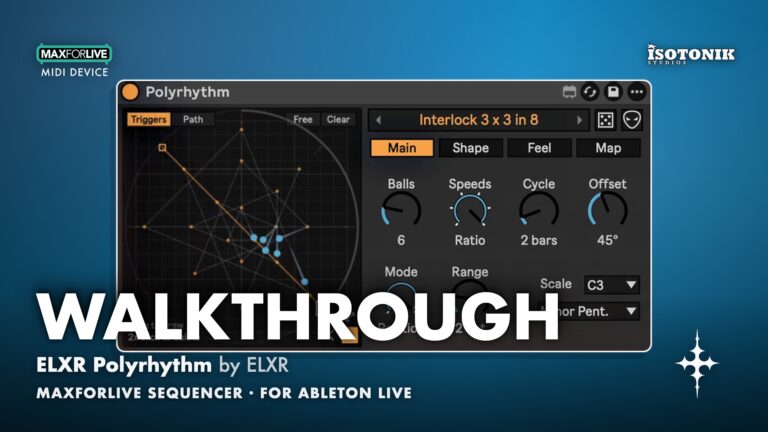
ELXR Polyrhythm by ELXR
VISUAL POLYRHYTHM SEQUENCER FOR ABLETON LIVE ELXR Polyrhythm is a Max for Live MIDI effect that turns orbiting dots into rhythmic patterns. Each dot circles at its own speed and plays a note every time it hits a trigger, always locked to Live's transport. Draw your own paths, map dots to any Live parameter, and roll new patterns on demand. • 23 Polyrhythm Types: From simple 3:2 ratios to nested polygons, phasing patterns and classic timelines. • Shape, Spacing and Motion: Triangle plays three notes per lap, pentagon five. Add Euclidean spacing, Swing, Gravity or Nested corners. • Draw Mode: Draw trigger lines and dot paths freehand or on a grid. • Map: Map any dot to any Live parameter with Min and Max per mapping. • Drum Rack Mode: Set scale to Drums and each dot plays its own pad. • Feel Controls: Swing, Humanize, Ratchet, Probability, Velocity, Gate, plus any scale and root. • Random and Mutate: Roll a completely new pattern or apply small mutations to the current one. • Copy MIDI: Turn what you just heard into a Live clip instantly. BUNDLE DISCOUNT: Get all 11 in the ELXR Bundle and save over 40%.

ELXR
ELXR develops creative audio software, plugins, Max for Live devices, and standalone applications for producers, musicians, and visual artists. Our tools combine powerful functionality with clean, int…
View all products by ELXRTry it
Play Polyrhythm in your browser
Pick how many balls, how their speeds relate and how long the cycle is, then press Play. Each ball plays a note as it crosses the top line, and they all meet again at the end of the cycle.
Browser preview: these simple tones are made in your browser. In Live, Polyrhythm plays your own instruments.
On an iPhone, turn off silent mode to hear the demo.
Overview
Visual polyrhythm sequencer for Ableton Live
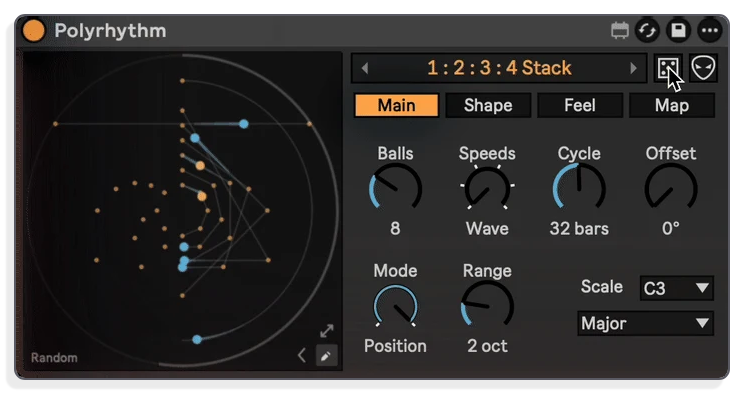
Polyrhythm is a visual rhythm playground. Dots orbit at different speeds, each one playing a note every time it crosses a trigger. They drift apart, weave patterns and all meet again at the end of the cycle, locked tight to Live’s transport. Start from 23 polyrhythm types, draw your own trigger lines, or let Random and Mutate throw you something unexpected.
Because it is a MIDI effect, it plays whatever instrument sits after it in your chain. Set the scale to Drums and each dot drives its own Drum Rack pad. Map any dot to any Live parameter, shape the feel with Swing, Humanize, Ratchet and Probability, then use Copy MIDI to turn your favourite pattern into a clip you can keep.
- 23 polyrhythm types, from simple ratios like 3:2 and 5:4:3 to stacks of speeds, nested polygons, phasing patterns and classic timelines
- Shape, Spacing and Motion controls: triangle plays three notes per lap, pentagon five; Euclidean spacing, Swing, Gravity and Nested corner modes available
- Draw mode: draw your own trigger lines and the path the dots travel, on a grid or freehand
- Map any dot to any Live parameter with individual Min and Max per mapping, as many dots as needed
- Drum Rack mode: set scale to Drums and each dot plays its own pad
- Feel controls: Swing, Humanize, Ratchet, Probability, Velocity and Gate, plus any scale and root
- Random and Mutate: roll a completely new pattern or apply small changes to the current one
- Copy MIDI: converts a played pattern into a Live clip instantly
- Zero latency MIDI effect, locked to Live’s transport, works at any sample rate Live supports
- Max for Live MIDI Device .amxd device
- User manual (PDF)
Free for subscribers
Join the list and get 10 free downloads, including 8 Max for Live devices
Subscribers get Isotonik FX, Live Scratcher, Modular Series LE Part ONE, Modular Series LE Part TWO and more for free. You also hear about new releases and deals first.
Just your email. No spam, unsubscribe anytime.

Reviews
No reviews yet. Be the first to review this product.
Pendulum Wave
Dots orbit and play notes in Live
Each dot circles at its own speed and plays a note every time it hits a trigger. Patterns drift apart, weave together and all meet again at the end of the cycle, locked to Live's transport.
Types
Choose from 23 polyrhythm types
Start from simple ratios like 3:2 and 5:4:3, or pick from stacks of speeds, nested polygons, phasing patterns and classic timelines. Twenty-three types give a wide range of starting points.
Shape, Spacing, Motion
Shape the rhythm with geometry and feel
A triangle plays three notes per lap, a pentagon five. Spacing makes the pattern Euclidean, Motion adds Swing or Gravity, and Nested gives every dot one more corner.
Draw
Draw your own triggers and dot paths
Paint custom trigger lines and define the path each dot travels, working on a grid or freehand. This lets you build rhythms that no preset type can produce.
Map
Map dots to any parameter in Live
Assign any dot to any Live parameter, with individual Min and Max values per mapping. You can map as many dots as you like, turning the rhythm into modulation.
Drum Rack
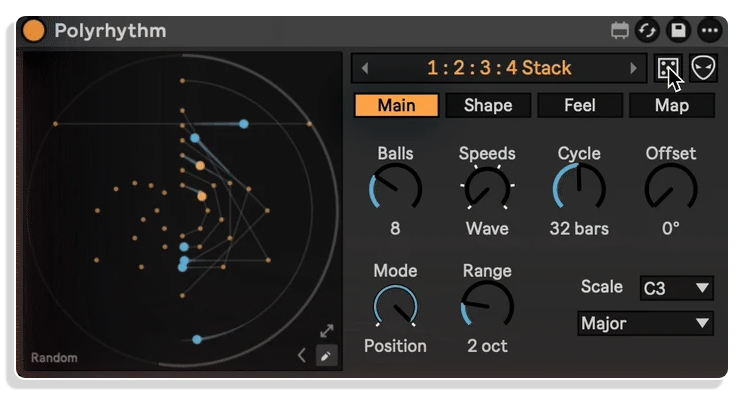
Each dot triggers its own Drum Rack pad
Set the scale to Drums and every orbiting dot plays a different pad. Drop Polyrhythm before a Drum Rack and your polyrhythm becomes a fully mapped drum pattern.
Random and Mutate
Generate or nudge patterns in one click
Roll the dice to produce a completely new pattern from scratch, or use Mutate to apply a handful of small changes to the pattern you already have. Both options keep results locked to Live's transport.
Important Information
CHANGELOG
v1.2.6 · released 3 Nov 2026
Features
- Dots orbit at their own speeds and play a note each time they cross a trigger, locked to Live's transport
- 23 polyrhythm types, Draw mode, Drum Rack mode and mapping of any dot to any Live parameter
- Music page with Phrase, Fill and Accent, plus Copy MIDI to turn what you heard into a clip
Improvements
- Whole-number knobs glide smoothly when an LFO or modulator moves them
INSTALLATION
Our Products are generally provided as Zip file downloads which in all cases will need to be extracted and saved to your hard drive prior to installation. Details on the different file type provided and what to do with them are below.
.alp Files – These are Ableton Live Packs and will either install directly into the Packs Section of the browser of Ableton Live or ask you to save them to your hard drive. For packs that install to the library, when you double click on them you will see a pop up window asking you to confirm that installation is ok as the files are described as “Legacy”. This is fine and you are ok to proceed, the packs are created using the format for an earlier version of Live and so remain compatible with the current version.
.amxd files – These are individual MaxforLive Devices and can be stored anywhere on your hard drive. We’d advise creating a folder for them and then adding that folder as a location within the Places section of Lives Browser.
LICENSE
END-USER LICENSE AGREEMENT FOR ISOTONIK STUDIOS SOFTWARE PRODUCTS.
PLEASE READ THE TERMS AND CONDITIONS OF THIS LICENSE AGREEMENT CAREFULLY BEFORE CONTINUING WITH THIS PROGRAM INSTALL.
This End-User License Agreement (referred to as “EULA”) is a legal agreement between an individual or a single entity (referred to as “LICENSEE”) and Isotonik Studios for the Isotonik Studios software product(s) which may include associated software components, media, printed materials, and “online” or electronic documentation (referred to as “SOFTWARE PRODUCT”). By installing, copying, or otherwise using the SOFTWARE PRODUCT, the LICENSEE agrees to be bound by the terms of this EULA.
This EULA represents the entire agreement concerning the program between the LICENSEE and Isotonik Studios and it supersedes any prior proposal, representation, or understanding between the parties. If the LICENSEE does not agree to the terms of this EULA, the LICENSEE should not install or use the SOFTWARE PRODUCT.
The SOFTWARE PRODUCT is protected by copyright laws and international copyright treaties, as well as other intellectual property laws and treaties. The SOFTWARE PRODUCT is licensed, not sold.
- GRANT OF LICENSE.
The SOFTWARE PRODUCT is licensed as follows:
(a) Installation and Use. Providing that the LICENSEE has paid any applicable license fees, Isotonik Studios grants the LICENSEE the right to install and use copies of the SOFTWARE PRODUCT on up to two computers in the LICENSEE’s possession that are running a validly licensed copy of the operating system for which the SOFTWARE PRODUCT was designed [e.g., Windows 10, macOS]. The computer(s) must be owned by the LICENSEE.
(b) Backup Copies. The LICENSEE may also make copies of the SOFTWARE PRODUCT as may be necessary for backup and archival purposes.
- DESCRIPTION OF OTHER RIGHTS AND LIMITATIONS.
(a) Maintenance of Copyright Notices. The LICENSEE must not remove or alter any copyright notices on any and all copies of the SOFTWARE PRODUCT.
(b) Distribution. The LICENSEE may not distribute registered copies of the SOFTWARE PRODUCT to third parties.
(c) Prohibition on Reverse Engineering, Decompilation, and Disassembly. The LICENSEE may not reverse engineer, decompile, or disassemble the SOFTWARE PRODUCT, except and only to the extent that such activity is expressly permitted by applicable law notwithstanding this limitation.
(d) Rental. The LICENSEE may not rent, lease, or lend the SOFTWARE PRODUCT.
(e) License transfer The LICENSEE may not transfer their license to the SOFTWARE PRODUCT to any third party. Any attempt to do so will be considered a violation of this EULA.
(f) Support Services. Isotonik Studios may provide the LICENSEE with support services related to the SOFTWARE PRODUCT for a period of 12 months following the date of purchase. Any supplemental software code provided to the LICENSEE as part of the Support Services shall be considered part of the SOFTWARE PRODUCT and subject to the terms and conditions of this EULA.
(g) Compliance with Applicable Laws. The LICENSEE must comply with all applicable laws regarding use of the SOFTWARE PRODUCT.
- TERMINATION Without prejudice to any other rights, Isotonik Studios may terminate this EULA if the LICENSEE fails to comply with the terms and conditions of this EULA. In such event, the LICENSEE must destroy all copies of the SOFTWARE PRODUCT in the LICENSEE’s possession.
- COPYRIGHT All title, including but not limited to copyrights, in and to the SOFTWARE PRODUCT and any copies thereof are owned by Isotonik Studios or its suppliers. All title and intellectual property rights in and to the content which may be accessed through use of the SOFTWARE PRODUCT is the property of the respective content owner and may be protected by applicable copyright or other intellectual property laws and treaties. This EULA grants the LICENSEE no rights to use such content. All rights not expressly granted are reserved by Isotonik Studios.
- NO WARRANTIES Isotonik Studios expressly disclaims any warranty for the SOFTWARE PRODUCT. The SOFTWARE PRODUCT is provided ‘As Is’ without any express or implied warranty of any kind, including but not limited to any warranties of merchantability, noninfringement, or fitness of a particular purpose. Isotonik Studios does not warrant or assume responsibility for the accuracy or completeness of any information, text, graphics, links or other items contained within the SOFTWARE PRODUCT. Isotonik Studios makes no warranties respecting any harm that may be caused by the transmission of a computer virus, worm, time bomb, logic bomb, or other such computer program. Isotonik Studios further expressly disclaims any warranty or representation to the LICENSEE or to any third party.
- LIMITATION OF LIABILITY In no event shall Isotonik Studios be liable for any damages (including, without limitation, lost profits, business interruption, or lost information) arising out of the LICENSEE’s use of or inability to use the SOFTWARE PRODUCT, even if Isotonik Studios has been advised of the possibility of such damages. In no event will Isotonik Studios be liable for loss of data or for indirect, special, incidental, consequential (including lost profit), or other damages based in contract, tort or otherwise. Isotonik Studios shall have no liability with respect to the content of the SOFTWARE PRODUCT or any part thereof, including but not limited to errors or omissions contained therein, libel, infringements of rights of publicity, privacy, trademark rights, business interruption, personal injury, loss of privacy, moral rights or the disclosure of confidential information.
Frequently Asked Questions
What is ELXR Polyrhythm?
Polyrhythm is a Max for Live MIDI effect. Dots orbit at different speeds, each playing a note every time it hits a trigger. Patterns are always locked to Live’s transport, and all dots meet again at the end of each cycle.
Will it play my own sounds and instruments?
Yes. Because it is a MIDI effect, place it before any instrument in Live and it plays that instrument. Set the scale to Drums and each dot plays its own Drum Rack pad.
Can Polyrhythm control other parameters in Live?
Yes. Map any dot to any parameter in Live, with individual Min and Max values per mapping. You can map as many dots as you like.
What do I need to run it?
You need Ableton Live 12 Standard with Max for Live, or Live Suite. It runs on Mac and Windows.
In Depth
What Polyrhythm Does
Polyrhythm is a visual rhythm playground for Ableton Live. It is a Max for Live MIDI effect that turns orbiting shapes into musical rhythms. Each dot travels its own circular path at its own speed and plays a note every time it crosses a trigger line. The dots drift apart, weave patterns together, and all meet again at the end of the cycle, locked tightly to Live’s transport throughout.
Where It Came From
The developer watched polyrhythm videos where dots orbit and ring notes, loved them, and could not find a device that did the same thing inside Live and looked like it belonged there. So they built one that you can play with and actually use in a track.
23 Polyrhythm Types to Start From
Your download includes 23 polyrhythm types to explore from the first session. Simple ratios like 3:2 and 5:4:3 sit alongside stacks of speeds, nested polygons, phasing patterns and classic timelines. There is always a starting point that fits the groove you are building, because the right ratio at the right moment changes everything.
Shape, Spacing and Motion
The shape is the rhythm. A triangle plays three notes per lap. A pentagon plays five. Spacing makes the pattern Euclidean. Motion adds Swing or Gravity. The Nested setting gives every dot one additional corner, which means a single toggle opens up a new layer of rhythmic complexity without touching anything else.
Draw Your Own Patterns
When none of the 23 types is quite right, Draw mode lets you place your own trigger lines and define the path the dots travel, on a grid or freehand. The rhythm becomes exactly what you hear in your head.
Map Dots to Any Live Parameter
Any dot can be mapped to any parameter in Live, with individual Min and Max values per mapping. Map as many dots as you like, which means Polyrhythm can drive melody, rhythm, modulation and automation all at the same time from a single device.
Drum Rack Mode
Set the scale to Drums and each dot plays its own Drum Rack pad. Drop Polyrhythm before a Drum Rack and your orbiting dots become a living beat pattern, always locked to the cycle.
Feel Controls
Swing, Humanize, Ratchet, Probability, Velocity and Gate are all available. Any scale and root note can be set. These controls let you move from a mechanical pulse to something that breathes, without leaving the device.
Random and Mutate
Roll the dice for a completely new pattern. Or use Mutate to nudge the pattern you already have with a few small changes. Both options work well for breaking out of repetition mid-session.
Copy MIDI
Version 1.2 adds a Copy MIDI function that turns what you just heard into a Live clip. Phrase, Fill and Accent are also part of the new Music page. When something sounds right, you can capture it immediately and keep building.
Technical Details
Polyrhythm is a MIDI effect with no added latency. It runs at any sample rate Live supports and works on both Mac and Windows. It is a one-time purchase: one payment, one download of the .amxd file, no subscription. Drop the file into your User Library or straight onto a MIDI track and it is ready to use.
More from ELXR
 Coming Soon