Follow Scene & Clip XL by Isotonik Studios
AUTOMATE CLIP AND SCENE TRANSITIONS WITH MIDI-TRIGGERABLE FOLLOW ACTIONS IN ABLETON LIVE
Follow Scene & Clip XL is Isotonik Studios’ most advanced MaxforLive follow actions toolset yet, designed to bring powerful automation and real-time flexibility to Ableton Live. Whether you’re performing live with a band, running backing tracks in a Worship context, or DJing with modular sets, this toolkit gives you deep control over how clips and scenes progress in your set.
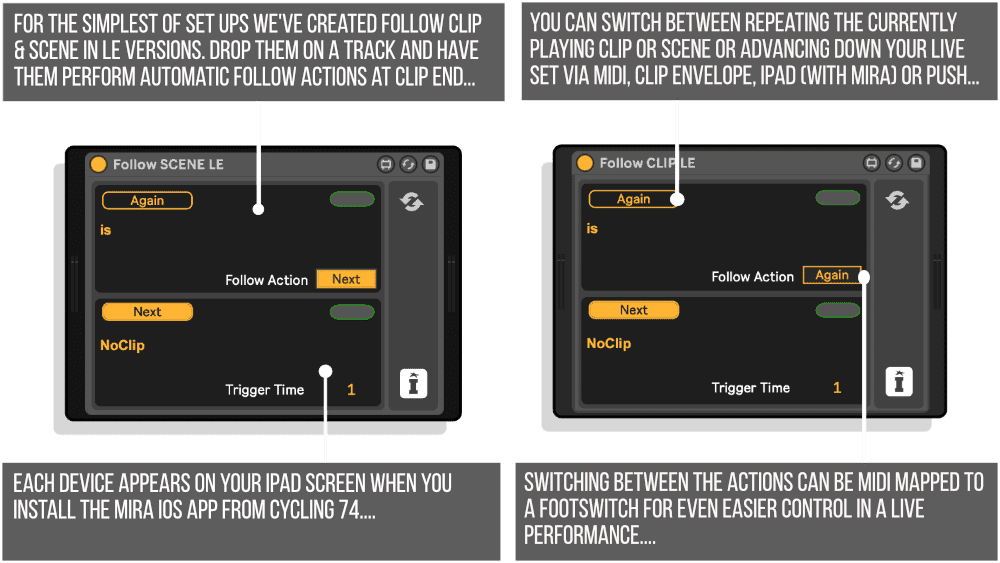
Automate transitions at clip end or stop, queue up alternate follow paths, and trigger scene changes with MIDI—all while maintaining tight timing and full creative control. Includes separate devices for clip and scene control, each tailored for unique workflows.
What’s Included:
- Follow Clip XL – automates follow actions within individual tracks
- Follow Scene XL – triggers entire scenes with tempo/signature recognition
- Follow LE – lightweight version for simplified control
- Supports up to 8 alternative next steps, triggered via MIDIIdeal for Worship sets, live band rigs, DJs, and improvisational performers. This is the ultimate tool for hands-off transitions and spontaneous control in Session View.
PLEASE NOTE: As of Live 12.2 Follow Actions are accessible by the Push Controller and Standalone
USER GUIDE: Modular Series XL USER GUIDE
Follow Scene & Clip XL by Isotonik Studios
AUTOMATE CLIP AND SCENE TRANSITIONS WITH MIDI-TRIGGERABLE FOLLOW ACTIONS IN ABLETON LIVE
Follow Scene & Clip XL is Isotonik Studios’ most advanced MaxforLive follow actions toolset yet, designed to bring powerful automation and real-time flexibility to Ableton Live. Whether you’re performing live with a band, running backing tracks in a Worship context, or DJing with modular sets, this toolkit gives you deep control over how clips and scenes progress in your set.
Automate transitions at clip end or stop, queue up alternate follow paths, and trigger scene changes with MIDI—all while maintaining tight timing and full creative control. Includes separate devices for clip and scene control, each tailored for unique workflows.
What’s Included:
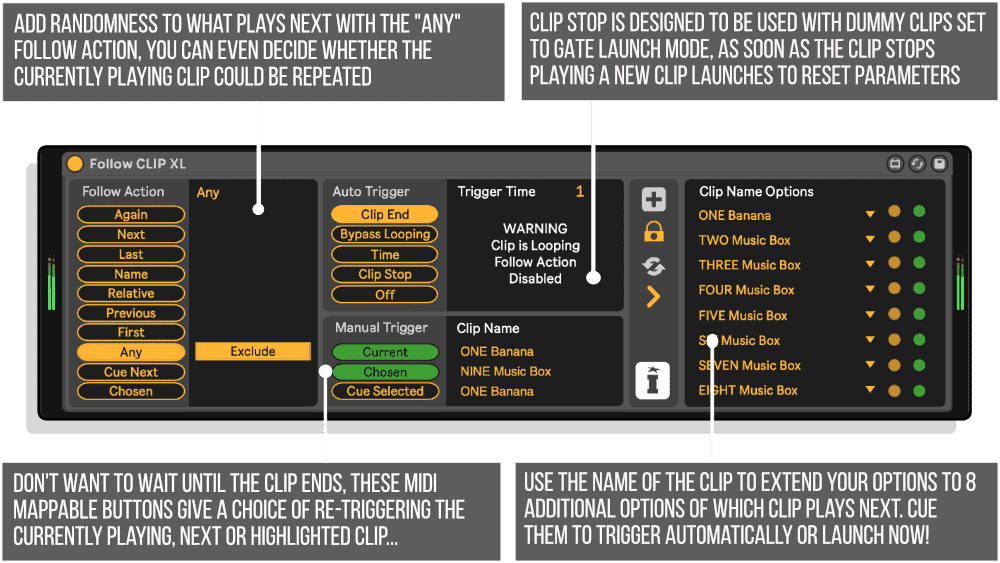
- Follow Clip XL – automates follow actions within individual tracks
- Follow Scene XL – triggers entire scenes with tempo/signature recognition
- Follow LE – lightweight version for simplified control
- Supports up to 8 alternative next steps, triggered via MIDIIdeal for Worship sets, live band rigs, DJs, and improvisational performers. This is the ultimate tool for hands-off transitions and spontaneous control in Session View.
PLEASE NOTE: As of Live 12.2 Follow Actions are accessible by the Push Controller and Standalone
USER GUIDE: Modular Series XL USER GUIDE
Product reviews
FEATURES
4.8 out of 5
15 reviews
How item rating is calculated
We show the average based on reviews. Only genuine reviews are displayed.
Sort by
December 2, 2025
This reviewer bought this product from our store.
A powerful and versatile tool for live performance and long-play session-view jamming.
Great device, invaluable and unique - it's the only way I can have clips start playing randomly per group without manually creating the follow action every single time I create one, so a live performance must. I also had terrific and fast responses from customer support when I needed help using it.
Extensive features
I recommend this product
February 20, 2021
Longtime user excited to upgrade to the XL version. I can't run a live set without this tool. If you're looking to split the difference between "press play" and "press a million buttons to keep launching clips" this is probably what you need. Basically gives me an arrangement without ever touching the Arrangement view but preserves all the flexibility of Session view. Must have.
June 9, 2020
This reviewer bought this product from our store.
Isotonik's Follow is invaluable to me when running backing tracks live. Skip around the track, repeat sections etc .... everything is made so easy with Follow. Also, as everyone is alluding to, the Customer Service is excellent ........ fast and efficient.
December 10, 2019
This reviewer bought this product from our store.
Follow Scene XL is the key plugin for my backingtrack-workflow in Ableton Live on stage. I highly recommend it to everyone who is working with backing tracks on stage. AND its first class customer support ist blazing fast.
November 12, 2019
This reviewer bought this product from our store.
This plugin is absolutely essential to anyone using live tracks or seeking flexibility in a setup (whether DJing, Worship, or backing tracks for a band that needs to be able to flow). Not to mention, the customer support is top notch.
Follow Scene & Clip XL by Isotonik Studios
NOW AVAILABLE – FOLLOW SCENE XL, FOLLOW CLIP XL & FOLLOW CLIP / SCENE LE
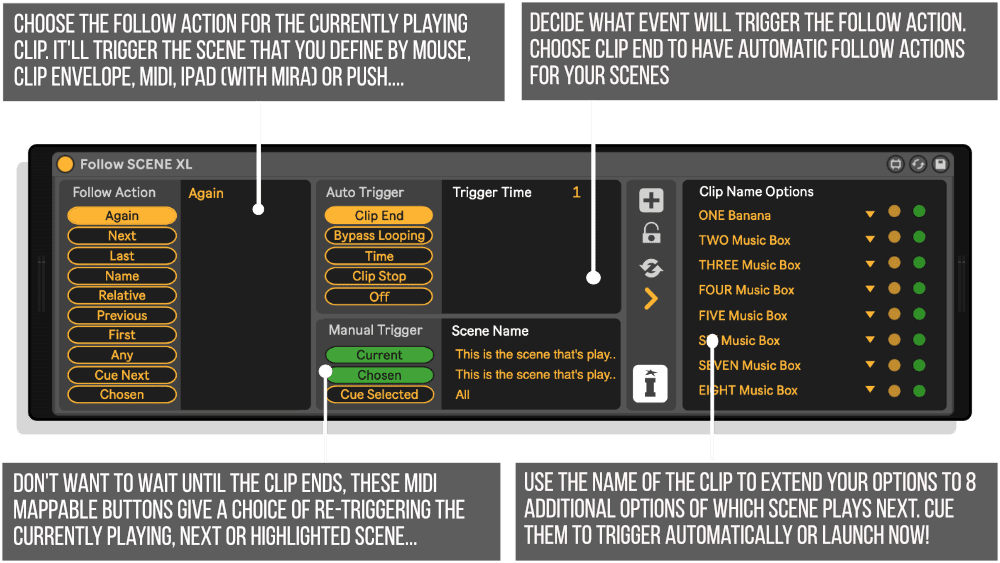
One of the most requested features of Ableton is the ability to set follow actions that occur at a clip end rather than a predetermined time.
With our MaxforLive devices you can program automatic follow actions at clip end, and you can also trigger them at clip stop, define the clip number to be played next or even switch the Clip follow action to become a Scene follow action.
This device has been very popular with users who run backing tracks in Ableton Live for a Live band, and DJ’s who split full tracks into individual clips to allow for perfect phrasing of their mixes…
Working with both cropped and un-cropped audio you can even simply cue up the next Clip or Scene so that its ready to play.
To make things simple the pack contains separate versions dependent on your use case, Follow Clip works on clips and many can be used in a set with the Follow Actions it creates working solely on the track within which it’s located. Follow Scene on the other hand runs follow actions for scenes (which will also observe changes to signature or BPM if written into the Scene name) and works as a single device in a set controlled buy a click track that contains clips of the length you wish your scenes to run for.
Both give you the ability to write up to 8 additional options into the clip name that can be triggered to play next or immediately.
With each Clip that plays you can additional define up to five other Clips or Scenes that could be triggered at Clip End, these can then be queued up via MIDI giving almost endless possibilities for variety in your live performances.
The final piece of the jigsaw is the ability to set an action in hours, minutes and seconds and apply this to an unwarped clip.
Frequently Asked Questions
A: It’s a set of MaxforLive devices that automate clip and scene transitions in Ableton Live, giving you full MIDI control over follow actions.
A: Yes, this device pack is built specifically for MaxforLive users.
A: MaxforLive is a platform that integrates the visual programming environment Max with Ableton Live, allowing users to create and use custom audio, MIDI, and control devices.
A: You can explore more of Isotonik Studios’ tools and devices here: ISOTONIK STUDIOS
Important Information
23/10/2023
Follow SCENE XL – first release for Push 3 Standalone
16/12/2023
Mac M1 compatibility
Live 11 compatibility
1/8/2018
Follow SCENE Five released – Live 10 Compatibility
Our Products are generally provided as Zip file downloads which in all cases will need to be extracted and saved to your hard drive prior to installation. Details on the different file type provided and what to do with them are below.
.alp Files – These are Ableton Live Packs and will either install directly into the Packs Section of the browser of Ableton Live or ask you to save them to your hard drive. For packs that install to the library, when you double click on them you will see a pop up window asking you to confirm that installation is ok as the files are described as “Legacy”. This is fine and you are ok to proceed, the packs are created using the format for an earlier version of Live and so remain compatible with the current version.
.amxd files – These are individual MaxforLive Devices and can be stored anywhere on your hard drive. We’d advise creating a folder for them and then adding that folder as a location within the Places section of Lives Browser.
END-USER LICENSE AGREEMENT FOR ISOTONIK STUDIOS SOFTWARE PRODUCTS.
PLEASE READ THE TERMS AND CONDITIONS OF THIS LICENSE AGREEMENT CAREFULLY BEFORE CONTINUING WITH THIS PROGRAM INSTALL.
This End-User License Agreement (referred to as “EULA”) is a legal agreement between an individual or a single entity (referred to as “LICENSEE”) and Isotonik Studios for the Isotonik Studios software product(s) which may include associated software components, media, printed materials, and “online” or electronic documentation (referred to as “SOFTWARE PRODUCT”). By installing, copying, or otherwise using the SOFTWARE PRODUCT, the LICENSEE agrees to be bound by the terms of this EULA.
This EULA represents the entire agreement concerning the program between the LICENSEE and Isotonik Studios and it supersedes any prior proposal, representation, or understanding between the parties. If the LICENSEE does not agree to the terms of this EULA, the LICENSEE should not install or use the SOFTWARE PRODUCT.
The SOFTWARE PRODUCT is protected by copyright laws and international copyright treaties, as well as other intellectual property laws and treaties. The SOFTWARE PRODUCT is licensed, not sold.
- GRANT OF LICENSE.
The SOFTWARE PRODUCT is licensed as follows:
(a) Installation and Use. Providing that the LICENSEE has paid any applicable license fees, Isotonik Studios grants the LICENSEE the right to install and use copies of the SOFTWARE PRODUCT on up to two computers in the LICENSEE’s possession that are running a validly licensed copy of the operating system for which the SOFTWARE PRODUCT was designed [e.g., Windows 10, macOS]. The computer(s) must be owned by the LICENSEE.
(b) Backup Copies. The LICENSEE may also make copies of the SOFTWARE PRODUCT as may be necessary for backup and archival purposes.
- DESCRIPTION OF OTHER RIGHTS AND LIMITATIONS.
(a) Maintenance of Copyright Notices. The LICENSEE must not remove or alter any copyright notices on any and all copies of the SOFTWARE PRODUCT.
(b) Distribution. The LICENSEE may not distribute registered copies of the SOFTWARE PRODUCT to third parties.
(c) Prohibition on Reverse Engineering, Decompilation, and Disassembly. The LICENSEE may not reverse engineer, decompile, or disassemble the SOFTWARE PRODUCT, except and only to the extent that such activity is expressly permitted by applicable law notwithstanding this limitation.
(d) Rental. The LICENSEE may not rent, lease, or lend the SOFTWARE PRODUCT.
(e) License transfer The LICENSEE may not transfer their license to the SOFTWARE PRODUCT to any third party. Any attempt to do so will be considered a violation of this EULA.
(f) Support Services. Isotonik Studios may provide the LICENSEE with support services related to the SOFTWARE PRODUCT for a period of 12 months following the date of purchase. Any supplemental software code provided to the LICENSEE as part of the Support Services shall be considered part of the SOFTWARE PRODUCT and subject to the terms and conditions of this EULA.
(g) Compliance with Applicable Laws. The LICENSEE must comply with all applicable laws regarding use of the SOFTWARE PRODUCT.
- TERMINATION Without prejudice to any other rights, Isotonik Studios may terminate this EULA if the LICENSEE fails to comply with the terms and conditions of this EULA. In such event, the LICENSEE must destroy all copies of the SOFTWARE PRODUCT in the LICENSEE’s possession.
- COPYRIGHT All title, including but not limited to copyrights, in and to the SOFTWARE PRODUCT and any copies thereof are owned by Isotonik Studios or its suppliers. All title and intellectual property rights in and to the content which may be accessed through use of the SOFTWARE PRODUCT is the property of the respective content owner and may be protected by applicable copyright or other intellectual property laws and treaties. This EULA grants the LICENSEE no rights to use such content. All rights not expressly granted are reserved by Isotonik Studios.
- NO WARRANTIES Isotonik Studios expressly disclaims any warranty for the SOFTWARE PRODUCT. The SOFTWARE PRODUCT is provided ‘As Is’ without any express or implied warranty of any kind, including but not limited to any warranties of merchantability, noninfringement, or fitness of a particular purpose. Isotonik Studios does not warrant or assume responsibility for the accuracy or completeness of any information, text, graphics, links or other items contained within the SOFTWARE PRODUCT. Isotonik Studios makes no warranties respecting any harm that may be caused by the transmission of a computer virus, worm, time bomb, logic bomb, or other such computer program. Isotonik Studios further expressly disclaims any warranty or representation to the LICENSEE or to any third party.
- LIMITATION OF LIABILITY In no event shall Isotonik Studios be liable for any damages (including, without limitation, lost profits, business interruption, or lost information) arising out of the LICENSEE’s use of or inability to use the SOFTWARE PRODUCT, even if Isotonik Studios has been advised of the possibility of such damages. In no event will Isotonik Studios be liable for loss of data or for indirect, special, incidental, consequential (including lost profit), or other damages based in contract, tort or otherwise. Isotonik Studios shall have no liability with respect to the content of the SOFTWARE PRODUCT or any part thereof, including but not limited to errors or omissions contained therein, libel, infringements of rights of publicity, privacy, trademark rights, business interruption, personal injury, loss of privacy, moral rights or the disclosure of confidential information.