Push: Mute Mode by Isotonik Studios & Push Patterns
ELEKTRON-STYLE PAD MUTING FOR ABLETON PUSH — INSTANT PERFORMANCE CONTROL WITHOUT BREAKING YOUR FLOW.
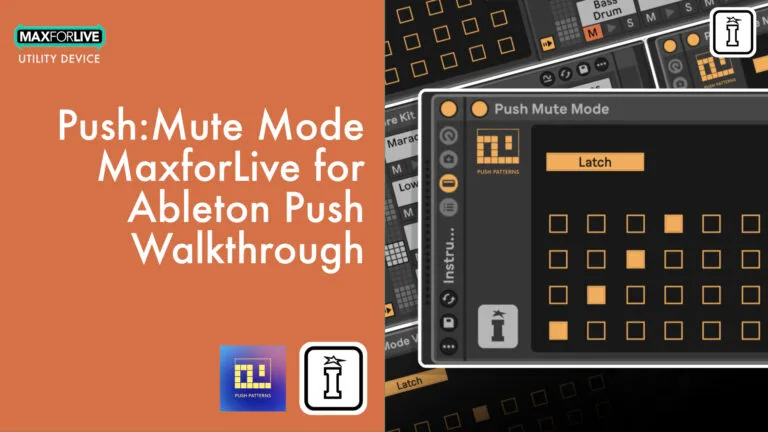
Push Mute Mode is a MaxforLive device created by Craig Lowe and Isotonik Studios to bring Elektron Rytm-style pad muting directly to Ableton Push. Designed specifically for performance and jamming, it transforms the Ableton Push into a powerful live muting controller for your Drum Racks.
Toggle pads on and off instantly, build mute groups, and save macros for fast recall — all within your Push hardware. Whether you’re in studio or standalone mode, this tool brings back tactile control and expressive possibilities without disrupting your creative momentum.
- Real-time pad muting directly on Push 3
- Choose between Momentary or Latch modes
- Save custom mute groups to Push macros
- Works across all 128 Drum Rack pads
- Designed for live performance and improvisation
- Developed by Craig Lowe with Isotonik Studios
Get your groove flowing — no menus, no mouse, just music.
USER GUIDE: Push Mute Mode User Guide
Push: Mute Mode by Isotonik Studios & Push Patterns
ELEKTRON-STYLE PAD MUTING FOR ABLETON PUSH — INSTANT PERFORMANCE CONTROL WITHOUT BREAKING YOUR FLOW.
Push Mute Mode is a MaxforLive device created by Craig Lowe and Isotonik Studios to bring Elektron Rytm-style pad muting directly to Ableton Push. Designed specifically for performance and jamming, it transforms the Ableton Push into a powerful live muting controller for your Drum Racks.
Toggle pads on and off instantly, build mute groups, and save macros for fast recall — all within your Push hardware. Whether you’re in studio or standalone mode, this tool brings back tactile control and expressive possibilities without disrupting your creative momentum.
- Real-time pad muting directly on Push 3
- Choose between Momentary or Latch modes
- Save custom mute groups to Push macros
- Works across all 128 Drum Rack pads
- Designed for live performance and improvisation
- Developed by Craig Lowe with Isotonik Studios
Get your groove flowing — no menus, no mouse, just music.
USER GUIDE: Push Mute Mode User Guide
Additional information
| MaxforLive | Control Devices |
|---|---|
| Ableton Live Compatibility | Ableton Live 12 Standard with MaxforLive, Ableton Live 12 Suite |
| Controllers | Ableton Push THREE Controller, Ableton Push THREE Standalone, Ableton Push TWO |
| Min. Requirements | Ableton Live 12 with MaxforLive Installed |
| OS | Mac, Windows |
PRICE: £16.00
Product reviews
4.8 out of 5
13 reviews
How item rating is calculated
We show the average based on reviews. Only genuine reviews are displayed.
Sort by
November 6, 2025
This reviewer bought this product from our store.
It’s great!
Great device, does exactly what it says it does. Fantastic work.
I’d absolutely love an extension to it which enabled both track mutes and solos to be triggered by pads, as on the NI Maschine.
Don’t like the button mutes on the Push, not good for quick performance.
And maybe other performance based actions on the pads, there are a lot of them on the Push, top four rows could be a layout for say beat repeats or other things. Like the Polyend Play performance mode.
Does exactly what it says it does.
None
I recommend this product
September 30, 2025
This reviewer bought this product from our store.
Handy little tool that makes muting on Push much easier.
Simple, effective, and fun to use.
September 27, 2025
This reviewer bought this product from our store.
So simple, so good!
September 23, 2025
This reviewer bought this product from our store.
Really amazing device! Probably the most fun, dynamic & streamlined workflow I've ever had playing with my Push. Was having an issue with my Push2 not recognizing the the max device which looked to be hardware specific. Darren contacted me right away & offered me some solutions which seems to have fixed my problem. Thanks man, appreciate the help & great job on the device guys!
September 19, 2025
This reviewer bought this product from our store.
Does what it says on the tin. Perfect!
Push: Mute Mode by Isotonik Studios & Push Patterns
Overview & Inspiration
Push Mute Mode was born from a simple frustration: why isn’t there a better way to mute Drum Rack pads on Push? If you’ve ever used an Elektron Rytm or MPC, you’ll know how vital pad muting is for dynamic performance. Craig Lowe of Push Patterns felt the gap and teamed up with Isotonik Studios to bring that missing feature to Push 3 — and the result is a MaxforLive utility that turns your Push into a muting powerhouse.
Push Mute Mode – How It Works
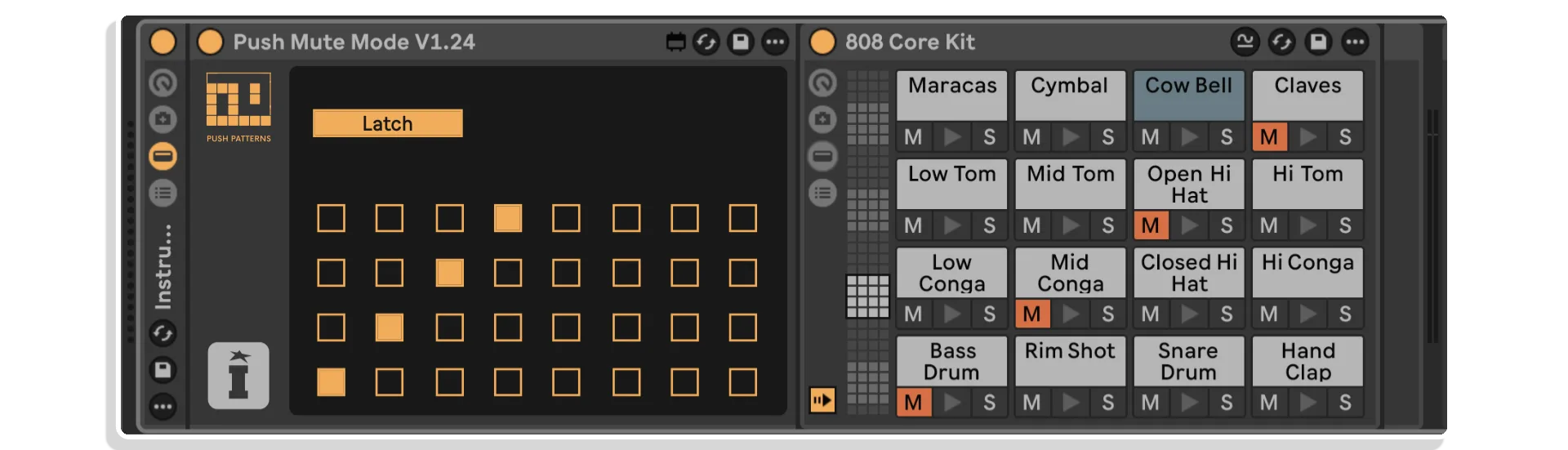
Drop Push Mute Mode on a MIDI track with a Drum Rack, and your Push interface transforms into Mute Mode:
- Green = playing
- Grey = muted
- Blue = selected for mute/unmute
Switch between Momentary (hold Shift) or Latch (toggle Shift) modes to suit your performance style. Use the Select button to mute/unmute multiple pads at once, or save your mute setups to the macro pads on the right for one-touch recall during a live set.
Smart Features for Performers
- Mute and unmute with tactile speed
- Retain mutes even after leaving Mute Mode
- Save favorite combinations across all 128 pads
- Instantly recall entire mute states with macro pads
- Pair with a “Master On” snapshot for full control
- Compatible With Push 3 Standalone
- Push Mute Mode works flawlessly on Push 3 in both controller and standalone modes — just transfer the .amxd file to your device and go.
Frequently Asked Questions
A: It’s a MaxforLive device that brings performance-style pad muting to Ableton Push 3, inspired by the Elektron Rytm.
A: Yes.
A: MaxforLive is a platform that integrates the visual programming environment Max with Ableton Live, allowing users to create and use custom audio, MIDI, and control devices.
A: You can subscribe to more of Craig’s Youtube channel here: PUSH PATTERNS
You can explore more of Isotoniks’s tools and devices here: ISOTONIK STUDIOS
Important Information
V1.0.0 – Initial Release – August 2025
Our Products are generally provided as Zip file downloads which in all cases will need to be extracted and saved to your hard drive prior to installation. Details on the different file type provided and what to do with them are below.
.alp Files – These are Ableton Live Packs and will either install directly into the Packs Section of the browser of Ableton Live or ask you to save them to your hard drive. For packs that install to the library, when you double click on them you will see a pop up window asking you to confirm that installation is ok as the files are described as “Legacy”. This is fine and you are ok to proceed, the packs are created using the format for an earlier version of Live and so remain compatible with the current version.
.amxd files – These are individual MaxforLive Devices and can be stored anywhere on your hard drive. We’d advise creating a folder for them and then adding that folder as a location within the Places section of Lives Browser.
END-USER LICENSE AGREEMENT FOR ISOTONIK STUDIOS SOFTWARE PRODUCTS.
PLEASE READ THE TERMS AND CONDITIONS OF THIS LICENSE AGREEMENT CAREFULLY BEFORE CONTINUING WITH THIS PROGRAM INSTALL.
This End-User License Agreement (referred to as “EULA”) is a legal agreement between an individual or a single entity (referred to as “LICENSEE”) and Isotonik Studios for the Isotonik Studios software product(s) which may include associated software components, media, printed materials, and “online” or electronic documentation (referred to as “SOFTWARE PRODUCT”). By installing, copying, or otherwise using the SOFTWARE PRODUCT, the LICENSEE agrees to be bound by the terms of this EULA.
This EULA represents the entire agreement concerning the program between the LICENSEE and Isotonik Studios and it supersedes any prior proposal, representation, or understanding between the parties. If the LICENSEE does not agree to the terms of this EULA, the LICENSEE should not install or use the SOFTWARE PRODUCT.
The SOFTWARE PRODUCT is protected by copyright laws and international copyright treaties, as well as other intellectual property laws and treaties. The SOFTWARE PRODUCT is licensed, not sold.
- GRANT OF LICENSE.
The SOFTWARE PRODUCT is licensed as follows:
(a) Installation and Use. Providing that the LICENSEE has paid any applicable license fees, Isotonik Studios grants the LICENSEE the right to install and use copies of the SOFTWARE PRODUCT on up to two computers in the LICENSEE’s possession that are running a validly licensed copy of the operating system for which the SOFTWARE PRODUCT was designed [e.g., Windows 10, macOS]. The computer(s) must be owned by the LICENSEE.
(b) Backup Copies. The LICENSEE may also make copies of the SOFTWARE PRODUCT as may be necessary for backup and archival purposes.
- DESCRIPTION OF OTHER RIGHTS AND LIMITATIONS.
(a) Maintenance of Copyright Notices. The LICENSEE must not remove or alter any copyright notices on any and all copies of the SOFTWARE PRODUCT.
(b) Distribution. The LICENSEE may not distribute registered copies of the SOFTWARE PRODUCT to third parties.
(c) Prohibition on Reverse Engineering, Decompilation, and Disassembly. The LICENSEE may not reverse engineer, decompile, or disassemble the SOFTWARE PRODUCT, except and only to the extent that such activity is expressly permitted by applicable law notwithstanding this limitation.
(d) Rental. The LICENSEE may not rent, lease, or lend the SOFTWARE PRODUCT.
(e) License transfer The LICENSEE may not transfer their license to the SOFTWARE PRODUCT to any third party. Any attempt to do so will be considered a violation of this EULA.
(f) Support Services. Isotonik Studios may provide the LICENSEE with support services related to the SOFTWARE PRODUCT for a period of 12 months following the date of purchase. Any supplemental software code provided to the LICENSEE as part of the Support Services shall be considered part of the SOFTWARE PRODUCT and subject to the terms and conditions of this EULA.
(g) Compliance with Applicable Laws. The LICENSEE must comply with all applicable laws regarding use of the SOFTWARE PRODUCT.
- TERMINATION Without prejudice to any other rights, Isotonik Studios may terminate this EULA if the LICENSEE fails to comply with the terms and conditions of this EULA. In such event, the LICENSEE must destroy all copies of the SOFTWARE PRODUCT in the LICENSEE’s possession.
- COPYRIGHT All title, including but not limited to copyrights, in and to the SOFTWARE PRODUCT and any copies thereof are owned by Isotonik Studios or its suppliers. All title and intellectual property rights in and to the content which may be accessed through use of the SOFTWARE PRODUCT is the property of the respective content owner and may be protected by applicable copyright or other intellectual property laws and treaties. This EULA grants the LICENSEE no rights to use such content. All rights not expressly granted are reserved by Isotonik Studios.
- NO WARRANTIES Isotonik Studios expressly disclaims any warranty for the SOFTWARE PRODUCT. The SOFTWARE PRODUCT is provided ‘As Is’ without any express or implied warranty of any kind, including but not limited to any warranties of merchantability, noninfringement, or fitness of a particular purpose. Isotonik Studios does not warrant or assume responsibility for the accuracy or completeness of any information, text, graphics, links or other items contained within the SOFTWARE PRODUCT. Isotonik Studios makes no warranties respecting any harm that may be caused by the transmission of a computer virus, worm, time bomb, logic bomb, or other such computer program. Isotonik Studios further expressly disclaims any warranty or representation to the LICENSEE or to any third party.
- LIMITATION OF LIABILITY In no event shall Isotonik Studios be liable for any damages (including, without limitation, lost profits, business interruption, or lost information) arising out of the LICENSEE’s use of or inability to use the SOFTWARE PRODUCT, even if Isotonik Studios has been advised of the possibility of such damages. In no event will Isotonik Studios be liable for loss of data or for indirect, special, incidental, consequential (including lost profit), or other damages based in contract, tort or otherwise. Isotonik Studios shall have no liability with respect to the content of the SOFTWARE PRODUCT or any part thereof, including but not limited to errors or omissions contained therein, libel, infringements of rights of publicity, privacy, trademark rights, business interruption, personal injury, loss of privacy, moral rights or the disclosure of confidential information.
More from Isotonik Studios
Isotonik StudiosLive Mapper LE (Tenacious Edition) by Isotonik StudiosLive 11 & 12 · Max for LiveName your price
Isotonik StudiosPush 3 Control Master LE by Isotonik StudiosLive 11 & 12 · Max for LiveName your price
Frequently Bought Together
 ★ Popular
 ★ Popular