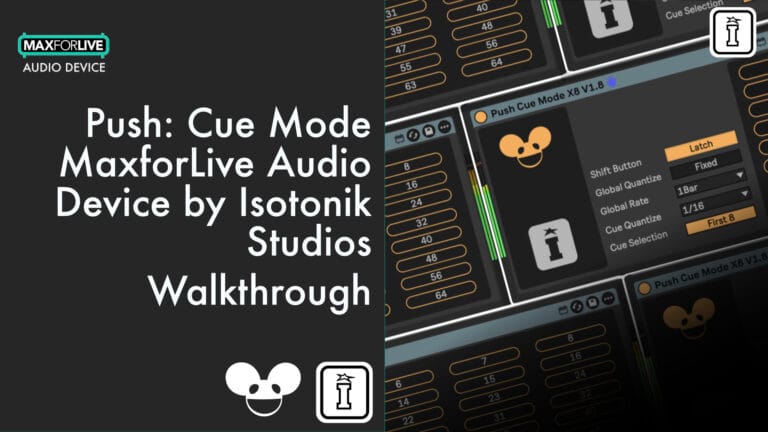

Push: Cue Mode by Isotonik Studios
DVS STYLE HOT CUES FOR ABLETON LIVE
Bring DVS-style cue triggering to Ableton Push 3 with Push:Cue Mode – a MaxforLive device that transforms your Button Matrix into a powerful hot cue controller.
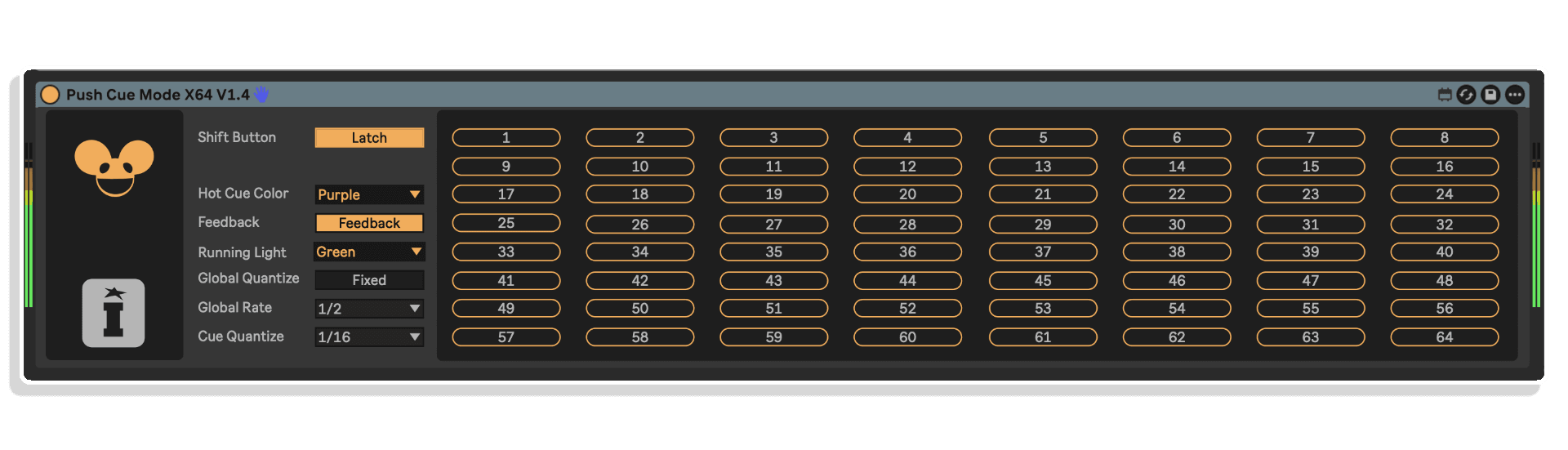
Designed for DJs and live performers, it lets you assign and launch up to 64 cue points via warp markers within a single audio clip. With built-in quantization options and visual feedback on your Push, this tool makes live remixing intuitive and tactile, all without leaving the native Ableton environment.
- Automatically maps warp markers to Push Button Matrix
- Supports up to 8 or 64 hot cues per audio clip
- Visual cue feedback via running light and highlight colors
- Temporary quantization override during cue triggering
- Highlight favourites via naming convention (e.g., “Q 3 4 5”) – V8 Version
- Designed specifically for Ableton Push 2 & 3 (Controller)
- Includes feedback control and quick reset options
Add live DJ functionality to your Ableton Push 2 & 3 workflow – get hands-on with hot cue performance today.
USER GUIDE: Push Cue Mode User Guide
Push: Cue Mode by Isotonik Studios
DVS STYLE HOT CUES FOR ABLETON LIVE
Bring DVS-style cue triggering to Ableton Push 3 with Push:Cue Mode – a MaxforLive device that transforms your Button Matrix into a powerful hot cue controller.
Designed for DJs and live performers, it lets you assign and launch up to 64 cue points via warp markers within a single audio clip. With built-in quantization options and visual feedback on your Push, this tool makes live remixing intuitive and tactile, all without leaving the native Ableton environment.
- Automatically maps warp markers to Push Button Matrix
- Supports up to 8 or 64 hot cues per audio clip
- Visual cue feedback via running light and highlight colors
- Temporary quantization override during cue triggering
- Highlight favourites via naming convention (e.g., “Q 3 4 5”) – V8 Version
- Designed specifically for Ableton Push 2 & 3 (Controller)
- Includes feedback control and quick reset options
Add live DJ functionality to your Ableton Push 2 & 3 workflow – get hands-on with hot cue performance today.
USER GUIDE: Push Cue Mode User Guide
Additional information
| MaxforLive | Control Devices |
|---|---|
| Ableton Live Compatibility | Ableton Live 12 Standard with MaxforLive, Ableton Live 12 Suite |
| Controllers | Ableton Push THREE Controller, Ableton Push TWO |
| Min. Requirements | Ableton Live 12 with MaxforLive Installed |
| OS | Mac, Windows |
PRICE: £18.00
Product reviews
5 out of 5
5 reviews
How item rating is calculated
We show the average based on reviews. Only genuine reviews are displayed.
Sort by
July 22, 2026
Essential for DAWless Standalone (and surprisingly efficient!)
I use this device for my DAWless Jungle live sets on the Push 3 Standalone. Given how much functionality it brings (CDJ/DVS-style Hot Cues), the plugin is actually very lightweight and not overly resource-hungry at all.
A quick tip for Push 3 Standalone users: just be mindful of the total number and complexity of Max for Live devices in your project. Standalone has a general limit for M4L background traffic, but that is a native Ableton hardware limitation, not a flaw of Cue Mode itself.
Massive big up to Darren from tech support! It was genuinely a pleasure to get help from a like-minded person who actually understands the live Jungle scene. Top-tier, patient, and responsive support. Highly recommended!
Very efficient, brings essential DJ workflow to Push 3, incredible tech support.
None (just keep an eye on your overall M4L load on Standalone).
I recommend this product
Reply from Isotonik Studios
July 22, 2026
February 2, 2026
This reviewer bought this product from our store.
Solid tool extremely useful function added to Ableton !
Really love Isotonik studios and their products the push cue mode is very useful tool and brings much needed cue points to tracks or samples making it so much fun to play and be intuitive with your tracks. Much needed tool
The ability to cue track on fly from push controller anywhere in audio file
I wish it had a slip function option so track would jump back to where it was normally playing like on turn tables
I recommend this product
November 3, 2025
This reviewer bought this product from our store.
Great for Sampling or djing in new ways
Quite straightforward product description and video shows what is capable of, and works immediately! Of course, you can explore further and discover new ways to use it!
I recommend this product
November 1, 2025
This reviewer bought this product from our store.
Super easy to use and shed loads of fun jamming live!
Every now and again you stumble on a tool that makes a step change to your productions or live performances…this one is an awesome addition to my live set. Something I’ve tried to achieve in other ways and failed. This one does it very elegantly!
It achieves this functionality with minimal variation from std functionality…using cue points. Quick and easy to implement.
Not a big thing, but this does require resetting all clips that use the global quantise to 1 bar, to avoid live set chaos when the global is changed for cue point jamming. An easy change.
I recommend this product
October 31, 2025
This reviewer bought this product from our store.
A must-buy
An absolute game-changer for live performers and DJs using Ableton Push. It solves one of the most common workflow frustrations by adding a simple, intuitive way to cue tracks directly from the controller before they go live. This essential utility finally makes a hybrid DJ/live performance seamless, A must-buy.
simple, intuitive
I recommend this product
Push: Cue Mode by Isotonik Studios
Push Cue Mode Overview & Inspiration
Push:Cue Mode brings one of the most requested features to the Ableton Push 2 & 3: hot cue triggering. Drawing inspiration from DVS systems like Traktor and Serato, this MaxforLive device gives you expressive control over warp markers, allowing DJs and performers to jump between musical moments with precision – no mouse required. Whether you’re remixing, beat juggling, or refining your live set, Push:Cue Mode turns your Push into a cue-slicing powerhouse.
Features & Functionality
- Warp Marker Hot Cues: Map up to 8 0r 64 cue points in an audio clip using warp markers
- Push Integration: Takes over the Button Matrix when selected for immediate access
- Dynamic Quantization: Override global clip quantization on the fly
- Cue Highlighting: X8 Version allows Highlight specific cues by naming clips with “Q [numbers]” (e.g., “Amen Break Q 3 5 8”)
- Visual Feedback: Follow the playhead with a running light or LED color feedback
- Failsafe & Reset: Includes quick reset via the Isotonik logo for reconnection issues
- Non-destructive Control: Device deactivates cleanly and restores prior matrix/quantization state
How to Use
- Add the device to an audio track.
- Trigger a clip and select the device – it will auto-map warp markers to pads.
- Use the naming system to highlight your key cues.
- Adjust cue quantization or visual feedback within the device UI.
Perform and trigger cues live via Push with high precision.
Push:Cue Mode keeps your hands on the hardware and your focus on the performance.
ALSO AVAILABLE BY ISOTONIK STUDIOS – OKTOPUSH THREE | FOLLOW XL | ISOTONIK FX | PUSH MUTE MODE | SMART XL | MODULAR SERIES XL
Frequently Asked Questions
A: Push:Cue Mode is a MaxforLive utility that enables hot cue-style triggering from your Push 3 controller or standalone unit, using warp markers in audio clips.
A: Yes. Push:Cue Mode is a MaxforLive device and requires MaxforLive to function.
A: MaxforLive is a platform that integrates the visual programming environment Max with Ableton Live, allowing users to create and use custom audio, MIDI, and control devices.
A: To use this product, ensure the following requirements are met:
- Ableton Live Suite (version compatible with Push 3)
- MaxforLive installed
- Ableton Push 2 or 3 Controller or Push 3 Standalone
- Audio clips with warp markers
A: You can explore more of Isotonik Studios’ tools and devices here:
Isotonik Studios
Important Information
V1.0.0 – Initial Release – October 2025
Our Products are generally provided as Zip file downloads which in all cases will need to be extracted and saved to your hard drive prior to installation. Details on the different file type provided and what to do with them are below.
.alp Files – These are Ableton Live Packs and will either install directly into the Packs Section of the browser of Ableton Live or ask you to save them to your hard drive. For packs that install to the library, when you double click on them you will see a pop up window asking you to confirm that installation is ok as the files are described as “Legacy”. This is fine and you are ok to proceed, the packs are created using the format for an earlier version of Live and so remain compatible with the current version.
.amxd files – These are individual MaxforLive Devices and can be stored anywhere on your hard drive. We’d advise creating a folder for them and then adding that folder as a location within the Places section of Lives Browser.
END-USER LICENSE AGREEMENT FOR ISOTONIK STUDIOS SOFTWARE PRODUCTS.
PLEASE READ THE TERMS AND CONDITIONS OF THIS LICENSE AGREEMENT CAREFULLY BEFORE CONTINUING WITH THIS PROGRAM INSTALL.
This End-User License Agreement (referred to as “EULA”) is a legal agreement between an individual or a single entity (referred to as “LICENSEE”) and Isotonik Studios for the Isotonik Studios software product(s) which may include associated software components, media, printed materials, and “online” or electronic documentation (referred to as “SOFTWARE PRODUCT”). By installing, copying, or otherwise using the SOFTWARE PRODUCT, the LICENSEE agrees to be bound by the terms of this EULA.
This EULA represents the entire agreement concerning the program between the LICENSEE and Isotonik Studios and it supersedes any prior proposal, representation, or understanding between the parties. If the LICENSEE does not agree to the terms of this EULA, the LICENSEE should not install or use the SOFTWARE PRODUCT.
The SOFTWARE PRODUCT is protected by copyright laws and international copyright treaties, as well as other intellectual property laws and treaties. The SOFTWARE PRODUCT is licensed, not sold.
- GRANT OF LICENSE.
The SOFTWARE PRODUCT is licensed as follows:
(a) Installation and Use. Providing that the LICENSEE has paid any applicable license fees, Isotonik Studios grants the LICENSEE the right to install and use copies of the SOFTWARE PRODUCT on up to two computers in the LICENSEE’s possession that are running a validly licensed copy of the operating system for which the SOFTWARE PRODUCT was designed [e.g., Windows 10, macOS]. The computer(s) must be owned by the LICENSEE.
(b) Backup Copies. The LICENSEE may also make copies of the SOFTWARE PRODUCT as may be necessary for backup and archival purposes.
- DESCRIPTION OF OTHER RIGHTS AND LIMITATIONS.
(a) Maintenance of Copyright Notices. The LICENSEE must not remove or alter any copyright notices on any and all copies of the SOFTWARE PRODUCT.
(b) Distribution. The LICENSEE may not distribute registered copies of the SOFTWARE PRODUCT to third parties.
(c) Prohibition on Reverse Engineering, Decompilation, and Disassembly. The LICENSEE may not reverse engineer, decompile, or disassemble the SOFTWARE PRODUCT, except and only to the extent that such activity is expressly permitted by applicable law notwithstanding this limitation.
(d) Rental. The LICENSEE may not rent, lease, or lend the SOFTWARE PRODUCT.
(e) License transfer The LICENSEE may not transfer their license to the SOFTWARE PRODUCT to any third party. Any attempt to do so will be considered a violation of this EULA.
(f) Support Services. Isotonik Studios may provide the LICENSEE with support services related to the SOFTWARE PRODUCT for a period of 12 months following the date of purchase. Any supplemental software code provided to the LICENSEE as part of the Support Services shall be considered part of the SOFTWARE PRODUCT and subject to the terms and conditions of this EULA.
(g) Compliance with Applicable Laws. The LICENSEE must comply with all applicable laws regarding use of the SOFTWARE PRODUCT.
- TERMINATION Without prejudice to any other rights, Isotonik Studios may terminate this EULA if the LICENSEE fails to comply with the terms and conditions of this EULA. In such event, the LICENSEE must destroy all copies of the SOFTWARE PRODUCT in the LICENSEE’s possession.
- COPYRIGHT All title, including but not limited to copyrights, in and to the SOFTWARE PRODUCT and any copies thereof are owned by Isotonik Studios or its suppliers. All title and intellectual property rights in and to the content which may be accessed through use of the SOFTWARE PRODUCT is the property of the respective content owner and may be protected by applicable copyright or other intellectual property laws and treaties. This EULA grants the LICENSEE no rights to use such content. All rights not expressly granted are reserved by Isotonik Studios.
- NO WARRANTIES Isotonik Studios expressly disclaims any warranty for the SOFTWARE PRODUCT. The SOFTWARE PRODUCT is provided ‘As Is’ without any express or implied warranty of any kind, including but not limited to any warranties of merchantability, noninfringement, or fitness of a particular purpose. Isotonik Studios does not warrant or assume responsibility for the accuracy or completeness of any information, text, graphics, links or other items contained within the SOFTWARE PRODUCT. Isotonik Studios makes no warranties respecting any harm that may be caused by the transmission of a computer virus, worm, time bomb, logic bomb, or other such computer program. Isotonik Studios further expressly disclaims any warranty or representation to the LICENSEE or to any third party.
- LIMITATION OF LIABILITY In no event shall Isotonik Studios be liable for any damages (including, without limitation, lost profits, business interruption, or lost information) arising out of the LICENSEE’s use of or inability to use the SOFTWARE PRODUCT, even if Isotonik Studios has been advised of the possibility of such damages. In no event will Isotonik Studios be liable for loss of data or for indirect, special, incidental, consequential (including lost profit), or other damages based in contract, tort or otherwise. Isotonik Studios shall have no liability with respect to the content of the SOFTWARE PRODUCT or any part thereof, including but not limited to errors or omissions contained therein, libel, infringements of rights of publicity, privacy, trademark rights, business interruption, personal injury, loss of privacy, moral rights or the disclosure of confidential information.
More from Isotonik Studios
Isotonik StudiosLive Mapper LE (Tenacious Edition) by Isotonik StudiosLive 11 & 12 · Max for LiveName your price
Isotonik StudiosPush 3 Control Master LE by Isotonik StudiosLive 11 & 12 · Max for LiveName your price
Frequently Bought Together
 ★ Popular
 ★ Popular