MKT Mapper V2.0 by KILLIHU
WHY SHOULD MODULATION FOLLOW THE CLOCK?
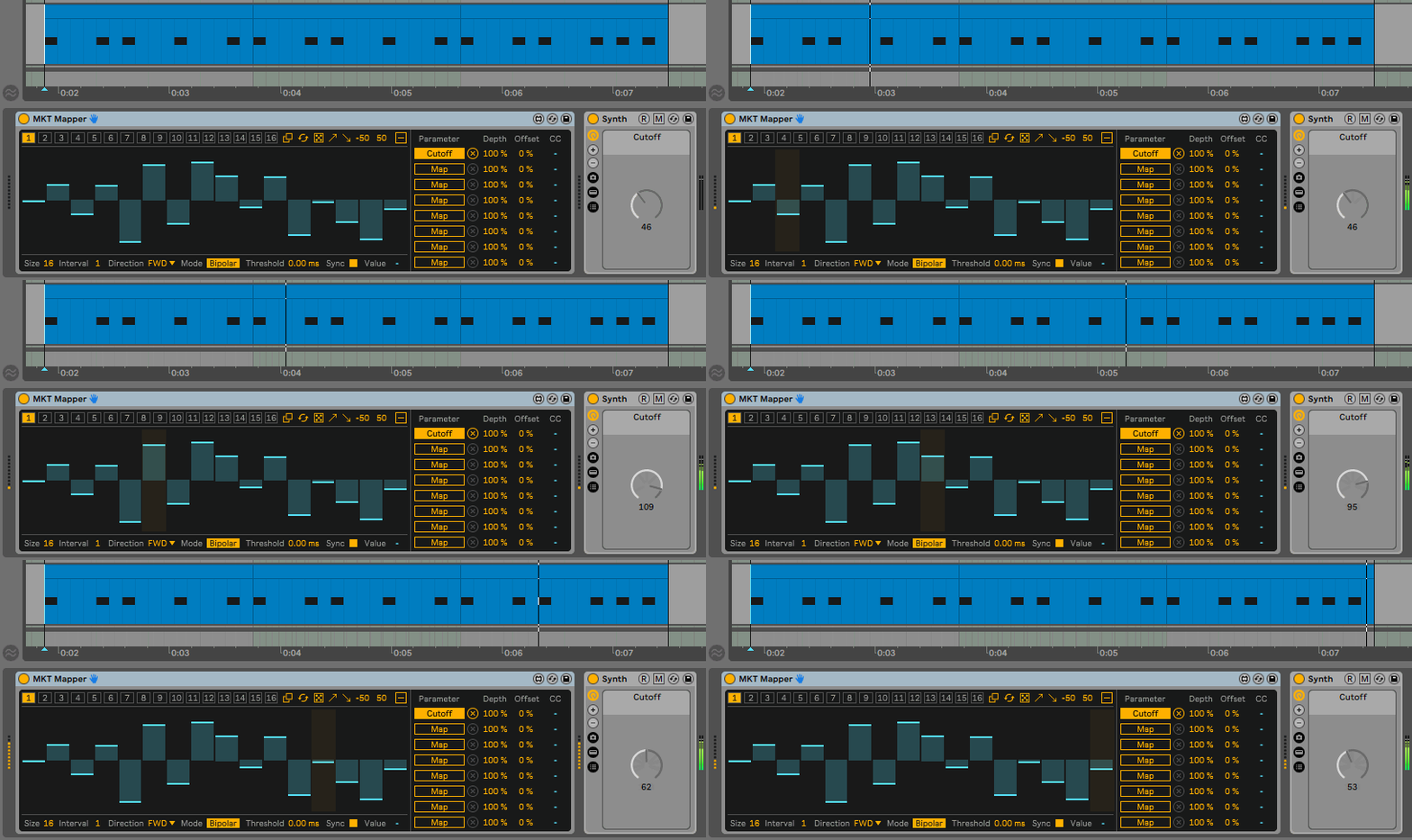
MKT Mapper by killihu transforms parameter modulation by making your MIDI notes – not tempo – advance the sequence. Each note you play triggers the next step, creating organic, performance-driven parameter movement that follows your playing rhythm rather than marching to the grid.
Inside you’ll find:
- MIDI-triggered step sequencer with up to 64 steps
- Two versions: v2 optimized for Live 12 modulation mapping, v1 compatible with Live 10/11/12
- 8 parameter mapping slots plus 8 MIDI CC outputs
- Intelligent chord detection (chords advance only one step)
- Interval control (advance every Nth note instead of every note)
- Multiple playback directions (forward, backward, ping-pong, rotate, random)
- 16 preset slots with automation support
- Bipolar and Slider modes for different parameter types
- Built-in generators (random, ramp up, ramp down)
- Transport sync option for arrangement consistency
- Visual multislider editor with numerical step value feedback
- Adjustable threshold for loose/humanized chord timing
Perfect for generative music producers creating evolving soundscapes, live performers adding dynamic modulation, experimental musicians building complex note-to-parameter relationships, and sound designers programming timbral evolution that unfolds note-by-note rather than beat-by-beat.
MaxforLive MIDI effect for Ableton Live 10/11/12 (Mac & Windows)
USER GUIDE: MKT-Mapper-Manual
MKT Mapper V2.0 by KILLIHU
WHY SHOULD MODULATION FOLLOW THE CLOCK?
MKT Mapper by killihu transforms parameter modulation by making your MIDI notes – not tempo – advance the sequence. Each note you play triggers the next step, creating organic, performance-driven parameter movement that follows your playing rhythm rather than marching to the grid.
Inside you’ll find:
- MIDI-triggered step sequencer with up to 64 steps
- Two versions: v2 optimized for Live 12 modulation mapping, v1 compatible with Live 10/11/12
- 8 parameter mapping slots plus 8 MIDI CC outputs
- Intelligent chord detection (chords advance only one step)
- Interval control (advance every Nth note instead of every note)
- Multiple playback directions (forward, backward, ping-pong, rotate, random)
- 16 preset slots with automation support
- Bipolar and Slider modes for different parameter types
- Built-in generators (random, ramp up, ramp down)
- Transport sync option for arrangement consistency
- Visual multislider editor with numerical step value feedback
- Adjustable threshold for loose/humanized chord timing
Perfect for generative music producers creating evolving soundscapes, live performers adding dynamic modulation, experimental musicians building complex note-to-parameter relationships, and sound designers programming timbral evolution that unfolds note-by-note rather than beat-by-beat.
MaxforLive MIDI effect for Ableton Live 10/11/12 (Mac & Windows)
USER GUIDE: MKT-Mapper-Manual
Buying for someone?Send a gift card →
Additional information
| MaxforLive | Control Devices |
|---|---|
| Ableton Live Compatibility | Ableton Live 10 Standard with MaxforLive, Ableton Live 10 Suite, Ableton Live 11 Standard with MaxforLive, Ableton Live 11 Suite, Ableton Live 12 Standard with MaxforLive, Ableton Live 12 Suite |
| Min. Requirements | Ableton Live 10 Standard with MaxforLive Installed or Ableton Live 10 Suite |
| OS | Mac, Windows |
PRICE: £18.00
Product reviews
5 out of 5
1 review
How item rating is calculated
We show the average based on reviews. Only genuine reviews are displayed.
Customer media

Sort by
March 31, 2026
This reviewer bought this product from our store.
I've been waiting for something like this...
I love this device & the doors it opens up creatively.
It can be used to add parameter locks on plugins & devices in Live.
To make it closer to what would happen in an Elektron device, use multiple instances of this device, one for each parameter that needs to be adjusted, then group the devices as parallel "lanes" in a Device group.
Works wonders, even with 3rd party plugins & macros!
Opens up cool new ways of modulating sounds, without having to draw multiple automation lanes.
I would love to have the ability to have more than one modulation sequencer in the device but there are workarounds so it's a minor inconvenience.
I recommend this product
MKT Mapper V2.0 by KILLIHU
Traditional step sequencers march forward in lockstep with tempo. Every beat, every measure, every predetermined interval triggers the next step whether you’re ready or not. MKT Mapper breaks that constraint entirely by putting you in control of when steps advance. Each MIDI note you play triggers the next step in the sequence, creating organic, performance-driven modulation that responds to your playing rather than the clock.
This isn’t just another LFO or envelope follower. MKT Mapper creates stepped parameter sequences that advance only when you trigger them with MIDI notes. Play a melody and watch filter cutoff, reverb send, distortion drive, or any mapped parameter step through a custom sequence in perfect sync with your notes. Program complex evolving textures where every chord change brings new timbral movement. Design generative patches where the rhythm of your playing determines the pace of sonic evolution. The tempo becomes irrelevant – your performance becomes the sequencer clock.
With up to 64 steps per sequence, 16 saveable presets, multiple playback directions including random and ping-pong modes, intelligent chord detection that treats chords as single triggers, both parameter mapping and MIDI CC output, and two versions optimized for different Live workflows, MKT Mapper delivers the incremental mapping functionality found in high-end synthesizers like Zebra 2, directly inside Ableton Live.
Features & Highlights
MIDI-Triggered Step Advancement: Each MIDI note received advances the sequence by one step, independent of tempo or clock. Play slowly and the sequence evolves slowly. Play rapid runs and parameters change quickly. Your performance rhythm controls the modulation timing, creating organic, musical parameter movement that follows your playing naturally.
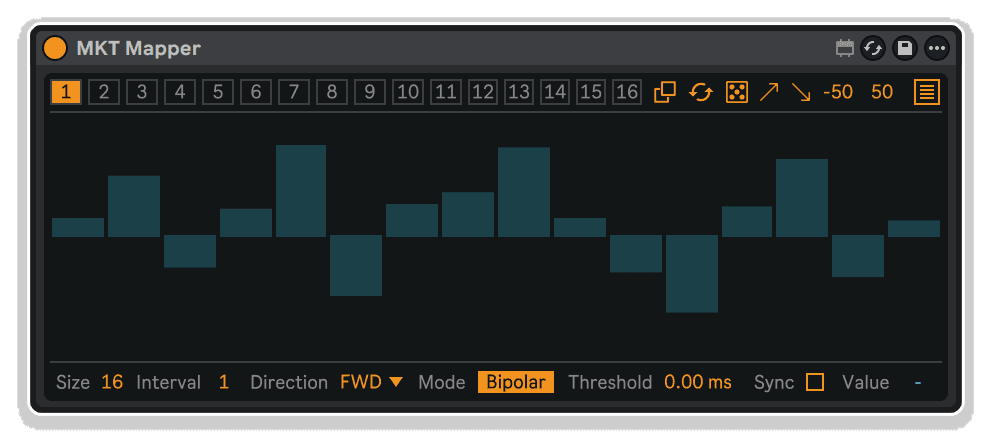
Up to 64-Step Sequences: Create long, evolving modulation sequences with the visual multislider interface. Click and drag to draw step values, see exact numerical feedback for the selected step, and build complex parameter movements that unfold over dozens of note triggers. Each step can hold any value from the selected range, giving you complete control over the modulation shape.
Intelligent Chord Detection: When you play a chord, all notes trigger simultaneously but the sequence advances only one step. The adjustable threshold control lets you set how tightly-timed notes need to be to count as a chord, accommodating both perfectly quantized MIDI and humanized, slightly-loose playing from external keyboards.
Interval Control: Set how many MIDI notes must be received before advancing one step. At the default setting of 1, every note triggers the next step. Set the interval to 4 and the sequence advances only every fourth note, creating longer rhythmic cycles. The interval can reach up to 64, allowing extremely long trigger patterns before step advancement.
Multiple Playback Directions: Choose how the sequence progresses when it reaches the end. Forward mode loops back to step one. Back mode plays the sequence in reverse. Back and Forward creates a ping-pong effect. Rotate mode shifts the entire sequence by one position. Random mode selects steps unpredictably, introducing controlled chaos into your parameter movements.
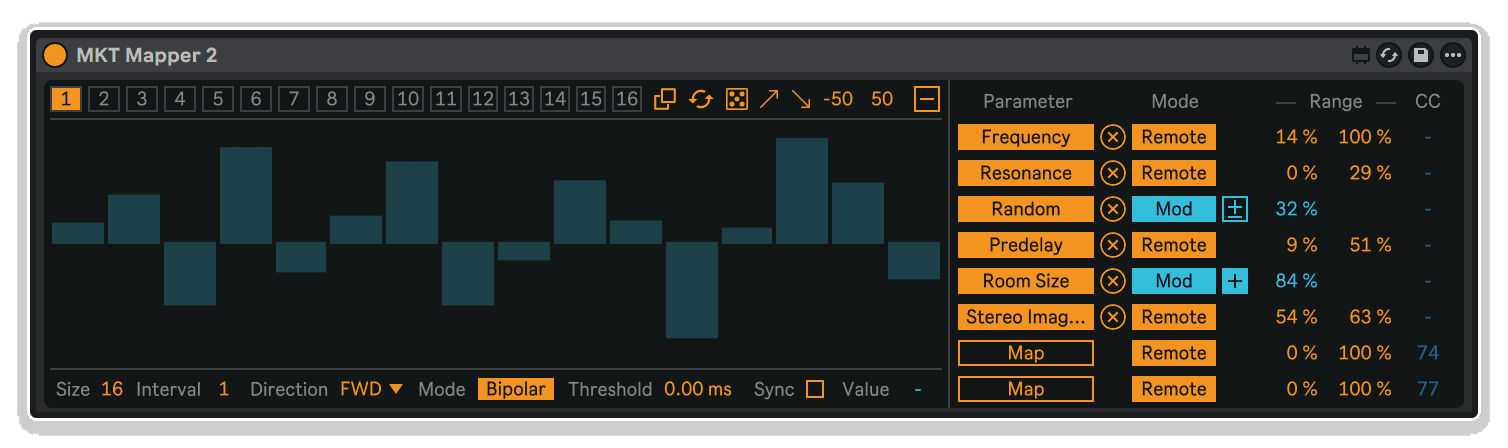
Two Operational Modes: Bipolar mode displays values from -50 to 50 with center as the default, perfect for parameters like pan, pitch, or any control where zero is the neutral position. Slider mode shows 0 to 100 with minimum as default, ideal for typical parameters like volume, filter cutoff, or send levels. The mode affects both visual display and mapping behavior.
Transport Sync Option: Enable sync to retrigger the sequence from step one whenever you start Live’s transport. This ensures consistent behavior at the beginning of arrangements or live set sections, while still maintaining note-triggered advancement during playback.
Built-In Sequence Generators: Create sequences instantly with random, ramp up, and ramp down generators. Set the value range for generated steps, then click to populate the entire multislider with mathematically-perfect ramps or organic random variations. Perfect for quick experimentation or building starting points for further manual editing.
16 Preset Slots with Automation: Save up to 16 complete sequence configurations including multislider values, size, interval, and direction settings. Switch between presets manually during performance or automate preset changes in your arrangement for dramatic sequence shifts at specific moments. Visual feedback shows which presets have unsaved modifications.
Dual Mapping System (Version 2): The Live 12-optimized version features the same modulation and remote control mapping modes found in native devices like LFO. Choose between modulation mapping (adds to current parameter value) or remote control (overrides parameter value completely). Eight mapping slots plus eight MIDI CC outputs give you extensive control over multiple parameters and external hardware simultaneously.
Legacy Compatibility (Version 1): The Live 10/11 compatible version provides modulation-style mapping even before Live 12 introduced the feature natively. Bipolar mode with Depth and Offset controls mimics modulation mapping behavior, while Slider mode operates like traditional remote control. Both versions are included in the download.
How to Use
Insert MKT Mapper before a MIDI instrument on any MIDI track. The device receives MIDI note input, advances its internal step sequence based on incoming notes, and sends parameter values to mapped destinations or MIDI CC messages to other devices.
Basic Setup:
Set the Size control to determine how many steps your sequence contains (up to 64). Click and drag on the multislider to draw your desired step values. Map parameters from other devices to one or more of MKT Mapper’s eight mapping slots. Play MIDI notes into the track – each note advances the sequence by one step and sends the step value to all mapped parameters.
Creating Sequences:
Click individual steps on the multislider and drag vertically to adjust their values. The current step value displays numerically in the lower right corner for precision. Use the generator buttons to create starting patterns: random for organic variation, ramp up for rising sweeps, ramp down for falling patterns. Set the generator range values first to control the minimum and maximum values for generated steps.
Controlling Playback Behavior:
Use the Direction menu to choose how the sequence progresses. Forward creates standard looping sequences. Back plays in reverse. Back and Forward creates ping-pong effects where parameters sweep up then back down. Random introduces unpredictability while still drawing from your programmed step values. Combine direction modes with interval settings for complex rhythmic relationships.
Working with Chords:
By default, when you play a chord, all notes trigger simultaneously but advance the sequence only one step. If you’re playing external MIDI keyboards with slight timing variations, increase the Threshold control to set how much time variation still counts as a chord. Higher threshold values group loosely-timed notes together as single triggers.
Mapping Parameters (Version 2):
Click “Map” on any mapping slot, then click the parameter you want to control in another device. Set the Mode to either Modulation (adds to parameter’s current value) or Remote (overrides parameter value). In Modulation mode, use the base value control to set the center point around which modulation occurs. In Remote mode, set the range minimum and maximum. Optionally enable MIDI CC output and set the CC number to control external hardware or other software.
Mapping Parameters (Version 1):
Select Slider or Bipolar mode based on your needs. In Slider mode, use Range controls to set minimum and maximum values sent to mapped parameters. In Bipolar mode, use Depth to control modulation amount and Offset to shift the center position. This provides modulation-style mapping even in Live 10 and 11 before the feature existed natively.
Using Presets:
Click any numbered preset slot to recall a saved configuration or to save your current settings to that slot. The preset slot displays in a different color when modifications haven’t been saved – click the slot again to save changes. Use the Copy Preset button to duplicate the current preset to another slot. Automate preset selection to create dramatic sequence shifts at specific points in your arrangement.
Ideal For
Generative Music Producers: Create evolving soundscapes where parameter changes follow your performance rather than the grid. Design patches where filter movement, effect sends, and timbral shifts respond organically to note density and playing rhythm.
Live Performers: Add dynamic, performance-driven modulation to your sets without programming complex automation. Every performance becomes unique because the sequence timing follows your playing, not a predetermined tempo.
Experimental Electronic Musicians: Build complex interactions between your note patterns and parameter modulation. Use random direction mode for controlled chaos, or create sequences that take dozens of notes to complete their full cycle.
Sound Designers: Program intricate timbral evolutions that unfold note-by-note rather than beat-by-beat. Create patches where every note played brings subtle or dramatic changes to the sound character.
Techno & House Producers: Design evolving filter sequences that advance with your bass line or lead melody rather than running in parallel. Create grooves where parameter movement is locked to specific melodic rhythms.
What’s Included
- MKT Mapper v1 device (AMXD file) – compatible with Live 10, 11, and 12
- MKT Mapper v2 device (AMXD file) – optimized for Live 12 with modulation mapping
- 11-page PDF reference manual
- Up to 64-step sequences with visual multislider editor
- 16 preset slots with automation support
- 8 parameter mapping slots
- 8 MIDI CC output channels
- Multiple playback directions (forward, back, ping-pong, rotate, random)
- Interval control for rhythmic trigger patterns
- Intelligent chord detection with adjustable threshold
- Built-in sequence generators (random, ramp up, ramp down)
- Transport sync option
- Bipolar and Slider operational modes
Requirements
- MKT Mapper v2: Ableton Live 12 with Max for Live
- MKT Mapper v1: Ableton Live 10, 11, or 12 with Max for Live
- Mac or Windows operating system
Explore More
Single Mapper | Clipboard Device | MIDI Explorer | Advanced Toolbar Buttons 2 | Notes Frequency Pro | View All killihu Products
Frequently Asked Questions
A: MKT Mapper is a MaxforLive MIDI-triggered step sequencer that advances based on incoming MIDI notes rather than tempo. Each note you play triggers the next step in a sequence (up to 64 steps), sending values to mapped parameters or MIDI CC outputs. It includes intelligent chord detection, multiple playback directions, 16 presets, and comes in two versions: v2 optimized for Live 12’s modulation mapping system, and v1 compatible with Live 10/11/12.
A: Yes, MKT Mapper is a MaxforLive device and requires Ableton Live with Max for Live installed. Version 2 requires Live 12 specifically, while Version 1 works with Live 10, 11, or 12.
A: MaxforLive is a platform that integrates the visual programming environment Max with Ableton Live, allowing users to create and use custom audio, MIDI, and control devices. It extends Live’s capabilities with powerful custom tools like MKT Mapper that provide functionality not available in the native application.
A: Traditional step sequencers advance based on tempo and timing (every 16th note, every beat, etc.). MKT Mapper advances based on your MIDI note input – each note you play triggers the next step, regardless of tempo. This creates organic, performance-driven modulation where your playing rhythm controls the parameter evolution rather than the clock. Play slowly and modulation evolves slowly; play rapid runs and parameters change quickly.
A: You can explore more of killihu’s tools and devices here: killihu
Important Information
V2.0 – Released March 2026
– Added modulation mapping for use in Live 12.
– Changed font size for better display on macOS.
– Updated PDF Manual.
v2.0 Bugfixes:
– Fixed a bug where unmapping a parameter would automatically remap it when the project was reopened.
Initial Release – November 2024
Our Products are generally provided as Zip file downloads which in all cases will need to be extracted and saved to your hard drive prior to installation. Details on the different file type provided and what to do with them are below.
.alp Files – These are Ableton Live Packs and will either install directly into the Packs Section of the browser of Ableton Live or ask you to save them to your hard drive. For packs that install to the library, when you double click on them you will see a pop up window asking you to confirm that installation is ok as the files are described as “Legacy”. This is fine and you are ok to proceed, the packs are created using the format for an earlier version of Live and so remain compatible with the current version.
.amxd files – These are individual MaxforLive Devices and can be stored anywhere on your hard drive. We’d advise creating a folder for them and then adding that folder as a location within the Places section of Lives Browser.
END-USER LICENSE AGREEMENT FOR ISOTONIK STUDIOS SOFTWARE PRODUCTS.
PLEASE READ THE TERMS AND CONDITIONS OF THIS LICENSE AGREEMENT CAREFULLY BEFORE CONTINUING WITH THIS PROGRAM INSTALL.
This End-User License Agreement (referred to as “EULA”) is a legal agreement between an individual or a single entity (referred to as “LICENSEE”) and Isotonik Studios for the Isotonik Studios software product(s) which may include associated software components, media, printed materials, and “online” or electronic documentation (referred to as “SOFTWARE PRODUCT”). By installing, copying, or otherwise using the SOFTWARE PRODUCT, the LICENSEE agrees to be bound by the terms of this EULA.
This EULA represents the entire agreement concerning the program between the LICENSEE and Isotonik Studios and it supersedes any prior proposal, representation, or understanding between the parties. If the LICENSEE does not agree to the terms of this EULA, the LICENSEE should not install or use the SOFTWARE PRODUCT.
The SOFTWARE PRODUCT is protected by copyright laws and international copyright treaties, as well as other intellectual property laws and treaties. The SOFTWARE PRODUCT is licensed, not sold.
- GRANT OF LICENSE.
The SOFTWARE PRODUCT is licensed as follows:
(a) Installation and Use. Providing that the LICENSEE has paid any applicable license fees, Isotonik Studios grants the LICENSEE the right to install and use copies of the SOFTWARE PRODUCT on up to two computers in the LICENSEE’s possession that are running a validly licensed copy of the operating system for which the SOFTWARE PRODUCT was designed [e.g., Windows 10, macOS]. The computer(s) must be owned by the LICENSEE.
(b) Backup Copies. The LICENSEE may also make copies of the SOFTWARE PRODUCT as may be necessary for backup and archival purposes.
- DESCRIPTION OF OTHER RIGHTS AND LIMITATIONS.
(a) Maintenance of Copyright Notices. The LICENSEE must not remove or alter any copyright notices on any and all copies of the SOFTWARE PRODUCT.
(b) Distribution. The LICENSEE may not distribute registered copies of the SOFTWARE PRODUCT to third parties.
(c) Prohibition on Reverse Engineering, Decompilation, and Disassembly. The LICENSEE may not reverse engineer, decompile, or disassemble the SOFTWARE PRODUCT, except and only to the extent that such activity is expressly permitted by applicable law notwithstanding this limitation.
(d) Rental. The LICENSEE may not rent, lease, or lend the SOFTWARE PRODUCT.
(e) License transfer The LICENSEE may not transfer their license to the SOFTWARE PRODUCT to any third party. Any attempt to do so will be considered a violation of this EULA.
(f) Support Services. Isotonik Studios may provide the LICENSEE with support services related to the SOFTWARE PRODUCT for a period of 12 months following the date of purchase. Any supplemental software code provided to the LICENSEE as part of the Support Services shall be considered part of the SOFTWARE PRODUCT and subject to the terms and conditions of this EULA.
(g) Compliance with Applicable Laws. The LICENSEE must comply with all applicable laws regarding use of the SOFTWARE PRODUCT.
- TERMINATION Without prejudice to any other rights, Isotonik Studios may terminate this EULA if the LICENSEE fails to comply with the terms and conditions of this EULA. In such event, the LICENSEE must destroy all copies of the SOFTWARE PRODUCT in the LICENSEE’s possession.
- COPYRIGHT All title, including but not limited to copyrights, in and to the SOFTWARE PRODUCT and any copies thereof are owned by Isotonik Studios or its suppliers. All title and intellectual property rights in and to the content which may be accessed through use of the SOFTWARE PRODUCT is the property of the respective content owner and may be protected by applicable copyright or other intellectual property laws and treaties. This EULA grants the LICENSEE no rights to use such content. All rights not expressly granted are reserved by Isotonik Studios.
- NO WARRANTIES Isotonik Studios expressly disclaims any warranty for the SOFTWARE PRODUCT. The SOFTWARE PRODUCT is provided ‘As Is’ without any express or implied warranty of any kind, including but not limited to any warranties of merchantability, noninfringement, or fitness of a particular purpose. Isotonik Studios does not warrant or assume responsibility for the accuracy or completeness of any information, text, graphics, links or other items contained within the SOFTWARE PRODUCT. Isotonik Studios makes no warranties respecting any harm that may be caused by the transmission of a computer virus, worm, time bomb, logic bomb, or other such computer program. Isotonik Studios further expressly disclaims any warranty or representation to the LICENSEE or to any third party.
- LIMITATION OF LIABILITY In no event shall Isotonik Studios be liable for any damages (including, without limitation, lost profits, business interruption, or lost information) arising out of the LICENSEE’s use of or inability to use the SOFTWARE PRODUCT, even if Isotonik Studios has been advised of the possibility of such damages. In no event will Isotonik Studios be liable for loss of data or for indirect, special, incidental, consequential (including lost profit), or other damages based in contract, tort or otherwise. Isotonik Studios shall have no liability with respect to the content of the SOFTWARE PRODUCT or any part thereof, including but not limited to errors or omissions contained therein, libel, infringements of rights of publicity, privacy, trademark rights, business interruption, personal injury, loss of privacy, moral rights or the disclosure of confidential information.
More from Killihu

 ★ Popular
Frequently Bought Together