

MIDI Explorer by Killihu
WHY LEAVE LIVE TO PREVIEW MIDI FILES?
Transform your instrument track into a MIDI file browser and player with instant preview, drag-and-drop loading, and complete control over your library without ever leaving Live’s interface. Click to audition, drag to import, and keep your workflow flowing.
Inside you’ll find:
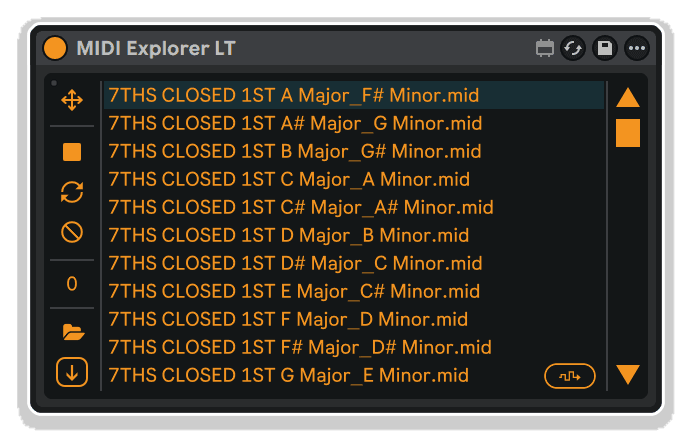
- Two versions: MIDI Explorer with full folder navigation, MIDI Explorer LT for single-folder workflow
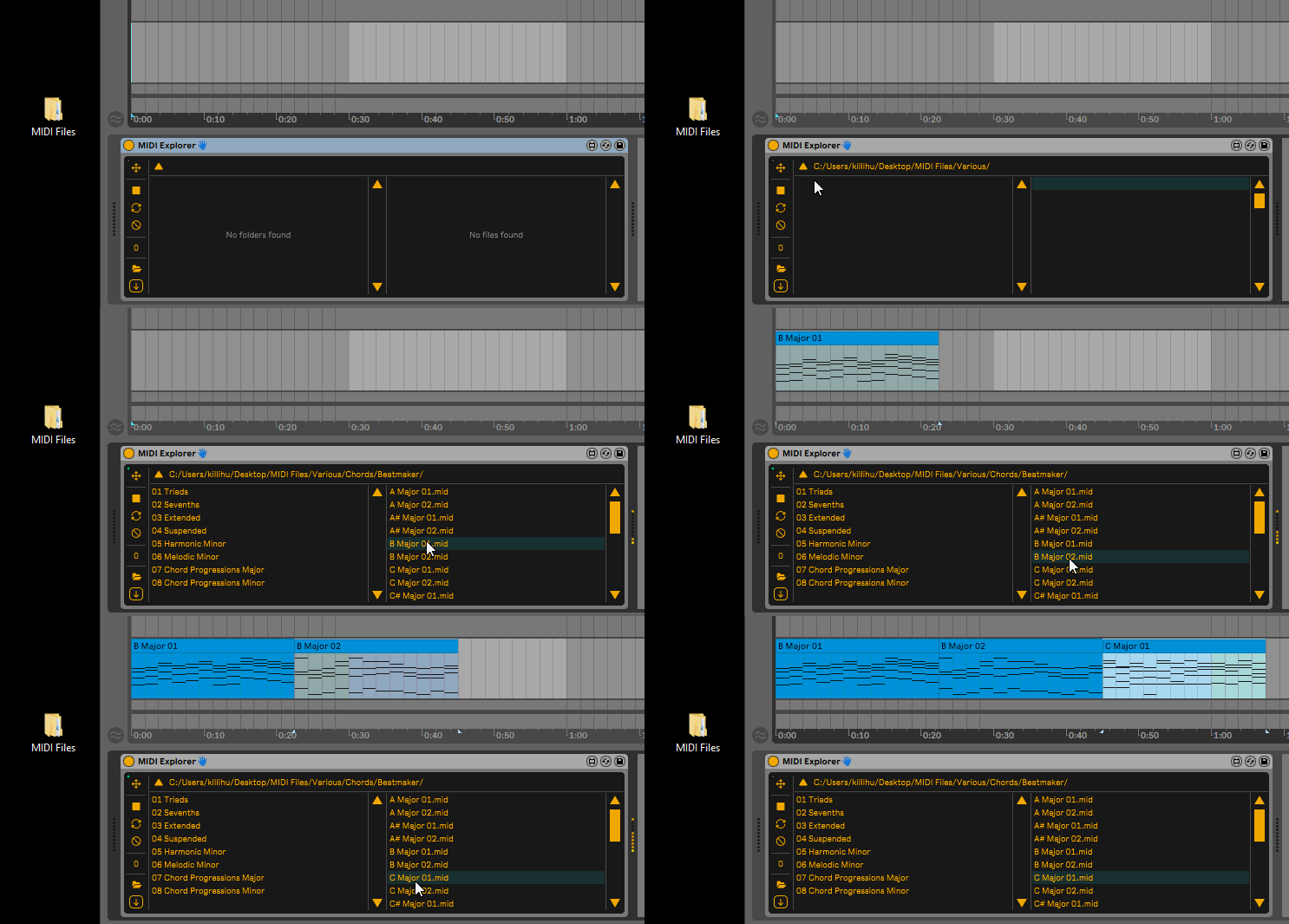
- One-click MIDI file preview through your current instrument
- Drag-and-drop loading directly into arrangement or session view
- Loop function for continuous pattern playback
- CC Lock to filter control changes during preview
- Transpose control (-4 to +4 octaves) for auditioning in different registers
- Random file selection for instant inspiration
- Folder path presets for quick access to frequently-used libraries
- Non-destructive workflow that never blocks your MIDI input
- Smart playback sync to measure boundaries when Live transport is running
- Automatic playback stop when dragging files into project
Perfect for MIDI loop collectors, sample pack users, composers organizing sketch libraries, and producers managing large pattern collections. Browse, audition, and load your entire MIDI library without workflow interruption.
MaxforLive device for Ableton Live 10/11/12 (Mac & Windows)
USER GUIDE: MIDI Explorer Manual
MIDI Explorer by Killihu
WHY LEAVE LIVE TO PREVIEW MIDI FILES?
Transform your instrument track into a MIDI file browser and player with instant preview, drag-and-drop loading, and complete control over your library without ever leaving Live’s interface. Click to audition, drag to import, and keep your workflow flowing.
Inside you’ll find:
- Two versions: MIDI Explorer with full folder navigation, MIDI Explorer LT for single-folder workflow
- One-click MIDI file preview through your current instrument
- Drag-and-drop loading directly into arrangement or session view
- Loop function for continuous pattern playback
- CC Lock to filter control changes during preview
- Transpose control (-4 to +4 octaves) for auditioning in different registers
- Random file selection for instant inspiration
- Folder path presets for quick access to frequently-used libraries
- Non-destructive workflow that never blocks your MIDI input
- Smart playback sync to measure boundaries when Live transport is running
- Automatic playback stop when dragging files into project
Perfect for MIDI loop collectors, sample pack users, composers organizing sketch libraries, and producers managing large pattern collections. Browse, audition, and load your entire MIDI library without workflow interruption.
MaxforLive device for Ableton Live 10/11/12 (Mac & Windows)
USER GUIDE: MIDI Explorer Manual
Additional information
| MaxforLive | Control Devices |
|---|---|
| Ableton Live Compatibility | Ableton Live 10 Standard with MaxforLive, Ableton Live 10 Suite, Ableton Live 11 Standard with MaxforLive, Ableton Live 11 Suite, Ableton Live 12 Standard with MaxforLive, Ableton Live 12 Suite |
| Min. Requirements | Ableton Live 10 Standard with MaxforLive Installed or Ableton Live 10 Suite |
| OS | Mac, Windows |
PRICE: £8.00
Product reviews
4 out of 5
1 review
How item rating is calculated
We show the average based on reviews. Only genuine reviews are displayed.
Sort by
December 2, 2024
This reviewer bought this product from our store.
As someone who often uses midi files as a starting point with songs, Midi Explorer is a fantastic utility that has uses far beyond auditioning midi files with a particular sound. Using Midi Explorer in conjunction with other midi effects (generative ones especially), scrolling through files, and recording the output onto a new track is an incredible way of generating new musical ideas to work from.
MIDI Explorer by Killihu
Auditioning MIDI files before committing them to your project shouldn’t require hunting through folders, opening files in other applications, or cluttering your arrangement with test clips. MIDI Explorer eliminates that friction, putting a fully functional MIDI file browser directly on your instrument track.
Preview any MIDI file through your current instrument with a single click, loop it to hear the full pattern, and drag it into your project when you find the right one. The device stays out of your way during normal workflow, never blocking your MIDI input or interfering with your playing, while giving you instant access to your entire MIDI library without leaving Live’s interface.
Two versions are included for different workflows: MIDI Explorer features a full file browser for navigating folder hierarchies across your drives, perfect for exploring large libraries. MIDI Explorer LT focuses on a single folder at a time, ideal for working with curated collections or specific projects where you’ve pre-organized your MIDI content.
Features & Highlights
Instant MIDI Preview: Click any MIDI file in the browser to hear it played through your current instrument track. No need to import files, create test clips, or switch applications. The preview plays at the original MIDI file tempo and syncs to the start of the next measure when Live’s transport is running.
Drag and Drop Integration: When you find the perfect MIDI file, simply drag the file name directly into your arrangement or session view to create a new clip. Playback stops automatically on drag, and the file loads with all its original note data, velocities, and MIDI CC information intact.
Two Versions for Different Workflows: MIDI Explorer includes a hierarchical file browser with folder navigation, showing folders on the left and MIDI files on the right. Navigate your entire drive structure and save frequently-used root folders as device presets. MIDI Explorer LT displays a single folder’s contents, streamlining workflows where you work with pre-organized collections.
Non-Destructive Workflow: The device never blocks your track’s MIDI input, so you can continue playing your controller or keyboard while browsing files. Switch between previewing library content and live playing instantly without any configuration changes or routing adjustments.
Playback Controls: Loop switch enables continuous playback for hearing full patterns and variations. Stop button halts preview instantly. Playback also stops automatically when you start or stop Live’s transport, when you drag a file into your project, or when you turn off the loop switch.
CC Lock Function: Filter out MIDI control change data during preview to hear only the note content without affecting your current instrument settings. Perfect for auditioning patterns that contain automation you don’t want applied to your synth. Note that CC Lock only affects preview playback, not the file when it’s dropped into your project.
Transpose Control: Shift previewed MIDI files up or down by up to 4 octaves in either direction, letting you audition melodic content in different registers or match patterns to your current key without opening the MIDI editor.
Random File Selection: Trigger a random file from the current folder for quick inspiration or happy accidents. Great for breaking creative blocks or discovering unexpected combinations from your library.
Folder Path Presets: Both versions can save folder paths as device presets, giving you instant access to frequently-used MIDI collections. Create multiple device presets pointing to different libraries: drum patterns, bass lines, chord progressions, or full arrangements.
How to Use
Insert MIDI Explorer before any MIDI instrument in your Live set. The device sits between your MIDI input and the instrument, allowing you to preview files while maintaining normal MIDI input functionality.
With MIDI Explorer (Full Version):
Use the Open Folder button or Drop Folder area to select a root folder for navigation. This sets your starting point for browsing subfolders. The left panel displays folders within the current location, while the right panel shows MIDI files. Click folder names to navigate deeper into your directory structure. Use the back button at the top to return to parent folders. The current path displays above the browser for orientation.
With MIDI Explorer LT:
Select a folder using Open Folder or Drop Folder controls. The browser displays all MIDI files within that single folder. This streamlined approach works perfectly when you’ve organized MIDI content into project-specific or genre-specific collections.
Previewing Files:
Click any filename to trigger playback through your current instrument. If Live’s transport is stopped, playback begins immediately. If Live’s transport is running, playback syncs to the start of the next measure. Enable the Loop switch to hear patterns repeat continuously. The Stop button halts playback, as does starting or stopping Live’s transport.
Loading Files as Clips:
Click and drag from the drag-and-drop icon (⊕ symbol) to load the currently selected file as a new MIDI clip in your arrangement or session view. Playback stops automatically when you begin dragging. The file loads with all its original timing, note data, velocities, and MIDI CC information.
Note About Zoom:
The file browser scroll bar works correctly at 100% zoom only (due to Max for Live object properties). At other zoom levels, use the mouse wheel to scroll or click the arrows at the top and bottom of the scroll bar.
Ideal For
MIDI Loop Collectors: Browse and audition large libraries of MIDI loops, patterns, and phrases without the tedious process of importing each file individually. Quickly find the right groove, melody, or progression for your track.
Sample Pack Users: Many commercial sample packs include MIDI files alongside audio content. Preview these patterns through your own instruments rather than the pack’s default sounds, unlocking new creative possibilities.
Composers & Arrangers: Organize your sketches, ideas, and partial arrangements into folder hierarchies, then quickly audition and recall them when building new compositions. Save different root folders as presets for quick access to specific projects or musical styles.
Beat Makers & Producers: Maintain libraries of drum patterns, bass lines, chord progressions, and melodic hooks organized by tempo, style, or mood. Preview files through your current production kit to hear how they fit your track’s sonic character.
Live Performers: Build setlists using MIDI Explorer LT presets pointing to different folders for each song or section. Quickly trigger backing patterns, harmonies, or accompaniment parts during performance.
What’s Included
- MIDI Explorer device (AMXD file) – full version with hierarchical folder browser
- MIDI Explorer LT device (AMXD file) – streamlined single-folder version
- 11dragfiles.mxo external component (Mac users, see manual for installation)
- Comprehensive reference manual covering both versions
Requirements
- Ableton Live 10, 11, or 12 with Max for Live
- Mac or Windows operating system
- Mac users: Additional setup required for drag-and-drop functionality (see manual)
Explore More
inScale | Clipboard Device | Session Clips | Device Navigator | Master Pitch Pro | View All killihu Products
For the device to work correctly on Live 10 a separate installation of Max for Live must be used. Instructions in the following article on the Ableton website.
https://help.ableton.com/hc/en-us/articles/209070309-How-to-use-an-external-Max-for-Live-installation”
Frequently Asked Questions
A: MIDI Explorer is a MaxforLive device that puts a MIDI file browser directly on your instrument track, letting you preview MIDI files through your current instrument and drag them into your project with a single motion. Two versions are included: MIDI Explorer with hierarchical folder navigation for browsing entire drive structures, and MIDI Explorer LT for streamlined single-folder workflow.
A: Yes, MIDI Explorer is a MaxforLive device and requires Ableton Live 10, 11, or 12 with Max for Live installed.
A: MaxforLive is a platform that integrates the visual programming environment Max with Ableton Live, allowing users to create and use custom audio, MIDI, and control devices. It extends Live’s capabilities with powerful custom instruments, effects, and workflow utilities like MIDI Explorer.
A: Yes, MIDI Explorer works on both Mac and Windows. Mac users need to complete an additional installation step for the drag-and-drop functionality (copying the 11dragfiles.mxo component and running a Terminal command). Complete instructions are provided in the reference manual.
A: You can explore more of killihu’s tools and devices here: killihu
Important Information
Initial Release – November 2024
Our Products are generally provided as Zip file downloads which in all cases will need to be extracted and saved to your hard drive prior to installation. Details on the different file type provided and what to do with them are below.
.alp Files – These are Ableton Live Packs and will either install directly into the Packs Section of the browser of Ableton Live or ask you to save them to your hard drive. For packs that install to the library, when you double click on them you will see a pop up window asking you to confirm that installation is ok as the files are described as “Legacy”. This is fine and you are ok to proceed, the packs are created using the format for an earlier version of Live and so remain compatible with the current version.
.amxd files – These are individual MaxforLive Devices and can be stored anywhere on your hard drive. We’d advise creating a folder for them and then adding that folder as a location within the Places section of Lives Browser.
END-USER LICENSE AGREEMENT FOR ISOTONIK STUDIOS SOFTWARE PRODUCTS.
PLEASE READ THE TERMS AND CONDITIONS OF THIS LICENSE AGREEMENT CAREFULLY BEFORE CONTINUING WITH THIS PROGRAM INSTALL.
This End-User License Agreement (referred to as “EULA”) is a legal agreement between an individual or a single entity (referred to as “LICENSEE”) and Isotonik Studios for the Isotonik Studios software product(s) which may include associated software components, media, printed materials, and “online” or electronic documentation (referred to as “SOFTWARE PRODUCT”). By installing, copying, or otherwise using the SOFTWARE PRODUCT, the LICENSEE agrees to be bound by the terms of this EULA.
This EULA represents the entire agreement concerning the program between the LICENSEE and Isotonik Studios and it supersedes any prior proposal, representation, or understanding between the parties. If the LICENSEE does not agree to the terms of this EULA, the LICENSEE should not install or use the SOFTWARE PRODUCT.
The SOFTWARE PRODUCT is protected by copyright laws and international copyright treaties, as well as other intellectual property laws and treaties. The SOFTWARE PRODUCT is licensed, not sold.
- GRANT OF LICENSE.
The SOFTWARE PRODUCT is licensed as follows:
(a) Installation and Use. Providing that the LICENSEE has paid any applicable license fees, Isotonik Studios grants the LICENSEE the right to install and use copies of the SOFTWARE PRODUCT on up to two computers in the LICENSEE’s possession that are running a validly licensed copy of the operating system for which the SOFTWARE PRODUCT was designed [e.g., Windows 10, macOS]. The computer(s) must be owned by the LICENSEE.
(b) Backup Copies. The LICENSEE may also make copies of the SOFTWARE PRODUCT as may be necessary for backup and archival purposes.
- DESCRIPTION OF OTHER RIGHTS AND LIMITATIONS.
(a) Maintenance of Copyright Notices. The LICENSEE must not remove or alter any copyright notices on any and all copies of the SOFTWARE PRODUCT.
(b) Distribution. The LICENSEE may not distribute registered copies of the SOFTWARE PRODUCT to third parties.
(c) Prohibition on Reverse Engineering, Decompilation, and Disassembly. The LICENSEE may not reverse engineer, decompile, or disassemble the SOFTWARE PRODUCT, except and only to the extent that such activity is expressly permitted by applicable law notwithstanding this limitation.
(d) Rental. The LICENSEE may not rent, lease, or lend the SOFTWARE PRODUCT.
(e) License transfer The LICENSEE may not transfer their license to the SOFTWARE PRODUCT to any third party. Any attempt to do so will be considered a violation of this EULA.
(f) Support Services. Isotonik Studios may provide the LICENSEE with support services related to the SOFTWARE PRODUCT for a period of 12 months following the date of purchase. Any supplemental software code provided to the LICENSEE as part of the Support Services shall be considered part of the SOFTWARE PRODUCT and subject to the terms and conditions of this EULA.
(g) Compliance with Applicable Laws. The LICENSEE must comply with all applicable laws regarding use of the SOFTWARE PRODUCT.
- TERMINATION Without prejudice to any other rights, Isotonik Studios may terminate this EULA if the LICENSEE fails to comply with the terms and conditions of this EULA. In such event, the LICENSEE must destroy all copies of the SOFTWARE PRODUCT in the LICENSEE’s possession.
- COPYRIGHT All title, including but not limited to copyrights, in and to the SOFTWARE PRODUCT and any copies thereof are owned by Isotonik Studios or its suppliers. All title and intellectual property rights in and to the content which may be accessed through use of the SOFTWARE PRODUCT is the property of the respective content owner and may be protected by applicable copyright or other intellectual property laws and treaties. This EULA grants the LICENSEE no rights to use such content. All rights not expressly granted are reserved by Isotonik Studios.
- NO WARRANTIES Isotonik Studios expressly disclaims any warranty for the SOFTWARE PRODUCT. The SOFTWARE PRODUCT is provided ‘As Is’ without any express or implied warranty of any kind, including but not limited to any warranties of merchantability, noninfringement, or fitness of a particular purpose. Isotonik Studios does not warrant or assume responsibility for the accuracy or completeness of any information, text, graphics, links or other items contained within the SOFTWARE PRODUCT. Isotonik Studios makes no warranties respecting any harm that may be caused by the transmission of a computer virus, worm, time bomb, logic bomb, or other such computer program. Isotonik Studios further expressly disclaims any warranty or representation to the LICENSEE or to any third party.
- LIMITATION OF LIABILITY In no event shall Isotonik Studios be liable for any damages (including, without limitation, lost profits, business interruption, or lost information) arising out of the LICENSEE’s use of or inability to use the SOFTWARE PRODUCT, even if Isotonik Studios has been advised of the possibility of such damages. In no event will Isotonik Studios be liable for loss of data or for indirect, special, incidental, consequential (including lost profit), or other damages based in contract, tort or otherwise. Isotonik Studios shall have no liability with respect to the content of the SOFTWARE PRODUCT or any part thereof, including but not limited to errors or omissions contained therein, libel, infringements of rights of publicity, privacy, trademark rights, business interruption, personal injury, loss of privacy, moral rights or the disclosure of confidential information.
More from Killihu
 ★ Popular


Frequently Bought Together
More from Killihu
★ PopularFrequently Bought Together