
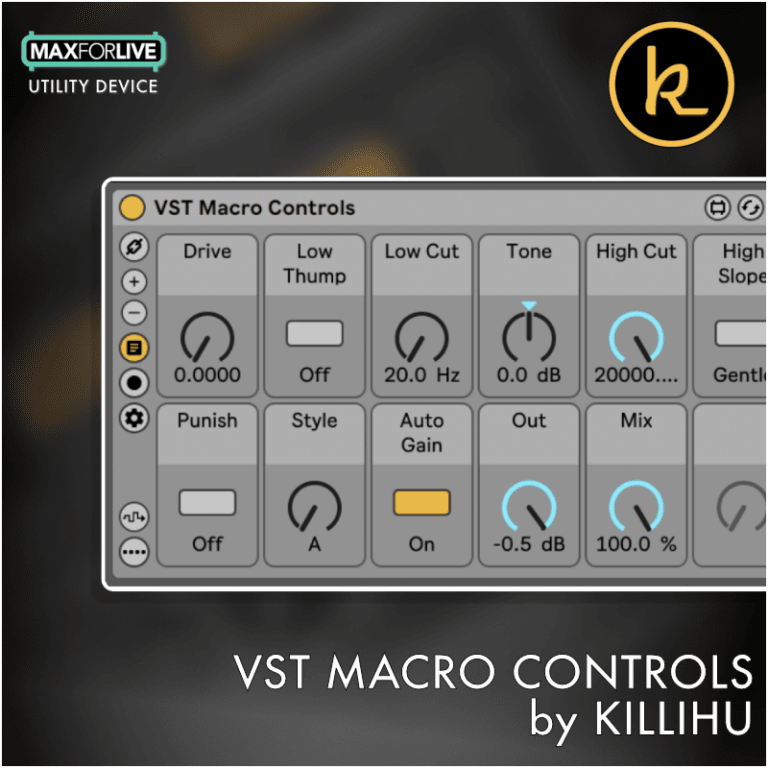
VST Macro Controls allow you to control VST plugin parameters in a more advanced way than Live’s Effects Rack device.
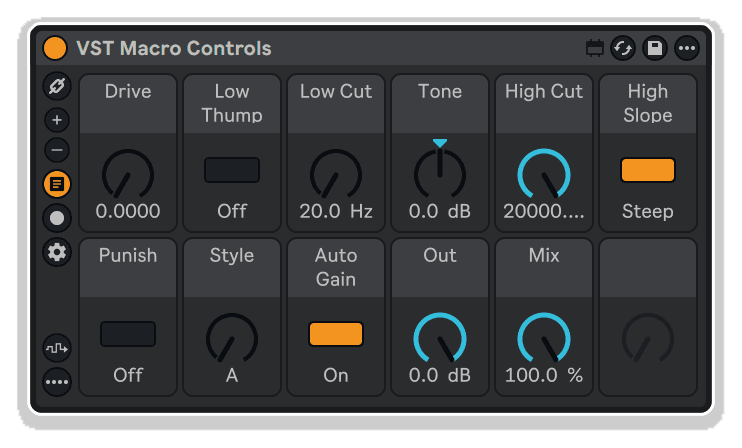
Replace Effect Rack’s generic macro system with VST Macro Controls by killihu—displaying authentic plugin parameter values (dB, Hz, percentages) with customizable control styles, colors, names, min/max ranges, intelligent randomization, and seamless bidirectional synchronization.
True plugin values, advanced control design, zero compromise.
Inside you’ll find:
Authentic plugin control with professional-grade customization—Effect Rack macros, evolved.
Replace Effect Rack’s generic macro system with VST Macro Controls by killihu—displaying authentic plugin parameter values (dB, Hz, percentages) with customizable control styles, colors, names, min/max ranges, intelligent randomization, and seamless bidirectional synchronization.
True plugin values, advanced control design, zero compromise.
Inside you’ll find:
Authentic plugin control with professional-grade customization—Effect Rack macros, evolved.
Buying for someone?Send a gift card →
| MaxforLive | Control Devices |
|---|---|
| Ableton Live Compatibility | Ableton Live 10 Standard with MaxforLive, Ableton Live 10 Suite, Ableton Live 11 Standard with MaxforLive, Ableton Live 11 Suite, Ableton Live 12 Standard with MaxforLive, Ableton Live 12 Suite |
| Min. Requirements | Ableton Live 10 Standard with MaxforLive Installed or Ableton Live 10 Suite |
| OS | Mac, Windows |
No reviews yet. Be the first to review this product.
Overview & Inspiration
Why do Live’s Effect Rack macros display VST parameters as generic 0-127 values instead of their actual units? Why can’t you see real dB, Hz, or percentage values when controlling third-party plugins?
VST Macro Controls by killihu transforms third-party plugin control with an advanced macro system that displays authentic parameter values—not abstract 0-127 ranges. Configure controls as knobs, bipolar knobs, or buttons, customize colors and names, set min/max ranges, and randomize parameters with lock protection, all while maintaining proper automation and plugin preset compatibility.
This MaxforLive device operates without wrapping VST/AU plugins in Max containers, preventing latency misreporting issues and ensuring projects open correctly in Live versions without MaxforLive. True plugin values, intelligent control design, seamless integration.
Features & Highlights
Real Parameter Value Display – Unlike Effect Rack macros showing generic 0-127 values, VST Macro Controls displays actual plugin parameter values: dB for gain, Hz for frequency, percentages for mix—exactly as they appear in the plugin interface.
Flexible Control Styling – Configure each of 16 macro controls as standard knobs, bipolar knobs (for pan-type parameters), or buttons (for on/off switches), plus menu dropdowns for AU plugins (Mac)—matching control appearance to parameter function.
Custom Color and Naming – Assign custom colors to each macro using Live’s color picker, and create friendly custom names for parameters with cryptic default labels, improving visual organization and workflow clarity.
Adjustable Min/Max Ranges – Set independent minimum and maximum values for each macro control, restricting parameter ranges to useful values or inverting control direction by setting max below min—functionality unavailable in standard Effect Rack macros.
Intelligent Randomization System – One-click randomization across all parameters with individual lock switches protecting specific controls from random changes, and min/max range constraints defining randomization boundaries per control.
Return to Default Function – Unlike standard MaxforLive controls, activate Return to Default mode to reveal circular reset buttons on each macro, instantly returning parameters to plugin default values.
Bidirectional Synchronization – Move device controls and the plugin interface updates simultaneously; adjust plugin parameters and macro controls track instantly. Change plugin presets and macro values update automatically (supported by most VST/AU plugins).
Non-Intrusive Integration – The device doesn’t take exclusive control or add steps to undo history—Live registers changes directly on the VST plugin. Automation and external controller mapping work normally when focused on the plugin itself.
No Plugin Wrapping – Unlike MaxforLive devices that encapsulate VST plugins, VST Macro Controls operates externally, preventing latency compensation misreporting issues and ensuring projects open correctly in Live versions without MaxforLive installed.
Scalable Interface – Display 1-16 macro controls using plus/minus buttons, showing only the parameters you need while keeping the interface compact and organized.
Preset-Savable Configurations – Configure control styles, colors, names, ranges, and randomize locks, then save everything as a Live rack preset for instant recall with specific VST plugins—create specialized control surfaces for your favorite instruments and effects.
Configure Mode Integration – Automatically links to parameters added via the VST plugin’s Configure button, accessing the same parameter list as Effect Rack macros but displaying them with authentic values and enhanced control options.
Separate VST and AU Versions – VST Macro Controls for Windows and Mac, AU Macro Controls for Mac with additional menu-style control support for dropdown parameters common in AU plugins.
How to Use
Load your VST or AU plugin onto a track and click its Configure button. Add the parameters you want to control (up to 16) using the standard Live parameter selection process, just as you would for Effect Rack macros.
Drop VST Macro Controls (or AU Macro Controls on Mac) immediately before the plugin. The device automatically links and displays all configured parameters with their real values. Use the Link button if manual reconnection is needed.
Click the plus/minus buttons to show between 1 and 16 macro controls, displaying only the parameters you need. The device automatically accesses parameters in the order they appear in the plugin’s Configure mode.
Enable the Configure button to reveal control customization options. Use the dropdown menu below each macro to set its style: Knob (standard rotation), Knob Bipolar (center-zero for pan/balance), Button (on/off toggle), or Menu (AU plugins only, for dropdown parameters).
Click the small color square below each macro to assign custom colors using Live’s color picker, visually grouping related parameters or highlighting important controls.
Enable Custom Names mode and click any macro name while Configure is active to rename parameters, replacing cryptic plugin labels with friendly descriptions that make sense in your workflow.
Enable Range Settings to reveal min/max sliders for each macro. Set the upper slider (maximum value) and lower slider (minimum value) to restrict parameter ranges—perfect for limiting resonance peaks or focusing EQ frequency selection. Set max below min to reverse control direction.
Use the Randomize button to instantly generate random parameter combinations across all unlocked macros. Enable the Randomize Lock switch (in Range Settings) for specific controls to protect them from randomization—useful for preserving mix levels, output gains, or other critical settings.
Enable Return to Default mode to reveal circular reset buttons on each macro, allowing one-click return to plugin default values—functionality standard Live controls provide via double-click but MaxforLive requires explicit buttons.
Group the device and plugin into a Live rack, then save as a preset to preserve all customizations (control styles, colors, names, ranges, locks) for instant recall with the same VST plugin in future projects.
Ideal For
What’s Included
Requirements
Explore More
Presets | Control Matrix | Mapper Ki | Clipboard Device | View All killihu Products
A: VST Macro Controls is a MaxforLive device providing advanced macro control for VST and AU plugins, displaying real parameter values (dB, Hz, percentages) instead of generic 0-127 ranges. It offers customizable control styles (knobs, bipolar knobs, buttons), custom colors and names, adjustable min/max ranges, and intelligent randomization—all without plugin wrapping that causes latency issues.
A: Yes, VST Macro Controls is a MaxforLive device.
A: MaxforLive is a platform that integrates the visual programming environment Max with Ableton Live, allowing users to create and use custom audio, MIDI, and control devices.
A: Effect Rack macros display all VST parameters as generic 0-127 values. VST Macro Controls displays real plugin values (like “-12.5 dB” or “2400 Hz”). It also offers control style customization (knobs, bipolar knobs, buttons), custom colors, adjustable min/max ranges with inversion, intelligent randomization with locks, and return-to-default buttons—features unavailable in standard Effect Rack macros.
A: Yes, but with an important distinction: the device doesn’t take exclusive control of the plugin. Automation and external controller mapping work normally when focused (blue hand) on the VST plugin itself, not the device. This non-intrusive approach prevents undo history clutter and ensures Live registers changes directly on the plugin.
A: Yes. Unlike MaxforLive devices that wrap VST plugins inside Max containers, VST Macro Controls operates externally. Projects open correctly in Live versions without MaxforLive—automation and plugin settings remain intact, though the macro control interface won’t be present.
A: Some MaxforLive devices encapsulate VST plugins inside Max containers, which can cause latency compensation misreporting and compatibility issues. VST Macro Controls controls plugins externally, preventing these problems while maintaining full automation compatibility.
A: VST Macro Controls works with VST2/VST3 plugins on both Windows and Mac. AU Macro Controls works with Audio Unit plugins on Mac only, with an additional “Menu” control style for displaying dropdown parameters common in AU plugins (shown as dropdown menus in Configure Mode).
A: Yes, each macro has independent min/max range sliders. Set these to restrict parameters to useful values (e.g., limit filter resonance to prevent screaming peaks). You can even invert control direction by setting max below min, perfect for creative parameter relationships.
A: You can explore more of killihu’s tools and devices here: killihu
v1.3 – Released May 2025
New features and improvements:
v1.3 Bugfixes:
v1.1 Bugfixes:
v1.0.1 Bugfixes:
Our Products are generally provided as Zip file downloads which in all cases will need to be extracted and saved to your hard drive prior to installation. Details on the different file type provided and what to do with them are below.
.alp Files – These are Ableton Live Packs and will either install directly into the Packs Section of the browser of Ableton Live or ask you to save them to your hard drive. For packs that install to the library, when you double click on them you will see a pop up window asking you to confirm that installation is ok as the files are described as “Legacy”. This is fine and you are ok to proceed, the packs are created using the format for an earlier version of Live and so remain compatible with the current version.
.amxd files – These are individual MaxforLive Devices and can be stored anywhere on your hard drive. We’d advise creating a folder for them and then adding that folder as a location within the Places section of Lives Browser.
END-USER LICENSE AGREEMENT FOR ISOTONIK STUDIOS SOFTWARE PRODUCTS.
PLEASE READ THE TERMS AND CONDITIONS OF THIS LICENSE AGREEMENT CAREFULLY BEFORE CONTINUING WITH THIS PROGRAM INSTALL.
This End-User License Agreement (referred to as “EULA”) is a legal agreement between an individual or a single entity (referred to as “LICENSEE”) and Isotonik Studios for the Isotonik Studios software product(s) which may include associated software components, media, printed materials, and “online” or electronic documentation (referred to as “SOFTWARE PRODUCT”). By installing, copying, or otherwise using the SOFTWARE PRODUCT, the LICENSEE agrees to be bound by the terms of this EULA.
This EULA represents the entire agreement concerning the program between the LICENSEE and Isotonik Studios and it supersedes any prior proposal, representation, or understanding between the parties. If the LICENSEE does not agree to the terms of this EULA, the LICENSEE should not install or use the SOFTWARE PRODUCT.
The SOFTWARE PRODUCT is protected by copyright laws and international copyright treaties, as well as other intellectual property laws and treaties. The SOFTWARE PRODUCT is licensed, not sold.
The SOFTWARE PRODUCT is licensed as follows:
(a) Installation and Use. Providing that the LICENSEE has paid any applicable license fees, Isotonik Studios grants the LICENSEE the right to install and use copies of the SOFTWARE PRODUCT on up to two computers in the LICENSEE’s possession that are running a validly licensed copy of the operating system for which the SOFTWARE PRODUCT was designed [e.g., Windows 10, macOS]. The computer(s) must be owned by the LICENSEE.
(b) Backup Copies. The LICENSEE may also make copies of the SOFTWARE PRODUCT as may be necessary for backup and archival purposes.
(a) Maintenance of Copyright Notices. The LICENSEE must not remove or alter any copyright notices on any and all copies of the SOFTWARE PRODUCT.
(b) Distribution. The LICENSEE may not distribute registered copies of the SOFTWARE PRODUCT to third parties.
(c) Prohibition on Reverse Engineering, Decompilation, and Disassembly. The LICENSEE may not reverse engineer, decompile, or disassemble the SOFTWARE PRODUCT, except and only to the extent that such activity is expressly permitted by applicable law notwithstanding this limitation.
(d) Rental. The LICENSEE may not rent, lease, or lend the SOFTWARE PRODUCT.
(e) License transfer The LICENSEE may not transfer their license to the SOFTWARE PRODUCT to any third party. Any attempt to do so will be considered a violation of this EULA.
(f) Support Services. Isotonik Studios may provide the LICENSEE with support services related to the SOFTWARE PRODUCT for a period of 12 months following the date of purchase. Any supplemental software code provided to the LICENSEE as part of the Support Services shall be considered part of the SOFTWARE PRODUCT and subject to the terms and conditions of this EULA.
(g) Compliance with Applicable Laws. The LICENSEE must comply with all applicable laws regarding use of the SOFTWARE PRODUCT.

 ★ Popular
Join the list for fresh Max for Live devices, sound packs and offers. No spam, unsubscribe anytime.

Curated Ableton Live, Max for Live & sound-design tools from the world's best independent developers.
Trusted by thousands of music producers worldwide