Repeat Pro by Noiss COKO
PUSH 2 INTEGRATED MIDI SEQUENCING WITH DEEP RANDOMNESS AND DETAILED STEP CONTROL.
STACK & SAVE: Select three or more NOISS COKO MaxforLive devices and unlock an instant 20% discount—applied automatically when you check out.
Repeat PRO by Noiss Coko is a fully programmable Max for Live MIDI sequencer built for expressive rhythmic and melodic creation inside Ableton Live.
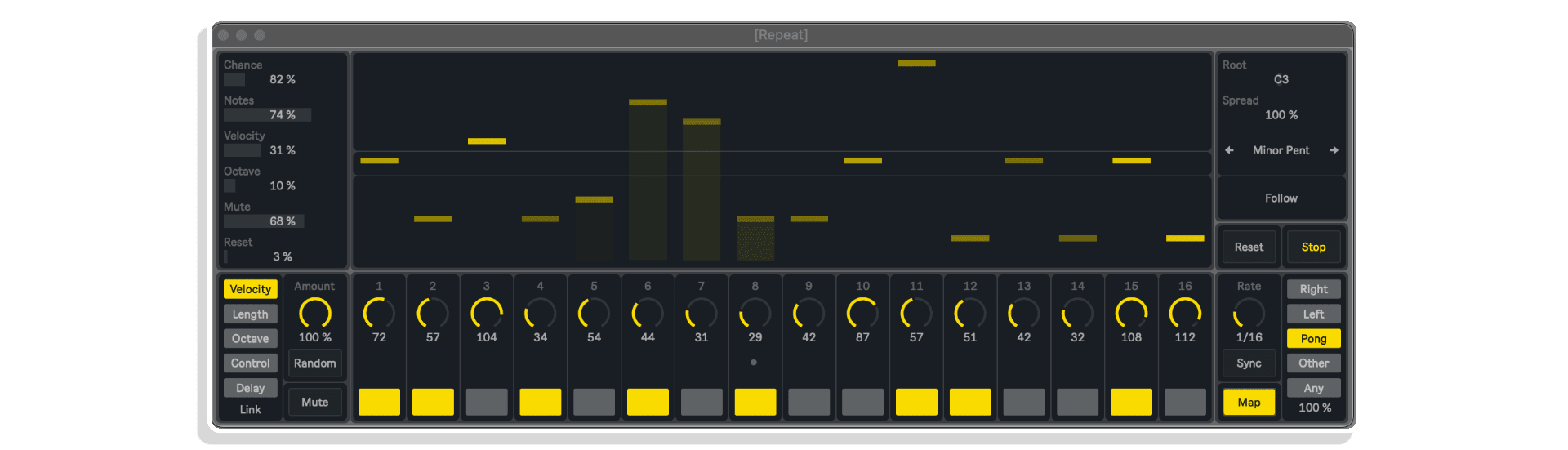
From velocity and pitch to delay and modulation, each of its 16 steps is individually tweakable—with rich randomization and full Push 2 control for dynamic pattern building.
Key Features:
- Sixteen-step sequencer with per-step control: note, velocity, octave, delay, and more
- Randomization engine for evolving melodic sequences
- 64-slot preset manager with Push 2 storage and recall
- Five playback modes and three sync options (Sync, Free, Track)
- Map, Control Change, and Program Change for internal and external modulation
Add Repeat PRO to your toolkit and unlock playful, precision-driven MIDI sequencing.
USER GUIDE: Repeat Pro
Repeat Pro by Noiss COKO
PUSH 2 INTEGRATED MIDI SEQUENCING WITH DEEP RANDOMNESS AND DETAILED STEP CONTROL.
STACK & SAVE: Select three or more NOISS COKO MaxforLive devices and unlock an instant 20% discount—applied automatically when you check out.
Repeat PRO by Noiss Coko is a fully programmable Max for Live MIDI sequencer built for expressive rhythmic and melodic creation inside Ableton Live.
From velocity and pitch to delay and modulation, each of its 16 steps is individually tweakable—with rich randomization and full Push 2 control for dynamic pattern building.
Key Features:
- Sixteen-step sequencer with per-step control: note, velocity, octave, delay, and more
- Randomization engine for evolving melodic sequences
- 64-slot preset manager with Push 2 storage and recall
- Five playback modes and three sync options (Sync, Free, Track)
- Map, Control Change, and Program Change for internal and external modulation
Add Repeat PRO to your toolkit and unlock playful, precision-driven MIDI sequencing.
USER GUIDE: Repeat Pro
Product reviews
FEATURES
4.9 out of 5
8 reviews
How item rating is calculated
We show the average based on reviews. Only genuine reviews are displayed.
Sort by
October 22, 2025
This reviewer bought this product from our store.
Sweetness in motion!
Pretty much the perfect step sequencer.
I have many, I recommend K-Teck for generative goodness.
But this one is simple and effective with enough control and variation if needed.
was missing exactly this. My go to from now on. I guess :)
The spread control which is always within the scale and can be autoated for some nice variation is something I have not seen on any other sequencers, it is lovely!
Running multiple on old cpu machine, no problem :)
I recommend this product
March 27, 2025
This reviewer bought this product from our store.
I find myself returning to step sequencers very often with my music, and Repeat is the one I tend to default to the most often because of the fantastic pop-out UI, the randomization features, and the parameter mapping capabilities. It's a delight to use.
November 14, 2024
This reviewer bought this product from our store.
An easy and really good sequencer well worth the price
May 6, 2022
This reviewer bought this product from our store.
First of all, I can say, after trying many sequencers (m4l and vst), that this sequencer is by far the best sequencer, believe me, THE BEST! The first thing that makes the difference is the integration with push, you can manage all from push but not like other m4l where the push is disabled, no, in this case, you can continue browsing and using the push as usual. Second, you can access all the functions from push and third, it's simple, it has a spread that creates melodic variations that others don't have, percentages of random, in short... wonderful. I use it as an external sequencer for my eurorack.
Cons: You can save your presets but you can't export them.
The step indicators appear in the push as percentages when the name of the notes should appear.
This sequencer is highly recommended without a doubt, it is seen that it is made with a lot of love and dedication, Congratulations.
Note: Christian Fock asks if pattern changes can be automated, yes, but not in a fly way, make a clip in Ableton and go to envelopes on the clip, search for pattern change and draw the changes in the clip as you like.
February 18, 2021
This reviewer bought this product from our store.
Sequencer is great, but is there no way to automate pattern change?
Repeat Pro by Noiss COKO
Repeat PRO by Noiss Coko is a powerful Max for Live MIDI sequencer that opens up expressive and precise rhythm and melody programming inside Ableton Live.
Whether you’re sequencing an analog bassline, modulating a soft synth’s filter, or building evolving generative compositions, Repeat PRO gives you surgical step-level control with a creative flow that’s uniquely playful.
Each of the 16 steps offers independent settings for pitch, velocity, note length, octave, control (CC), and delay. You can mute or skip steps, program parameter spreads, and activate deep randomization for melodies that constantly evolve. From subtle humanization to full-blown chaos, Repeat PRO puts unpredictability on a dial.
Pack Contents:
- Max for Live MIDI sequencer with deep per-step modulation
- Velocity, Length, Octave, Control, Delay editing
- Push 2 integration for real-time sequencing and preset control
- 64 preset slots with manual and hardware-based recall
- Global random panel and individual parameter randomization
- Scale system with root and spread control (Chromatic, Pentatonic, Modes, etc.)
- Five playback modes: Right, Left, Pong, Other, Any (with proximity control)
- Three tempo modes: Sync (Live transport), Free (BPM), and Track (MIDI-triggered)
More than a note repeater, Repeat PRO becomes a modular brain inside your session. Control synths, samplers, or modular gear via MIDI out, while shaping sequences that morph subtly or swing wildly based on probability, chance, and user-defined boundaries.
Push 2 users will find one of the most thoughtfully designed control integrations available in a Max for Live device. From matrix-based muting and skipping to parameter selection, scale navigation, and real-time randomization — the hardware layout mirrors your creative workflow without leaving the grid.
Want to build a slow-evolving ambient arpeggio? Use the “Any” playback mode with step-based delay, octave spread, and note chance. Creating a glitchy acid-style bassline? Dive into Pong mode, map the control dial to your filter cutoff, and sequence octave jumps with probability.
Repeat PRO is built with performance in mind. Save and recall up to 64 patterns from Push or mouse. Modulate Ableton parameters or send CC/Program Change to hardware. Sequence drums with precise timing or use Rate: Track mode to trigger steps from any MIDI note input.
With such a deep feature set, Repeat PRO brings intuitive sequencing to a new level — whether you’re using mouse, Push, or both. The result is a sequencer that’s as powerful as it is playable.
If you create with movement, modulation, or microtiming in mind, Repeat PRO delivers a sequencing ecosystem that rewards exploration and elevates your entire MIDI workflow inside Ableton Live.
BUILD YOUR OWN BUNDLE: Purchase any three qualifying Noiss COKO Packs at the same time and get an automatic 20% Discount applied at Checkout!!
ALSO AVAILABLE: GOSSIP | MOVERS PACK | CONTROL PACK PLUS | GRAINLOOP | SEMPLER PRO
Frequently Asked Questions
A: Repeat PRO is a Max for Live MIDI effect by Noiss Coko that allows you to program intricate rhythmic and melodic patterns, with step-by-step control over pitch, velocity, delay, and modulation. It features 16-step sequencing, deep randomization tools, Push 2 integration, and external MIDI control capabilities.
A: Repeat PRO is compatible with Ableton Live 10, 11, and 12 (Standard with Max for Live or Suite). It supports the Push 2 controller. Installation is drag-and-drop via the User Library, and no external plugins are required.</br></br>
A: MaxforLive is an extension of Ableton Live Suite that allows users to create or use custom-built devices, adding new instruments, effects, and functionality to Live.</br></br>
A: You can find more releases from Noiss Coko here: NOISS COKO
Important Information
V1.2 – Released 28th December 2020
– Fixed Mute and Skip values not being saved with Live/Max latest versions.
– Fixed Pong mode not playing immediately after Live session is reopen.
– Fixed Change slider not showing when Live session is reopen.
– Fixed Random (Repeat button) function sometimes being stuck with Note values when using Push 2 as control surface.
V1.1 Released 16th July 2020
Now it’s possible to define two different behaviors for the Follow Mode! A new toggle is found on the Settings Window, which allows the sequence to be reset every time a MIDI Note is received. Besides working as a tracking function for the Root key, incoming MIDI Notes will only turn the Play button on and off, or also reset the counter and play the sequence from its first active step.
Initial Release – 1st June 2020
Our Products are generally provided as Zip file downloads which in all cases will need to be extracted and saved to your hard drive prior to installation. Details on the different file type provided and what to do with them are below.
.alp Files – These are Ableton Live Packs and will either install directly into the Packs Section of the browser of Ableton Live or ask you to save them to your hard drive. For packs that install to the library, when you double click on them you will see a pop up window asking you to confirm that installation is ok as the files are described as “Legacy”. This is fine and you are ok to proceed, the packs are created using the format for an earlier version of Live and so remain compatible with the current version.
.amxd files – These are individual MaxforLive Devices and can be stored anywhere on your hard drive. We’d advise creating a folder for them and then adding that folder as a location within the Places section of Lives Browser.
END-USER LICENSE AGREEMENT FOR ISOTONIK STUDIOS SOFTWARE PRODUCTS.
PLEASE READ THE TERMS AND CONDITIONS OF THIS LICENSE AGREEMENT CAREFULLY BEFORE CONTINUING WITH THIS PROGRAM INSTALL.
This End-User License Agreement (referred to as “EULA”) is a legal agreement between an individual or a single entity (referred to as “LICENSEE”) and Isotonik Studios for the Isotonik Studios software product(s) which may include associated software components, media, printed materials, and “online” or electronic documentation (referred to as “SOFTWARE PRODUCT”). By installing, copying, or otherwise using the SOFTWARE PRODUCT, the LICENSEE agrees to be bound by the terms of this EULA.
This EULA represents the entire agreement concerning the program between the LICENSEE and Isotonik Studios and it supersedes any prior proposal, representation, or understanding between the parties. If the LICENSEE does not agree to the terms of this EULA, the LICENSEE should not install or use the SOFTWARE PRODUCT.
The SOFTWARE PRODUCT is protected by copyright laws and international copyright treaties, as well as other intellectual property laws and treaties. The SOFTWARE PRODUCT is licensed, not sold.
- GRANT OF LICENSE.
The SOFTWARE PRODUCT is licensed as follows:
(a) Installation and Use. Providing that the LICENSEE has paid any applicable license fees, Isotonik Studios grants the LICENSEE the right to install and use copies of the SOFTWARE PRODUCT on up to two computers in the LICENSEE’s possession that are running a validly licensed copy of the operating system for which the SOFTWARE PRODUCT was designed [e.g., Windows 10, macOS]. The computer(s) must be owned by the LICENSEE.
(b) Backup Copies. The LICENSEE may also make copies of the SOFTWARE PRODUCT as may be necessary for backup and archival purposes.
- DESCRIPTION OF OTHER RIGHTS AND LIMITATIONS.
(a) Maintenance of Copyright Notices. The LICENSEE must not remove or alter any copyright notices on any and all copies of the SOFTWARE PRODUCT.
(b) Distribution. The LICENSEE may not distribute registered copies of the SOFTWARE PRODUCT to third parties.
(c) Prohibition on Reverse Engineering, Decompilation, and Disassembly. The LICENSEE may not reverse engineer, decompile, or disassemble the SOFTWARE PRODUCT, except and only to the extent that such activity is expressly permitted by applicable law notwithstanding this limitation.
(d) Rental. The LICENSEE may not rent, lease, or lend the SOFTWARE PRODUCT.
(e) License transfer The LICENSEE may not transfer their license to the SOFTWARE PRODUCT to any third party. Any attempt to do so will be considered a violation of this EULA.
(f) Support Services. Isotonik Studios may provide the LICENSEE with support services related to the SOFTWARE PRODUCT for a period of 12 months following the date of purchase. Any supplemental software code provided to the LICENSEE as part of the Support Services shall be considered part of the SOFTWARE PRODUCT and subject to the terms and conditions of this EULA.
(g) Compliance with Applicable Laws. The LICENSEE must comply with all applicable laws regarding use of the SOFTWARE PRODUCT.
- TERMINATION Without prejudice to any other rights, Isotonik Studios may terminate this EULA if the LICENSEE fails to comply with the terms and conditions of this EULA. In such event, the LICENSEE must destroy all copies of the SOFTWARE PRODUCT in the LICENSEE’s possession.
- COPYRIGHT All title, including but not limited to copyrights, in and to the SOFTWARE PRODUCT and any copies thereof are owned by Isotonik Studios or its suppliers. All title and intellectual property rights in and to the content which may be accessed through use of the SOFTWARE PRODUCT is the property of the respective content owner and may be protected by applicable copyright or other intellectual property laws and treaties. This EULA grants the LICENSEE no rights to use such content. All rights not expressly granted are reserved by Isotonik Studios.
- NO WARRANTIES Isotonik Studios expressly disclaims any warranty for the SOFTWARE PRODUCT. The SOFTWARE PRODUCT is provided ‘As Is’ without any express or implied warranty of any kind, including but not limited to any warranties of merchantability, noninfringement, or fitness of a particular purpose. Isotonik Studios does not warrant or assume responsibility for the accuracy or completeness of any information, text, graphics, links or other items contained within the SOFTWARE PRODUCT. Isotonik Studios makes no warranties respecting any harm that may be caused by the transmission of a computer virus, worm, time bomb, logic bomb, or other such computer program. Isotonik Studios further expressly disclaims any warranty or representation to the LICENSEE or to any third party.
- LIMITATION OF LIABILITY In no event shall Isotonik Studios be liable for any damages (including, without limitation, lost profits, business interruption, or lost information) arising out of the LICENSEE’s use of or inability to use the SOFTWARE PRODUCT, even if Isotonik Studios has been advised of the possibility of such damages. In no event will Isotonik Studios be liable for loss of data or for indirect, special, incidental, consequential (including lost profit), or other damages based in contract, tort or otherwise. Isotonik Studios shall have no liability with respect to the content of the SOFTWARE PRODUCT or any part thereof, including but not limited to errors or omissions contained therein, libel, infringements of rights of publicity, privacy, trademark rights, business interruption, personal injury, loss of privacy, moral rights or the disclosure of confidential information.