Rotation by Rawton Forge
BUILD YOUR BUNDLE: Add any three or more Rawton Forge products to your cart and save 20% automatically at checkout.
STEREO WIDTH WITHOUT MONO COMPROMISE
Mono compatibility shouldn’t be an afterthought—and with Rotation, it never is. This Max for Live device uses a Hilbert transformer to generate phase-perfect quadrature signals, delivering genuine stereo width where every harmonic component is individually processed and distributed without phase cancellation.
Inside you’ll find:
- Hilbert transformer-based stereo widening with full mono compatibility
- Phase, Width, and Angle controls for precise stereo field positioning
- Three-mode LFO with independent routing to Phase, Width, and Angle (Off / Sine Bipolar / Full Rotation)
- MIDI input for harmonically locking rotation frequency to a played note
- Ratio control defining the relationship between MIDI pitch and rotation frequency
- Envelope section for dynamic Rate modulation triggered by incoming audio
- Feedback control for phasor-like resonance and complex harmonic movement
- Real-time Stereo Meter displaying Mid/Side field geometry
- Dry/Wet blend from fully dry to fully processed
Compatible with Ableton Live 11 and Live 12 with Max for Live.
The widener that respects your mix—because stereo should open things up, not quietly break them.
USER GUIDE: Rotation User Guide
Rotation by Rawton Forge
BUILD YOUR BUNDLE: Add any three or more Rawton Forge products to your cart and save 20% automatically at checkout.
STEREO WIDTH WITHOUT MONO COMPROMISE
Mono compatibility shouldn’t be an afterthought—and with Rotation, it never is. This Max for Live device uses a Hilbert transformer to generate phase-perfect quadrature signals, delivering genuine stereo width where every harmonic component is individually processed and distributed without phase cancellation.
Inside you’ll find:
- Hilbert transformer-based stereo widening with full mono compatibility
- Phase, Width, and Angle controls for precise stereo field positioning
- Three-mode LFO with independent routing to Phase, Width, and Angle (Off / Sine Bipolar / Full Rotation)
- MIDI input for harmonically locking rotation frequency to a played note
- Ratio control defining the relationship between MIDI pitch and rotation frequency
- Envelope section for dynamic Rate modulation triggered by incoming audio
- Feedback control for phasor-like resonance and complex harmonic movement
- Real-time Stereo Meter displaying Mid/Side field geometry
- Dry/Wet blend from fully dry to fully processed
Compatible with Ableton Live 11 and Live 12 with Max for Live.
The widener that respects your mix—because stereo should open things up, not quietly break them.
USER GUIDE: Rotation User Guide
Additional information
| MaxforLive | Audio Devices |
|---|---|
| Ableton Live Compatibility | Ableton Live 11 Standard with MaxforLive, Ableton Live 11 Suite, Ableton Live 12 Standard with MaxforLive, Ableton Live 12 Suite |
| Min. Requirements | Ableton Live 11 Standard with MaxforLive Installed or Ableton Live 11 Suite |
| OS | Mac, Windows |
PRICE: £16.00

Product reviews
5 out of 5
14 reviews
How item rating is calculated
We show the average based on reviews. Only genuine reviews are displayed.
Sort by
September 23, 2026
Rock Solid
Absolutely brilliant. I've been looking for a solid widener that doesn't immediately ruin your mono mix, and as an Ableton user, I have now fallen in absolute love with this. Essential if you use Ableton Live!!!
Hi quality dsp
none!
I recommend this product
August 6, 2026
This reviewer bought this product from our store.
Rotation has me rotating almost all my sounds. I try to put it on my pads and keys to make a more surrounding atmosphere. Same quality level as a stock ableton plugin.
I recommend this product
July 29, 2026
Flexible & solid!
Absolutely stellar control of image, using some solid techniques that keep mono compatibility. Like any stereo tool it can get out of hand quickly, so the device is extremely well made in that it gives you as much control as needed for many situations!
I recommend this product
July 16, 2026
This reviewer bought this product from our store.
Natural movement without sounding gimmicky. It keeps sounds evolving while preserving their energy and character.
I recommend this product
July 5, 2026
This reviewer bought this product from our store.
Does what it says on the tin.
But it struggles with bass lines that keep the same rhythm but change in pitch.
I recommend this product
Rotation by Rawton Forge
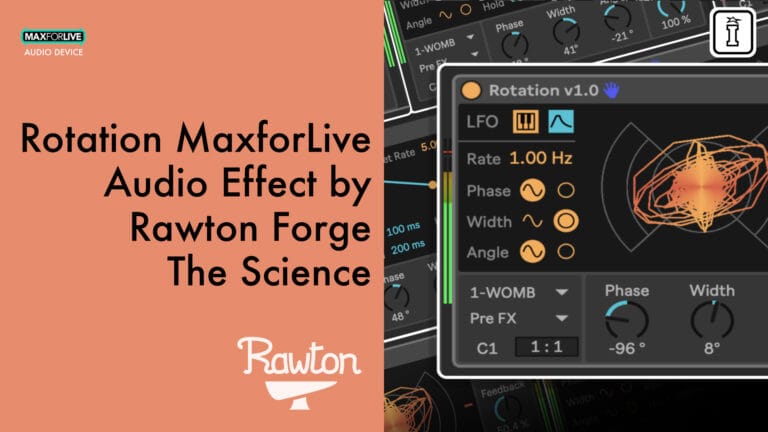
Mono compatibility is a non-negotiable for serious mixers—yet most stereo wideners quietly destroy it. Rotation takes a fundamentally different approach, using a Hilbert transformer built from a precision-calibrated all-pass network to produce two quadrature signals phase-shifted by exactly 90° across the entire spectrum. Every harmonic component is individually processed and distributed between channels, delivering genuine stereo width with zero phase cancellation. The result is stereo that holds up in mono every time—no compromises, no surprises.
Because the two output signals are mathematically orthogonal, they can be treated as a complex vector in the stereo plane. Rotation exploits this geometry to enable controlled, musically meaningful movement through the stereo field—behaviour that no conventional widener can replicate.
Main Parameters
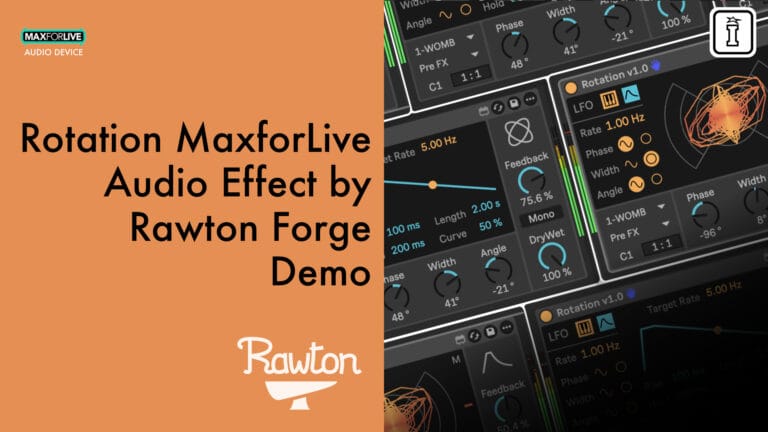
Phase sets the global rotation of the stereo signal, changing the overall angular orientation of the sound in the stereo field without altering its width. Width controls the stereo spread—from fully mono through to maximum quadrature at ±90°, producing the widest possible image while remaining perfectly mono-compatible. Angle acts as a stereo pan control, shifting the entire image left or right without affecting its width.
Feedback routes part of the rotated signal back into the processor, adding motion and resonance. Higher values move toward phasor-like behaviour and introduce rich harmonic complexity. Dry/Wet blends between the original and processed signal across the full 0–100% range.
Stereo Meter
Rotation includes a real-time stereo field display showing the Mid (vertical axis) and Side (horizontal axis) components of the incoming signal. A vertical line indicates pure mono, a diagonal line indicates hard left or right, a horizontal line indicates pure side, and a perfect circle represents a sine wave paired with its 90° quadrature signal. This visual feedback makes complex stereo transformations immediately readable and intuitive.
LFO Modulation
The built-in LFO can target Phase, Width, and Angle simultaneously, animating the stereo field with complex, synchronized movement. Each parameter supports three independent routing states:
- Off — The knob controls the value directly with no modulation
- Sine Bipolar — Applies a symmetrical sine wave above and below the knob position, defining the modulation depth
- Full Rotation — Continuously sweeps the parameter across its entire range in a cyclic ramp from −180° to +180°, offset by the knob position
At low LFO rates, movement is slow and spatial—a gentle animation of the stereo image. As rate increases toward audio range, modulation intensifies into rich, growling textures, particularly when tuned precisely to the fundamental frequency of the incoming note.
MIDI Integration
Rotation’s MIDI input allows the rotation frequency to be locked to the pitch of an incoming note. When precisely tuned, the rotation speed matches the fundamental frequency of the signal. The stereo structure appears perceptually stable—as if the rotation has stopped—while the spatial transformation remains fully active beneath the surface.
The Ratio control defines the frequency relationship between the incoming MIDI note and the internal rotation frequency, enabling precise harmonic alignment. The Rate control acts as an offset from this tuned frequency: any adjustment causes the stabilized structure to begin rotating again at the selected rate, allowing for expressive detuning and dynamic spatial behaviour in real time.
Envelope
The Envelope section dynamically modulates the Rate parameter over time in response to the audio signal. When an audio event triggers the envelope, Rate moves from its current value toward a Target Rate, then gradually returns—creating fast initial motion that decelerates over time. The envelope is triggered by an internal audio envelope detector and can only re-trigger after a brief silence, ensuring distinct, clearly separated modulation cycles.
- Rise — Attack time before reaching the Target Rate
- Hold — Duration at the Target Rate before release begins
- Length — Total decay time back to the original Rate
- Curve — Shapes the decay contour from linear to exponential
- Target Rate — The destination Rate value during envelope activation
Ideal For
- Producers needing mono-safe stereo widening for low-frequency content—basses, kicks, and sub elements
- Sound designers seeking precise, mathematically grounded control over stereo positioning
- Electronic and experimental producers exploring coherent spatial modulation as a compositional tool
- Mixing engineers wanting a transparent, phase-accurate widener that holds up under mono-fold checks
- Live performers using MIDI-synced stereo motion as an expressive performance parameter
Requirements
- Ableton Live 11 or Ableton Live 12
- Max for Live
Explore More
View All Rawton Forge Products
RAWTON FORGE BUNDLE — SAVE 20%: Pick any three or more Rawton Forge devices and the 20% bundle discount applies automatically at checkout — no code needed.
Frequently Asked Questions
A: Rotation is a Max for Live stereo processing device that uses a Hilbert transformer built from a precision all-pass network to generate two quadrature signals phase-shifted by 90° across the entire spectrum. It delivers genuine, musically controllable stereo width that remains perfectly mono-compatible—making it particularly effective on low-frequency material such as bass and kick drums.
A: Yes, Rotation is a Max for Live device and requires Max for Live to run.
A: Max for Live is a platform that integrates the visual programming environment Max with Ableton Live, allowing users to create and use custom audio, MIDI, and control devices.
A:
- Ableton Live 11 or Ableton Live 12
- Max for Live
A: You can explore more of Rawton Forge’s tools and devices here: Rawton Forge
Important Information
v2.1 xc2xb7 9 August 2026
Version 2.1 – 9 August 2026
– The stereo XY scope has been completely rebuilt. It no longer uses OpenGL for
rendering, which was the cause of crashes on specific configurations: Live
crashing on load on Push 3 standalone, and Live crashing when the audio
engine started on some Windows machines after a GPU driver update (AMD
OpenGL drivers in particular).
– Angle and Width are now full range: both can be set from -180 to +180
degrees, instead of being limited to 45 degrees for Angle and 90 degrees
for Width.
-Rotation Mini is now included in the main file
v2.0 xc2xb7 5 August 2026
Version 2.0 – 5 August 2026
– Refreshed and improved interface design.
– Fixed a bug that caused Live to crash when using the device on Push.
– Known issue: on Windows with display scaling above 100% and HiDPI mode enabled in Live, the scope may appear scaled and offset. Workaround: set Windows display scaling to 100%, or disable HiDPI mode in Live.
v1.9 xc2xb7 23 July 2026
Fixed
Version 1.8 introduced a bug that left the Angle, Phase and Width knobs unresponsive.
These controls now work as intended again.
Important: how to update
Do not drag and drop version 1.9 onto an already loaded instance of the device.
Delete the loaded instance first, then drag version 1.9 into your set.
Replacing a loaded instance by drag and drop will crash Live.
v1.8 xc2xb7 21 July 2026
Version 1.8 – 21 July 2026
– Fixed a bug where the modulation mode for Angle, Width, and Phase was not saved with the project. The selected mode is now correctly recalled when reopening the project.
v1.7 xc2xb7 10 July 2026
– Fixed sample-rate-dependent smoothing that caused incorrect behaviour at sample rates other than 44.1 kHz (most visible on automation at 96 kHz). Smoothing is now consistent across all sample rates.
Version 1.6 – 7 April 2026
– Added support for Push 3 standalone (except for MIDI routing)
– Restored the stereo XY scope, now available on all computer configurations
Version 1.5 – 24 March 2026
– Minor bug fix: the correlation meter is no longer clickable.
Version 1.4 – 24 March 2026
– Fixed a small bug in the gen~ code that prevented it from compiling for some users.
Version 1.3 – 23 March 2026
– Add a XY Pad controlling the width and angle and correction of the mathematical representation.
StereoScope
Version 1.1 – March 23, 2026
– Added XY Scope Jitter (previously part of the rotation section, but moved here as it can be GPU-intensive and may cause Ableton to crash on some systems)
Version 1.2 – 22 March 2026
– Displays an optimized mathematical representation assuming a sine wave, reducing GPU load.
V1.1.0 – Released MArch 2026
- Fixed a bug affecting the Full Rotation/Oscillation selector; it previously behaved incorrectly when automated, and is now resolved.
V1.0.0 – Initial Release – February 2026
Our Products are generally provided as Zip file downloads which in all cases will need to be extracted and saved to your hard drive prior to installation. Details on the different file type provided and what to do with them are below.
.alp Files – These are Ableton Live Packs and will either install directly into the Packs Section of the browser of Ableton Live or ask you to save them to your hard drive. For packs that install to the library, when you double click on them you will see a pop up window asking you to confirm that installation is ok as the files are described as “Legacy”. This is fine and you are ok to proceed, the packs are created using the format for an earlier version of Live and so remain compatible with the current version.
.amxd files – These are individual MaxforLive Devices and can be stored anywhere on your hard drive. We’d advise creating a folder for them and then adding that folder as a location within the Places section of Lives Browser.
**IMPORTANT FOR THE DEVICE TO WORK**
You must have the FREE Ableton Convolution Reverb Pack installed in order to access the IRs:
https://www.ableton.com/en/packs/convolution-reverb/
**IMPORTANT FOR PRESETS TO LOAD**
Below is the install instructions for each device type. They all folow the same pattern so once you do one the rest follows the same (NOTE DIFFERENCE BETWEEN INSTRUMENTS AND AUDIO EFFECTS!):
NIRVANA (Full device instrument) ______________________
Drop the entire folder called “Nirvana” into the folder called “…/ableton/user library/presets/instruments/max instrument”. This is found in the “Places” section in Live’s browser or in your finder/file browser. If you are going through finder (mac) the Ableton folder is typically in your “Music” folder. If you are going through your file browser (windows) it is typically in the “My Music” folder.
So if you followed the above instructions correctly for the presets to load, the full path to the device file (the .amxd file) shoulde be:
…/user library/presets/instuments/max instrument/Nirvana/Nirvana.amxd
NIRVANA C (Circuit mode only instrument) ______________________
Drop the entire folder called “Nirvana C” into the folder called “…/ableton/user library/presets/instruments/max instrument”. This is found in the “Places” section in Live’s browser or in your finder/file browser. If you are going through finder (mac) the Ableton folder is typically in your “Music” folder. If you are going through your file browser (windows) it is typically in the “My Music” folder.
So if you followed the above instructions correctly for the presets to load, the full path to the device file (the .amxd file) shoulde be:
…/user library/presets/instuments/max instrument/Nirvana C/Nirvana C.amxd
NIRVANA SM (Space and Material mode only instrument) ______________________
Drop the entire folder called “Nirvana SM” into the folder called “…/ableton/user library/presets/instruments/max instrument”. This is found in the “Places” section in Live’s browser or in your finder/file browser. If you are going through finder (mac) the Ableton folder is typically in your “Music” folder. If you are going through your file browser (windows) it is typically in the “My Music” folder.
So if you followed the above instructions correctly for the presets to load, the full path to the device file (the .amxd file) shoulde be:
…/user library/presets/instuments/max instrument/Nirvana SM/Nirvana SM.amxd
NIRVANA FX (Full device audio effect) ______________________
Drop the entire folder called “NirvanaFX” into the folder called “…/ableton/user library/presets/audio effects/max audio effect”. This is found in the “Places” section in Live’s browser or in your finder/file browser. If you are going through finder (mac) the Ableton folder is typically in your “Music” folder. If you are going through your file browser (windows) it is typically in the “My Music” folder.
So if you followed the above instructions correctly for the presets to load, the full path to the device file (the .amxd file) shoulde be:
…/user library/presets/audio effects/max audio effect/NirvanaFX/NirvanaFX.amxd
NIRVANA FX C (Circuit mode only audio effect) ______________________
Drop the entire folder called “NirvanaFX” into the folder called “…/ableton/user library/presets/audio effects/max audio effect”. This is found in the “Places” section in Live’s browser or in your finder/file browser. If you are going through finder (mac) the Ableton folder is typically in your “Music” folder. If you are going through your file browser (windows) it is typically in the “My Music” folder.
So if you followed the above instructions correctly for the presets to load, the full path to the device file (the .amxd file) shoulde be:
…/user library/presets/audio effects/max audio effect/NirvanaFX C/NirvanaFX C.amxd
NIRVANA FX SM (Space and Material mode only audio effect) ______________________
Drop the entire folder called “NirvanaFX” into the folder called “…/ableton/user library/presets/audio effects/max audio effect”. This is found in the “Places” section in Live’s browser or in your finder/file browser. If you are going through finder (mac) the Ableton folder is typically in your “Music” folder. If you are going through your file browser (windows) it is typically in the “My Music” folder.
So if you followed the above instructions correctly for the presets to load, the full path to the device file (the .amxd file) shoulde be:
…/user library/presets/audio effects/max audio effect/NirvanaFX SM/NirvanaFX SM.amxd
END-USER LICENSE AGREEMENT FOR ISOTONIK STUDIOS SOFTWARE PRODUCTS.
PLEASE READ THE TERMS AND CONDITIONS OF THIS LICENSE AGREEMENT CAREFULLY BEFORE CONTINUING WITH THIS PROGRAM INSTALL.
This End-User License Agreement (referred to as “EULA”) is a legal agreement between an individual or a single entity (referred to as “LICENSEE”) and Isotonik Studios for the Isotonik Studios software product(s) which may include associated software components, media, printed materials, and “online” or electronic documentation (referred to as “SOFTWARE PRODUCT”). By installing, copying, or otherwise using the SOFTWARE PRODUCT, the LICENSEE agrees to be bound by the terms of this EULA.
This EULA represents the entire agreement concerning the program between the LICENSEE and Isotonik Studios and it supersedes any prior proposal, representation, or understanding between the parties. If the LICENSEE does not agree to the terms of this EULA, the LICENSEE should not install or use the SOFTWARE PRODUCT.
The SOFTWARE PRODUCT is protected by copyright laws and international copyright treaties, as well as other intellectual property laws and treaties. The SOFTWARE PRODUCT is licensed, not sold.
- GRANT OF LICENSE.
The SOFTWARE PRODUCT is licensed as follows:
(a) Installation and Use. Providing that the LICENSEE has paid any applicable license fees, Isotonik Studios grants the LICENSEE the right to install and use copies of the SOFTWARE PRODUCT on up to two computers in the LICENSEE’s possession that are running a validly licensed copy of the operating system for which the SOFTWARE PRODUCT was designed [e.g., Windows 10, macOS]. The computer(s) must be owned by the LICENSEE.
(b) Backup Copies. The LICENSEE may also make copies of the SOFTWARE PRODUCT as may be necessary for backup and archival purposes.
- DESCRIPTION OF OTHER RIGHTS AND LIMITATIONS.
(a) Maintenance of Copyright Notices. The LICENSEE must not remove or alter any copyright notices on any and all copies of the SOFTWARE PRODUCT.
(b) Distribution. The LICENSEE may not distribute registered copies of the SOFTWARE PRODUCT to third parties.
(c) Prohibition on Reverse Engineering, Decompilation, and Disassembly. The LICENSEE may not reverse engineer, decompile, or disassemble the SOFTWARE PRODUCT, except and only to the extent that such activity is expressly permitted by applicable law notwithstanding this limitation.
(d) Rental. The LICENSEE may not rent, lease, or lend the SOFTWARE PRODUCT.
(e) License transfer The LICENSEE may not transfer their license to the SOFTWARE PRODUCT to any third party. Any attempt to do so will be considered a violation of this EULA.
(f) Support Services. Isotonik Studios may provide the LICENSEE with support services related to the SOFTWARE PRODUCT for a period of 12 months following the date of purchase. Any supplemental software code provided to the LICENSEE as part of the Support Services shall be considered part of the SOFTWARE PRODUCT and subject to the terms and conditions of this EULA.
(g) Compliance with Applicable Laws. The LICENSEE must comply with all applicable laws regarding use of the SOFTWARE PRODUCT.
- TERMINATION Without prejudice to any other rights, Isotonik Studios may terminate this EULA if the LICENSEE fails to comply with the terms and conditions of this EULA. In such event, the LICENSEE must destroy all copies of the SOFTWARE PRODUCT in the LICENSEE’s possession.
- COPYRIGHT All title, including but not limited to copyrights, in and to the SOFTWARE PRODUCT and any copies thereof are owned by Isotonik Studios or its suppliers. All title and intellectual property rights in and to the content which may be accessed through use of the SOFTWARE PRODUCT is the property of the respective content owner and may be protected by applicable copyright or other intellectual property laws and treaties. This EULA grants the LICENSEE no rights to use such content. All rights not expressly granted are reserved by Isotonik Studios.
- NO WARRANTIES Isotonik Studios expressly disclaims any warranty for the SOFTWARE PRODUCT. The SOFTWARE PRODUCT is provided ‘As Is’ without any express or implied warranty of any kind, including but not limited to any warranties of merchantability, noninfringement, or fitness of a particular purpose. Isotonik Studios does not warrant or assume responsibility for the accuracy or completeness of any information, text, graphics, links or other items contained within the SOFTWARE PRODUCT. Isotonik Studios makes no warranties respecting any harm that may be caused by the transmission of a computer virus, worm, time bomb, logic bomb, or other such computer program. Isotonik Studios further expressly disclaims any warranty or representation to the LICENSEE or to any third party.
- LIMITATION OF LIABILITY In no event shall Isotonik Studios be liable for any damages (including, without limitation, lost profits, business interruption, or lost information) arising out of the LICENSEE’s use of or inability to use the SOFTWARE PRODUCT, even if Isotonik Studios has been advised of the possibility of such damages. In no event will Isotonik Studios be liable for loss of data or for indirect, special, incidental, consequential (including lost profit), or other damages based in contract, tort or otherwise. Isotonik Studios shall have no liability with respect to the content of the SOFTWARE PRODUCT or any part thereof, including but not limited to errors or omissions contained therein, libel, infringements of rights of publicity, privacy, trademark rights, business interruption, personal injury, loss of privacy, moral rights or the disclosure of confidential information.
More from Rawton Forge
 ★ Popular
 ★ Popular
Frequently Bought Together