

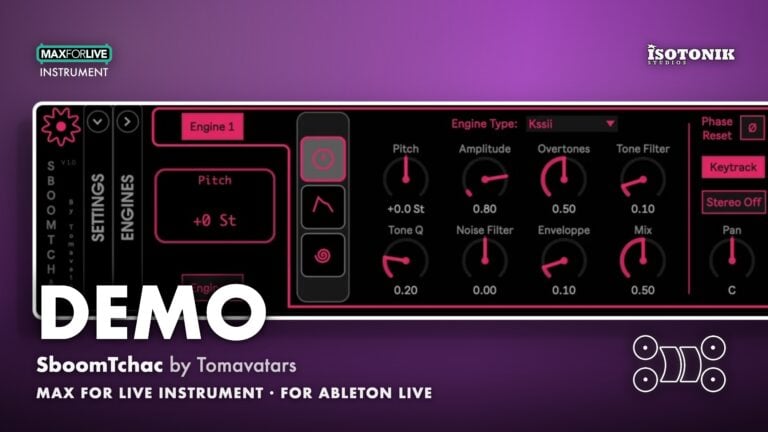
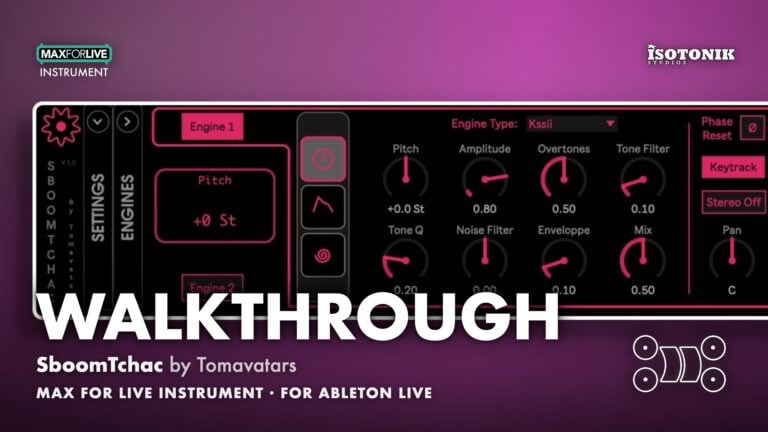
SboomTchac by Tomavatars
TWO ENGINES, ONE HIT, INFINITE COLLISIONS SboomTchac is a Max for Live monophonic drum synthesiser with two parallel engines that do not simply layer, they collide. Choose any two of 14 sound sources, blend them through 12 unique mixing algorithms, and shape everything with hand-drawn MSEG envelopes and step-based modulation. • 14 Engine Types: Kicks, snares, metallic resonators, claps, hats, FM bells, pulsar buzz, noise, chord synths, samplers and more. • 12 Mix Algorithms: Ring modulation, terrain, vocoding, wave folding, granulation, phase distortion and mathematical transforms, all mapped to a single Mix slider. • MSEG Modulation: Hand-drawn multi-segment envelope generators control amplitude, pitch and the Mix, with five universal MSEGs routable to any parameter. • Snap Preset System: Eight snapshot slots per instrument, with a morph wheel for smooth real-time transitions between presets at audio rate. • Steppy Modulator: A variable-length vertical step sequencer assignable to any parameter for adding rhythmic movement to your sound. With three play modes: incremental, Midi, velocity. • Randomiser: Per-section randomisation knobs covering Engines, FX, Mix, Routing and Matrix, with the option to lock what you love and roll on the rest. • Full Push Control: Complete Ableton Push compatibility for hands-on performance.
Tomavatars
Tomavatars makes MaxforLive devices that approach rhythm and sampling from unconventional angles.
View all products by TomavatarsOverview
The playful drum lab
SboomTchac puts two independent synthesis engines under every hit you trigger. Pick any two sources from 14 engine types, give each its own pair of FX slots, then watch what happens when 12 different mixing algorithms decide how they meet in the middle. Ring modulation, vocoding, folding, granulation, and more all live between the two ends of a single Mix slider, because the strange stuff always lives in between.
Everything in SboomTchac moves. Hand-drawn MSEG envelopes shape amplitude, pitch and the Mix itself. Five universal modulators route to any knob. The Steppy step sequencer adds rhythmic motion on top of all of that. Eight preset snapshots sit ready on the Snap wheel, morphing smoothly between them at audio rate, so one pad can drift from a dry click to a ringing metal crash without touching an automation lane. One knob away from a new idea.
- Two parallel synthesis engines per hit, each independently configurable, that collide rather than simply layer
- 14 engine types including kicks, snares, metallic resonators, claps, hats, FM bells, pulsar buzz, noise, chord synths and samplers
- 12 mixing algorithms including ring modulation, vocoding, folding, granulation and phase distortion, all controlled by a single Mix slider with an MSEG envelope
- Hand-drawn MSEG (multi-segment envelope generator) control over amplitude and pitch per engine, plus a dedicated Mix MSEG
- Five universal MSEGs routable to any parameter via a modulation matrix
- Two multi-effects slots per engine with stereo FX processing
- Steppy modulator: a variable-length vertical step sequencer assignable to any SboomTchac parameter for step-based movement
- Snap preset system with eight snapshot slots, a morphing wheel for smooth real-time and audio-rate transitions, and copy/paste tools
- Per-section randomiser with independent knobs for Engines, FX, Mix, Routing and Matrix, with per-section locking
- Full Ableton Push compatibility
- Max for Live Instrument .amxd device
- Ableton Live .als demo set (requires Ableton Live 12.4.6)
- User manual (PDF)
Free for subscribers
Join the list and get 8 free downloads, including 6 Max for Live devices
Subscribers get Isotonik FX, Live Scratcher, Modular Series LE Part ONE, Modular Series LE Part TWO and more for free. You also hear about new releases and deals first.
Just your email. No spam, unsubscribe anytime.

Reviews
No reviews yet. Be the first to review this product.
Foldable sections
Here's the device when you drop it in your session
Drop SboomTchac onto a MIDI track and it appears as a single device with six collapsible sections. Each section, from Engines and Mix to Steppy and Snap, can be folded away to keep your session tidy.
MSEGS
The engine and mix MSEGS
Each engine has two MSEG (multi-segment envelope generator) slots, one for amplitude and one for pitch. The Mix section also uses an MSEG to control how the two engines blend over time, following the chosen mixing algorithm.
Steppy
Steppy sequencers for each parameters
Each parameter in SboomTchac has its own vertical step sequencer. Click a parameter, draw values across the steps, and add rhythmic or evolving movement to any aspect of the sound.
Snap
Snap, the preset wheel
Snap holds eight preset slots in a rotating wheel, letting you recall or switch between full instrument snapshots on the fly. It also includes copy and paste buttons, two control knobs, and the ability to morph smoothly between presets.
Routing
The routing matrix with 5 MSEGS
The Routing section houses five universal MSEGs that act as modulation sources. Use the Route Target button to assign any MSEG to a parameter, then drag that parameter to apply modulation across the instrument. Control every modulations from a matrix view.
Randomizer and settings
You can randomize every sections. Handy settings in there too.
Each section of SboomTchac has its own randomizer knob based on presets. Locks let you protect what you want to keep while rolling the dice on the rest. There's a bunch of useful settings as well like unit color etc.
Mix section
The mix section Mseg and position crossfader
The Mix section uses an MSEG envelope to control how the two engines are blended, with the top of the graph representing full Engine 1, the bottom full Engine 2, and the middle a full blend of both. A position crossfader works alongside the MSEG to modulate the mix between engines, based on bounds operations: clip, wrap and fold.
Important Information
INSTALLATION
Our Products are generally provided as Zip file downloads which in all cases will need to be extracted and saved to your hard drive prior to installation. Details on the different file type provided and what to do with them are below.
.alp Files: These are Ableton Live Packs and will either install directly into the Packs Section of the browser of Ableton Live or ask you to save them to your hard drive. For packs that install to the library, when you double click on them you will see a pop up window asking you to confirm that installation is ok as the files are described as “Legacy”. This is fine and you are ok to proceed, the packs are created using the format for an earlier version of Live and so remain compatible with the current version.
.amxd files: These are individual MaxforLive Devices and can be stored anywhere on your hard drive. We’d advise creating a folder for them and then adding that folder as a location within the Places section of Lives Browser.
LICENSE
END-USER LICENSE AGREEMENT FOR ISOTONIK STUDIOS SOFTWARE PRODUCTS.
PLEASE READ THE TERMS AND CONDITIONS OF THIS LICENSE AGREEMENT CAREFULLY BEFORE CONTINUING WITH THIS PROGRAM INSTALL.
This End-User License Agreement (referred to as “EULA”) is a legal agreement between an individual or a single entity (referred to as “LICENSEE”) and Isotonik Studios for the Isotonik Studios software product(s) which may include associated software components, media, printed materials, and “online” or electronic documentation (referred to as “SOFTWARE PRODUCT”). By installing, copying, or otherwise using the SOFTWARE PRODUCT, the LICENSEE agrees to be bound by the terms of this EULA.
This EULA represents the entire agreement concerning the program between the LICENSEE and Isotonik Studios and it supersedes any prior proposal, representation, or understanding between the parties. If the LICENSEE does not agree to the terms of this EULA, the LICENSEE should not install or use the SOFTWARE PRODUCT.
The SOFTWARE PRODUCT is protected by copyright laws and international copyright treaties, as well as other intellectual property laws and treaties. The SOFTWARE PRODUCT is licensed, not sold.
- GRANT OF LICENSE.
The SOFTWARE PRODUCT is licensed as follows:
(a) Installation and Use. Providing that the LICENSEE has paid any applicable license fees, Isotonik Studios grants the LICENSEE the right to install and use copies of the SOFTWARE PRODUCT on up to two computers in the LICENSEE’s possession that are running a validly licensed copy of the operating system for which the SOFTWARE PRODUCT was designed [e.g., Windows 10, macOS]. The computer(s) must be owned by the LICENSEE.
(b) Backup Copies. The LICENSEE may also make copies of the SOFTWARE PRODUCT as may be necessary for backup and archival purposes.
- DESCRIPTION OF OTHER RIGHTS AND LIMITATIONS.
(a) Maintenance of Copyright Notices. The LICENSEE must not remove or alter any copyright notices on any and all copies of the SOFTWARE PRODUCT.
(b) Distribution. The LICENSEE may not distribute registered copies of the SOFTWARE PRODUCT to third parties.
(c) Prohibition on Reverse Engineering, Decompilation, and Disassembly. The LICENSEE may not reverse engineer, decompile, or disassemble the SOFTWARE PRODUCT, except and only to the extent that such activity is expressly permitted by applicable law notwithstanding this limitation.
(d) Rental. The LICENSEE may not rent, lease, or lend the SOFTWARE PRODUCT.
(e) License transfer The LICENSEE may not transfer their license to the SOFTWARE PRODUCT to any third party. Any attempt to do so will be considered a violation of this EULA.
(f) Support Services. Isotonik Studios may provide the LICENSEE with support services related to the SOFTWARE PRODUCT for a period of 12 months following the date of purchase. Any supplemental software code provided to the LICENSEE as part of the Support Services shall be considered part of the SOFTWARE PRODUCT and subject to the terms and conditions of this EULA.
(g) Compliance with Applicable Laws. The LICENSEE must comply with all applicable laws regarding use of the SOFTWARE PRODUCT.
- TERMINATION Without prejudice to any other rights, Isotonik Studios may terminate this EULA if the LICENSEE fails to comply with the terms and conditions of this EULA. In such event, the LICENSEE must destroy all copies of the SOFTWARE PRODUCT in the LICENSEE’s possession.
- COPYRIGHT All title, including but not limited to copyrights, in and to the SOFTWARE PRODUCT and any copies thereof are owned by Isotonik Studios or its suppliers. All title and intellectual property rights in and to the content which may be accessed through use of the SOFTWARE PRODUCT is the property of the respective content owner and may be protected by applicable copyright or other intellectual property laws and treaties. This EULA grants the LICENSEE no rights to use such content. All rights not expressly granted are reserved by Isotonik Studios.
- NO WARRANTIES Isotonik Studios expressly disclaims any warranty for the SOFTWARE PRODUCT. The SOFTWARE PRODUCT is provided ‘As Is’ without any express or implied warranty of any kind, including but not limited to any warranties of merchantability, noninfringement, or fitness of a particular purpose. Isotonik Studios does not warrant or assume responsibility for the accuracy or completeness of any information, text, graphics, links or other items contained within the SOFTWARE PRODUCT. Isotonik Studios makes no warranties respecting any harm that may be caused by the transmission of a computer virus, worm, time bomb, logic bomb, or other such computer program. Isotonik Studios further expressly disclaims any warranty or representation to the LICENSEE or to any third party.
- LIMITATION OF LIABILITY In no event shall Isotonik Studios be liable for any damages (including, without limitation, lost profits, business interruption, or lost information) arising out of the LICENSEE’s use of or inability to use the SOFTWARE PRODUCT, even if Isotonik Studios has been advised of the possibility of such damages. In no event will Isotonik Studios be liable for loss of data or for indirect, special, incidental, consequential (including lost profit), or other damages based in contract, tort or otherwise. Isotonik Studios shall have no liability with respect to the content of the SOFTWARE PRODUCT or any part thereof, including but not limited to errors or omissions contained therein, libel, infringements of rights of publicity, privacy, trademark rights, business interruption, personal injury, loss of privacy, moral rights or the disclosure of confidential information.
Frequently Asked Questions
What is SboomTchac?
SboomTchac is a Max for Live monophonic drum synthesiser with two parallel engines. Every hit you trigger comes from two sound sources at once, merged through one of 12 unique mixing algorithms. It is designed for deep sound design and happy sonic accidents.
What Ableton Live version do I need?
SboomTchac requires Ableton Live 12 with Max for Live. It was developed using Max version 9. It runs on both Mac and Windows.
What are the 14 engine types?
The 14 engine types include kicks, snares, metallic resonators, claps, hats, FM bells, pulsar buzz, noise, chord synths and samplers. Tomavatars has noted that more engine types will be added in future updates.
What do the mixing algorithms actually do?
The 12 mixing algorithms determine how the two engines are combined. Options include ring modulation, vocoding, folding, granulation, terrain, phase distortion and other mathematical processes. The Mix slider moves between full Engine 1, full mix, and full Engine 2, with each algorithm creating different sonic results in between.
How does the Snap preset system work?
The Snap section stores eight snapshots of your instrument settings. You can jump to them instantly or morph smoothly between any two using the rotation/morph wheel and live automation controls, including at audio rate. Copy and paste tools let you move settings between slots, and nearly all SboomTchac parameters are captured per preset.
Does SboomTchac work with Ableton Push?
Yes. SboomTchac includes full Push compatibility, allowing hands-on control of the instrument directly from your Push controller. Not tested on standalone but some features like dropping samples on samplers and full MSEG edition are not included.
In Depth
Two engines. One hit. Endless results.
SboomTchac is a Max for Live drum synthesiser where every sound comes from two engines running in parallel. It offers a wide range of base engines, each able to stand on its own, and it’s when they cross paths that SboomTchac becomes truly singular. Drop it on a MIDI track and drive it with a clip or a hardware sequencer: a single instance delivers a broad variety of possible variations, all within the same context.
Fourteen sound sources, pick any two
Each engine draws from a library of 14 algorithms covering kicks, snares, metallic resonators, claps, hats, FM bells, pulsar buzz, noise, chord synths, and samplers. Engine 1 and Engine 2 each get their own type selector and eight parameters, plus independent pitch and amplitude envelopes. Phase Reset keeps your transients snappy on retrigger. Keytrack lets the MIDI note set the pitch. A Pan/Width knob handles stereo placement per engine, because spatial detail matters even at the drum-synthesis level.
Two FX slots per engine
Each engine carries two multi-effects slots with 7 different effects. That is four FX processors shaping the sound before the engines ever meet the Mix section. Each slot has four parameters to sculpt, which means there is always another texture one adjustment away. Play with delay, distortion, comb filter etc.
Twelve ways to merge two engines into one sound
The Mix section is where SboomTchac earns its character. A dedicated MSEG envelope rides a slider between the two engines, but the slider is not a simple crossfade. Twelve mixing algorithms include ring modulation, vocoding, wavefolding, granulation, and phase distortion, among others. The top of the slider is pure Engine 1, the bottom is pure Engine 2, and the strange stuff lives in between. A Master section adds three saturation and mastering algorithms on the combined output, with volume controls to keep levels in check.
Hand-drawn envelopes for amplitude, pitch, and mix
SboomTchac uses MSEG, multi-segment envelope generators, throughout. You draw the shape you want rather than adjusting fixed attack-decay-sustain-release stages. Add up to eight points per MSEG with a left click, drag to reposition, and adjust curve handles between segments. Five play modes cover one-shot, free loop, retriggered loop, sample-and-hold, and random value picking. An amount knob scales how much the envelope affects its target, and a randomise button can regenerate the shape with a controllable amount of variation. MSEG presets give you a starting point when you want one.
Eight snapshots, one morphing wheel
Every instance of SboomTchac holds eight preset slots, called Snaps. Snaps are saved automatically, allowing you to switch to other presets without a second thought. The Snap section gives you a selection wheel and a morph control so you can drift between stored states smoothly, at audio rate if you choose. One kick can travel from a dry click to a ringing metal crash without a single automation lane. Copy and paste between slots, initialise a slot to defaults, and use the two control knobs to navigate quickly. Because nearly every parameter is stored in a Snap, morphing is a genuine transformation of the whole instrument.
Steppy: step-based modulation on any parameter
Steppy is a variable-length vertical step sequencer that can target any SboomTchac parameter. Click a parameter, draw values across the steps, and the instrument gains a rhythmic modulation layer that would otherwise need a separate LFO or automation clip to achieve. Three playback modes (incremental, MIDI, velocity) per modulated parameter allow you to immerse yourself in an infinite variety of movements of your choice.
Five universal modulators and a routing matrix
The Routing section provides five MSEG modulation sources that can be assigned to any knob via a route-target button and a drag gesture. Select your modulation source, click Route Target, drag to the destination, and the connection is made. The modulation matrix adds step-based motion on top of that, so moving, breathing textures build themselves rather than requiring manual automation.
Randomiser with section-level control
A dedicated randomiser covers Engine, FX, Mix, Routing, and Matrix sections individually. Each section has its own depth knob, from a gentle nudge to a complete rebuild. Lock the parts you want to keep, roll the dice on the rest. One knob away from a new idea is a reasonable way to describe the workflow.
Push compatibility and practical details
SboomTchac is fully mapped for Ableton Push. All six sections, Engines, Mix, Routing, Steppy, Snap, and Settings, are collapsible, so the interface scales to whatever you need on screen at a given moment. Installation is a single amxd file copied to your User Library. It requires Ableton Live 12 with Max for Live on Mac or Windows.
More from Tomavatars


