OktoPush Three by Isotonik Studios & PerforModule
PERFORMANCE TEMPLATE FOR THE ABLETON PUSH 3 & PUSH 3 STANDALONE
OktoPush THREE is a performance-optimized MaxforLive template for Ableton Push 3 Standalone, created by Isotonik Studios and PerforModule. Evolving from a public development series with Create Digital Music, it delivers a modular control system for artists seeking advanced live workflows.
This premium template includes multiple controller modes tailored to Push 3’s matrix layout—enabling real-time effect manipulation, macro variation switching, return track routing, and more. Switch between control layouts using intuitive button combinations and unlock Push’s full performance potential.
What’s Included:
- Mode One: 16 macro controls, variation switching, and chain selection
- Mode Two: Dynamic return track routing and FX control with Return XL
- Matrix-integrated macro variation and effect selection
- Designed for Push 3 Standalone, Push 3 Controller, and Push 2
- Created in collaboration with performance FX designer PerforModule
OktoPush THREE is the go-to template for performers looking to transform Push 3 into a live control powerhouse.
USER GUIDE: OktoPush THREE - MaxforLive Performance Template for the Ableton Push 3 Standalone V1.9
OktoPush Three by Isotonik Studios & PerforModule
PERFORMANCE TEMPLATE FOR THE ABLETON PUSH 3 & PUSH 3 STANDALONE
OktoPush THREE is a performance-optimized MaxforLive template for Ableton Push 3 Standalone, created by Isotonik Studios and PerforModule. Evolving from a public development series with Create Digital Music, it delivers a modular control system for artists seeking advanced live workflows.
This premium template includes multiple controller modes tailored to Push 3’s matrix layout—enabling real-time effect manipulation, macro variation switching, return track routing, and more. Switch between control layouts using intuitive button combinations and unlock Push’s full performance potential.
What’s Included:
- Mode One: 16 macro controls, variation switching, and chain selection
- Mode Two: Dynamic return track routing and FX control with Return XL
- Matrix-integrated macro variation and effect selection
- Designed for Push 3 Standalone, Push 3 Controller, and Push 2
- Created in collaboration with performance FX designer PerforModule
OktoPush THREE is the go-to template for performers looking to transform Push 3 into a live control powerhouse.
USER GUIDE: OktoPush THREE - MaxforLive Performance Template for the Ableton Push 3 Standalone V1.9
Additional information
| Controllers | Ableton Push THREE Controller, Ableton Push THREE Standalone, Ableton Push TWO |
|---|---|
| MaxforLive | Control Devices |
| Ableton Live Compatibility | Ableton Live 12 Standard with MaxforLive, Ableton Live 12 Suite |
| Min. Requirements | Ableton Live 12.2 with MaxforLive Installed |
| OS | Mac, Windows |
PRICE: £30.00
OktoPush Three by Isotonik Studios & PerforModule
OktoPush THREE is the flagship MaxforLive template from Isotonik Studios and PerforModule, built for live performers using Push 3 Standalone. Engineered to map the Push matrix into expressive, mode-based layouts, it gives you precise control over macros, send levels, effect chains, and return tracks—all without touching your laptop.
This is not a static template. It’s a performance environment that adapts with each update, integrating user feedback and expanding as Push’s API evolves.
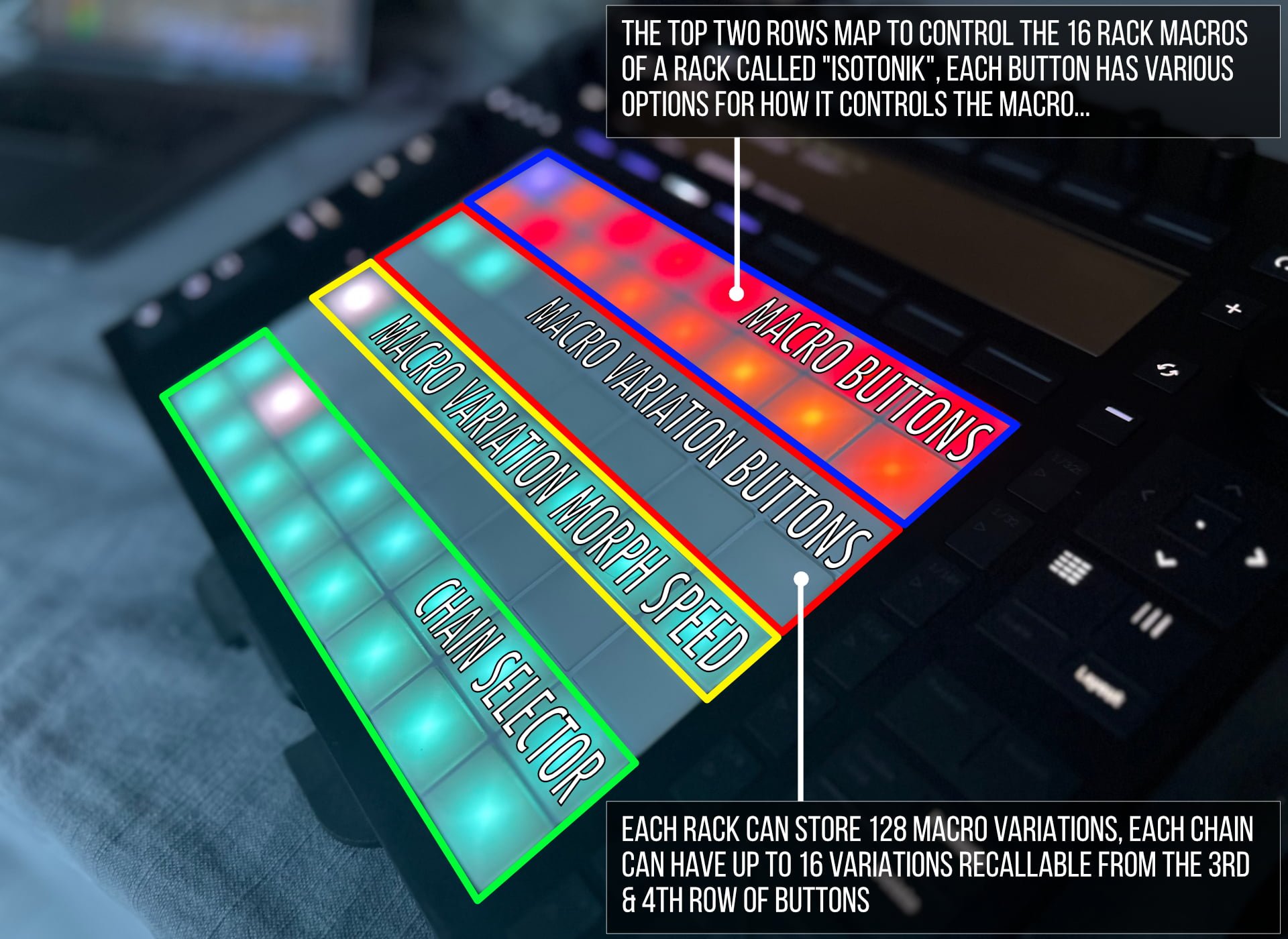
Mode One – Isotonik Rack Control
- Gain full hands-on access to your rack effects:
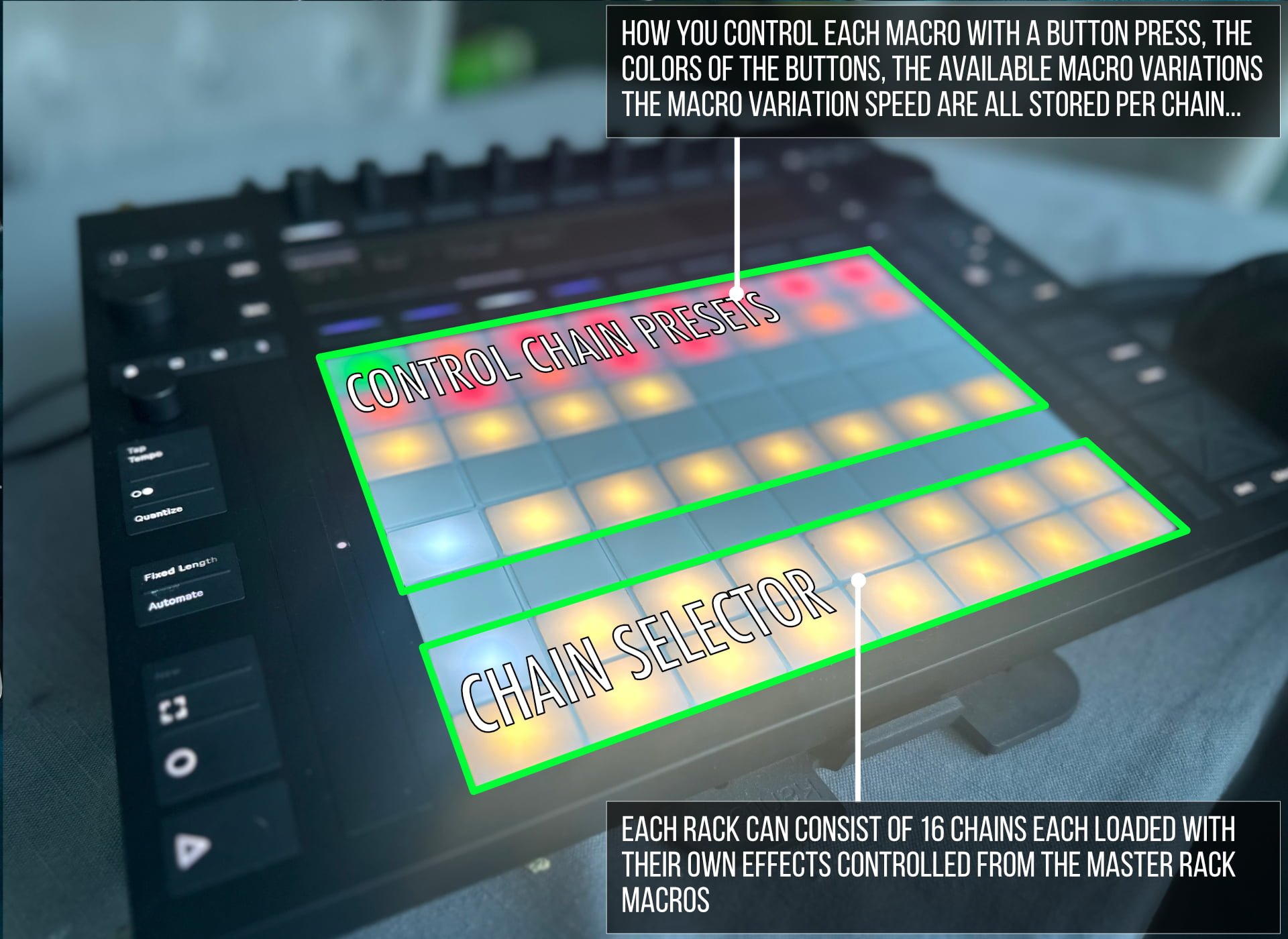
- Top two rows: control 16 macros
- Mid rows: morph between macro variations
- Fifth row: control variation speed (velocity or jog wheel)
- Bottom two rows: select effect chains for instant switching
- Save custom variation presets and map them across chains.
Mode Two – Send and Return Routing
- Take control of depth and direction:
- Columns 1–8: adjust send levels per return track
- Momentary or latch modes for live flexibility
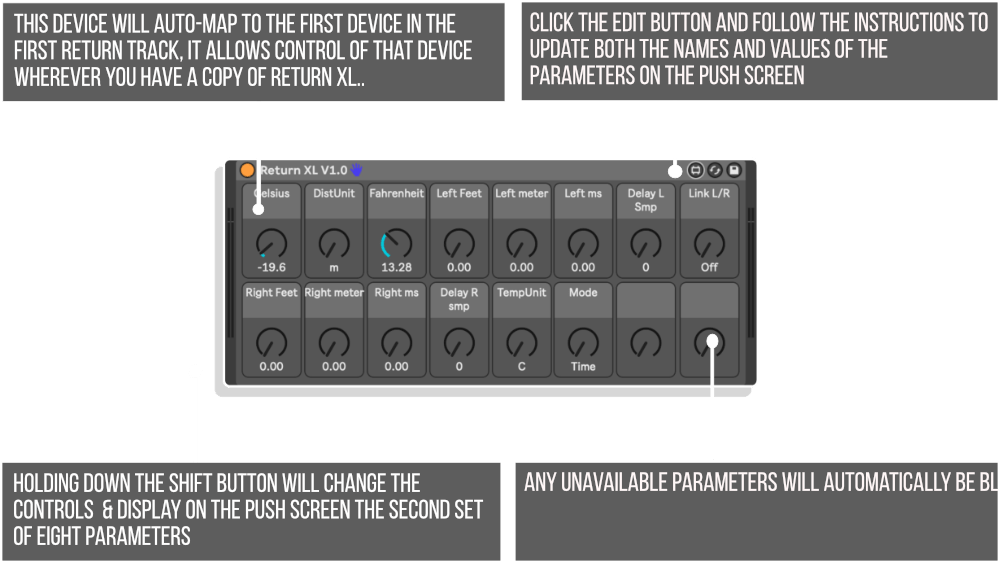
- Navigate and activate return track FX with Return XL
- Select macro variations on return devices from the matrix
- Designed for intuitive FX punching and real-time return control.
Modes 3–8 – Coming as Separate Devices
Future development will deliver additional MODE devices—each designed for specific control tasks. These will be made available to all customers who purchased before August 1st, 2025 as free separate downloads.
Frequently Asked Questions
A: It’s a MaxforLive performance template for Push 3 Standalone that provides multiple modular control modes for live FX, macro variations, and return routing.
A: Yes, it requires MaxforLive.
A: MaxforLive is a platform that integrates the visual programming environment Max with Ableton Live, allowing users to create and use custom audio, MIDI, and control devices.
A: You can explore more of Isotonik Studios’ tools and devices here: ISOTONIK STUDIOS
Important Information
V2.1.4 – Released May 2025
- Now a self installing Live Pack
- GENERAL CHANGES
- Moved OktoPush Device to Main Track to allow for easy duplication of provided MIDI and Audio Track Templates. When creating your own set simply duplicate the number of tracks you need and then save the set. Close Live and reopen and all new tracks will be scanned and the OktoPush device will be configured ready for populating with clips.
- Removed many debug objects and cleared many errors appearing in max window to help further with response times.
MODE ONE
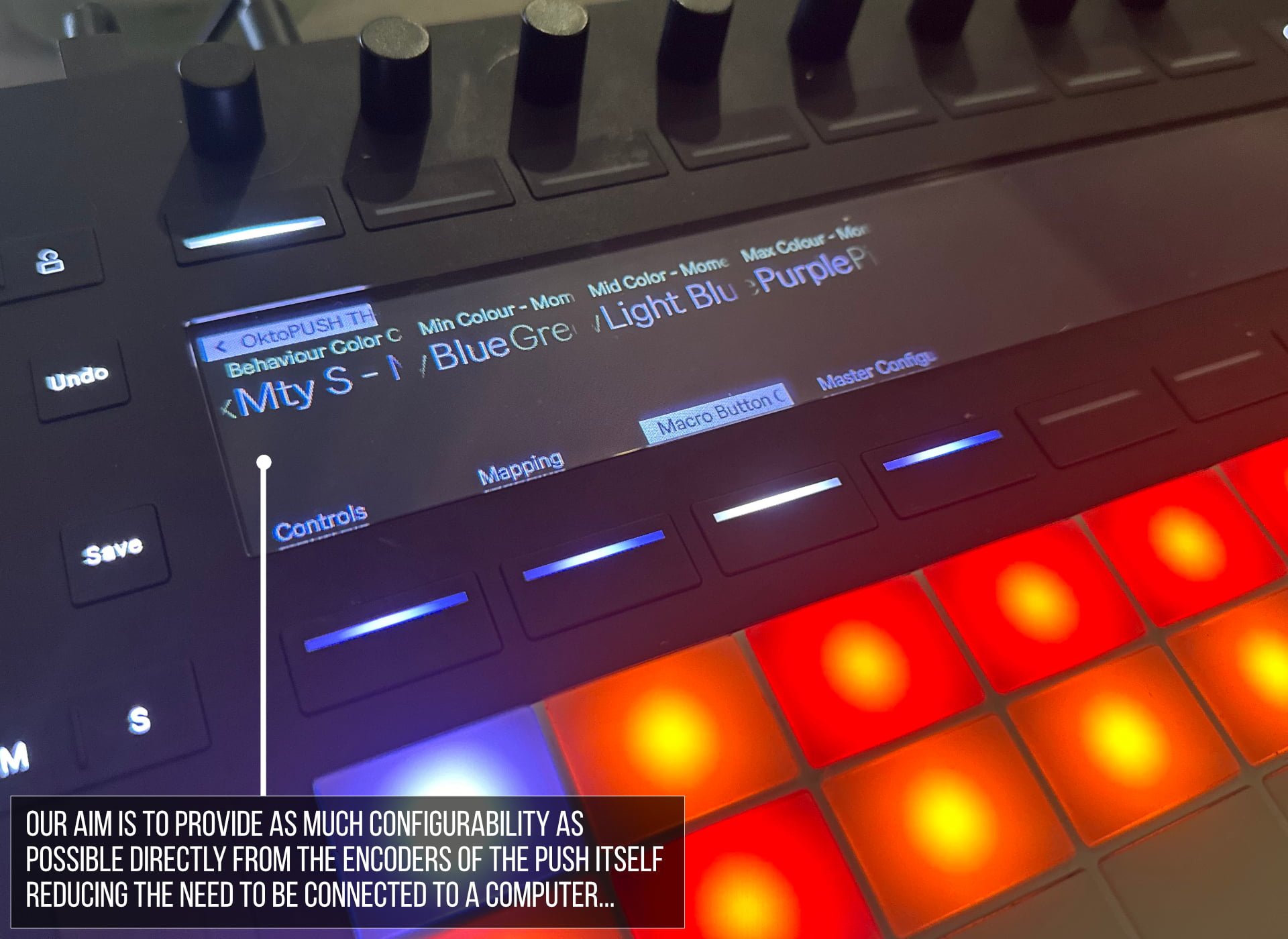
- Updated Variants so that each chain has eight variants named for display on push screen, 1st variant per chain is always a dry setting allowing for full expressive control of the right hand macros, many of the chains now have variations programmed for them for use in a performance setting.
- Named the macros in the Isotonik Rack to correspond with the numbered chain, this allows display of what each chain name is for easy recall when using standalone
- Renamed Macro Variation Speed of None to Velocity, when selected the speed of morphing between the saved variations is driven by the velocity of the press when selecting a new variation, you can of course switch between variations instantly with the latest Push 3 Firmware and the Jog Wheel.
- Changed the ninth chain (first button in second row of buttons for chain selector) to be an Instant Gratification Rack. The left hand side of the macro buttons have Beat Repeats of Different sizes with the left hand giving instantly triggerable effects per button. The last button controls the variations of the Instant Effects
MODE ONE: BUG FIXES
- When pressing down a Macro Button whilst recalling a variation will no longer allow the variation to continue to change the macro value, this avoids jittery behaviour of macros.
- Fixed lighting for Variation Speed buttons so that they consistently show the correct value
- Fixed an issue that meant variation recalling got out of sync for more than 32 variations
- When changing tracks the correct preset to match the chain selector is recalled
- When initially opening a set the device will automatically select the first dry chain, this ensures the correct lighting recall for the buttons.
MODE TWO
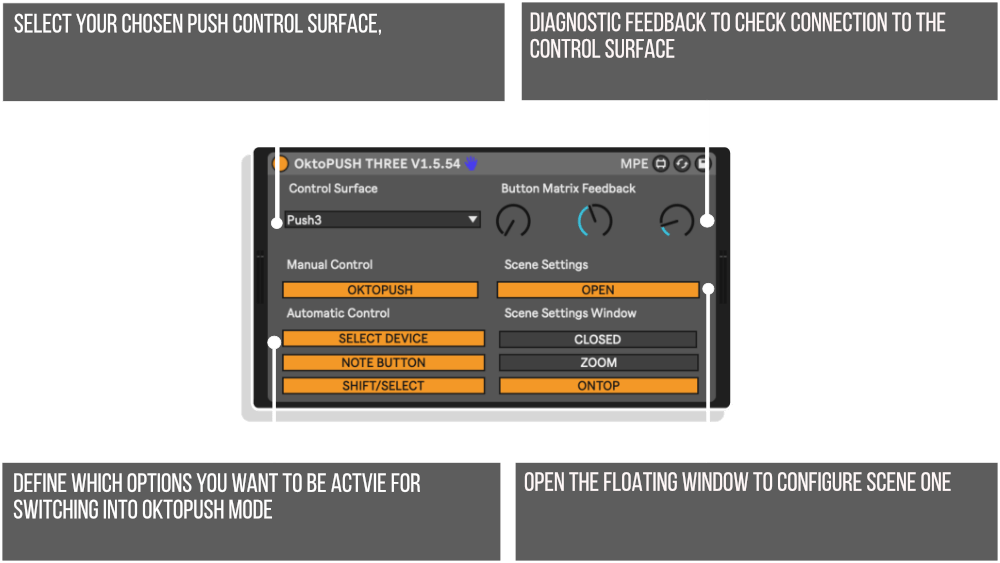
With racks supplied by PerforModule once more this second MODE is accessible with SHIFT + the 1/32 note repeat button and as per the first scene will take over the Button Matrix for control.
The feature this time is to give control of the send values on the currently selected track, further details can be found further in this manual.
V1.9 – Released February 4th 2024
This release focuses mainly on controlling Macro Variations, allowing them to be configured and stored directly from the Push and morphing between them in a performance context.
SCENE ONE
- When changing between chains any currently in operation changes of values will stop, this allows for the setting of long release times without the changing value continuing when switching to a new effect
- Made the reset value box smaller so as not to obstruct the dial display
- Added Sigabort’s code for scanning Isotonik Racks at startup
- This supports grabbing all of the rack ids, macro ID’s, so they don’t need to be constantly grabbed whilst performing increasing the performance response considerably
- Gave the ability for the user to define the number of tracks, macro variations and chains to scan, this will be useful for people when performing with larger sets.
- Names of nested parameters are recalled and displayed in the floating window
- All macro Variation values are stored and recalled instantly allowing for seamless morphing between values
- Holding down a Macro Button and recalling a Macro Variation will exclude that button from the recall
- Added variations for the Beat Repeat Effect
- When storing new variation the device will automatically scan for the new values allowing them to be used instantly.
- Focusing on an Isotonik Rack, which will be greyed out by default as it is controlled by live.remotes to operate at an audio rate, and pressing the SELECT Button will release control allowing for the encoders to be used to dial in a new Macro Variation, you can then store your desired values by holding shift and a plan k Macro Variation Button. Press the SELECT Button once more to regain control of the Isotonik Rack
- Completed the line up of PerforModule Racks (plus a few bonus ones to give added choice.
PLEASE NOTE: The images in the manual will need updating, I wanted to get this out to you all before my vacation, I’m away from the Internet for the next few weeks so look forwards to being able to finish Scene ONE and film the promotional video when I return!
V1.8 – Released January 18th 2024
V1.7 – Released Wednesday 3rd January 2024 – Happy New Year
V1.6 – Released Wednesday 27th December – Alpha Testers Only
V1.5 – Released Friday 22nd December 2023
V1.4.0 – Released Black Friday 24th November 2023
V1.3.0 – Released 18th November 2023
Initial Release – V1.2.1 – 15th October 2023
Our Products are generally provided as Zip file downloads which in all cases will need to be extracted and saved to your hard drive prior to installation. Details on the different file type provided and what to do with them are below.
.alp Files – These are Ableton Live Packs and will either install directly into the Packs Section of the browser of Ableton Live or ask you to save them to your hard drive. For packs that install to the library, when you double click on them you will see a pop up window asking you to confirm that installation is ok as the files are described as “Legacy”. This is fine and you are ok to proceed, the packs are created using the format for an earlier version of Live and so remain compatible with the current version.
.amxd files – These are individual MaxforLive Devices and can be stored anywhere on your hard drive. We’d advise creating a folder for them and then adding that folder as a location within the Places section of Lives Browser.
END-USER LICENSE AGREEMENT FOR ISOTONIK STUDIOS SOFTWARE PRODUCTS.
PLEASE READ THE TERMS AND CONDITIONS OF THIS LICENSE AGREEMENT CAREFULLY BEFORE CONTINUING WITH THIS PROGRAM INSTALL.
This End-User License Agreement (referred to as “EULA”) is a legal agreement between an individual or a single entity (referred to as “LICENSEE”) and Isotonik Studios for the Isotonik Studios software product(s) which may include associated software components, media, printed materials, and “online” or electronic documentation (referred to as “SOFTWARE PRODUCT”). By installing, copying, or otherwise using the SOFTWARE PRODUCT, the LICENSEE agrees to be bound by the terms of this EULA.
This EULA represents the entire agreement concerning the program between the LICENSEE and Isotonik Studios and it supersedes any prior proposal, representation, or understanding between the parties. If the LICENSEE does not agree to the terms of this EULA, the LICENSEE should not install or use the SOFTWARE PRODUCT.
The SOFTWARE PRODUCT is protected by copyright laws and international copyright treaties, as well as other intellectual property laws and treaties. The SOFTWARE PRODUCT is licensed, not sold.
- GRANT OF LICENSE.
The SOFTWARE PRODUCT is licensed as follows:
(a) Installation and Use. Providing that the LICENSEE has paid any applicable license fees, Isotonik Studios grants the LICENSEE the right to install and use copies of the SOFTWARE PRODUCT on up to two computers in the LICENSEE’s possession that are running a validly licensed copy of the operating system for which the SOFTWARE PRODUCT was designed [e.g., Windows 10, macOS]. The computer(s) must be owned by the LICENSEE.
(b) Backup Copies. The LICENSEE may also make copies of the SOFTWARE PRODUCT as may be necessary for backup and archival purposes.
- DESCRIPTION OF OTHER RIGHTS AND LIMITATIONS.
(a) Maintenance of Copyright Notices. The LICENSEE must not remove or alter any copyright notices on any and all copies of the SOFTWARE PRODUCT.
(b) Distribution. The LICENSEE may not distribute registered copies of the SOFTWARE PRODUCT to third parties.
(c) Prohibition on Reverse Engineering, Decompilation, and Disassembly. The LICENSEE may not reverse engineer, decompile, or disassemble the SOFTWARE PRODUCT, except and only to the extent that such activity is expressly permitted by applicable law notwithstanding this limitation.
(d) Rental. The LICENSEE may not rent, lease, or lend the SOFTWARE PRODUCT.
(e) License transfer The LICENSEE may not transfer their license to the SOFTWARE PRODUCT to any third party. Any attempt to do so will be considered a violation of this EULA.
(f) Support Services. Isotonik Studios may provide the LICENSEE with support services related to the SOFTWARE PRODUCT for a period of 12 months following the date of purchase. Any supplemental software code provided to the LICENSEE as part of the Support Services shall be considered part of the SOFTWARE PRODUCT and subject to the terms and conditions of this EULA.
(g) Compliance with Applicable Laws. The LICENSEE must comply with all applicable laws regarding use of the SOFTWARE PRODUCT.
- TERMINATION Without prejudice to any other rights, Isotonik Studios may terminate this EULA if the LICENSEE fails to comply with the terms and conditions of this EULA. In such event, the LICENSEE must destroy all copies of the SOFTWARE PRODUCT in the LICENSEE’s possession.
- COPYRIGHT All title, including but not limited to copyrights, in and to the SOFTWARE PRODUCT and any copies thereof are owned by Isotonik Studios or its suppliers. All title and intellectual property rights in and to the content which may be accessed through use of the SOFTWARE PRODUCT is the property of the respective content owner and may be protected by applicable copyright or other intellectual property laws and treaties. This EULA grants the LICENSEE no rights to use such content. All rights not expressly granted are reserved by Isotonik Studios.
- NO WARRANTIES Isotonik Studios expressly disclaims any warranty for the SOFTWARE PRODUCT. The SOFTWARE PRODUCT is provided ‘As Is’ without any express or implied warranty of any kind, including but not limited to any warranties of merchantability, noninfringement, or fitness of a particular purpose. Isotonik Studios does not warrant or assume responsibility for the accuracy or completeness of any information, text, graphics, links or other items contained within the SOFTWARE PRODUCT. Isotonik Studios makes no warranties respecting any harm that may be caused by the transmission of a computer virus, worm, time bomb, logic bomb, or other such computer program. Isotonik Studios further expressly disclaims any warranty or representation to the LICENSEE or to any third party.
- LIMITATION OF LIABILITY In no event shall Isotonik Studios be liable for any damages (including, without limitation, lost profits, business interruption, or lost information) arising out of the LICENSEE’s use of or inability to use the SOFTWARE PRODUCT, even if Isotonik Studios has been advised of the possibility of such damages. In no event will Isotonik Studios be liable for loss of data or for indirect, special, incidental, consequential (including lost profit), or other damages based in contract, tort or otherwise. Isotonik Studios shall have no liability with respect to the content of the SOFTWARE PRODUCT or any part thereof, including but not limited to errors or omissions contained therein, libel, infringements of rights of publicity, privacy, trademark rights, business interruption, personal injury, loss of privacy, moral rights or the disclosure of confidential information.