BPM Converter Pro by KILLIHU
STOP CALCULATING. START CREATING.
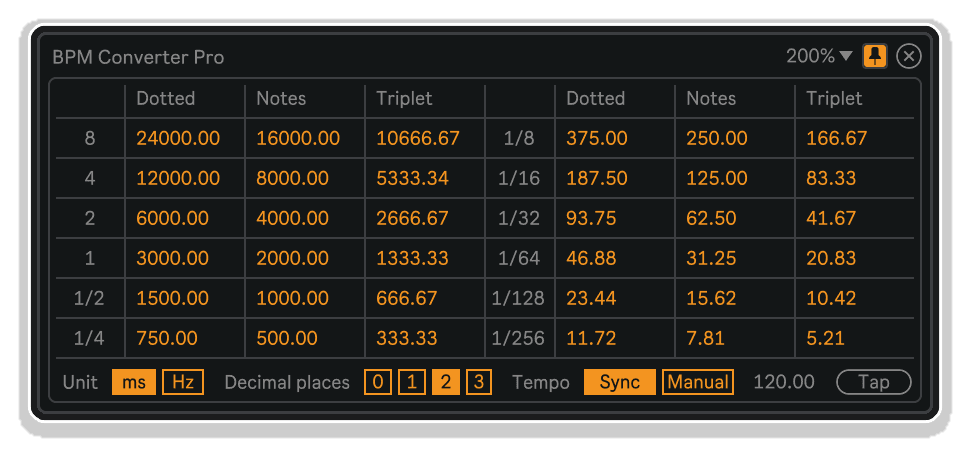
BPM Converter Pro by killihu delivers instant tempo conversions in a floating reference window—no calculators, no web browsers, no workflow interruption. Convert BPM to milliseconds or hertz automatically as your project tempo changes, or use manual mode with tap tempo for calculating values independent of your session.
Inside you’ll find:
- Real-time BPM-to-milliseconds and BPM-to-hertz conversions
- Comprehensive note value coverage (1/1 through 1/64, including dotted and triplet subdivisions)
- Automatic project tempo sync or manual tempo entry with tap tempo
- Adjustable decimal precision (0-3 places) for exact or rounded values
- Floating, resizable, dockable window that stays visible across all applications
- Mappable show/hide button for keyboard shortcut access
Perfect for syncing non-tempo-synced delay plugins, programming LFO rates in hertz, calculating hardware timing specifications, or referencing rhythmic modulation values. The window displays every musically relevant subdivision with precision-adjustable values, updating automatically or accepting manual input as needed.
Compatible with Ableton Live 10, 11, and 12 with Max for Live. Windows and Mac.
USER GUIDE: BPM Converter Pro 1.1
BPM Converter Pro by KILLIHU
STOP CALCULATING. START CREATING.
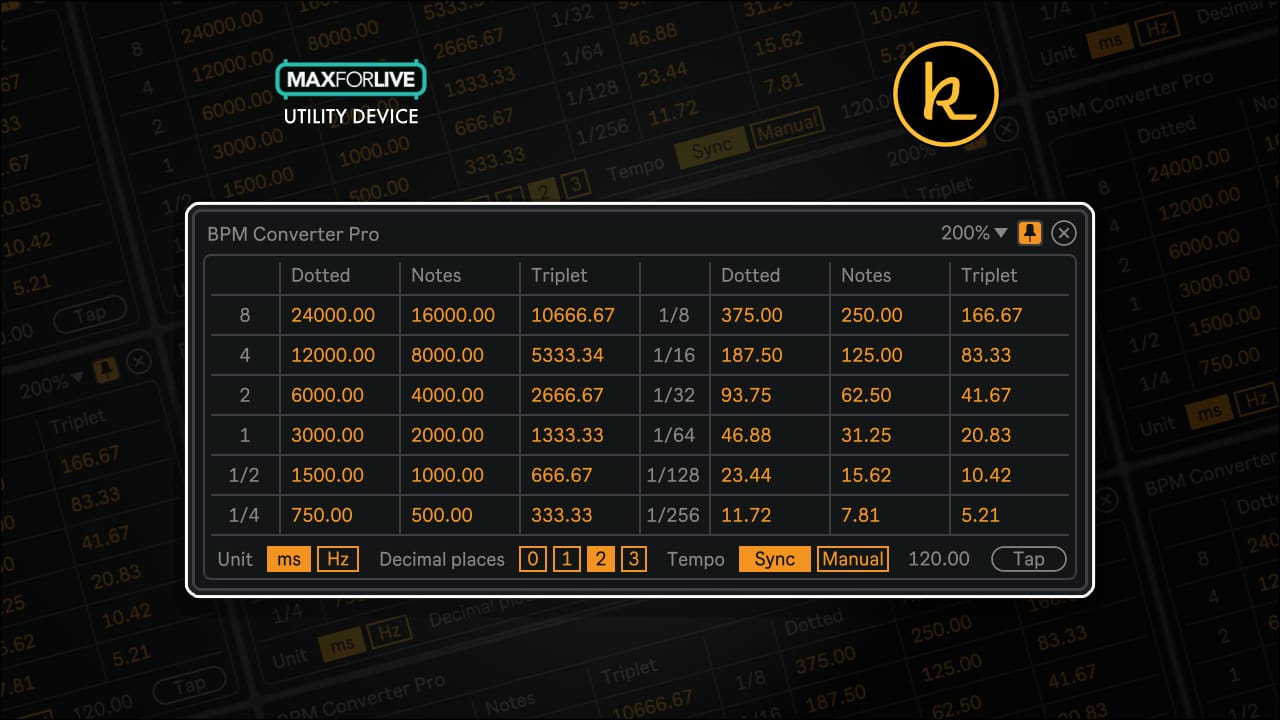
BPM Converter Pro by killihu delivers instant tempo conversions in a floating reference window—no calculators, no web browsers, no workflow interruption. Convert BPM to milliseconds or hertz automatically as your project tempo changes, or use manual mode with tap tempo for calculating values independent of your session.
Inside you’ll find:
- Real-time BPM-to-milliseconds and BPM-to-hertz conversions
- Comprehensive note value coverage (1/1 through 1/64, including dotted and triplet subdivisions)
- Automatic project tempo sync or manual tempo entry with tap tempo
- Adjustable decimal precision (0-3 places) for exact or rounded values
- Floating, resizable, dockable window that stays visible across all applications
- Mappable show/hide button for keyboard shortcut access
Perfect for syncing non-tempo-synced delay plugins, programming LFO rates in hertz, calculating hardware timing specifications, or referencing rhythmic modulation values. The window displays every musically relevant subdivision with precision-adjustable values, updating automatically or accepting manual input as needed.
Compatible with Ableton Live 10, 11, and 12 with Max for Live. Windows and Mac.
USER GUIDE: BPM Converter Pro 1.1
Additional information
| MaxforLive | Control Devices |
|---|---|
| Ableton Live Compatibility | Ableton Live 10 Standard with MaxforLive, Ableton Live 10 Suite, Ableton Live 11 Standard with MaxforLive, Ableton Live 11 Suite, Ableton Live 12 Standard with MaxforLive, Ableton Live 12 Suite |
| Min. Requirements | Ableton Live 10 Standard with MaxforLive Installed or Ableton Live 10 Suite |
| OS | Mac, Windows |
PRICE: £6.00
Product reviews
No reviews yet. Be the first to review this product.
BPM Converter Pro by KILLIHU
Overview & Inspiration
How many times have you needed to calculate delay times in milliseconds or modulation rates in hertz, only to open a calculator or web browser mid-session?
BPM Converter Pro by killihu eliminates tempo conversion friction with instant, always-visible BPM-to-milliseconds and BPM-to-hertz calculations displayed in a floating window. Whether syncing delay plugins that require millisecond input, programming LFO rates in hertz, or dialing in precise rhythmic modulation values, this MaxforLive utility device provides real-time tempo conversions that automatically update with your project tempo or manual input.
The transparent floating window displays comprehensive note value conversions (1/1 through 1/64, including dotted and triplet subdivisions) for both milliseconds and hertz, with adjustable decimal precision from 0 to 3 places. Set tempo to Sync mode for automatic project tempo tracking, or switch to Manual mode with tap tempo capability for calculating values independent of your current project. The mappable show/hide button allows keyboard shortcut access, while the dockable window ensures conversions remain visible across all your applications.
Features & Highlights
Automatic Project Tempo Sync – In Sync mode, BPM Converter Pro automatically tracks your Ableton Live project tempo, updating all conversion values in real-time as you adjust tempo. No manual recalculation required when experimenting with different tempos during production.
Comprehensive Note Value Coverage – View conversions for every rhythmically relevant note subdivision: whole notes (1/1), half notes (1/2), quarter notes (1/4), eighth notes (1/8), sixteenth notes (1/16), thirty-second notes (1/32), sixty-fourth notes (1/64), plus dotted and triplet variations for all values.
Dual Unit Display (Milliseconds and Hertz) – Toggle between millisecond (ms) and hertz (Hz) displays depending on your current task. Milliseconds are ideal for delay time calculations, echo feedback timing, and envelope attack/release durations. Hertz values simplify LFO rate programming, tremolo speed settings, and filter modulation frequencies.
Adjustable Decimal Precision – Select 0, 1, 2, or 3 decimal places for displayed values. Higher precision supports exact technical specifications, while rounded values speed visual scanning during creative workflows. All values automatically round based on your selected precision level.
Manual Tempo Mode with Tap Tempo – Switch to Manual mode to set custom tempo values independent of your project tempo. Perfect for calculating delay times for external hardware, programming standalone effects processors, or referencing tempo-based values for tracks running at different speeds. The included tap tempo button functions identically to Live’s native tap control—click once per beat to establish manual tempo.
Floating Window with Docking – The resizable floating window can be positioned anywhere on screen and docked on top of all other applications for permanent visibility. Move it by dragging the top bar, resize it using the window controls, and dock it to ensure tempo conversions remain visible while working in other applications or plugin windows.
Mappable Show/Hide Control – The show/hide button on the device rack accepts keyboard mapping, allowing instant window display or dismissal via hotkey. Ideal for keeping your workspace uncluttered until tempo conversions are needed, then revealing the window instantly without mouse navigation.
Minimal CPU Impact – BPM Converter Pro calculates conversions without audio processing overhead. The device functions purely as a visual reference tool, consuming negligible CPU resources regardless of project complexity or track count.
How to Use
Load BPM Converter Pro onto any MIDI track in your project (the Master track works well for organizational clarity). Click the Show button on the device rack to display the floating window. The window will appear with tempo conversions calculated from your current project tempo.
Use the Unit selector to toggle between milliseconds (ms) and hertz (Hz) display modes. Select your preferred decimal precision using the Decimal Places control—choose 0 for rounded whole numbers, or 1-3 for increasing precision levels.
The Tempo control defaults to Sync mode, automatically tracking your project tempo. All conversion values update in real-time as you adjust your project’s master tempo. For manual tempo entry, switch the Tempo control to Manual and either adjust the tempo value directly or use the Tap button to tap out a tempo (click once per beat, just like Live’s native tap tempo control).
Position the floating window anywhere on screen by clicking and dragging the top bar. Resize the window using the scaling control at the top right. Click the dock icon (pin/thumbtack) to keep the window visible on top of all other applications—perfect for referencing tempo values while working in plugin windows or external applications.
Map a keyboard shortcut to the Show button on the device rack for instant window display and dismissal. This keeps your workspace clean until tempo conversions are needed, then provides immediate access via hotkey.
Common Applications: Setting delay plugin times when manufacturers don’t provide tempo sync (input millisecond values directly from the conversion chart). Programming LFO rates in synthesizers using hertz values for precise modulation speeds. Calculating tape delay feedback times for outboard hardware. Establishing tremolo speeds in guitar amp plugins. Syncing modular synthesizer clock dividers using millisecond timing. Setting audio interface monitoring latency compensation. Programming drum machine pattern lengths in external sequencers.
Ideal For
- Electronic music producers synchronizing non-tempo-synced delay plugins and effects
- Sound designers calculating precise LFO modulation rates in hertz
- Hybrid producers integrating external hardware requiring millisecond timing specifications
- Anyone tired of opening calculators or tempo conversion websites mid-session
- Live performers needing quick tempo reference during hardware programming
- Engineers programming effects processors with millisecond-based parameters
- Modular synthesizer users translating BPM to clock division timing
- Producers working with vintage gear lacking modern tempo sync capabilities
What’s Included
- BPM Converter Pro MaxforLive device (.amxd)
- 7-page PDF reference manual
- Floating window with comprehensive note value conversions
- Milliseconds and hertz display modes
- Manual tempo mode with tap tempo functionality
- 0-3 decimal place precision selector
- Dockable, resizable window interface
- Mappable show/hide keyboard control
Requirements
- Ableton Live 10, 11, or 12 with Max for Live
- Compatible with both Windows and Mac
Explore More
Advanced Toolbar Buttons 2 | Auto Clip Props | Clipboard Device | Device Navigator | View All killihu Products
Frequently Asked Questions
A: BPM Converter Pro is a MaxforLive utility device that provides real-time BPM-to-milliseconds and BPM-to-hertz conversions in a floating reference window, displaying comprehensive note value subdivisions with adjustable decimal precision and automatic project tempo tracking or manual tempo input.
A: Yes, BPM Converter Pro is a MaxforLive device.
A: MaxforLive integrates Max—a powerful visual programming environment—directly into Ableton Live, enabling the creation and use of custom instruments, effects, and control devices that extend Live’s capabilities.
A: Milliseconds (ms) are ideal for calculating delay times, echo feedback timing, and envelope durations—parameters that most time-based effects use. Hertz (Hz) values simplify LFO rate programming, tremolo speeds, and filter modulation frequencies. Both modes display the same tempo subdivisions but in different units depending on your current task.
A: Switch the Tempo control from Sync to Manual to enter custom tempo values independent of your project tempo. You can either adjust the tempo value directly using the numerical control or use the Tap button (click once per beat) to establish tempo by tapping, just like Live’s native tap tempo control. This is perfect for calculating values for external hardware or standalone effects processors.
A: Yes, the floating window includes a dock control (pin/thumbtack icon) that keeps it visible on top of all other applications. This is particularly useful when working in plugin windows, external editors, or hardware control software where you need tempo reference values without switching back to Live.
A: You can explore more of killihu’s tools and devices here: killihu
Important Information
v1.1 New features and improvements:
– Modified GUI to adapt to the new rack design in Live version 12.2, does not change the operation of the device.
Initial Release – November 2024
Our Products are generally provided as Zip file downloads which in all cases will need to be extracted and saved to your hard drive prior to installation. Details on the different file type provided and what to do with them are below.
.alp Files – These are Ableton Live Packs and will either install directly into the Packs Section of the browser of Ableton Live or ask you to save them to your hard drive. For packs that install to the library, when you double click on them you will see a pop up window asking you to confirm that installation is ok as the files are described as “Legacy”. This is fine and you are ok to proceed, the packs are created using the format for an earlier version of Live and so remain compatible with the current version.
.amxd files – These are individual MaxforLive Devices and can be stored anywhere on your hard drive. We’d advise creating a folder for them and then adding that folder as a location within the Places section of Lives Browser.
END-USER LICENSE AGREEMENT FOR ISOTONIK STUDIOS SOFTWARE PRODUCTS.
PLEASE READ THE TERMS AND CONDITIONS OF THIS LICENSE AGREEMENT CAREFULLY BEFORE CONTINUING WITH THIS PROGRAM INSTALL.
This End-User License Agreement (referred to as “EULA”) is a legal agreement between an individual or a single entity (referred to as “LICENSEE”) and Isotonik Studios for the Isotonik Studios software product(s) which may include associated software components, media, printed materials, and “online” or electronic documentation (referred to as “SOFTWARE PRODUCT”). By installing, copying, or otherwise using the SOFTWARE PRODUCT, the LICENSEE agrees to be bound by the terms of this EULA.
This EULA represents the entire agreement concerning the program between the LICENSEE and Isotonik Studios and it supersedes any prior proposal, representation, or understanding between the parties. If the LICENSEE does not agree to the terms of this EULA, the LICENSEE should not install or use the SOFTWARE PRODUCT.
The SOFTWARE PRODUCT is protected by copyright laws and international copyright treaties, as well as other intellectual property laws and treaties. The SOFTWARE PRODUCT is licensed, not sold.
- GRANT OF LICENSE.
The SOFTWARE PRODUCT is licensed as follows:
(a) Installation and Use. Providing that the LICENSEE has paid any applicable license fees, Isotonik Studios grants the LICENSEE the right to install and use copies of the SOFTWARE PRODUCT on up to two computers in the LICENSEE’s possession that are running a validly licensed copy of the operating system for which the SOFTWARE PRODUCT was designed [e.g., Windows 10, macOS]. The computer(s) must be owned by the LICENSEE.
(b) Backup Copies. The LICENSEE may also make copies of the SOFTWARE PRODUCT as may be necessary for backup and archival purposes.
- DESCRIPTION OF OTHER RIGHTS AND LIMITATIONS.
(a) Maintenance of Copyright Notices. The LICENSEE must not remove or alter any copyright notices on any and all copies of the SOFTWARE PRODUCT.
(b) Distribution. The LICENSEE may not distribute registered copies of the SOFTWARE PRODUCT to third parties.
(c) Prohibition on Reverse Engineering, Decompilation, and Disassembly. The LICENSEE may not reverse engineer, decompile, or disassemble the SOFTWARE PRODUCT, except and only to the extent that such activity is expressly permitted by applicable law notwithstanding this limitation.
(d) Rental. The LICENSEE may not rent, lease, or lend the SOFTWARE PRODUCT.
(e) License transfer The LICENSEE may not transfer their license to the SOFTWARE PRODUCT to any third party. Any attempt to do so will be considered a violation of this EULA.
(f) Support Services. Isotonik Studios may provide the LICENSEE with support services related to the SOFTWARE PRODUCT for a period of 12 months following the date of purchase. Any supplemental software code provided to the LICENSEE as part of the Support Services shall be considered part of the SOFTWARE PRODUCT and subject to the terms and conditions of this EULA.
(g) Compliance with Applicable Laws. The LICENSEE must comply with all applicable laws regarding use of the SOFTWARE PRODUCT.
- TERMINATION Without prejudice to any other rights, Isotonik Studios may terminate this EULA if the LICENSEE fails to comply with the terms and conditions of this EULA. In such event, the LICENSEE must destroy all copies of the SOFTWARE PRODUCT in the LICENSEE’s possession.
- COPYRIGHT All title, including but not limited to copyrights, in and to the SOFTWARE PRODUCT and any copies thereof are owned by Isotonik Studios or its suppliers. All title and intellectual property rights in and to the content which may be accessed through use of the SOFTWARE PRODUCT is the property of the respective content owner and may be protected by applicable copyright or other intellectual property laws and treaties. This EULA grants the LICENSEE no rights to use such content. All rights not expressly granted are reserved by Isotonik Studios.
- NO WARRANTIES Isotonik Studios expressly disclaims any warranty for the SOFTWARE PRODUCT. The SOFTWARE PRODUCT is provided ‘As Is’ without any express or implied warranty of any kind, including but not limited to any warranties of merchantability, noninfringement, or fitness of a particular purpose. Isotonik Studios does not warrant or assume responsibility for the accuracy or completeness of any information, text, graphics, links or other items contained within the SOFTWARE PRODUCT. Isotonik Studios makes no warranties respecting any harm that may be caused by the transmission of a computer virus, worm, time bomb, logic bomb, or other such computer program. Isotonik Studios further expressly disclaims any warranty or representation to the LICENSEE or to any third party.
- LIMITATION OF LIABILITY In no event shall Isotonik Studios be liable for any damages (including, without limitation, lost profits, business interruption, or lost information) arising out of the LICENSEE’s use of or inability to use the SOFTWARE PRODUCT, even if Isotonik Studios has been advised of the possibility of such damages. In no event will Isotonik Studios be liable for loss of data or for indirect, special, incidental, consequential (including lost profit), or other damages based in contract, tort or otherwise. Isotonik Studios shall have no liability with respect to the content of the SOFTWARE PRODUCT or any part thereof, including but not limited to errors or omissions contained therein, libel, infringements of rights of publicity, privacy, trademark rights, business interruption, personal injury, loss of privacy, moral rights or the disclosure of confidential information.