Hidden MIDI Keyboard by KILLIHU
WHY SHOULD YOUR MIDI KEYBOARD STEAL WINDOW FOCUS?
Hidden MIDI Keyboard by killihu transforms your computer keyboard into a MIDI controller that works invisibly in the background - no window switching, no focus stealing, no workflow interruption. Activate with a hotkey (F12 by default, fully customizable), play notes while working in your DAW, and deactivate just as quickly when you need your keyboard back. Pop-up messages provide visual feedback without disrupting your workspace.
Inside you'll find:
- Focus-independent operation (works without requiring window focus)
- Customizable activation hotkey (F12 by default)
- Pop-up feedback messages for activation, layout changes, and parameter adjustments
- 10 predefined layouts optimized for common workflows
- Custom layout editor for unlimited personalized configurations
- Selective key capture (only configured keys send MIDI, others work normally)
- Instant layout switching (system tray menu, Layout Cycle key, or numeric keypad 1-9)
- Ableton Extended layout (expands Live's computer keyboard with more keys)
- Drum Pads layout (32 pads optimized for Drum Rack)
- MIDI CC fader simulation (create virtual faders from key ranges)
- inScale integration layout (designed for inScale MaxforLive device)
- Adjustable velocity control and velocity-sensitive layouts
- Octave transpose with configurable transpose amount, pitch bend, and sustain pedal simulation
- Relative and Fixed note modes in custom editor (for transposable or fixed note triggers)
- Layout import/export for sharing and backup
- Cross-language keyboard support (works on any keyboard layout)
- System tray operation
Essential for laptop producers without MIDI controllers, studio producers wanting quick MIDI input, Ableton Live users extending computer keyboard functionality, sound designers creating custom control layouts, and anyone frustrated with traditional virtual keyboards that force constant window switching.
Windows app for Windows 10/11 - Requires virtual MIDI port (loopMIDI recommended)
Hidden MIDI Keyboard by KILLIHU
WHY SHOULD YOUR MIDI KEYBOARD STEAL WINDOW FOCUS?
Hidden MIDI Keyboard by killihu transforms your computer keyboard into a MIDI controller that works invisibly in the background - no window switching, no focus stealing, no workflow interruption. Activate with a hotkey (F12 by default, fully customizable), play notes while working in your DAW, and deactivate just as quickly when you need your keyboard back. Pop-up messages provide visual feedback without disrupting your workspace.
Inside you'll find:
- Focus-independent operation (works without requiring window focus)
- Customizable activation hotkey (F12 by default)
- Pop-up feedback messages for activation, layout changes, and parameter adjustments
- 10 predefined layouts optimized for common workflows
- Custom layout editor for unlimited personalized configurations
- Selective key capture (only configured keys send MIDI, others work normally)
- Instant layout switching (system tray menu, Layout Cycle key, or numeric keypad 1-9)
- Ableton Extended layout (expands Live's computer keyboard with more keys)
- Drum Pads layout (32 pads optimized for Drum Rack)
- MIDI CC fader simulation (create virtual faders from key ranges)
- inScale integration layout (designed for inScale MaxforLive device)
- Adjustable velocity control and velocity-sensitive layouts
- Octave transpose with configurable transpose amount, pitch bend, and sustain pedal simulation
- Relative and Fixed note modes in custom editor (for transposable or fixed note triggers)
- Layout import/export for sharing and backup
- Cross-language keyboard support (works on any keyboard layout)
- System tray operation
Essential for laptop producers without MIDI controllers, studio producers wanting quick MIDI input, Ableton Live users extending computer keyboard functionality, sound designers creating custom control layouts, and anyone frustrated with traditional virtual keyboards that force constant window switching.
Windows app for Windows 10/11 - Requires virtual MIDI port (loopMIDI recommended)
Additional information
| OS | Windows |
|---|
PRICE: £6.00
Product reviews
No reviews yet. Be the first to review this product.
Hidden MIDI Keyboard by KILLIHU
Virtual MIDI keyboard apps force an impossible choice: maintain focus on the keyboard window and lose access to your DAW controls, or work in your DAW and lose MIDI input capability. Switching between windows destroys creative flow, breaks concentration, and turns music-making into a frustrating exercise in window management. Hidden MIDI Keyboard eliminates this friction entirely by working invisibly in the background, always ready to send MIDI data regardless of which application has focus.
This isn’t just another on-screen piano that clutters your workspace. Hidden MIDI Keyboard operates completely in the background with no visible window, activated and deactivated instantly with a custom hotkey you define. Only the keys you configure for MIDI transmission are captured – every other key remains fully functional for your DAW shortcuts, typing, and normal computer use. Switch between a standard MIDI keyboard layout, percussion pads, CC faders, or completely custom configurations on the fly without opening menus or losing your workflow position.
With multiple predefined layouts optimized for common workflows, a powerful custom layout editor for creating personalized configurations, intelligent key blocking to prevent accidental DAW triggers, adjustable velocity curves, transpose and octave shifting, sustain and pitch bend controls, and the ability to switch layouts mid-session without interrupting your work, Hidden MIDI Keyboard delivers professional MIDI input capability without the window-switching frustration that plagues traditional virtual keyboard apps.
Features & Highlights
Focus-Independent Operation: The defining feature that separates Hidden MIDI Keyboard from every other virtual keyboard app. Work in your DAW, notation software, or any other application while sending MIDI data from your computer keyboard. No window switching, no focus stealing, no workflow interruption. Press your activation hotkey (F12 by default, fully customizable) and start playing – the app works invisibly in the background. Discrete pop-up messages appear under your mouse pointer confirming activation, deactivation, layout changes, and octave or velocity adjustments, giving you visual feedback without disrupting your workspace.
Selective Key Capture: Only keys configured for MIDI transmission are captured by Hidden MIDI Keyboard. Every other key continues to function normally for DAW shortcuts, typing, menu navigation, and system commands. This means you can have MIDI note keys active while still using keyboard shortcuts for transport control, editing, mixing, and all other DAW functions.
Multiple Predefined Layouts: Ten carefully designed layouts cover common production scenarios. Ableton Extended expands Live’s computer keyboard MIDI functionality while preserving shortcut keys. Drum Pads provides 32 pads optimized for Drum Rack workflow. Dual Keyboard offers two and a half octaves with sustain, pitch bend, and velocity controls. inScale layout integrates perfectly with the inScale MaxforLive device for scale-locked performance. Logic Plus replicates and extends Logic’s virtual keyboard with modulation wheel and additional keys.
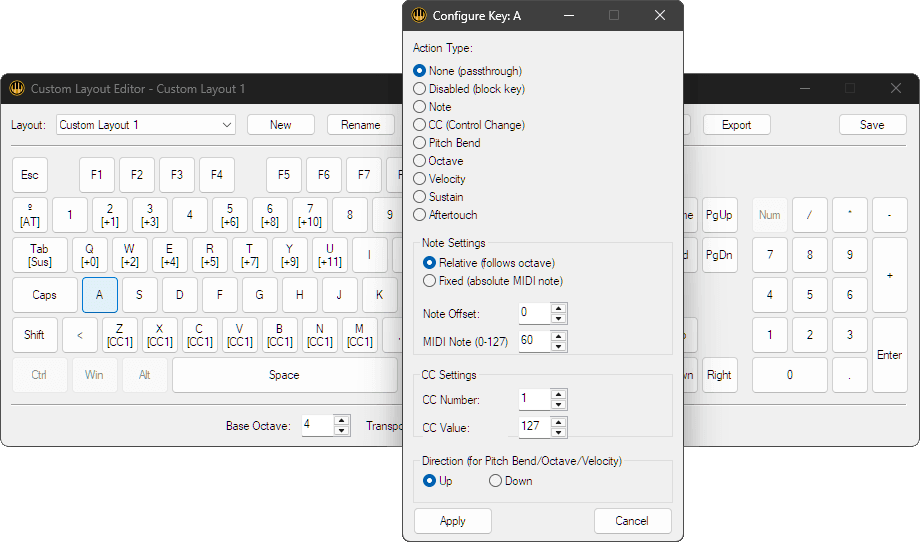
Custom Layout Editor: Create unlimited custom layouts tailored to your exact workflow needs. Assign any computer key to send any MIDI note, CC message, pitch bend, or program change. Configure notes in Relative mode (responds to octave transposition, perfect for melodic layouts) or Fixed mode (always sends the same note regardless of octave shifting, ideal for percussion triggers or specific sample mappings). Set velocity curves, configure transpose ranges, control sustain behavior, and even disable specific keys to prevent accidental triggers. Build specialized controllers for specific plugins, design percussion layouts that match your drum mapping preferences, or create hybrid configurations that combine notes, CC faders, and transport controls in a single layout.
Layout Switching On The Fly: Change between different keyboard layouts instantly without opening settings or interrupting your session. Switch from a standard MIDI keyboard to percussion pads when moving from melody to drums. Swap to CC fader layout for hands-on mixing, then back to keyboard layout for recording. Use the numeric keypad for direct access to your first nine selected layouts, or press the Layout Cycle key to step through only the layouts you’ve enabled in your settings. Each layout remembers its configuration independently.
Adjustable Velocity Control: Set fixed velocity for consistent triggering, or use velocity-sensitive keys where different rows or sections of your keyboard send different velocity values. The Multi-Velocity layout dedicates entire key rows to different velocity levels, perfect for expressive percussion programming or dynamics control without a hardware controller.
Transport and Performance Controls: Most layouts include sustain pedal simulation, octave transpose controls (shift keyboard range up or down without reconfiguring, with customizable transpose amount to suit your workflow), pitch bend (typically assigned to easily-accessible keys for expressive performance), and velocity adjustment keys for on-the-fly dynamic control.
MIDI CC Fader Simulation: Several layouts include MIDI CC faders created by assigning ranges of keys to send continuous controller messages. Press keys in sequence to sweep through CC values like moving a hardware fader. The MIDI Faders layout provides four complete CC faders plus pitch bend, while Drum Pads + CC combines 16 pads with three CC faders for hybrid control.
Intelligent Key Blocking: Predefined layouts include smart key blocking that prevents accidental keypresses from reaching your DAW. For example, keys positioned between black note keys are often blocked to avoid unintended triggers when reaching for chromatic notes. This design consideration reduces mistakes during rapid playing.
Cross-Language Keyboard Support: The app uses physical key positions rather than character labels, so it works correctly on keyboards of any language layout (QWERTY, QWERTZ, AZERTY, etc.). Your computer keyboard language doesn’t affect functionality – the app reads key positions, not characters.
Layout Import/Export: Share custom layouts with other users or back up your configurations. Export layouts as files and import them on other computers. This is particularly useful for studios with multiple workstations or for sharing specialized layouts within production teams.
How to Use
Install Hidden MIDI Keyboard on your Windows 10 or 11 computer. Create a virtual MIDI port using loopMIDI by Tobias Erichsen (free software) – this virtual port acts as the bridge between Hidden MIDI Keyboard and your DAW. Launch Hidden MIDI Keyboard and configure your activation hotkey in the settings.
Basic Setup:
Select a predefined layout that matches your workflow from the layout menu. In your DAW, set the MIDI input to the virtual MIDI port created by loopMIDI. Press your configured activation hotkey – Hidden MIDI Keyboard is now active and sending MIDI data. Press the hotkey again to deactivate when you need full keyboard access for typing or other tasks.
Working in Your DAW:
With Hidden MIDI Keyboard activated, work normally in your DAW. Open plugin windows, adjust mixer settings, edit MIDI clips, navigate your session – all while retaining the ability to play notes from your computer keyboard. Keys configured for MIDI transmission will send note data instead of triggering DAW shortcuts. Keys not assigned to MIDI functions continue to work as normal keyboard shortcuts.
Switching Layouts:
Change layouts instantly using multiple methods: open Hidden MIDI Keyboard’s system tray menu and select from the list, press the Layout Cycle key to step through your enabled layouts, or use the numeric keypad (keys 1-9) to jump directly to specific layouts in your selection. The change happens instantly without interrupting playback or losing MIDI data. Switch to Drum Pads layout when working with percussion, swap to Dual Keyboard for melodic parts, use MIDI Faders layout for mixing automation, or activate your custom layouts for specialized tasks. Each layout maintains its own configuration independently.
Creating Custom Layouts:
Open the custom layout editor from the app settings. Select a key on the virtual keyboard display, then configure what MIDI data it sends. Choose between Relative note mode (responds to octave transposition) or Fixed note mode (always sends the same note value). Assign note numbers, CC values, pitch bend, disable keys to prevent accidental presses, or leave keys unassigned so they continue functioning as normal keyboard keys. Set velocity values or velocity curves, configure the base octave and transpose amount. Save your custom layout with a descriptive name. The layout becomes available in the layout selection menu immediately. Note that predefined layouts cannot be edited directly – duplicate them first if you want to modify a preset configuration.
Optimizing for Specific Workflows:
Ableton Live users benefit from the Ableton Extended layout which preserves common shortcuts while expanding MIDI key range. Drum programmers should try Drum Pads layout with its 32-pad grid and intelligent transpose controls that shift by 16 positions to match Drum Rack’s pad layout. The inScale layout integrates with the inScale MaxforLive device for scale-locked composition and performance. Users mixing with keyboard controls will find MIDI Faders layout provides hands-on CC manipulation without hardware.
Ideal For
Laptop Producers Without MIDI Controllers: Turn your built-in keyboard into a functional MIDI input device without carrying additional hardware. Perfect for mobile production, hotel room sessions, or any situation where space and portability matter more than a full-size controller.
Studio Producers Who Want Quick MIDI Input: Keep your hands on the keyboard for rapid idea capture without reaching for a MIDI controller. Sketch melodies while mixing, program drums while editing, or add quick MIDI parts while staying focused on your computer screen.
Ableton Live Users: Extend Live’s native computer keyboard MIDI functionality with more keys, better layouts, and the ability to customize configurations. Use alongside Push or other controllers to add extra MIDI input options without additional hardware.
Sound Designers: Create custom layouts optimized for specific synthesizers or samplers. Map computer keys to trigger specific notes or CC values that match your sound design workflow, creating personalized control surfaces for software instruments.
Music Educators & Students: Demonstrate musical concepts and create examples without requiring physical MIDI keyboards in every teaching or learning environment. Students can practice MIDI sequencing and composition using only their laptop.
What’s Included
- Hidden MIDI Keyboard Windows application
- 10 predefined layouts (Ableton Extended, Drum Pads, Drum Pads + CC, Dual Keyboard, inScale, Logic Plus, MIDI Faders, Multi-Velocity, Sequential, Custom)
- Custom layout editor for unlimited configurations
- Layout import/export functionality
- Adjustable velocity curves and controls
- Octave transpose and pitch bend
- Sustain pedal simulation
- MIDI CC fader simulation
- Configurable activation hotkey
- System tray operation
- Comprehensive online help documentation
Requirements
- Windows 10 or Windows 11
- Virtual MIDI port software (loopMIDI by Tobias Erichsen recommended – free download)
- DAW or software that receives MIDI input
- Note: Some special keys may not be usable on certain keyboard layouts
Explore More
inScale | MKT Mapper | Control Matrix | Session Clips | Device Navigator | View All killihu Products
Frequently Asked Questions
A: Hidden MIDI Keyboard is a Windows application that turns your computer keyboard into a MIDI controller that works without requiring window focus. Unlike traditional virtual MIDI keyboards, it operates invisibly in the background – you can work in your DAW or any other application while sending MIDI notes, CC messages, and other MIDI data from your keyboard. It includes 10 predefined layouts plus a custom editor for creating personalized configurations.
A: Hidden MIDI Keyboard requires Windows 10 or Windows 11. You also need virtual MIDI port software to route MIDI data to your DAW – loopMIDI by Tobias Erichsen is recommended (free download). The app uses physical key positions rather than characters, so it works on keyboards of any language, though some special keys may not be usable on certain keyboard layouts.
A: Traditional virtual MIDI keyboards require their window to have focus – you must click on the keyboard app to play notes, which means you lose access to your DAW interface. Hidden MIDI Keyboard works without window focus. It runs invisibly in the background and can be activated/deactivated with a custom hotkey. Only the keys you configure for MIDI transmission are captured – all other keys continue working normally for DAW shortcuts and typing.
A: Yes! Hidden MIDI Keyboard works with any DAW or software that receives MIDI input, including Ableton Live, FL Studio, Logic Pro, Cubase, Studio One, Reaper, and others. It includes an Ableton Extended layout specifically designed to expand Live’s native computer keyboard MIDI functionality while preserving important keyboard shortcuts.
A: You can explore more of killihu’s tools and devices here: killihu
Important Information
Initial Release – April 2026
Our Products are generally provided as Zip file downloads which in all cases will need to be extracted and saved to your hard drive prior to installation. Details on the different file type provided and what to do with them are below.
.alp Files – These are Ableton Live Packs and will either install directly into the Packs Section of the browser of Ableton Live or ask you to save them to your hard drive. For packs that install to the library, when you double click on them you will see a pop up window asking you to confirm that installation is ok as the files are described as “Legacy”. This is fine and you are ok to proceed, the packs are created using the format for an earlier version of Live and so remain compatible with the current version.
.amxd files – These are individual MaxforLive Devices and can be stored anywhere on your hard drive. We’d advise creating a folder for them and then adding that folder as a location within the Places section of Lives Browser.
END-USER LICENSE AGREEMENT FOR ISOTONIK STUDIOS SOFTWARE PRODUCTS.
PLEASE READ THE TERMS AND CONDITIONS OF THIS LICENSE AGREEMENT CAREFULLY BEFORE CONTINUING WITH THIS PROGRAM INSTALL.
This End-User License Agreement (referred to as “EULA”) is a legal agreement between an individual or a single entity (referred to as “LICENSEE”) and Isotonik Studios for the Isotonik Studios software product(s) which may include associated software components, media, printed materials, and “online” or electronic documentation (referred to as “SOFTWARE PRODUCT”). By installing, copying, or otherwise using the SOFTWARE PRODUCT, the LICENSEE agrees to be bound by the terms of this EULA.
This EULA represents the entire agreement concerning the program between the LICENSEE and Isotonik Studios and it supersedes any prior proposal, representation, or understanding between the parties. If the LICENSEE does not agree to the terms of this EULA, the LICENSEE should not install or use the SOFTWARE PRODUCT.
The SOFTWARE PRODUCT is protected by copyright laws and international copyright treaties, as well as other intellectual property laws and treaties. The SOFTWARE PRODUCT is licensed, not sold.
- GRANT OF LICENSE.
The SOFTWARE PRODUCT is licensed as follows:
(a) Installation and Use. Providing that the LICENSEE has paid any applicable license fees, Isotonik Studios grants the LICENSEE the right to install and use copies of the SOFTWARE PRODUCT on up to two computers in the LICENSEE’s possession that are running a validly licensed copy of the operating system for which the SOFTWARE PRODUCT was designed [e.g., Windows 10, macOS]. The computer(s) must be owned by the LICENSEE.
(b) Backup Copies. The LICENSEE may also make copies of the SOFTWARE PRODUCT as may be necessary for backup and archival purposes.
- DESCRIPTION OF OTHER RIGHTS AND LIMITATIONS.
(a) Maintenance of Copyright Notices. The LICENSEE must not remove or alter any copyright notices on any and all copies of the SOFTWARE PRODUCT.
(b) Distribution. The LICENSEE may not distribute registered copies of the SOFTWARE PRODUCT to third parties.
(c) Prohibition on Reverse Engineering, Decompilation, and Disassembly. The LICENSEE may not reverse engineer, decompile, or disassemble the SOFTWARE PRODUCT, except and only to the extent that such activity is expressly permitted by applicable law notwithstanding this limitation.
(d) Rental. The LICENSEE may not rent, lease, or lend the SOFTWARE PRODUCT.
(e) License transfer The LICENSEE may not transfer their license to the SOFTWARE PRODUCT to any third party. Any attempt to do so will be considered a violation of this EULA.
(f) Support Services. Isotonik Studios may provide the LICENSEE with support services related to the SOFTWARE PRODUCT for a period of 12 months following the date of purchase. Any supplemental software code provided to the LICENSEE as part of the Support Services shall be considered part of the SOFTWARE PRODUCT and subject to the terms and conditions of this EULA.
(g) Compliance with Applicable Laws. The LICENSEE must comply with all applicable laws regarding use of the SOFTWARE PRODUCT.
- TERMINATION Without prejudice to any other rights, Isotonik Studios may terminate this EULA if the LICENSEE fails to comply with the terms and conditions of this EULA. In such event, the LICENSEE must destroy all copies of the SOFTWARE PRODUCT in the LICENSEE’s possession.
- COPYRIGHT All title, including but not limited to copyrights, in and to the SOFTWARE PRODUCT and any copies thereof are owned by Isotonik Studios or its suppliers. All title and intellectual property rights in and to the content which may be accessed through use of the SOFTWARE PRODUCT is the property of the respective content owner and may be protected by applicable copyright or other intellectual property laws and treaties. This EULA grants the LICENSEE no rights to use such content. All rights not expressly granted are reserved by Isotonik Studios.
- NO WARRANTIES Isotonik Studios expressly disclaims any warranty for the SOFTWARE PRODUCT. The SOFTWARE PRODUCT is provided ‘As Is’ without any express or implied warranty of any kind, including but not limited to any warranties of merchantability, noninfringement, or fitness of a particular purpose. Isotonik Studios does not warrant or assume responsibility for the accuracy or completeness of any information, text, graphics, links or other items contained within the SOFTWARE PRODUCT. Isotonik Studios makes no warranties respecting any harm that may be caused by the transmission of a computer virus, worm, time bomb, logic bomb, or other such computer program. Isotonik Studios further expressly disclaims any warranty or representation to the LICENSEE or to any third party.
- LIMITATION OF LIABILITY In no event shall Isotonik Studios be liable for any damages (including, without limitation, lost profits, business interruption, or lost information) arising out of the LICENSEE’s use of or inability to use the SOFTWARE PRODUCT, even if Isotonik Studios has been advised of the possibility of such damages. In no event will Isotonik Studios be liable for loss of data or for indirect, special, incidental, consequential (including lost profit), or other damages based in contract, tort or otherwise. Isotonik Studios shall have no liability with respect to the content of the SOFTWARE PRODUCT or any part thereof, including but not limited to errors or omissions contained therein, libel, infringements of rights of publicity, privacy, trademark rights, business interruption, personal injury, loss of privacy, moral rights or the disclosure of confidential information.