Notes Frequency Pro by Killihu
WHAT FREQUENCY IS THAT NOTE, EXACTLY?
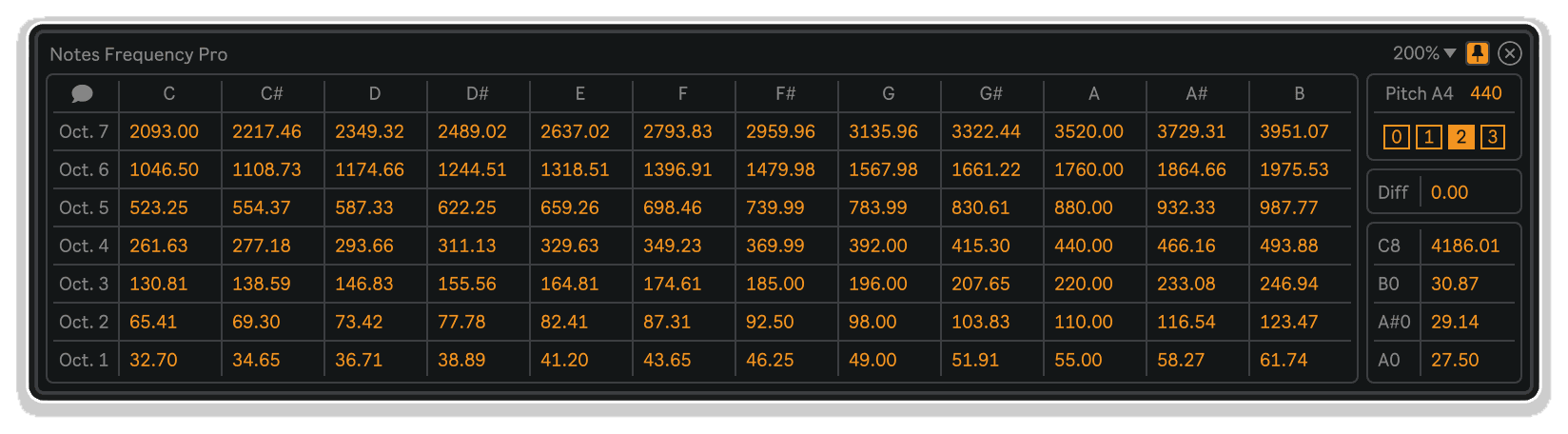
Notes Frequency Pro by killihu delivers instant access to every note frequency across the full 88-key piano range, with adjustable tuning standards, precision decimal control, and frequency difference calculations – all in a floating window that stays exactly where you need it.
Inside you’ll find:
- Complete 88-key frequency reference (A0 at 27.5 Hz through C8 at 4186 Hz)
- Adjustable musical pitch for alternate tuning systems (432 Hz, 442 Hz, baroque pitch, etc.)
- Frequency difference calculator between any two notes
- Selectable decimal precision (0, 1, 2, or 3 decimal places)
- Popup note name display on hover
- Resizable, movable floating window interface
- Docking option to keep reference always visible
- Mappable show/hide control for keyboard shortcut access
- Persistent window size and position across sessions
Essential for sound designers programming precise oscillators and filters, mixing engineers applying frequency-specific EQ, electronic producers tuning sub-bass to musical keys, composers exploring alternate temperaments, and anyone who needs to know exactly which Hz value corresponds to which musical note.
MaxforLive utility device for Ableton Live 10/11/12 (Mac & Windows)
USER GUIDE: Notes Frequency Pro 1.1
Notes Frequency Pro by Killihu
WHAT FREQUENCY IS THAT NOTE, EXACTLY?
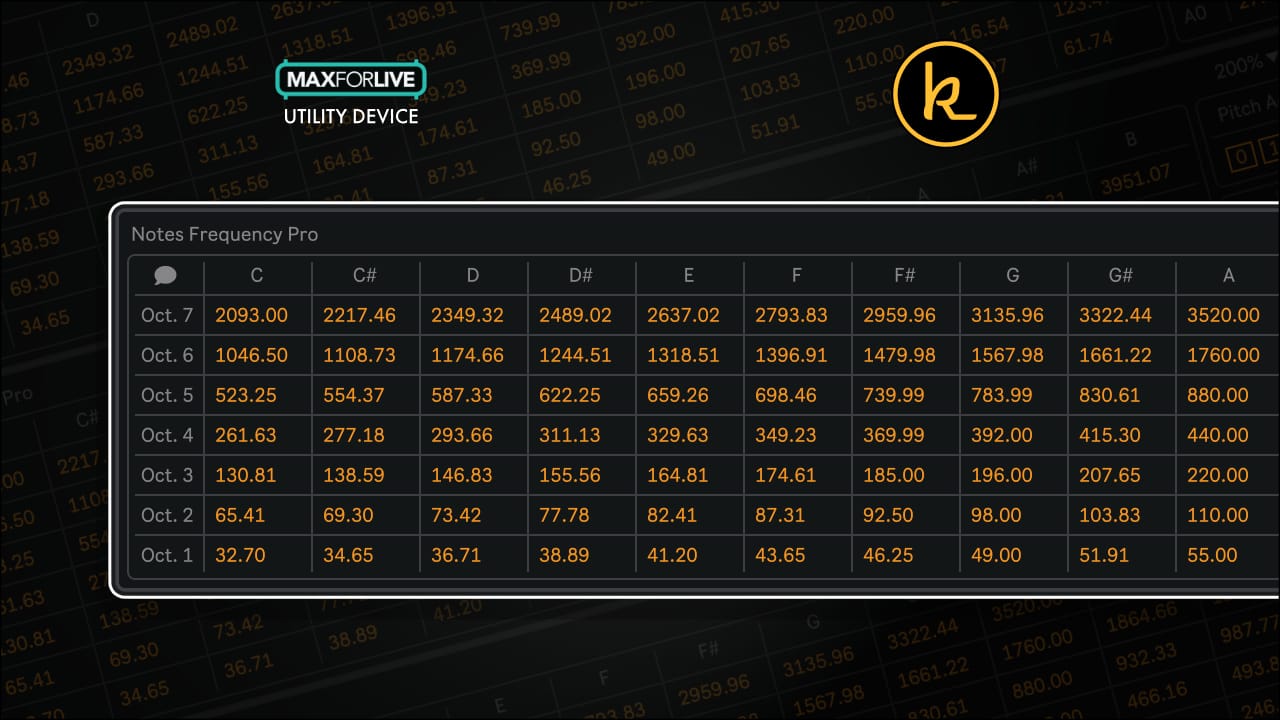
Notes Frequency Pro by killihu delivers instant access to every note frequency across the full 88-key piano range, with adjustable tuning standards, precision decimal control, and frequency difference calculations – all in a floating window that stays exactly where you need it.
Inside you’ll find:
- Complete 88-key frequency reference (A0 at 27.5 Hz through C8 at 4186 Hz)
- Adjustable musical pitch for alternate tuning systems (432 Hz, 442 Hz, baroque pitch, etc.)
- Frequency difference calculator between any two notes
- Selectable decimal precision (0, 1, 2, or 3 decimal places)
- Popup note name display on hover
- Resizable, movable floating window interface
- Docking option to keep reference always visible
- Mappable show/hide control for keyboard shortcut access
- Persistent window size and position across sessions
Essential for sound designers programming precise oscillators and filters, mixing engineers applying frequency-specific EQ, electronic producers tuning sub-bass to musical keys, composers exploring alternate temperaments, and anyone who needs to know exactly which Hz value corresponds to which musical note.
MaxforLive utility device for Ableton Live 10/11/12 (Mac & Windows)
USER GUIDE: Notes Frequency Pro 1.1
Additional information
| MaxforLive | Control Devices |
|---|---|
| Ableton Live Compatibility | Ableton Live 10 Standard with MaxforLive, Ableton Live 10 Suite, Ableton Live 11 Standard with MaxforLive, Ableton Live 11 Suite, Ableton Live 12 Standard with MaxforLive, Ableton Live 12 Suite |
| Min. Requirements | Ableton Live 10 Standard with MaxforLive Installed or Ableton Live 10 Suite |
| OS | Mac, Windows |
PRICE: £6.00
Product reviews
No reviews yet. Be the first to review this product.
Notes Frequency Pro by Killihu
Dialing in precise EQ cuts, programming synthesizer oscillators, matching filter frequencies to musical keys, or working with alternate tuning systems all require knowing exact note frequencies. Looking them up in reference charts interrupts workflow. Switching to external calculators breaks creative momentum. Notes Frequency Pro solves this by putting a complete 88-key frequency reference directly inside Live.
This isn’t just a static frequency chart. The floating window interface gives you instant access to every note from A0 (27.5 Hz) through C8 (4186 Hz), with adjustable musical pitch for alternate tuning standards, selectable decimal precision up to three places, frequency difference calculations between any two notes, and a mappable show/hide control that lets you summon the reference with a single keystroke.
Whether you’re sculpting low-end with surgical EQ precision, programming resonant filters to track specific harmonics, designing sub-bass that sits perfectly under your kick drum, or exploring historical temperaments and non-Western tuning systems, Notes Frequency Pro delivers the numbers you need exactly when you need them.
Features & Highlights
Complete 88-Key Frequency Reference: Every note from the lowest A on a full piano (27.5 Hz) to the highest C (4186 Hz) displayed in an organized, easy-to-read table format. No more searching online reference charts or memorizing frequency values for common notes.
Adjustable Musical Pitch: Change the reference pitch from the standard A4 = 440 Hz to any value for working with alternate tuning systems. Explore historical temperaments like A4 = 432 Hz (popular in certain musical and spiritual contexts) or baroque pitch standards around A4 = 415 Hz. Essential for orchestral, early music, and experimental tuning work.
Frequency Difference Calculator: Click any two notes in the table to instantly calculate the frequency difference between them. The result displays in the dedicated “Diff” section on the right side of the interface. Perfect for determining interval spacing when programming layered oscillators, calculating sideband frequencies for modulation effects, or analyzing harmonic relationships.
Decimal Precision Control: Select between 0, 1, 2, or 3 decimal places for frequency display. Whole numbers for quick reference work, three decimal places for precision synthesis programming and audio analysis. Values automatically round based on your selected precision level.
Popup Note Names: Enable the Popup Info function and hover your mouse over any frequency value to see its corresponding note name displayed in a tooltip. Useful when reading frequencies from spectrum analyzers or when working with numerical frequency data that needs musical context.
Floating Window Interface: The frequency table opens in a resizable, movable floating window that can be positioned anywhere on your screen. Dock it on top of other windows to keep it always visible while working, or close it when not needed. The window persists across Live sessions at your preferred size and position.
Mappable Show/Hide Control: The show window button on the device rack is fully mappable to any keyboard key or MIDI control. Assign it to a hotkey for instant access to the frequency reference without touching your mouse or hunting through device interfaces.
How to Use
Insert Notes Frequency Pro on any track in your Live set. The device doesn’t process audio or MIDI – it’s purely a reference utility that exists to provide information. Many users place it on the Master track or a dedicated utility track.
Opening the Frequency Table:
Click the show/hide button on the device rack to open the floating window containing the complete frequency reference. The window displays all 88 piano keys organized in a scrollable table with note names and their corresponding frequencies.
Adjusting Musical Pitch:
Use the “Pitch A4” control at the top of the window to change the reference tuning from standard 440 Hz. Common alternate values include 432 Hz (alternative tuning), 441 Hz (some European orchestras), 442 Hz (common in professional classical music), or 415 Hz (baroque period). All 88 note frequencies automatically recalculate based on your selected pitch standard.
Setting Decimal Precision:
Click one of the four decimal place buttons (0, 1, 2, or 3) to control how many digits appear after the decimal point. For general reference work, 0 or 1 decimal place is usually sufficient. For precise synthesis programming or when matching analyzer readings, 2 or 3 decimal places provide the necessary accuracy.
Calculating Frequency Differences:
Click any note in the frequency table – a box appears around the selected cell. Click a second note to calculate the frequency difference between the two values. The result displays in the “Diff” section on the right side of the window. To clear the selection and start over, click a third cell or click one of the currently selected cells to deselect it.
Using Popup Note Names:
Enable the Popup Info button (eye icon), then hover your mouse cursor over any frequency value to see a tooltip displaying the corresponding note name. This is particularly useful when you have frequency numbers from an external source and need to identify which musical notes they represent.
Keyboard Mapping:
Map the show/hide window button to a keyboard shortcut for instant access. Open Live’s MIDI mapping mode, select the show window button on the device rack, then press your desired keyboard key. This lets you toggle the frequency reference on and off without breaking your workflow focus.
Ideal For
Sound Designers: Quickly reference exact frequencies when programming synthesizer oscillators, filters, and effects. Match resonant peaks to musical keys, tune sub-oscillators precisely, and calculate harmonic ratios for FM synthesis programming.
Mixing Engineers: Identify which musical notes correspond to problematic resonances shown in spectrum analyzers. Apply surgical EQ cuts or boosts at frequencies that align with the song’s key and harmonic content rather than arbitrary Hz values.
Electronic Music Producers: Ensure sub-bass frequencies align perfectly with kick drums and bass notes. Tune 808-style bass hits to specific keys without trial and error. Program filter cutoffs that track melodic content accurately.
Composers Working with Alternate Tunings: Explore historical temperaments, non-Western tuning systems, or experimental pitch standards. See immediately how changing the reference pitch affects every note across the keyboard range.
Music Students & Educators: Teach the relationship between musical notes and frequencies with concrete numbers. Demonstrate how equal temperament divides the octave mathematically. Show students which frequencies correspond to the notes they’re playing or composing.
Mastering Engineers: Reference precise frequencies when working with linear-phase EQs that display Hz values. Make informed decisions about where to place filters and shelves based on the musical content of the track.
What’s Included
- Notes Frequency Pro MaxforLive device (AMXD file)
- 7-page PDF reference manual
- Complete 88-key frequency reference table (A0 through C8)
- Adjustable musical pitch (alternate tuning standards)
- Frequency difference calculator
- Selectable decimal precision (0-3 places)
- Popup note name display
- Resizable, dockable floating window interface
- Mappable show/hide control
Requirements
- Ableton Live 10, 11, or 12 with Max for Live
- Mac or Windows operating system
Explore More
inScale | MIDI Explorer | Device Navigator | Advanced Toolbar Buttons 2 | Control Matrix | View All killihu Products
Frequently Asked Questions
A: Notes Frequency Pro is a MaxforLive utility device that displays frequencies for all 88 piano keys in a floating reference window. It includes adjustable musical pitch for alternate tuning standards, frequency difference calculations between notes, selectable decimal precision, popup note names, and a mappable show/hide control for instant access.
A: Yes, Notes Frequency Pro is a MaxforLive device and requires Ableton Live 10, 11, or 12 with Max for Live installed.
A: MaxforLive is a platform that integrates the visual programming environment Max with Ableton Live, allowing users to create and use custom audio, MIDI, and control devices. It extends Live’s capabilities with powerful utilities like Notes Frequency Pro.
A: No, Notes Frequency Pro is purely a reference utility tool. It doesn’t process audio or MIDI signals – it simply displays frequency information in a floating window. Many users place it on their Master track or a dedicated utility track for easy access.
A: You can explore more of killihu’s tools and devices here: killihu
Important Information
v1.1 New features and improvements:
– Modified GUI to adapt to the new rack design in Live version 12.2, does not change the operation of the device.
Initial Release – November 2024
Our Products are generally provided as Zip file downloads which in all cases will need to be extracted and saved to your hard drive prior to installation. Details on the different file type provided and what to do with them are below.
.alp Files – These are Ableton Live Packs and will either install directly into the Packs Section of the browser of Ableton Live or ask you to save them to your hard drive. For packs that install to the library, when you double click on them you will see a pop up window asking you to confirm that installation is ok as the files are described as “Legacy”. This is fine and you are ok to proceed, the packs are created using the format for an earlier version of Live and so remain compatible with the current version.
.amxd files – These are individual MaxforLive Devices and can be stored anywhere on your hard drive. We’d advise creating a folder for them and then adding that folder as a location within the Places section of Lives Browser.
END-USER LICENSE AGREEMENT FOR ISOTONIK STUDIOS SOFTWARE PRODUCTS.
PLEASE READ THE TERMS AND CONDITIONS OF THIS LICENSE AGREEMENT CAREFULLY BEFORE CONTINUING WITH THIS PROGRAM INSTALL.
This End-User License Agreement (referred to as “EULA”) is a legal agreement between an individual or a single entity (referred to as “LICENSEE”) and Isotonik Studios for the Isotonik Studios software product(s) which may include associated software components, media, printed materials, and “online” or electronic documentation (referred to as “SOFTWARE PRODUCT”). By installing, copying, or otherwise using the SOFTWARE PRODUCT, the LICENSEE agrees to be bound by the terms of this EULA.
This EULA represents the entire agreement concerning the program between the LICENSEE and Isotonik Studios and it supersedes any prior proposal, representation, or understanding between the parties. If the LICENSEE does not agree to the terms of this EULA, the LICENSEE should not install or use the SOFTWARE PRODUCT.
The SOFTWARE PRODUCT is protected by copyright laws and international copyright treaties, as well as other intellectual property laws and treaties. The SOFTWARE PRODUCT is licensed, not sold.
- GRANT OF LICENSE.
The SOFTWARE PRODUCT is licensed as follows:
(a) Installation and Use. Providing that the LICENSEE has paid any applicable license fees, Isotonik Studios grants the LICENSEE the right to install and use copies of the SOFTWARE PRODUCT on up to two computers in the LICENSEE’s possession that are running a validly licensed copy of the operating system for which the SOFTWARE PRODUCT was designed [e.g., Windows 10, macOS]. The computer(s) must be owned by the LICENSEE.
(b) Backup Copies. The LICENSEE may also make copies of the SOFTWARE PRODUCT as may be necessary for backup and archival purposes.
- DESCRIPTION OF OTHER RIGHTS AND LIMITATIONS.
(a) Maintenance of Copyright Notices. The LICENSEE must not remove or alter any copyright notices on any and all copies of the SOFTWARE PRODUCT.
(b) Distribution. The LICENSEE may not distribute registered copies of the SOFTWARE PRODUCT to third parties.
(c) Prohibition on Reverse Engineering, Decompilation, and Disassembly. The LICENSEE may not reverse engineer, decompile, or disassemble the SOFTWARE PRODUCT, except and only to the extent that such activity is expressly permitted by applicable law notwithstanding this limitation.
(d) Rental. The LICENSEE may not rent, lease, or lend the SOFTWARE PRODUCT.
(e) License transfer The LICENSEE may not transfer their license to the SOFTWARE PRODUCT to any third party. Any attempt to do so will be considered a violation of this EULA.
(f) Support Services. Isotonik Studios may provide the LICENSEE with support services related to the SOFTWARE PRODUCT for a period of 12 months following the date of purchase. Any supplemental software code provided to the LICENSEE as part of the Support Services shall be considered part of the SOFTWARE PRODUCT and subject to the terms and conditions of this EULA.
(g) Compliance with Applicable Laws. The LICENSEE must comply with all applicable laws regarding use of the SOFTWARE PRODUCT.
- TERMINATION Without prejudice to any other rights, Isotonik Studios may terminate this EULA if the LICENSEE fails to comply with the terms and conditions of this EULA. In such event, the LICENSEE must destroy all copies of the SOFTWARE PRODUCT in the LICENSEE’s possession.
- COPYRIGHT All title, including but not limited to copyrights, in and to the SOFTWARE PRODUCT and any copies thereof are owned by Isotonik Studios or its suppliers. All title and intellectual property rights in and to the content which may be accessed through use of the SOFTWARE PRODUCT is the property of the respective content owner and may be protected by applicable copyright or other intellectual property laws and treaties. This EULA grants the LICENSEE no rights to use such content. All rights not expressly granted are reserved by Isotonik Studios.
- NO WARRANTIES Isotonik Studios expressly disclaims any warranty for the SOFTWARE PRODUCT. The SOFTWARE PRODUCT is provided ‘As Is’ without any express or implied warranty of any kind, including but not limited to any warranties of merchantability, noninfringement, or fitness of a particular purpose. Isotonik Studios does not warrant or assume responsibility for the accuracy or completeness of any information, text, graphics, links or other items contained within the SOFTWARE PRODUCT. Isotonik Studios makes no warranties respecting any harm that may be caused by the transmission of a computer virus, worm, time bomb, logic bomb, or other such computer program. Isotonik Studios further expressly disclaims any warranty or representation to the LICENSEE or to any third party.
- LIMITATION OF LIABILITY In no event shall Isotonik Studios be liable for any damages (including, without limitation, lost profits, business interruption, or lost information) arising out of the LICENSEE’s use of or inability to use the SOFTWARE PRODUCT, even if Isotonik Studios has been advised of the possibility of such damages. In no event will Isotonik Studios be liable for loss of data or for indirect, special, incidental, consequential (including lost profit), or other damages based in contract, tort or otherwise. Isotonik Studios shall have no liability with respect to the content of the SOFTWARE PRODUCT or any part thereof, including but not limited to errors or omissions contained therein, libel, infringements of rights of publicity, privacy, trademark rights, business interruption, personal injury, loss of privacy, moral rights or the disclosure of confidential information.