

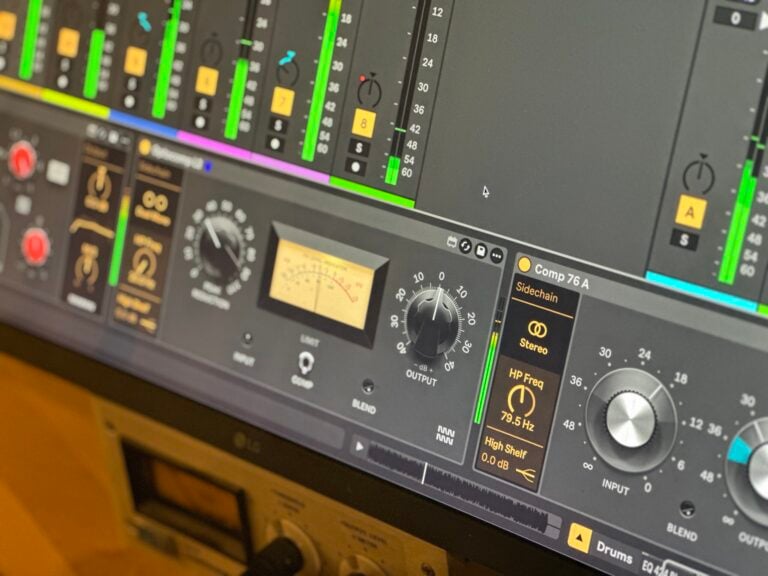
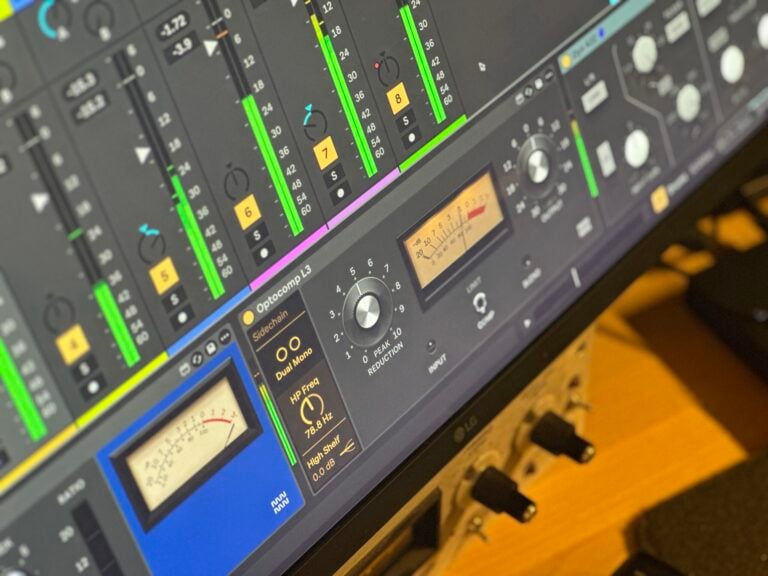
Optocomp Leveler by Monomono
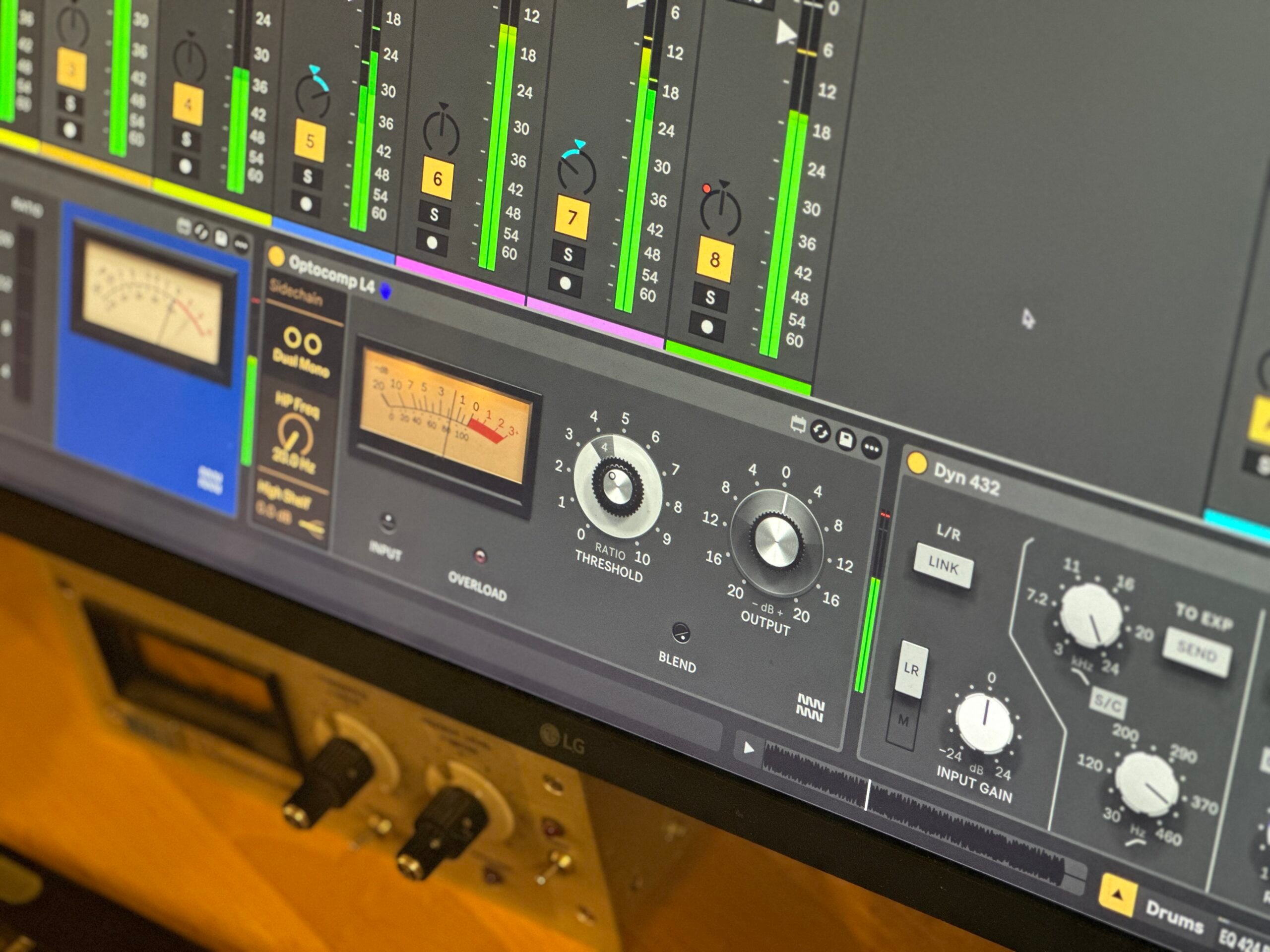
THREE OPTICAL COMPRESSORS MODELLED ON THE LA-2A, LA-3A AND LA-4 FOR ABLETON LIVE Optocomp Leveler brings three distinct optical compressors into Max for Live, each modelled on a different chapter of the Teletronix and UREI lineage. No Attack or Release controls, because the light cell sets the timing, just as it always did. Load all three and hear immediately how differently they grab, colour and let go. • L2: Modelled on the tube LA-2A, the fastest and most colourful of the three, with a wide gradual knee and a release that gives back half its reduction almost at once. • L3: Modelled on the solid-state LA-3A, the slowest to take hold, letting transients through hot before settling in, with a touch more glue between phrases. • L4: Modelled on the LA-4, driven by an RMS detector with an LED and photocells, a Ratio switch from 2:1 to 20:1, and the longest, most even-handed release of the three.

Overview
Three optical compressors for Ableton Live
Every compressor in Optocomp Leveler puts a light in charge of the gain, exactly as Jim Lawrence intended when he filed his patent in 1962. The music drives a light source, a photocell turns the level down, and the timing follows the signal naturally. There is no Attack or Release to dial in, because the cell’s own character handles it, and that character differs meaningfully across all three devices. L2 grabs fast and adds the most colour, growing richer the harder you push it. L3 waits longest before taking hold, letting a strum or a snare keep its bite while the body is levelled. L4 takes a first bite quickly then eases in steadily, holding on longest in release, an even hand on bass or anything that needs consistent control rather than obvious compression.
- Three distinct optical compressor models in one Max for Live device: L2, L3 and L4
- L2 modelled on the UREI 1968 drawing of the tube LA-2A, with 12AX7 and 12BH7 amplifier stages and T4 cell behaviour
- L3 modelled on the first LA-3A drawing, the solid-state transistor leveller with T4 cell, faster and quieter than the LA-2A with more midrange presence
- L4 modelled on the first LA-4, using an RMS detector with LED and photocells, a Ratio switch from 2:1 to 20:1, and a transformerless balanced input topology
- No Attack or Release controls on any model: timing is set by the light cell’s own nature, as on the hardware originals
- Three distinct compression curves: L2 begins earliest with a wide gradual knee, L4 starts a few decibels later with a firmer corner, L3 waits longest and lets loud signals through noticeably hotter
- Three distinct grab characters: L2 is the quickest, L3 the slowest with transient preservation, L4 takes an initial bite then eases the rest in evenly
- Two-stage release on all three models, a quick first step then a slow drift, with memory that stretches the tail after long passages of heavy reduction
- Shared panel layout across all three devices with per-model sonic differences clearly audible at matched settings
- Rooted in documented hardware history, each model captures its design at its starting point before later factory revisions
- Max for Live Audio Effect .amxd device
- User manual (PDF)
Free for subscribers
Join the list and get 10 free downloads, including 8 Max for Live devices
Subscribers get Isotonik FX, Live Scratcher, Modular Series LE Part ONE, Modular Series LE Part TWO and more for free. You also hear about new releases and deals first.
Just your email. No spam, unsubscribe anytime.


Reviews
No reviews yet. Be the first to review this product.
Optocomp L2
Tube optical compressor modelled on the LA-2A
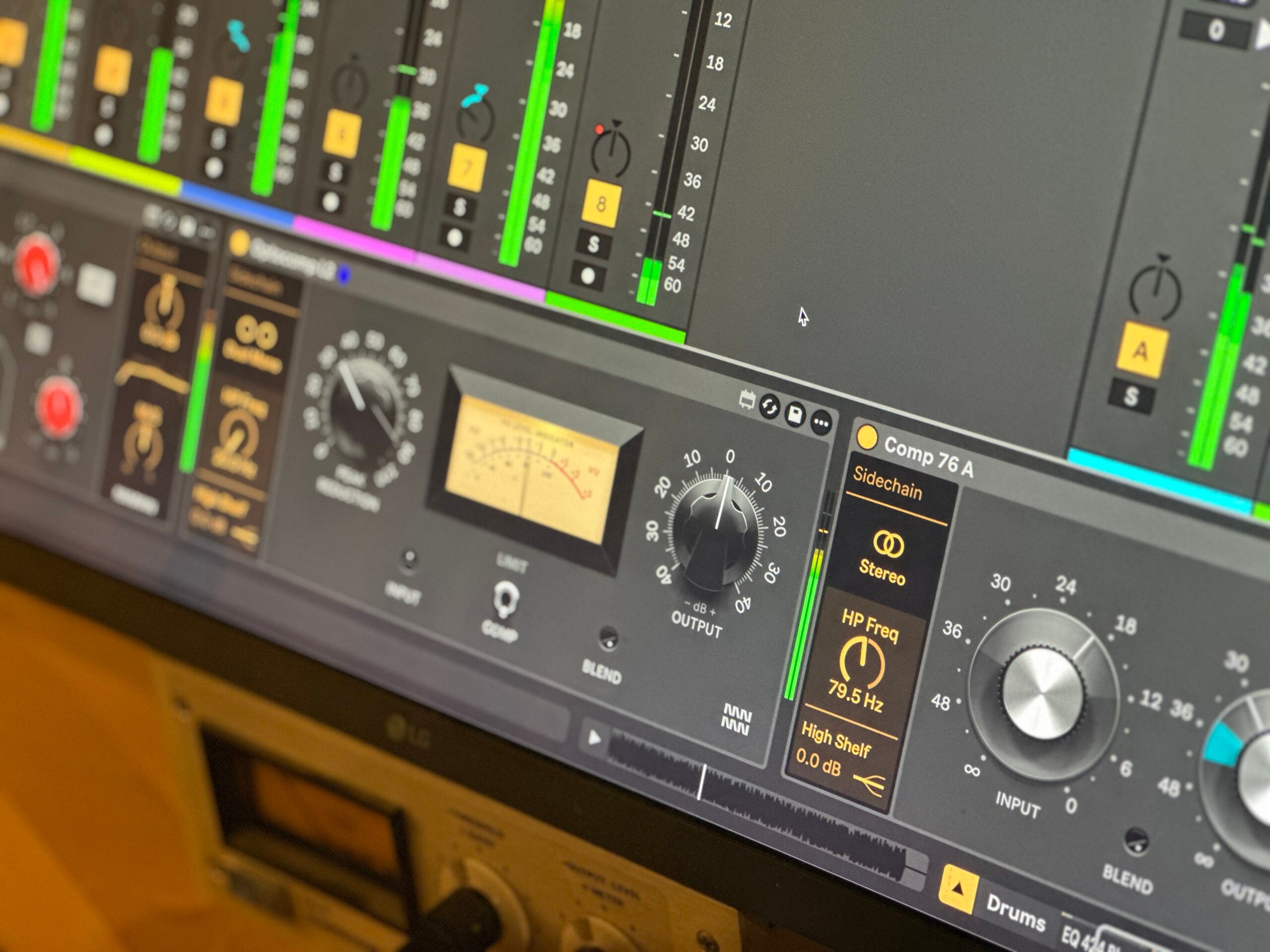
Optocomp L2 is modelled on UREI's 1968 drawing of the LA-2A leveling amplifier. It offers Peak Reduction, Comp and Limit modes, an Input control, a VU level indicator, and an Output knob.
Optocomp L3
Solid-state optical leveller modelled on the LA-3A
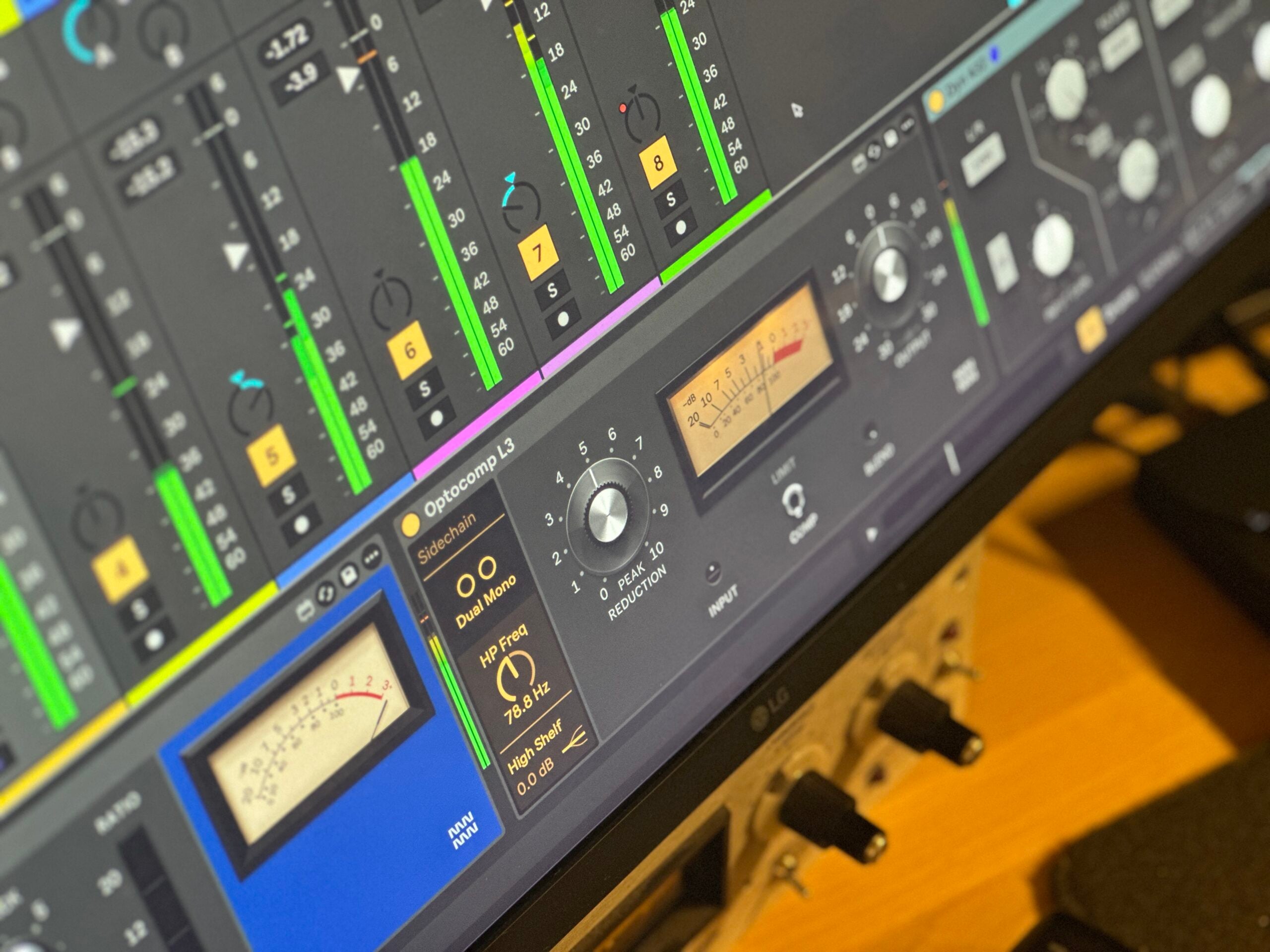
Optocomp L3 is modelled on the first LA-3A drawing, a half-rack transistor compressor that is faster and quieter than the tube LA-2A. It has the slowest grab of the three, letting transients through hot before settling into place over the following milliseconds.
Optocomp L4
LED and ratio switch replace the light cell
Optocomp L4 is modelled on the first LA-4, which swapped the T4 cell for an LED and photocells driven by an RMS detector, and added a Ratio switch from 2:1 to 20:1. Higher ratios grab faster, while 2:1 lowers the threshold for gentle, even compression.
Compress or Limit
Two responses from one control signal
L2 and L3 switch between Compress and Limit. In Compress the output keeps rising gently as the input climbs; in Limit it stops rising past the threshold and can even fall back as the input keeps climbing. On L2, the Limit Curve control on the back sets how far it falls back.
Sidechain
Shape what the compressor listens to
HP Freq rolls low end out of what the compressor hears, so bass stops pumping the gain, and High Shelf tilts the top end of what it hears from cut to boost. Neither filters the audio itself. Link ties the two channels together for stereo, so both get the same gain reduction and the image holds still, or leaves them as dual mono.
Backplate
Turn the unit around to see its curve
Click the logo on any model to flip it to the back panel. It draws the transfer curve for the current settings, so you can watch the knee move as you turn the dial, and shows the serial numbers of the two channels. Every serial is a different unit off the line, its parts a little different, so how much it compresses, its release and its colour shift slightly; neighbouring numbers are a closely matched pair. On L2 the back also holds the Limit Curve control.
Important Information
INSTALLATION
Our Products are generally provided as Zip file downloads which in all cases will need to be extracted and saved to your hard drive prior to installation. Details on the different file type provided and what to do with them are below.
.alp Files – These are Ableton Live Packs and will either install directly into the Packs Section of the browser of Ableton Live or ask you to save them to your hard drive. For packs that install to the library, when you double click on them you will see a pop up window asking you to confirm that installation is ok as the files are described as “Legacy”. This is fine and you are ok to proceed, the packs are created using the format for an earlier version of Live and so remain compatible with the current version.
.amxd files – These are individual MaxforLive Devices and can be stored anywhere on your hard drive. We’d advise creating a folder for them and then adding that folder as a location within the Places section of Lives Browser.
LICENSE
END-USER LICENSE AGREEMENT FOR ISOTONIK STUDIOS SOFTWARE PRODUCTS.
PLEASE READ THE TERMS AND CONDITIONS OF THIS LICENSE AGREEMENT CAREFULLY BEFORE CONTINUING WITH THIS PROGRAM INSTALL.
This End-User License Agreement (referred to as “EULA”) is a legal agreement between an individual or a single entity (referred to as “LICENSEE”) and Isotonik Studios for the Isotonik Studios software product(s) which may include associated software components, media, printed materials, and “online” or electronic documentation (referred to as “SOFTWARE PRODUCT”). By installing, copying, or otherwise using the SOFTWARE PRODUCT, the LICENSEE agrees to be bound by the terms of this EULA.
This EULA represents the entire agreement concerning the program between the LICENSEE and Isotonik Studios and it supersedes any prior proposal, representation, or understanding between the parties. If the LICENSEE does not agree to the terms of this EULA, the LICENSEE should not install or use the SOFTWARE PRODUCT.
The SOFTWARE PRODUCT is protected by copyright laws and international copyright treaties, as well as other intellectual property laws and treaties. The SOFTWARE PRODUCT is licensed, not sold.
- GRANT OF LICENSE.
The SOFTWARE PRODUCT is licensed as follows:
(a) Installation and Use. Providing that the LICENSEE has paid any applicable license fees, Isotonik Studios grants the LICENSEE the right to install and use copies of the SOFTWARE PRODUCT on up to two computers in the LICENSEE’s possession that are running a validly licensed copy of the operating system for which the SOFTWARE PRODUCT was designed [e.g., Windows 10, macOS]. The computer(s) must be owned by the LICENSEE.
(b) Backup Copies. The LICENSEE may also make copies of the SOFTWARE PRODUCT as may be necessary for backup and archival purposes.
- DESCRIPTION OF OTHER RIGHTS AND LIMITATIONS.
(a) Maintenance of Copyright Notices. The LICENSEE must not remove or alter any copyright notices on any and all copies of the SOFTWARE PRODUCT.
(b) Distribution. The LICENSEE may not distribute registered copies of the SOFTWARE PRODUCT to third parties.
(c) Prohibition on Reverse Engineering, Decompilation, and Disassembly. The LICENSEE may not reverse engineer, decompile, or disassemble the SOFTWARE PRODUCT, except and only to the extent that such activity is expressly permitted by applicable law notwithstanding this limitation.
(d) Rental. The LICENSEE may not rent, lease, or lend the SOFTWARE PRODUCT.
(e) License transfer The LICENSEE may not transfer their license to the SOFTWARE PRODUCT to any third party. Any attempt to do so will be considered a violation of this EULA.
(f) Support Services. Isotonik Studios may provide the LICENSEE with support services related to the SOFTWARE PRODUCT for a period of 12 months following the date of purchase. Any supplemental software code provided to the LICENSEE as part of the Support Services shall be considered part of the SOFTWARE PRODUCT and subject to the terms and conditions of this EULA.
(g) Compliance with Applicable Laws. The LICENSEE must comply with all applicable laws regarding use of the SOFTWARE PRODUCT.
- TERMINATION Without prejudice to any other rights, Isotonik Studios may terminate this EULA if the LICENSEE fails to comply with the terms and conditions of this EULA. In such event, the LICENSEE must destroy all copies of the SOFTWARE PRODUCT in the LICENSEE’s possession.
- COPYRIGHT All title, including but not limited to copyrights, in and to the SOFTWARE PRODUCT and any copies thereof are owned by Isotonik Studios or its suppliers. All title and intellectual property rights in and to the content which may be accessed through use of the SOFTWARE PRODUCT is the property of the respective content owner and may be protected by applicable copyright or other intellectual property laws and treaties. This EULA grants the LICENSEE no rights to use such content. All rights not expressly granted are reserved by Isotonik Studios.
- NO WARRANTIES Isotonik Studios expressly disclaims any warranty for the SOFTWARE PRODUCT. The SOFTWARE PRODUCT is provided ‘As Is’ without any express or implied warranty of any kind, including but not limited to any warranties of merchantability, noninfringement, or fitness of a particular purpose. Isotonik Studios does not warrant or assume responsibility for the accuracy or completeness of any information, text, graphics, links or other items contained within the SOFTWARE PRODUCT. Isotonik Studios makes no warranties respecting any harm that may be caused by the transmission of a computer virus, worm, time bomb, logic bomb, or other such computer program. Isotonik Studios further expressly disclaims any warranty or representation to the LICENSEE or to any third party.
- LIMITATION OF LIABILITY In no event shall Isotonik Studios be liable for any damages (including, without limitation, lost profits, business interruption, or lost information) arising out of the LICENSEE’s use of or inability to use the SOFTWARE PRODUCT, even if Isotonik Studios has been advised of the possibility of such damages. In no event will Isotonik Studios be liable for loss of data or for indirect, special, incidental, consequential (including lost profit), or other damages based in contract, tort or otherwise. Isotonik Studios shall have no liability with respect to the content of the SOFTWARE PRODUCT or any part thereof, including but not limited to errors or omissions contained therein, libel, infringements of rights of publicity, privacy, trademark rights, business interruption, personal injury, loss of privacy, moral rights or the disclosure of confidential information.
Frequently Asked Questions
What is Optocomp Leveler?
Optocomp Leveler is a Max for Live audio device containing three optical compressors: L2, modelled on the tube LA-2A; L3, modelled on the solid-state LA-3A; and L4, modelled on the LA-4 with its LED, photocells and Ratio switch. Each one puts a light source and photocell in charge of gain reduction, so timing follows the music rather than a fixed attack or release time.
What software and hardware do I need to run Optocomp Leveler?
You need Ableton Live 11 or 12 Suite with Max for Live on a Mac or Windows computer.
Why are there no Attack or Release controls?
On all three models the timing is set by the light cell’s own physical behaviour, exactly as on the hardware originals. How fast each one grabs and lets go is part of its character, not something you dial in. L2 is the fastest to grab and quickest to release, L3 the slowest to take hold, and L4 holds on longest in release.
How do the three compressors sound different from one another?
L2 is the quickest and most colourful, growing richer the harder you push it, with a wide gradual knee that starts working well below full scale. L3 lets transients through hot before settling in, preserving the bite of a strum or snare while levelling the body. L4 uses an RMS detector and takes an initial bite quickly, then eases in steadily and holds on the longest in release, making it well suited to bass or anything needing consistent, even control.
Which model should I use on vocals?
L2 at half dial settles a vocal in, rounding the attack and holding the part still without squeezing the life out of it. L3 at the same position only takes the tops, so it is a lighter touch; give it more Peak Reduction if you want it working at the same depth as L2.
Are the models based on real hardware?
Yes. L2 is modelled on UREI’s 1968 circuit drawing of the LA-2A. L3 is modelled on the first LA-3A drawing, the solid-state transistor leveller introduced in 1969. L4 is modelled on the first LA-4, introduced in 1976, capturing each design at its starting point before later factory revisions.
In Depth
Three optical compressors, one lineage
Optocomp Leveler brings three distinct optical compressors into Ableton Live as a single Max for Live audio device. Each one models a different point in a real hardware lineage: L2 follows the tube LA-2A, L3 the solid-state LA-3A, and L4 the LED-driven LA-4 with its Ratio switch. The underlying idea is the same in all three: the audio drives a light source, and a photocell reads that light to control the gain. Because the timing is the cell’s own nature, there is no Attack or Release knob. How hard you drive it is how you steer it.
Where the lineage begins
In May 1962 Jim Lawrence of Teletronix Engineering filed a patent for a leveling amplifier that put light in charge of the gain. The limiters of the day shifted the bias of an amplifier tube to control level, and that meant 2 to 10 percent distortion at 10 to 15 dB of reduction. Lawrence’s T4 assembly used an electroluminescent panel that glowed in step with the audio, feeding a photocell ahead of the first tube. The result was what Lawrence called a sound free of thump and the usual working sounds peculiar to limiters and compressors. Teletronix built the first unit, the LA-2, for broadcast in 1963. UREI acquired the rights in 1967 and kept developing the line through the LA-3A in 1969 and the LA-4 in 1976. Each revision changed the circuit around the same optical principle, which is why each one sounds and behaves differently from the others.
Three curves, three characters
Set all three at the same dial position with the same input level, and they already behave differently. L2 has the widest, most gradual knee, already working well below full scale. L4 starts a few decibels later and turns the corner more firmly. L3 waits longest, letting a loud signal through noticeably hotter. At the same setting, L2 sits a vocal into the mix and L3 only takes the very tops. To hear them working at the same depth, give L3 more Peak Reduction: at around 8 it starts where L2 does at half. The difference that remains after that is in how they move.
How fast they grab
L2 is the quickest of the three. Almost at once most of its reduction is in place, so the edge of a word barely gets past and the attack sounds rounded. L3 is the slowest to take hold: it lets the front through a few decibels hot, then sinks into place over the next few dozen milliseconds, which means a strum or a snare keeps its bite while the body is leveled. L4 takes a first bite within a few milliseconds then eases the rest in, the last of the three to reach full depth. It sounds even rather than grabbed, and Threshold barely changes that character.
How they let go
The release is where an optical leveler earns its name. All three let go in two stages, because that is what a light cell does: a quick first step that gives back about half the reduction, then a slow drift for the rest. All three also remember: after a short peak they release within a fraction of a second, but after a long passage the tail stretches out by seconds. L2 lets go fastest, so the next word or phrase comes straight back up while the last decibels creep back over a couple of seconds. L3 has the same shape, a little slower in both stages, adding a touch more hold between phrases and a little more glue on a part that plays through. L4 holds on longest. Its first step is several times slower than L2’s, and long after the other two have let go it is still holding some level back: less breathing, more leaning, an even hand on bass.
What each model does best
L2 is quick and thick. It has the fastest grab and by far the most colour, growing richer the harder you lean on it. It holds a part still without squeezing the life out of it. L3 is slower to take hold and slower to let go, which gives it more glue and a little more midrange presence, because that is what the solid-state LA-3A circuit brought over the tube original. L4 is the most flexible of the three: the Ratio switch from 2:1 to 20:1 lets you dial from gentle leveling to firm control, and its longer release means it leans on bass and low-mid content with an even, sustained hand rather than pumping.
How it fits into your session
Optocomp Leveler loads as a Max for Live audio device in Ableton Live 11 or 12 Suite on Mac or Windows. Drop it on a vocal, a bass track, a mix bus or a room mic return and choose which of the three models fits what you hear. Because none of the models has a fixed attack or release time, the response adapts to the material itself, which means less tweaking and more listening. The historical detail in the manual is there because knowing why a circuit behaves a certain way helps you use it deliberately rather than by accident.
More from Monomono
 Coming Soon
 -20%New★ Popular
 New
 -20%★ Popular
 ★ Popular
 ★ Popular
 -30%
 -30%★ Popular
 -30%