
Simpler in Key by KILLIHU
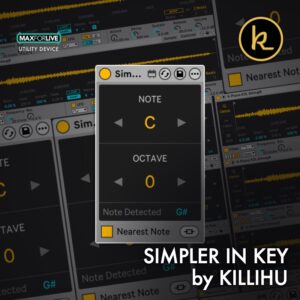
AUTO-PITCH CORRECTION FOR ABLETON'S SIMPLER Simpler in Key is a Max for Live device that automatically adjusts the transposition of any sample loaded into Simpler, keeping it locked to your chosen note. It reads the note information embedded in sample filenames and handles the pitch correction for you, so you never have to tweak transposition manually again. Particularly useful when browsing randomly or using Live's Similar Sample feature. • Automatic pitch adjustment: Analyses sample filenames to detect the source note and sets Simpler's transposition accordingly. • Target note control: Set any desired note; every newly loaded sample snaps to it instantly. • Octave transpose: Shift the loaded sample up or down by octaves without leaving the device. • Nearest Note mode: Chooses the closest octave position for the most musical transposition result. • Note Detected display: Shows the note read from the filename so you can verify detection at a glance.
Buying for someone?Send a gift card →
Frequently Bought Together
Black Week: 30% off with code BLACK2026
 Max for Live
 Max for Live
 Max for Live
- This item: Simpler in Key by KILLIHU£3.00
- Locator Manager by KILLIHU£12.00
- ALFIL Max by Killihu£8.00
Total price: £23.00 £16.10

Killihu
killihu is an audio developer focused primarily on developing resources for Ableton Live.
View all products by KillihuOverview
Auto-tune every Simpler sample to your chosen key
Loading samples into Simpler is fast, but keeping them in pitch is not. Every time a new sample lands, you stop, check the root note, and dial in the transposition manually. Simpler in Key removes that interruption entirely. Place it before Simpler, set your target note, and the device reads each sample’s filename, detects the source pitch, and applies the correct transposition automatically.
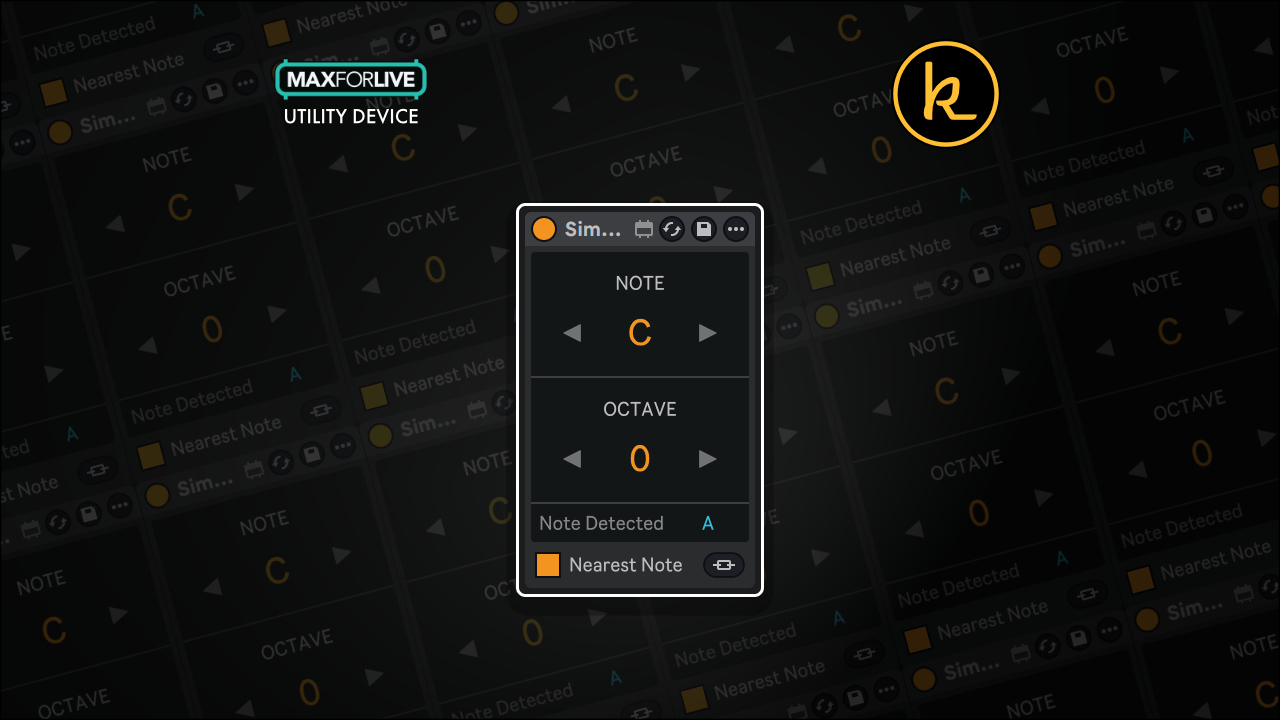
It works quietly in the background whether you are auditioning random samples or cycling through results with Live’s Similar Sample feature. A Note Detected display confirms what the device has read, Nearest Note mode picks the most musical octave position, and a dedicated Octave control lets you shift the result up or down without touching Simpler’s now-managed Transpose knob.
- Automatically adjusts Simpler’s transposition whenever a new sample is loaded
- Analyses the sample filename to detect the source note and correct the pitch
- Target Note control sets the note every loaded sample will be tuned to
- Octave control transposes the loaded sample up or down by whole octaves
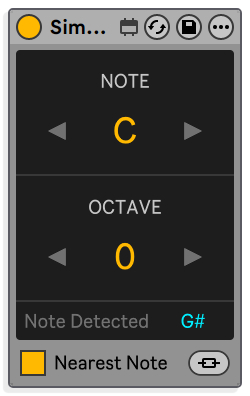
- Note Detected display shows the note read from the filename for quick verification
- Nearest Note mode adjusts to the closest octave for the most natural transposition
- Eliminates manual pitch correction when browsing randomly or using Live’s Similar Sample feature
- Link button connects the device to the Simpler instance on the right, with automatic linking on load
- Max for Live Audio Effect .amxd device
- User manual (PDF)
Free for subscribers
Join the list and get 10 free downloads, including 8 Max for Live devices
Subscribers get Isotonik FX, Live Scratcher, Modular Series LE Part ONE, Modular Series LE Part TWO and more for free. You also hear about new releases and deals first.
Just your email. No spam, unsubscribe anytime.


Reviews
No reviews yet. Be the first to review this product.
Simpler in Key
Automatic pitch adjustment for every new sample
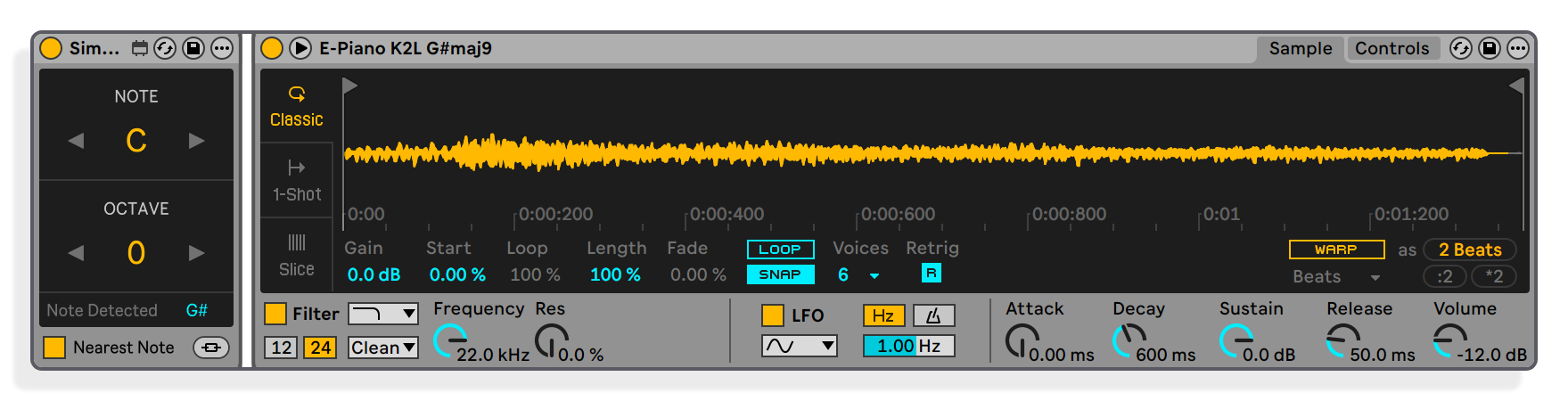
Simpler in Key analyses the sample filename to detect its note, then adjusts Simpler's transposition so the sample always plays at the correct pitch. Set the desired note and octave once, and every new sample loaded will stay in key.
Simpler in Key
Works alongside Simpler for hands-free transposition
Place Simpler in Key before an instance of Simpler and it takes control of the Transpose parameter automatically. This removes the need to manually correct pitch when loading samples randomly or using Live's Similar Sample feature.
Important Information
INSTALLATION
Our Products are generally provided as Zip file downloads which in all cases will need to be extracted and saved to your hard drive prior to installation. Details on the different file type provided and what to do with them are below.
.alp Files – These are Ableton Live Packs and will either install directly into the Packs Section of the browser of Ableton Live or ask you to save them to your hard drive. For packs that install to the library, when you double click on them you will see a pop up window asking you to confirm that installation is ok as the files are described as “Legacy”. This is fine and you are ok to proceed, the packs are created using the format for an earlier version of Live and so remain compatible with the current version.
.amxd files – These are individual MaxforLive Devices and can be stored anywhere on your hard drive. We’d advise creating a folder for them and then adding that folder as a location within the Places section of Lives Browser.
LICENSE
END-USER LICENSE AGREEMENT FOR ISOTONIK STUDIOS SOFTWARE PRODUCTS.
PLEASE READ THE TERMS AND CONDITIONS OF THIS LICENSE AGREEMENT CAREFULLY BEFORE CONTINUING WITH THIS PROGRAM INSTALL.
This End-User License Agreement (referred to as “EULA”) is a legal agreement between an individual or a single entity (referred to as “LICENSEE”) and Isotonik Studios for the Isotonik Studios software product(s) which may include associated software components, media, printed materials, and “online” or electronic documentation (referred to as “SOFTWARE PRODUCT”). By installing, copying, or otherwise using the SOFTWARE PRODUCT, the LICENSEE agrees to be bound by the terms of this EULA.
This EULA represents the entire agreement concerning the program between the LICENSEE and Isotonik Studios and it supersedes any prior proposal, representation, or understanding between the parties. If the LICENSEE does not agree to the terms of this EULA, the LICENSEE should not install or use the SOFTWARE PRODUCT.
The SOFTWARE PRODUCT is protected by copyright laws and international copyright treaties, as well as other intellectual property laws and treaties. The SOFTWARE PRODUCT is licensed, not sold.
- GRANT OF LICENSE.
The SOFTWARE PRODUCT is licensed as follows:
(a) Installation and Use. Providing that the LICENSEE has paid any applicable license fees, Isotonik Studios grants the LICENSEE the right to install and use copies of the SOFTWARE PRODUCT on up to two computers in the LICENSEE’s possession that are running a validly licensed copy of the operating system for which the SOFTWARE PRODUCT was designed [e.g., Windows 10, macOS]. The computer(s) must be owned by the LICENSEE.
(b) Backup Copies. The LICENSEE may also make copies of the SOFTWARE PRODUCT as may be necessary for backup and archival purposes.
- DESCRIPTION OF OTHER RIGHTS AND LIMITATIONS.
(a) Maintenance of Copyright Notices. The LICENSEE must not remove or alter any copyright notices on any and all copies of the SOFTWARE PRODUCT.
(b) Distribution. The LICENSEE may not distribute registered copies of the SOFTWARE PRODUCT to third parties.
(c) Prohibition on Reverse Engineering, Decompilation, and Disassembly. The LICENSEE may not reverse engineer, decompile, or disassemble the SOFTWARE PRODUCT, except and only to the extent that such activity is expressly permitted by applicable law notwithstanding this limitation.
(d) Rental. The LICENSEE may not rent, lease, or lend the SOFTWARE PRODUCT.
(e) License transfer The LICENSEE may not transfer their license to the SOFTWARE PRODUCT to any third party. Any attempt to do so will be considered a violation of this EULA.
(f) Support Services. Isotonik Studios may provide the LICENSEE with support services related to the SOFTWARE PRODUCT for a period of 12 months following the date of purchase. Any supplemental software code provided to the LICENSEE as part of the Support Services shall be considered part of the SOFTWARE PRODUCT and subject to the terms and conditions of this EULA.
(g) Compliance with Applicable Laws. The LICENSEE must comply with all applicable laws regarding use of the SOFTWARE PRODUCT.
- TERMINATION Without prejudice to any other rights, Isotonik Studios may terminate this EULA if the LICENSEE fails to comply with the terms and conditions of this EULA. In such event, the LICENSEE must destroy all copies of the SOFTWARE PRODUCT in the LICENSEE’s possession.
- COPYRIGHT All title, including but not limited to copyrights, in and to the SOFTWARE PRODUCT and any copies thereof are owned by Isotonik Studios or its suppliers. All title and intellectual property rights in and to the content which may be accessed through use of the SOFTWARE PRODUCT is the property of the respective content owner and may be protected by applicable copyright or other intellectual property laws and treaties. This EULA grants the LICENSEE no rights to use such content. All rights not expressly granted are reserved by Isotonik Studios.
- NO WARRANTIES Isotonik Studios expressly disclaims any warranty for the SOFTWARE PRODUCT. The SOFTWARE PRODUCT is provided ‘As Is’ without any express or implied warranty of any kind, including but not limited to any warranties of merchantability, noninfringement, or fitness of a particular purpose. Isotonik Studios does not warrant or assume responsibility for the accuracy or completeness of any information, text, graphics, links or other items contained within the SOFTWARE PRODUCT. Isotonik Studios makes no warranties respecting any harm that may be caused by the transmission of a computer virus, worm, time bomb, logic bomb, or other such computer program. Isotonik Studios further expressly disclaims any warranty or representation to the LICENSEE or to any third party.
- LIMITATION OF LIABILITY In no event shall Isotonik Studios be liable for any damages (including, without limitation, lost profits, business interruption, or lost information) arising out of the LICENSEE’s use of or inability to use the SOFTWARE PRODUCT, even if Isotonik Studios has been advised of the possibility of such damages. In no event will Isotonik Studios be liable for loss of data or for indirect, special, incidental, consequential (including lost profit), or other damages based in contract, tort or otherwise. Isotonik Studios shall have no liability with respect to the content of the SOFTWARE PRODUCT or any part thereof, including but not limited to errors or omissions contained therein, libel, infringements of rights of publicity, privacy, trademark rights, business interruption, personal injury, loss of privacy, moral rights or the disclosure of confidential information.
Frequently Asked Questions
What does Simpler in Key actually do?
It automatically adjusts the transposition of any sample loaded into Ableton’s Simpler device so that it plays back at your chosen target note. Place the device before Simpler, set your desired note, and pitch correction happens automatically every time a new sample loads.
How does the device know what pitch a sample is?
It analyses the sample’s filename. Most modern sample libraries embed the root note in the filename, and Simpler in Key reads that information to calculate the correct transposition. If the note cannot be detected from the filename, a dash is shown in the Note Detected display.
Is it useful when browsing samples randomly?
Yes, that is one of its main use cases. When loading samples randomly or using Live’s Similar Sample feature, you no longer need to stop and manually adjust Simpler’s Transpose control after each new sample loads.
What is the Nearest Note mode for?
When enabled, the device transposes the sample to the nearest occurrence of your target note, which may be in the next octave up or down. When disabled, the adjustment is made within the same octave. This gives you control over how big the transposition interval is.
What are the system requirements?
Simpler in Key requires Ableton Live 12 Standard with Max for Live, or Live 12 Suite. It runs on both Mac and Windows.
Do future updates cost extra?
No. Purchasing Simpler in Key gives you the latest version, and all future updates are included at no additional cost.
In Depth
What Simpler in Key Does
Simpler in Key is a Max for Live control device that automatically adjusts the pitch of the sample loaded into Ableton Live’s Simpler. Every time a new sample is loaded, the device reads the filename, detects the sample’s root note, and applies the correct transposition so the sample always plays back at the note you have set.
Most modern sample libraries include the root note in the filename. Simpler in Key uses that information to do the transposition work for you, so you never have to open Simpler’s settings and correct the pitch by hand.
Where It Helps Most
The device is particularly useful when browsing samples quickly or using Live’s Similar Sample feature. Without it, every new sample load can require a manual pitch correction. With it, that step is gone. You set the target note once and Simpler stays in key regardless of which sample lands in it.
How to Set It Up
Place Simpler in Key directly before an instance of Simpler on the same track. When the device loads, it establishes a link with Simpler automatically. If Simpler is added after the device, or if a new Simpler instance appears by mistake, press the Link button to reconnect. Once linked, Simpler’s Transpose control is handled entirely by the device.
Controls
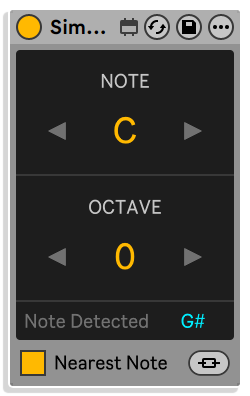
The Note control sets the target pitch. Click and drag up or down, or use the left and right buttons, to choose the note you want every loaded sample to play at. The Octave control lets you shift the result up or down by whole octaves, since the Transpose parameter in Simpler is managed by the device and cannot be adjusted manually while the link is active.
The Note Detected readout shows which root note the device found in the sample’s filename. It is display only and helps you confirm that detection worked correctly. When the filename does not contain a recognisable note, the display shows a dash.
The Nearest Note toggle changes how the transposition is calculated. When enabled, the sample is moved to whichever occurrence of the target note is closest in pitch. For example, a sample rooted at B being adjusted to C will move up by one semitone to the C in the next octave. When disabled, the adjustment stays within the same octave, so that same B to C move would apply a transposition of minus eleven semitones instead.
Compatibility
Simpler in Key requires Ableton Live 12 Standard with Max for Live, or Live 12 Suite. It runs on both Mac and Windows.
More from Killihu